



 More Products
 Compare












No Internet access with Wi-Fi connected
| No Internet access with Wi-Fi connected |
Problem:
When the phone/tablet is connected to Wi-Fi, the Wi-Fi icon in the status bar displays an exclamation mark, and the Wi-Fi interface in Settings shows a "No Internet connection" message.
Cause:
If there is an issue with the router, such as a loose cable or unpaid broadband bill, please follow the troubleshooting steps below:
1. Check if other devices connected to the same Wi-Fi network can access the Internet. This will help determine if the issue is with your device.

If other devices' Wi-Fi interface in Settings also shows "No Internet connection", this indicates that your HONOR device is functioning properly.Please contact the service provider for assistance.
2. Disconnect from the Wi-Fi network and then reconnect to see if the connection is restored.
3. Check if the cables connected to the router are loose.
4. Ensure that the router and the optical modem are connected correctly. The LAN port of the optical modem should be connected to the WAN or WAN/LAN port of the router.
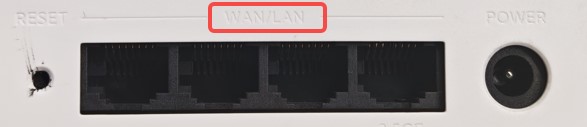
5. Restart or reset the router and try again.
6. Contact your broadband service provider to confirm that your broadband service is active and there are no unpaid bills.
7. If the issue persists, please call Honor customer service, or back up your data and bring your purchase proof to an Authorized Honor Service Center for assistance.
