



 More Products
 Compare



After the lid is opened, the laptop starts up automatically without pressing the power button
| After the lid is opened, the laptop starts up automatically without pressing the power button |
Problem:
After the lid is opened, the laptop starts up automatically without pressing the power button.
Cause:
For the convenience of users, we have added a new feature that allows the laptop (powered off and lid closed) to start up automatically after the lid is opened, without pressing the power button. The feature is enabled by default.
Solution:
You can take the following steps to disable this feature:
- Go to HONOR PC Manager, click Settings in the upper right corner, tap "Check for updates", and make sure the app is updated to version 16.0.0.112 (SP2) or later.
- Left click the PC Manager icon on the task bar in the lower right corner to show PC Manager sidebar.
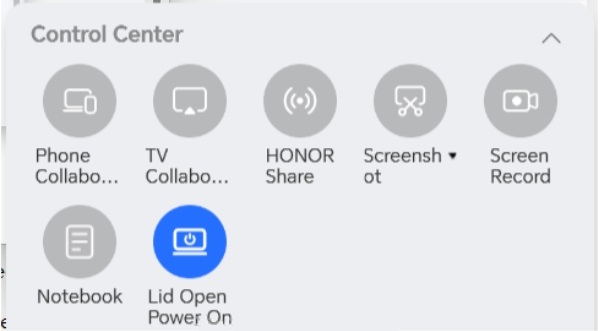
- Find Lid Open Power On in Control Center. Tap the button to turn on/off this feature. You need to restart the computer to apply changes.

If the button is blue, Lid Open Power On is enabled. If gray, the feature is disabled.
微信扫描二维码分享文章
Thank you for helping us grow better!
Your response has been submitted successfully!


