

 More Products
 Compare
Shop













我的荣耀 开启荣耀之旅
What Is a 2-in-1 Laptop? Everything You Need to Know
Table of Contents
You might have seen laptops that bend, flip, or fold and wondered what is a 2-in-1 laptop, exactly and why people like them.
The idea is simple. It’s a laptop when you need to type and a tablet when you want something lighter and more hands-on. Many buyers choose them because they cut down on clutter and fit easily into day-to-day life. But are these hybrids right for you?
This guide shows you what 2-in-1 laptops mean, how they stack up against normal laptops or tablets, and the key pros and cons, so you can decide if they suit the way you work and relax.
What Is a 2-in-1 Laptop?
So, what does a 2-in-1 laptop mean? Basically, a 2-in-1 laptop is a portable computer that works as both a laptop and a tablet. It has a touchscreen and a design that lets you either fold the screen right back or detach it from the keyboard. That means you can type in normal laptop mode, then switch to touch-only use when you want something more hands-on.
Most 2-in-1s fit into one of two design families:
Convertible 2-in-1
A convertible 2-in-1 looks much like a regular laptop at first, but its 360-degree hinge sets it apart. This hinge lets the screen fold all the way back, so the keyboard stays attached even when you switch to tablet-style use. Because of that design, you can move smoothly between several positions:
● Laptop mode
● Tablet mode (keyboard folded behind)
● Tent mode (upside-down V for video)
● Stand mode (keyboard as a base, screen pushed back).
Detachable 2-in-1
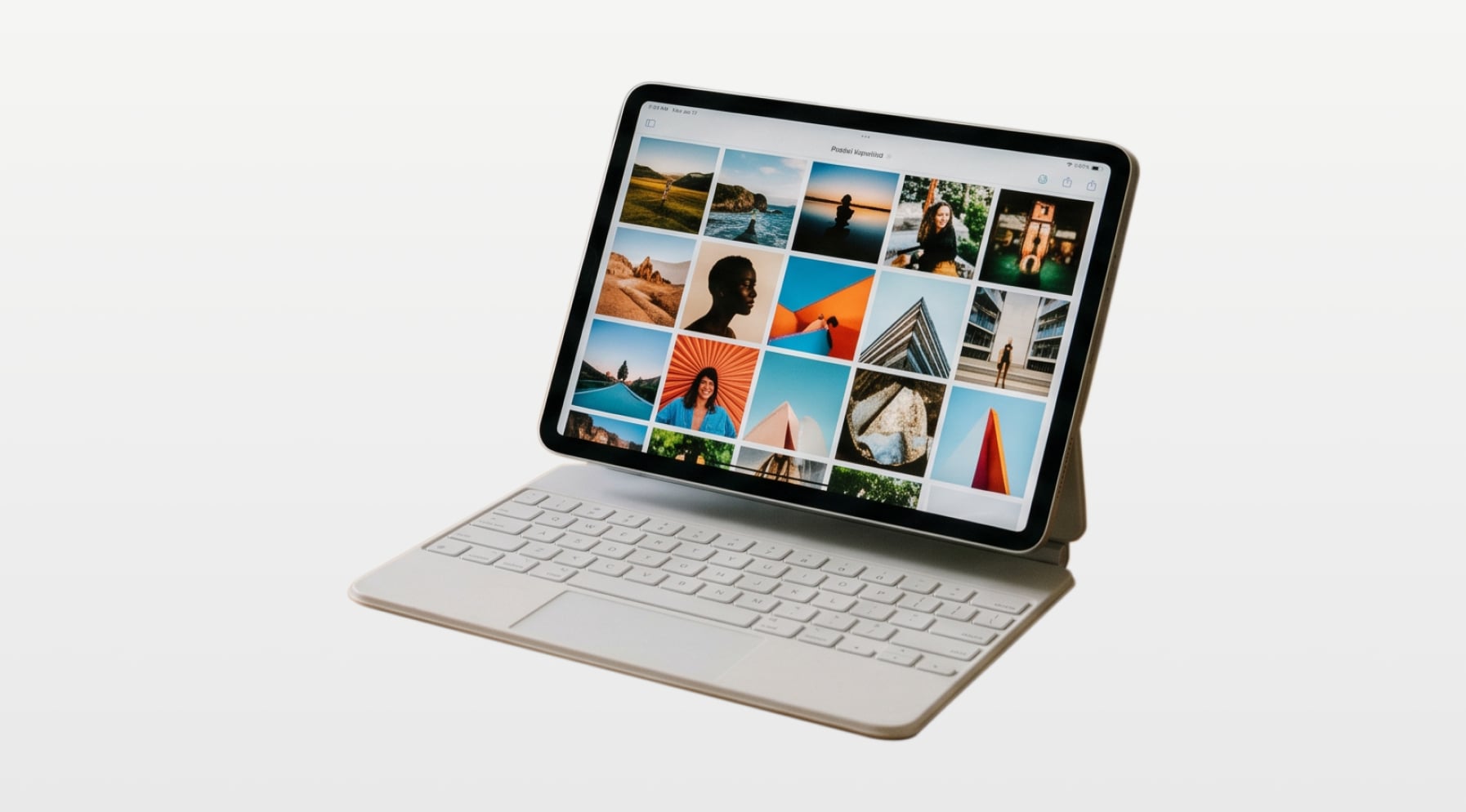
A detachable 2-in-1 takes a different approach. Here, the screen and keyboard are two separate parts, and the screen contains the actual computer hardware. You can click the keyboard on when you want to type or remove it entirely for a lighter, pure tablet feel.
Many detachable keyboards also include extra ports or an additional battery, giving you more flexibility when you need it.
In both cases, you get:
● A touchscreen as standard.
● A full hardware keyboard and trackpad.
● Support for a stylus or pen on many models (often sold separately).
So, a 2-in-1 laptop sits between a classic laptop and a tablet: one device, multiple ways to hold and use it.
How a 2-in-1 Laptop Differs from a Normal Laptop or Tablet
If you’re wondering, “Do I need a 2-in-1 laptop?”, it helps to compare it with three other common options:
● A traditional non-touchscreen laptop
● A touch screen laptop that doesn’t flip or detach
● A tablet (with or without a clip-on keyboard)
2-in-1 vs traditional non-touchscreen laptop
A traditional laptop uses the familiar clamshell design. The screen opens to a set angle, and you use a keyboard and touchpad. There’s no touch input, and the hinge is not meant to flip all the way around.
How a 2-in-1 laptop vs laptop looks:
Input
● 2-in-1: keyboard, trackpad, touchscreen, and often pen support.
● Traditional: keyboard and trackpad only.
Flexibility
● 2-in-1 laptop uses: built for multiple modes (laptop, tablet, tent, stand).
● Traditional: built for one mode—laptop.
Design focus
● 2-in-1: puts more focus on flexibility and touch.
● Traditional: often prioritises straightforward performance and cooling over shape-shifting hinges.
Touchscreen laptop vs 2-in-1
A touchscreen laptop is not always a 2-in-1. Many modern laptops, like the HONOR MagicBook Art 14 2025, now have a touch-capable screen, but the hinge still only opens to a normal angle.
Key differences:
Hinge and modes
● 2-in-1: hinge or detachable design is made for tablet-style use.
● Touchscreen laptop: hinge is usually the same as a non-touch model, so you still use it mostly like a normal laptop.
Comfort in tablet-style use
● 2-in-1: thin, light screens and hinges support tablet, tent, or stand modes.
● Touchscreen laptop: can feel awkward to hold or tap for long because it isn’t meant to be folded or detached.
Use cases
● 2-in-1: better suited if you plan to write or draw on the screen, present content face-on, or use it handheld.
● Touchscreen laptop: useful if you only tap or scroll on-screen now and then, but still work in laptop mode most of the time.
2-in-1 vs tablet
Tablets and 2-in-1s overlap, but they start from different places:
What they’re built around
● 2-in-1: designed as a laptop that can behave like a tablet.
● Tablet: designed as a tablet first; keyboards are often optional extras.
Operating system and apps
● 2-in-1: usually runs a full desktop operating system (Windows 11) that supports traditional desktop software.
● Tablet: often runs a mobile-style operating system (Android) built around touch apps and app stores.
Keyboard and ports
● 2-in-1: always has a hardware keyboard option and more laptop-style ports (USB, possibly full-size connectors).
● Tablet: may rely on a single port, wireless accessories, or slim add-on keyboards.
Side-by-side comparison
Feature / Aspect |
2-in-1 Laptop |
Traditional Non-Touchscreen Laptop |
Touchscreen Laptop (Non-Convertible) |
Tablet |
Primary role |
Laptop that can also act as a tablet |
General-purpose laptop |
Laptop with occasional touch use |
Tablet for touch-first use |
Screen |
Touchscreen as standard |
Non-touch display |
Touchscreen |
Touchscreen |
Keyboard |
Built-in keyboard (fixed or detachable) |
Built-in keyboard |
Built-in keyboard |
Often optional add-on keyboard |
Main input methods |
Keyboard, trackpad, touch, often pen |
Keyboard and trackpad |
Keyboard, trackpad, touch |
Touch and on-screen keyboard, often pen support |
Form factor / modes |
Convertible or detachable; supports laptop, tablet, tent, stand modes |
Clamshell only |
Clamshell only |
Slate-style tablet; may have kickstand or case with stand |
Hinge / attachment |
360° hinge or detachable mechanism |
Standard hinge that opens to a fixed range |
Standard hinge with limited angle |
No laptop hinge; may use kickstand or case |
Operating system (typical) |
Desktop-class OS (Windows) |
Desktop-class OS (Windows) |
Desktop-class OS (Windows) |
Usually mobile-style OS like Android (some run desktop-class OS on certain models) |
Portability |
Usually slim and light; designed for handheld and laptop use |
Varies; often heavier than tablets and some 2-in-1s |
Similar to non-touch models; touch layer can add a little weight |
Very light and thin |
Performance range |
Wide range; often balanced between mobility and power |
Very wide range; many high-performance options |
Similar to non-touch laptops |
Varies; many focus on efficiency over raw performance |
Ports and connectivity |
More ports than most tablets; fewer or similar to many laptops |
Usually the most physical ports |
Similar to non-touch laptops |
Often minimal ports; relies on wireless and adapters |
Stylus / pen use |
Common and often well integrated |
Rare |
Sometimes supported |
Common on many models |
Best suited for |
You want one device for typing, touch, and light tablet-style tasks |
You want a straightforward laptop for typing, multitasking, or heavier work |
You want a standard laptop but like the option to tap or scroll on the screen |
You want a light device mainly for browsing, media, and touch apps |
Pros and Cons of a 2-in-1 Laptop
Now, is it worth getting a 2-in-1 laptop? A 2-in-1 laptop gives you one device that can act like both a laptop and a tablet. That flexibility is useful, but it also brings trade-offs. Here’s a clear look at what you gain and what you give up:
Advantages of 2-in-1 laptop
● One device, several modes: Switch between laptop, tablet, tent, and stand positions, so one device adapts to work, study, or downtime. You don’t need to swap between separate devices, which keeps your setup simple.
● Touch and pen support: Built-in touchscreens and optional pens make note-taking, sketching, and on-screen editing more natural.
● Portable and space-saving: Slim designs reduce the need for separate devices and fit easily into small desks, bags, or travel setups.
● Better viewing options: Adjustable hinges or stands let you angle the screen for reading, video calls, or presentations without extra gear.
2-in-1 laptop disadvantages
● Not perfect as a pure laptop or tablet: Convertibles can feel heavy in tablet mode, while detachables may feel less stable for long typing sessions.
● More moving parts: 360° hinges or detachable mechanisms add complexity and depend on good build quality for long-term durability.
● Tablet mode comfort varies: Folded keyboards and thicker designs can make extended handheld use less comfortable than a dedicated tablet.
● Performance and battery trade-offs: Slimmer bodies may limit cooling, battery size, or high-end components.
● Higher cost: You may pay more for flexibility, and pens or keyboards on detachable models are sometimes sold separately.
What to Look for When Buying a 2-in-1 Laptop
Decided that a 2-in-1 laptop is right for you? Choosing a 2-in-1 is easier when you focus on how you’ll actually use it. Here are the key points to compare.
Pick the right design: convertible or detachable
● Convertible (360° hinge): best if you type often, use it on your lap, or switch between laptop and tent modes throughout the day.
● Detachable: ideal if you want a lighter tablet for reading or travel and don’t mind a less stable keyboard.
Screen quality
Your screen affects comfort more than any other part.
● Size: 12–13 inches for portability, 14–16 inches for multitasking.
● Resolution: Full HD or higher for sharper text and cleaner lines.
● Brightness and panel type: Look for good viewing angles and enough brightness for daylight use.
● Pen support: Useful if you take handwritten notes or sketch.
Performance that fits your routine
Match the hardware to the tasks you do daily.
● Processor: Mid-range laptop-class chips suit most work and study needs.
● RAM: 8 GB for basic use, 16 GB for heavier multitasking.
● Storage: 256 GB minimum; 512 GB or more if you store large files locally.
Battery life
For day-to-day work and study, aiming for 8 hours or more of mixed use is reasonable; higher-end models can push well past that.
Weight and build
Hybrid designs vary.
● Lighter models feel better in tablet mode.
● Convertibles with sturdy hinges are more comfortable for typing and long sessions.
● Detachables rely on kickstands, so check stability if you work on your lap.
Keyboard, touchpad, and pen
These shape your everyday experience.
● Look for a comfortable keyboard layout and a smooth, responsive touchpad.
● If you plan to write or draw often, prioritise a good pen and solid palm rejection.
Budget and overall value
A 2-in-1 can cost more than a standard laptop. Include accessories (pen, keyboard, dock) in your budget, and choose based on the features you’ll use every day—not just the ones that look appealing on paper.
Conclusion
Understanding what is a 2-in-1 laptop makes it easier to decide whether this flexible design matches the way you work and unwind. It blends the strengths of a laptop with the freedom of a tablet, all in one device. If you want something portable, adaptable, and able to switch modes without fuss, a 2-in-1 can be a smart fit. Compare the design, screen, performance, and battery life, and choose the model that supports your daily routine rather than reshaping it.
FAQs
What is the point of a 2-in-1 laptop?
The point of a 2-in-1 laptop is to give you a full Windows laptop and a touchscreen tablet in one device. You get a proper keyboard and trackpad for work, plus touch, pen support and modes like tablet or tent for drawing, scrolling and streaming. This flexibility and portability mean you can carry one device on the train, to lectures or into meetings instead of juggling a separate laptop and tablet.
What can I do with a 2-in-1 laptop?
With a 2-in-1 laptop you can type essays and emails in laptop mode, flip to tablet mode for reading, sketching or annotating PDFs with a stylus, and use tent or stand mode for watching Netflix or sharing a presentation. Many models have all-day battery life and decent performance, so you can browse, video-call, take notes in class and do light creative work or photo edits on a single, flexible device.
What is the difference between a 2-in-1 laptop and a traditional laptop?
A 2-in-1 laptop has a touchscreen and a hinge or detachable keyboard that lets it switch between laptop, tablet, tent and stand modes, while a traditional laptop normally stays in a standard clamshell shape and may not have touch at all. 2-in-1s focus on versatility and portability, sometimes with slightly slimmer specs, whereas traditional laptops often prioritise maximum performance, upgradability and cooling in exchange for extra weight and less flexibility.
Are 2-in-1 laptops worth buying in 2026?
If you’re wondering, “Are 2-in-1 laptops worth it?”, the answer can be yes if you value touch, pen input and flexibility. The current crop includes powerful convertibles and detachables with OLED screens, long battery life and modern AI-ready processors, with strong options widely available. They’re ideal for students, hybrid workers and creatives. However, if you only ever type at a desk or need serious gaming or workstation-class power, a traditional laptop may suit you better.
Is a 2-in-1 laptop or laptop and tablet better?
Neither option is universally better; it depends how you use your tech. A 2-in-1 laptop is great if you want one device that handles work, browsing and light tablet-style tasks, reducing clutter and overall cost because you don’t need to buy a separate tablet.
A separate laptop and tablet can be better if you want a very powerful laptop plus a slim, lightweight tablet with its own apps for drawing or media. Think about budget, portability and whether you truly need two devices.
Should I buy a convertible or detachable 2-in-1 laptop?
Choose a convertible 2-in-1 if you’ll mostly type and use it like a normal laptop, because the fixed 360° hinge and attached keyboard feel sturdier on a desk and usually offer better cooling and battery life. Pick a detachable if you care more about a light, handheld tablet for notes, sketching or reading and don’t mind a clip-on keyboard. In simple terms: laptop-first users go convertible; tablet-first users go detachable.
Source: HONOR Club
Products Recommend
Latest Blogs
Subscribe For Updates - Special Offers And More.
I agree to receive the latest offers and information on HONOR products through email or IM (e.g. WhatsApp) provided below and advertisement on third-party platforms. I understand that I can unsubscribe anytime according to Chapter 6 of HONOR Platform Privacy Statement .
Consumer hotline

Tax ID/VAT Registration No. 311123479500003
Commercial Registration No. 1010754462
E-Commerce Authentication No. 0000093589