

 More Products
 Compare















我的荣耀 开启荣耀之旅



 Disagree Terms
 Log out




[tips] Customise your Navigation Bar


 Last reply :
These days, as phones get bigger and BIGGER, it can sometimes become difficult to reach the top of the screen to pull down the notification bar.
Now... Did you know you can actually add a button to the navigation bar that will let you "pull down" the notification? See the button on the right (with the arrow pointing down) in the image below? Click on that and the notification bar will come down.

So... How do you do that?
From Settings, search for Navigation. Or you can also go Settings -- System -- System Navigation. You will see this:
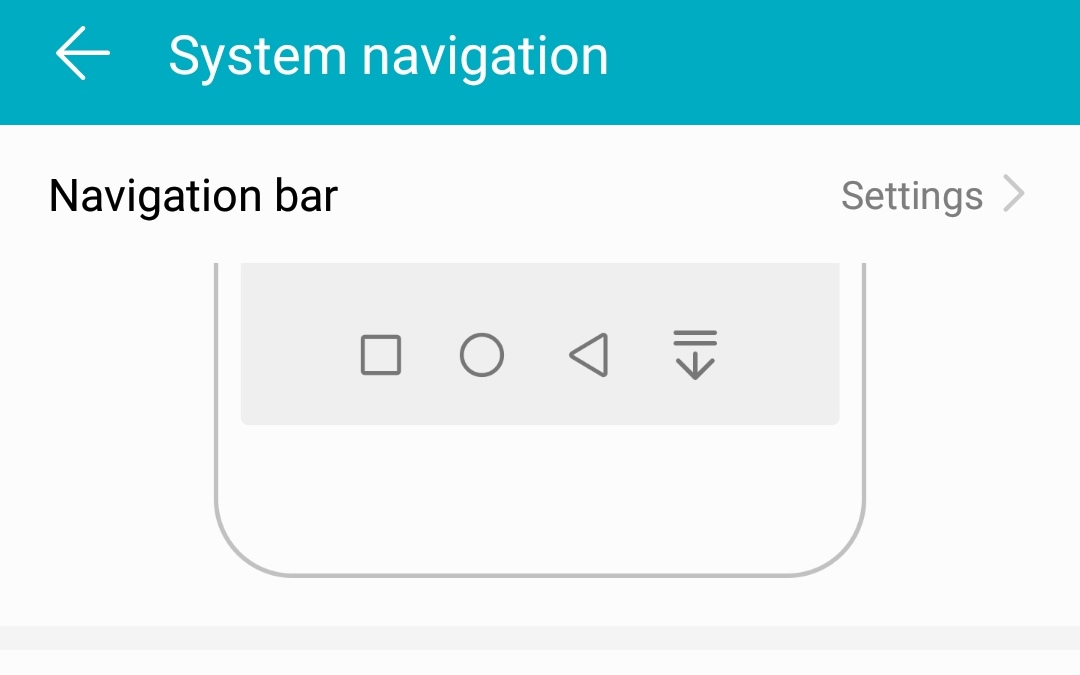
Click on Settings. You will then see:
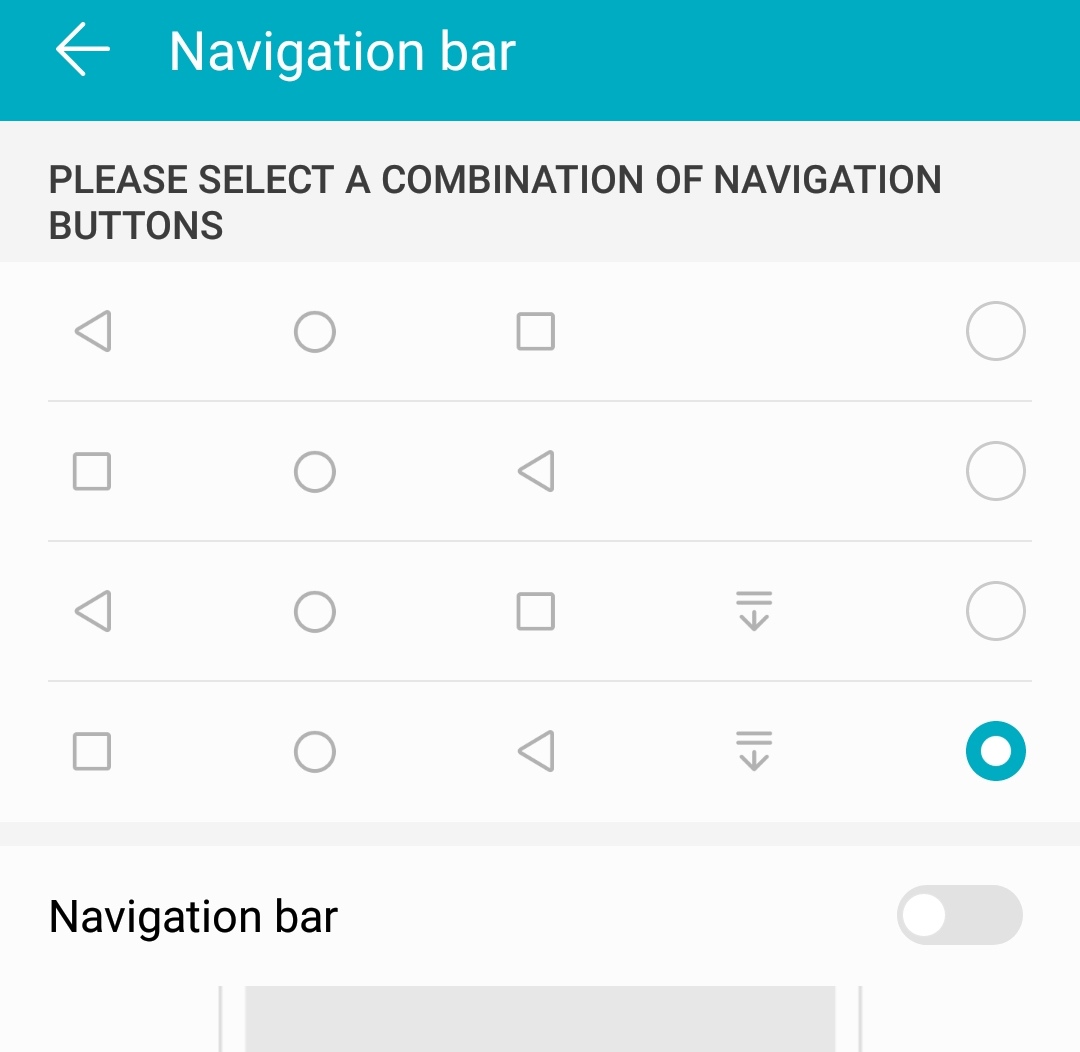
You can choose the way the Navigation bar will look. Back button on the right? Back button on the left?
Personally, this is why I like EMUI -- Because it gives users so many customisation options.
Remember the last image above? See the "Navigation bar" at the bottom of the image and a slider to enable it? Enable it and another "button" appears where you can hide the navigation bar (and get full screen).
Hope you guys enjoyed this simple trick. Don't forget to click LIKE if you find this useful.


- Posts
- Following
- Followers
- Energy
-

Adrian
-
+ Follow

-
- 179 Posts
- 26 Following
- 227 Followers
- 20036 Energy


SUBSCRIPTION
I agree to receive the latest offers and information on HONOR products through email or IM (e.g. WhatsApp) provided below and advertisement on third-party platforms. I understand that I can unsubscribe anytime according to Chapter 5 of HONOR Platform Privacy Statement.
CONTACT

- Posts
- photo
- video

These days, as phones get bigger and BIGGER, it can sometimes become difficult to reach the top of the screen to pull down the notification bar.
Now... Did you know you can actually add a button to the navigation bar that will let you "pull down" the notification? See the button on the right (with the arrow pointing down) in the image below? Click on that and the notification bar will come down.
So... How do you do that?
From Settings, search for Navigation. Or you can also go Settings -- System -- System Navigation. You will see this:
Click on Settings. You will then see:
You can choose the way the Navigation bar will look. Back button on the right? Back button on the left?
Personally, this is why I like EMUI -- Because it gives users so many customisation options.
Remember the last image above? See the "Navigation bar" at the bottom of the image and a slider to enable it? Enable it and another "button" appears where you can hide the navigation bar (and get full screen).
Hope you guys enjoyed this simple trick. Don't forget to click LIKE if you find this useful.