



 More Products
 Compare










































我的荣耀 开启荣耀之旅



 Disagree Terms
 Log out




[Step by Step Tutorial] HONOR Watch GS pro Change/Customize Watch Face


 Last reply :
[Step by Step Tutorial] HONOR Watch GS pro Change/Customize Watch Face
The Watch GS pro supports customizing watch faces. This article offers step by step tutorial to change the watch face, including how to make a watch face from a photo stored in your phone's gallery. This tutorial works for a bunch of other HONOR smartwatches as well, for example, HONOR Watch ES, HONOR Magic Watch 2, and HONOR Watch Magic. If you own an HONOR Fitness Tracker, for example, HONOR Band 5, you may try this tutorial as well.
Note:
By mentioning changing watch face, it means using the watch face available from the theme store.
While customizing a watch face, means a new watch face created from a photo stored in the smartphone.
1. Methods of Watch Face Changing for the Honor Watch GS Pro
For changing the Watch Face on Honor Watch GS Pro, you have two options. One of them is to directly change the watch face on Honor Watch GS Pro from the touch display. The other way is to change Watch Face via Huawei Health App. Both will be covered as below:
1.1 To directly change the watch face on HONOR Watch GS Pro
It is quite simple to change the watch face. Firstly press the upper button on the right side of the frame, go to Setting, then click on Display, and then choose your favorite watch face.
Another convenient way to change the watch face is:
Simply long-press the screen (home of the screen) until you feel the vibration. Then you can swipe the screen to the left or right and select your favorite watch face.
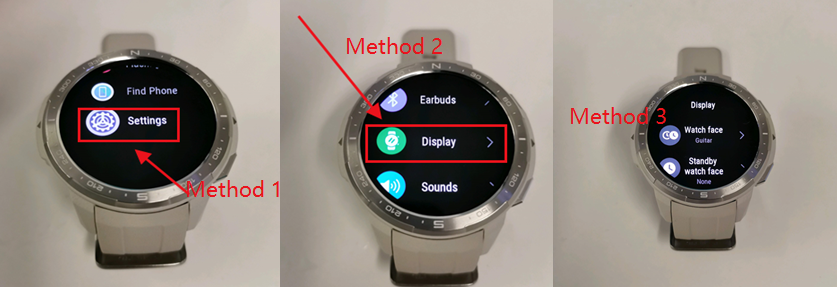
untitleddailyPress the button on the upper right corner, and then flow the methods in the image above

untitleddailyIf you choose normal watch face, just select your favorite one

untitleddailyIf you choose standby watch face, you can click the setting icon to select the color for watch face
1.2 Change Watch Face Via the Huawei Health App
Another way to change the watch face of the HONOR Watch GS pro is via the Huawei Health App. The Huawei Health app is developed by Huawei and it is the app for all HONOR Smartwatches, fitness trackers, and also the same from HUAWEI. It is also used to manage body fat scale from both brands.
If you use an Andriod phone, search and download the Huawei Health app from google play store. Or download that directly from the App Gallery if you use HUAWEI or HONOR Smartphone. Once you’ve installed the Huawei Health App, you should pair the Honor GS Pro with your smartphone through Bluetooth. (here is the HONOR Watch GS pro User Guide for your reference if you don't know how to pair. )
Then click “Devices” → Select HONOR Smart watches →Select “Honor Watch GS Pro”. After that, you can click "More" beside watch face and select the best watch face for you from "Me" tab.
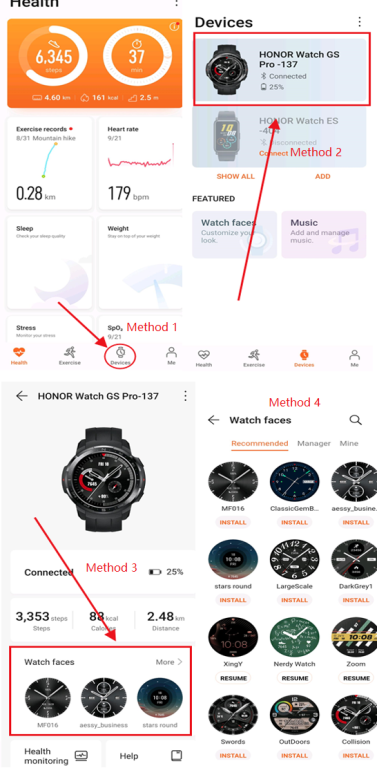
Methods of Changing Watch Face for Honor Watch GS Pro Via Huawei Health App
2. How to customize watch face on the HONOR Watch GS Pro
Once you clicked “Watch Face” at the 3th method and you entered Watch face page, you just need to complete the last 2 methods, and then adjusted image that you choosed for watchface.
Click “Mine” → Click “Gallery”, after that you can directly take photo by camera, and also you can choose an image from “Gallery”. And at the final method, adjust the size of the image for watch.
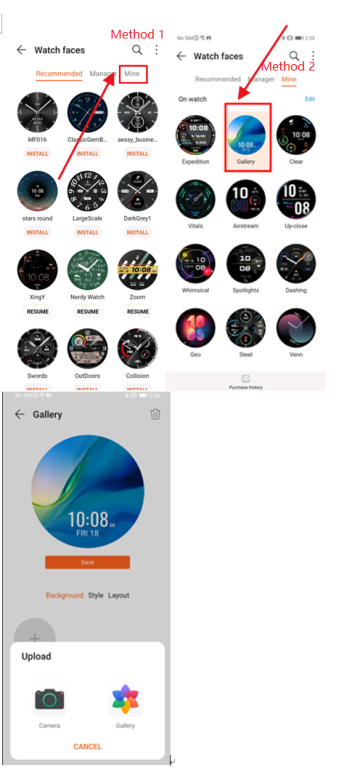
An image of Customizing watch face for Honor Wathc GS Pro
Don't forget to follow my account and like this changing/customizing watch face on the HONOR Watch GS pro tutorial, if it is helpful for you. Make your moment, if you have any suggestions.
All for today guys!






- Posts
- photo
- video

[Step by Step Tutorial] HONOR Watch GS pro Change/Customize Watch Face
The Watch GS pro supports customizing watch faces. This article offers step by step tutorial to change the watch face, including how to make a watch face from a photo stored in your phone's gallery. This tutorial works for a bunch of other HONOR smartwatches as well, for example, HONOR Watch ES, HONOR Magic Watch 2, and HONOR Watch Magic. If you own an HONOR Fitness Tracker, for example, HONOR Band 5, you may try this tutorial as well.
Note:
By mentioning changing watch face, it means using the watch face available from the theme store.
While customizing a watch face, means a new watch face created from a photo stored in the smartphone.
1. Methods of Watch Face Changing for the Honor Watch GS Pro
For changing the Watch Face on Honor Watch GS Pro, you have two options. One of them is to directly change the watch face on Honor Watch GS Pro from the touch display. The other way is to change Watch Face via Huawei Health App. Both will be covered as below:
1.1 To directly change the watch face on HONOR Watch GS Pro
It is quite simple to change the watch face. Firstly press the upper button on the right side of the frame, go to Setting, then click on Display, and then choose your favorite watch face.
Another convenient way to change the watch face is:
Simply long-press the screen (home of the screen) until you feel the vibration. Then you can swipe the screen to the left or right and select your favorite watch face.
untitleddailyPress the button on the upper right corner, and then flow the methods in the image above
untitleddailyIf you choose normal watch face, just select your favorite one
untitleddailyIf you choose standby watch face, you can click the setting icon to select the color for watch face
1.2 Change Watch Face Via the Huawei Health App
Another way to change the watch face of the HONOR Watch GS pro is via the Huawei Health App. The Huawei Health app is developed by Huawei and it is the app for all HONOR Smartwatches, fitness trackers, and also the same from HUAWEI. It is also used to manage body fat scale from both brands.
If you use an Andriod phone, search and download the Huawei Health app from google play store. Or download that directly from the App Gallery if you use HUAWEI or HONOR Smartphone. Once you’ve installed the Huawei Health App, you should pair the Honor GS Pro with your smartphone through Bluetooth. (here is the HONOR Watch GS pro User Guide for your reference if you don't know how to pair. )
Then click “Devices” → Select HONOR Smart watches →Select “Honor Watch GS Pro”. After that, you can click "More" beside watch face and select the best watch face for you from "Me" tab.
Methods of Changing Watch Face for Honor Watch GS Pro Via Huawei Health App
2. How to customize watch face on the HONOR Watch GS Pro
Once you clicked “Watch Face” at the 3th method and you entered Watch face page, you just need to complete the last 2 methods, and then adjusted image that you choosed for watchface.
Click “Mine” → Click “Gallery”, after that you can directly take photo by camera, and also you can choose an image from “Gallery”. And at the final method, adjust the size of the image for watch.
An image of Customizing watch face for Honor Wathc GS Pro
Don't forget to follow my account and like this changing/customizing watch face on the HONOR Watch GS pro tutorial, if it is helpful for you. Make your moment, if you have any suggestions.
All for today guys!