

 More Products
 Compare















我的荣耀 开启荣耀之旅



 Disagree Terms
 Log out




YouTube Alternative - YouTube Vanced


 Last reply :
An interesting discussion topic came up recently about alternative apps. For me, one important consideration is that the apps should be "safe". So, with this apps that I will share next, I will also provide some additional details about the apps/ sites so that you can also evaluate it for yourself.
TL;DR Version
Download and install MicroG from YouTube Vanced site (https://vanced.app/)
Download and install SAI from F-Droid (https://f-droid.org/packages/com.aefyr.sai.fdroid/)
Download and install APK from YouTube Vanced site (https://vanced.app/)
Detailed Version

OK, so what is YouTube Vanced? Well, YouTube Vanced is an alternative apps to view YouTube. According to XDA, YouTube Vanced is a popular modded version of YouTube. It adds a number of features to the official YouTube app, including built-in adblocking, background playback, black/dark themes, and much more.
This is one of the more popular YouTube alternative apps and can be useful for those who do not have Google Services on their phones.
From YouTube Vanced website, installing it is a matter of 4 simple steps:
Download and install MicroG. Click on the MicroG button at the bottom of this page: https://vanced.app/ (note: Install only if you want to login to your YouTube/ Google account)
Download SAI from the playstore: https://play.google.com/store/apps/details?id=com.aefyr.sai
Select the vanced .apk file you downloaded (it's in your Downloads folder)
Click install
Download and install MicroG
MicroG is a free and open-source implementation of proprietary Google libraries that serves as a replacement for Google Play Services on the Android operating system. It is maintained by German developer Marvin Wißfeld. MicroG allows mobile device users to access Google mobile services with less tracking of their device activity compared to Google Play Services. In a presentation, Wißfeld described MicroG as "the framework (libraries, services, patches) to create a fully-compatible Android distribution without any proprietary Google components".
You will need this if you want to login to your Google Account when you access YouTube. Otherwise, you do not even need this.
Download SAI from the playstore
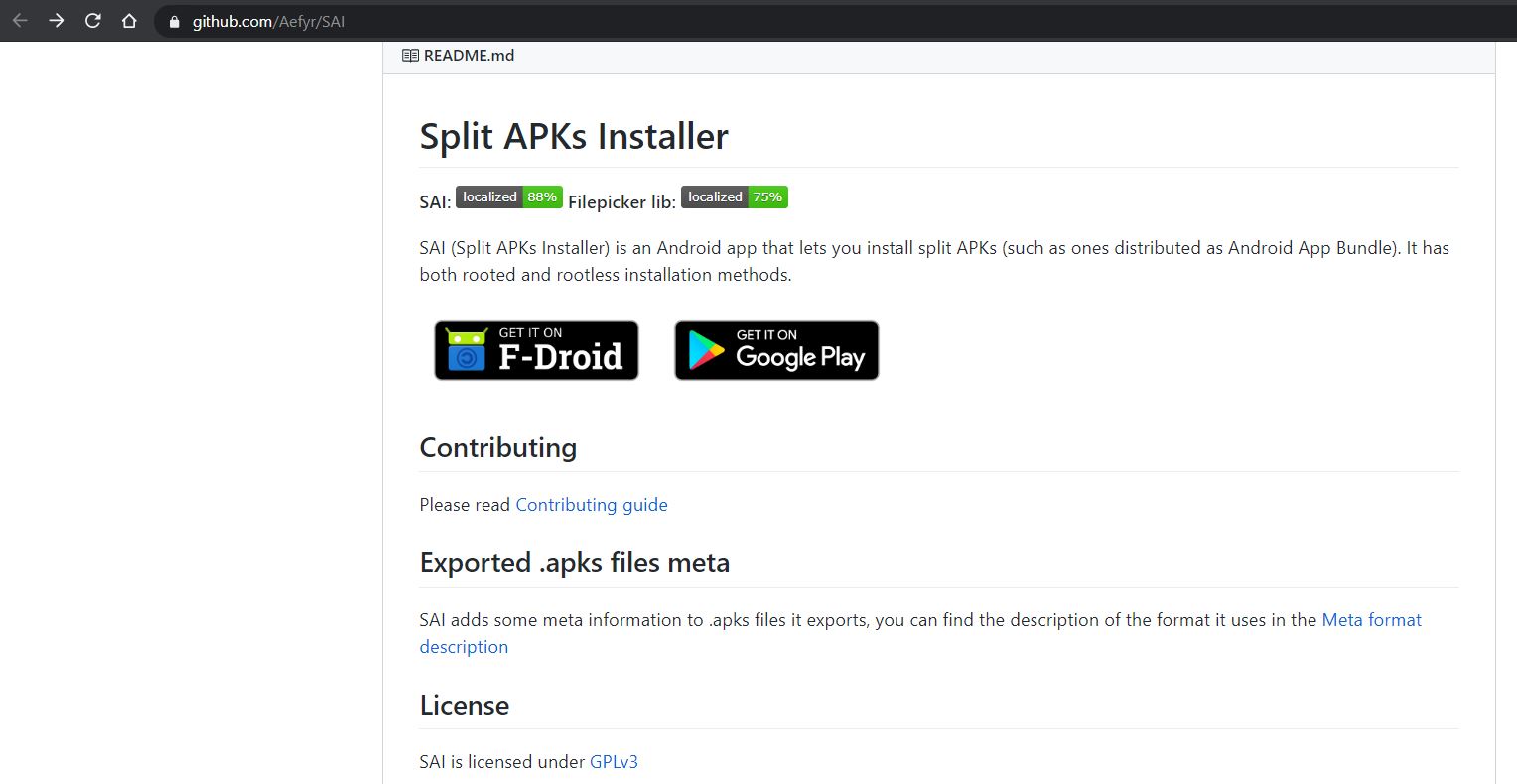
Split Application Installer is a way to combine APK files together so you can run it correctly. According the the description on Google Play Store, you can also find out more about this apps from GitHub (https://github.com/Aefyr/SAI):

What if you do not have access to Google Play (example: phone comes with only HMS)?
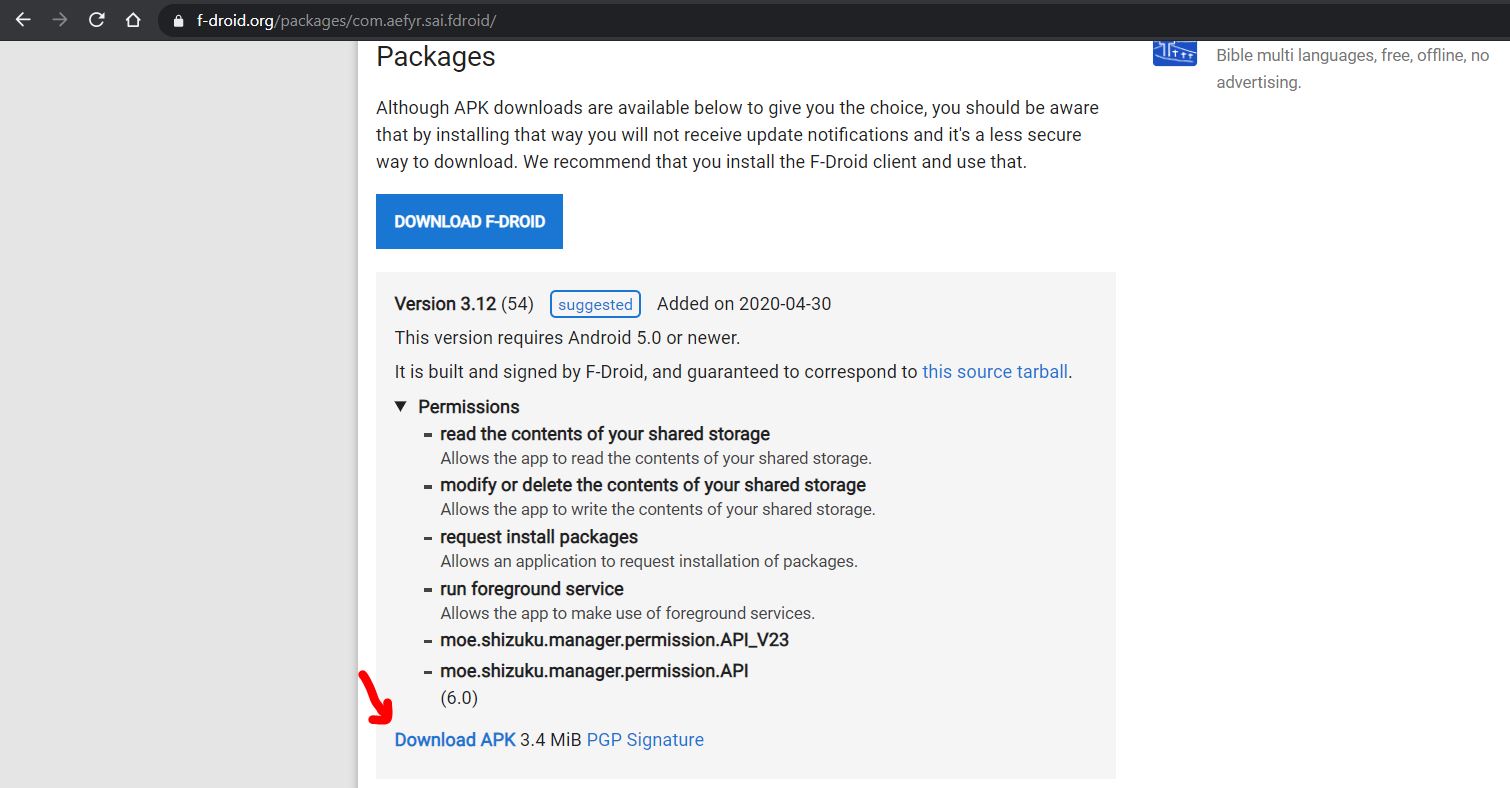
Well, according to their GitHub page, you can also download SAI from F-Droid (https://f-droid.org/packages/com.aefyr.sai.fdroid/).
It is best to check for the latest SAI APK from their website, but here's the one you can download now (as of posting this article, this is the latest version).
Select the vanced .apk file you downloaded
Finally, download the Vanced APK from YouTube Vanced site (https://vanced.app/). Select the following options: Non-Root (most phones are not rooted); Default; Dark.

So, what do you think of this apps?
Just to also mention that fellow member Blackpanther have also mentioned this in his article.


- Posts
- Following
- Followers
- Energy
-

Adrian
-
+ Follow

-
- 179 Posts
- 26 Following
- 227 Followers
- 20088 Energy


SUBSCRIPTION
I agree to receive the latest offers and information on HONOR products through email or IM (e.g. WhatsApp) provided below and advertisement on third-party platforms. I understand that I can unsubscribe anytime according to Chapter 5 of HONOR Platform Privacy Statement.
CONTACT

- Posts
- photo
- video

An interesting discussion topic came up recently about alternative apps. For me, one important consideration is that the apps should be "safe". So, with this apps that I will share next, I will also provide some additional details about the apps/ sites so that you can also evaluate it for yourself.
TL;DR Version
Download and install MicroG from YouTube Vanced site (https://vanced.app/)
Download and install SAI from F-Droid (https://f-droid.org/packages/com.aefyr.sai.fdroid/)
Download and install APK from YouTube Vanced site (https://vanced.app/)
Detailed Version
OK, so what is YouTube Vanced? Well, YouTube Vanced is an alternative apps to view YouTube. According to XDA, YouTube Vanced is a popular modded version of YouTube. It adds a number of features to the official YouTube app, including built-in adblocking, background playback, black/dark themes, and much more.
This is one of the more popular YouTube alternative apps and can be useful for those who do not have Google Services on their phones.
From YouTube Vanced website, installing it is a matter of 4 simple steps:
Download and install MicroG. Click on the MicroG button at the bottom of this page: https://vanced.app/ (note: Install only if you want to login to your YouTube/ Google account)
Download SAI from the playstore: https://play.google.com/store/apps/details?id=com.aefyr.sai
Select the vanced .apk file you downloaded (it's in your Downloads folder)
Click install
Download and install MicroG
MicroG is a free and open-source implementation of proprietary Google libraries that serves as a replacement for Google Play Services on the Android operating system. It is maintained by German developer Marvin Wißfeld. MicroG allows mobile device users to access Google mobile services with less tracking of their device activity compared to Google Play Services. In a presentation, Wißfeld described MicroG as "the framework (libraries, services, patches) to create a fully-compatible Android distribution without any proprietary Google components".
You will need this if you want to login to your Google Account when you access YouTube. Otherwise, you do not even need this.
Download SAI from the playstore
Split Application Installer is a way to combine APK files together so you can run it correctly. According the the description on Google Play Store, you can also find out more about this apps from GitHub (https://github.com/Aefyr/SAI):
What if you do not have access to Google Play (example: phone comes with only HMS)?
Well, according to their GitHub page, you can also download SAI from F-Droid (https://f-droid.org/packages/com.aefyr.sai.fdroid/).
It is best to check for the latest SAI APK from their website, but here's the one you can download now (as of posting this article, this is the latest version).
Select the vanced .apk file you downloaded
Finally, download the Vanced APK from YouTube Vanced site (https://vanced.app/). Select the following options: Non-Root (most phones are not rooted); Default; Dark.
So, what do you think of this apps?
Just to also mention that fellow member Blackpanther have also mentioned this in his article.