

 More Products
 Compare













我的荣耀 开启荣耀之旅



 Disagree Terms
 Log out




[Tutorial] How to take better selfies with HONOR phones


 Last reply :
As mobile photography is advanced, photo takes an important role in our daily life. More and more certain camera functions come out, but it still takes time for beginners or new users to understand how to use them.
This is why this class was born! Let’s see what it will offer for you!
l In this classroom we will offer one photo tip or camera knowledge
l We encourage all of our fans to share your photos or comments in the comment zone,and actively communicate with other fans for making progress together
l “The best photo” will be selected from the comment zone each lesson
Let’s get started!
#Lesson 1 Portrait Mode-How To Take Better Selfie With HONOR Phones
Many of us love to take pictures when we have fun with friends, or when we go somewhere amazing. But how to take a selfie photo better enough to post on your social media?
Today I will share some essential tips about Portrait mode.
Tip 1: Add some different blurring and studio lighting effects 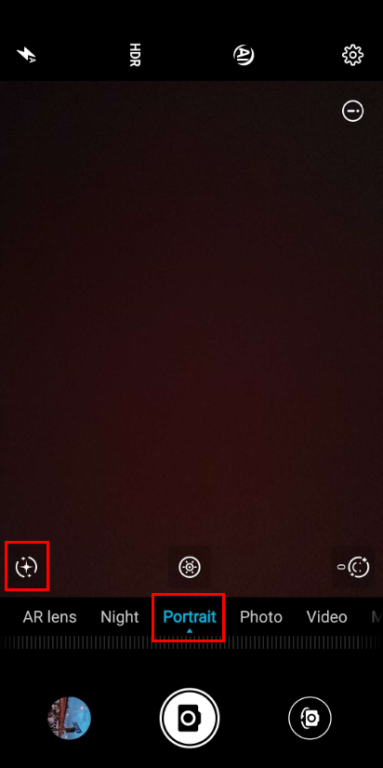
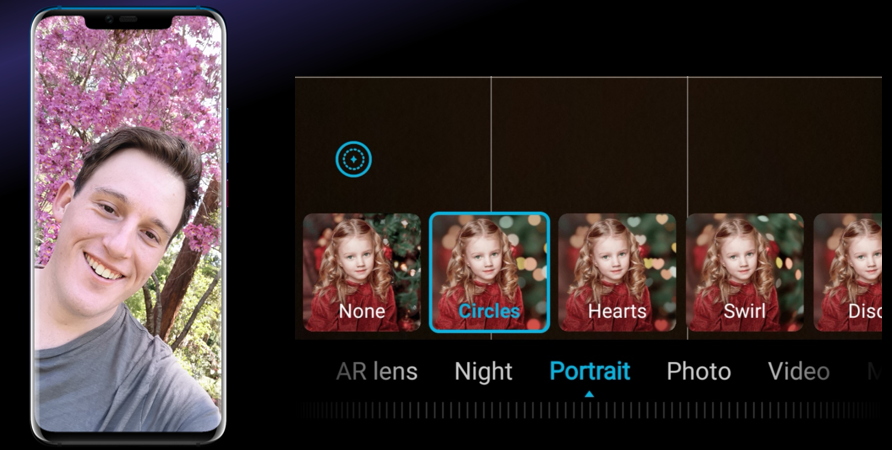
No matter the light spots made by natural or artificial light, the camera of HONOR phones can turn the background light behind the person into bokeh. And there are 4 lighting effects for us to choose.
*When the scene is backlit or dark, the beauty effects may be unstable, because the low lighting contrast is not conducive to detecting facial features.
It always takes us lots of time to fit all of us within the when taking a selfie with some friends. Even worse, warm-hearted passers-by don’t get us the picture we wish. T-T
Tips 2: Tailor made for Group photos——Timer, Audio control, Capture smiles!
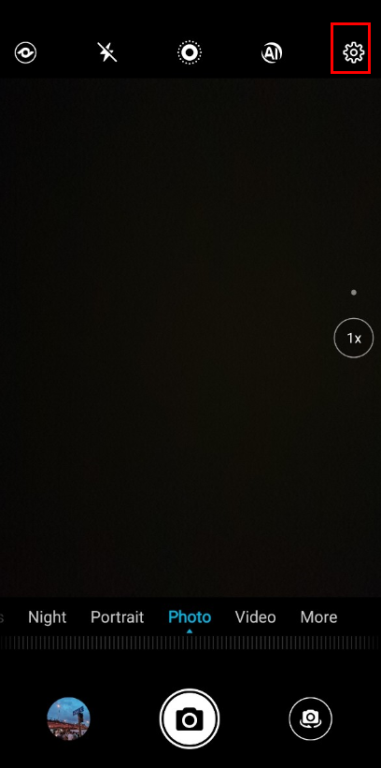
Touch the small gear (Setting button) in the upper right corner of the viewfinder to find the Timer, Audio control, and Capture smiles functions.
i Timed Shots
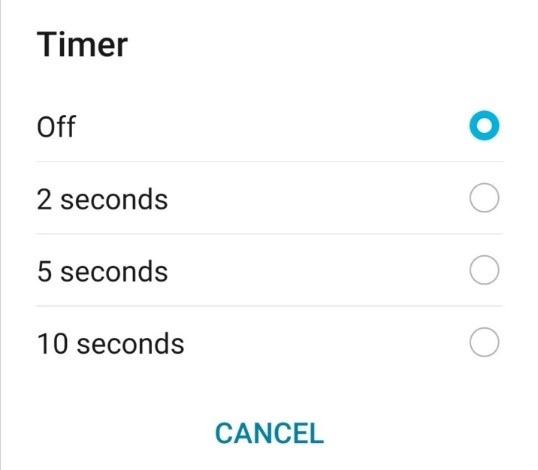
There are 3 timer choices for us to join the picture, strike a pose, and smile for the camera.
ii Audio control
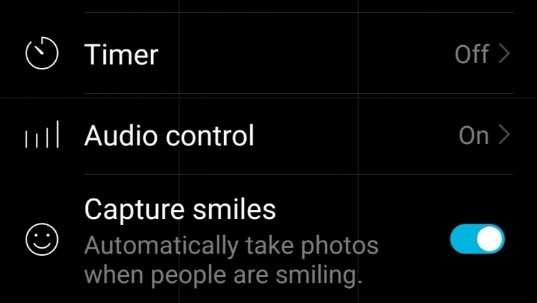
There are two shooting modes under Audio control. The first is to shout out the keyword "Cheese" to trigger the camera to take a picture. The other allows for the camera to automatically start shooting when the nearby volume reaches a certain level (not suggested in noisy environments).
*Audio control picture can also be timed.
iii Capture smiles
Once Capture smiles is enabled, the camera automatically starts shooting when it detects a smiling face. By the way, this setting is good for living up the atmosphere.
If a timed photo has also been set, there is no countdown for Capture smiles. Instead, the camera will automatically take a photo as soon as it detects a smiling face.
Okay, this is today’s class. Remember to share your best photos below and tips you were using or how you edit it.
If you have any advice for this class, please leave it in the comment zone and we will followJ!


- Posts
- Following
- Followers
- Energy
-

 Redbeanice
Community Team
Redbeanice
Community Team
-
+ Follow

-
- 60 Posts
- 19 Following
- 218 Followers
- 4185 Energy


SUBSCRIPTION
I agree to receive the latest offers and information on HONOR products through email or IM (e.g. WhatsApp) provided below and advertisement on third-party platforms. I understand that I can unsubscribe anytime according to Chapter 5 of HONOR Platform Privacy Statement.
CONTACT

- Posts
- photo
- video

As mobile photography is advanced, photo takes an important role in our daily life. More and more certain camera functions come out, but it still takes time for beginners or new users to understand how to use them.
This is why this class was born! Let’s see what it will offer for you!
l In this classroom we will offer one photo tip or camera knowledge
l We encourage all of our fans to share your photos or comments in the comment zone,and actively communicate with other fans for making progress together
l “The best photo” will be selected from the comment zone each lesson
Let’s get started!
#Lesson 1 Portrait Mode-How To Take Better Selfie With HONOR Phones
Many of us love to take pictures when we have fun with friends, or when we go somewhere amazing. But how to take a selfie photo better enough to post on your social media?
Today I will share some essential tips about Portrait mode.
Tip 1: Add some different blurring and studio lighting effects
No matter the light spots made by natural or artificial light, the camera of HONOR phones can turn the background light behind the person into bokeh. And there are 4 lighting effects for us to choose.
*When the scene is backlit or dark, the beauty effects may be unstable, because the low lighting contrast is not conducive to detecting facial features.
It always takes us lots of time to fit all of us within the when taking a selfie with some friends. Even worse, warm-hearted passers-by don’t get us the picture we wish. T-T
Tips 2: Tailor made for Group photos——Timer, Audio control, Capture smiles!
Touch the small gear (Setting button) in the upper right corner of the viewfinder to find the Timer, Audio control, and Capture smiles functions.
i Timed Shots
There are 3 timer choices for us to join the picture, strike a pose, and smile for the camera.
ii Audio control
There are two shooting modes under Audio control. The first is to shout out the keyword "Cheese" to trigger the camera to take a picture. The other allows for the camera to automatically start shooting when the nearby volume reaches a certain level (not suggested in noisy environments).
*Audio control picture can also be timed.
iii Capture smiles
Once Capture smiles is enabled, the camera automatically starts shooting when it detects a smiling face. By the way, this setting is good for living up the atmosphere.
If a timed photo has also been set, there is no countdown for Capture smiles. Instead, the camera will automatically take a photo as soon as it detects a smiling face.
Okay, this is today’s class. Remember to share your best photos below and tips you were using or how you edit it.
If you have any advice for this class, please leave it in the comment zone and we will followJ!