

 More Products
 Compare













我的荣耀 开启荣耀之旅



 Disagree Terms
 Log out




[tips] What is launching on your phone?


 Last reply :
I can tell you many things I like about EMUI (and also a few things I don't like), like how EMUI allows us to customise the looks and feel to suit our taste and needs.
Another thing I like about EMUI is it lets us control what gets auto-launched in your phone. Less auto-launch = Faster phone start up. Less apps in background = Better battery usage (usually).
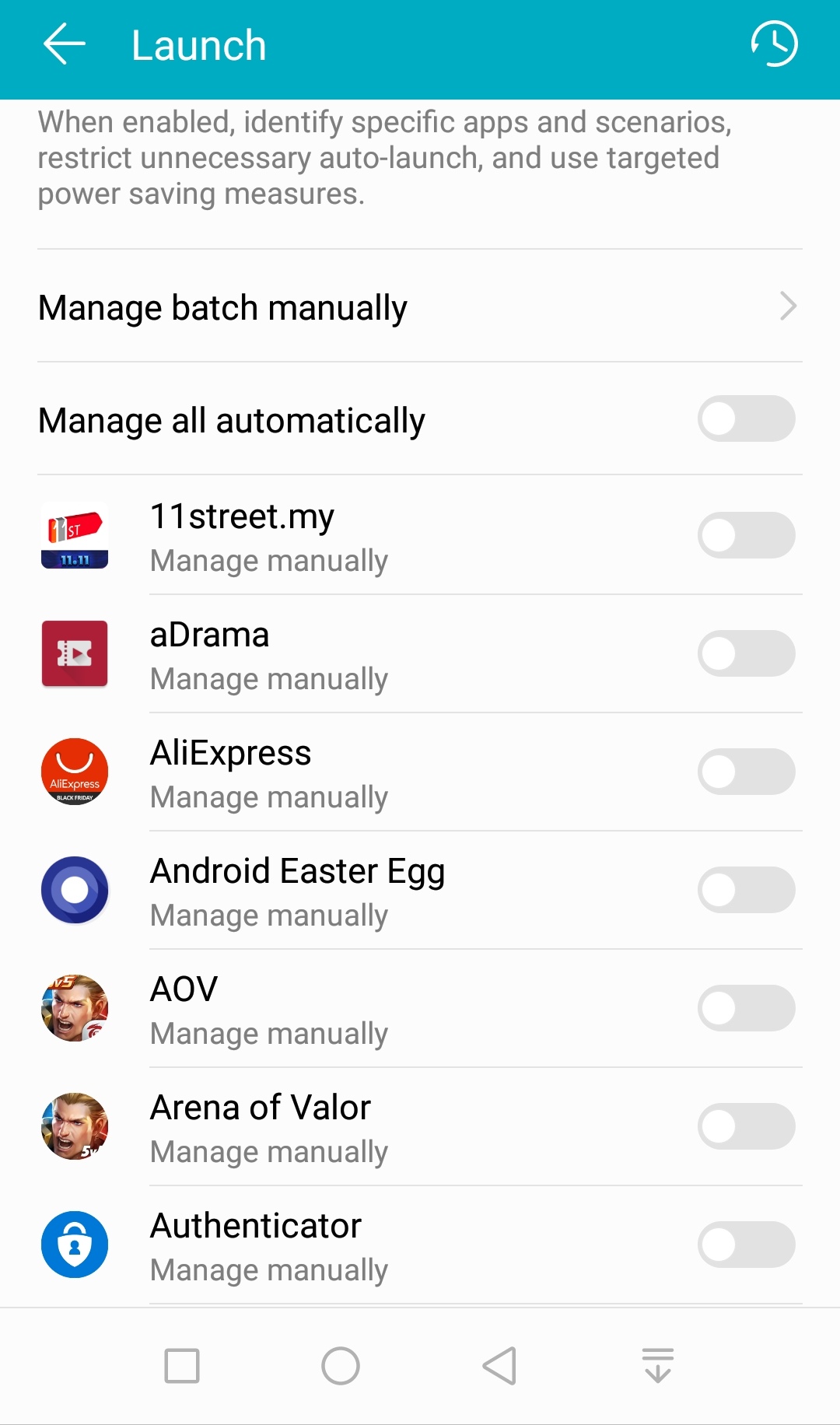
To manage what gets launched (at least on EMUI 8.0.0), go to Settings --> Battery --> Launch. You will see this:
Click on the apps you want to manage. You will see this:
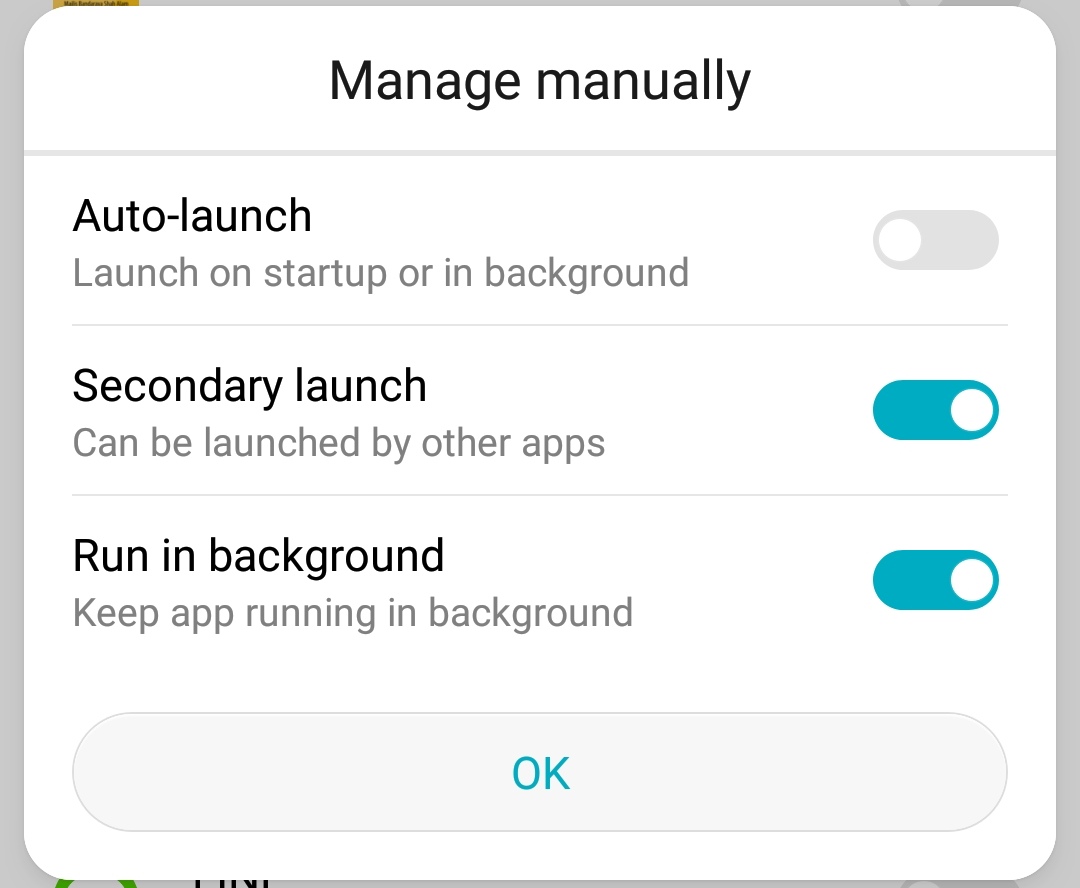
Auto-lauch means the apps wull launch when phone starts up, or when there is a "timer" to wake it up. I like to disable this for most apps. But keep this enabled for your messaging and calendar apps, otherwise you get not messages and event notification.
Secondary launch means it can be launched by another apps. For example, you are browsing on Chrome and when you click a Lazada link, it can open up Lazada apps on your phone. If you want Chrome to be able to open Lazada apps, you must make sure Secondary launch is enabled for Lazada.
Run in background means after the screen is off, the apps will continue to run. Enable this for your messaging and calender apps so you can continue to receive messages/ notifications.
Another thing you can see from Settings --> Battery --> Launch screen is a record of what has been launched. Click on the clock icon at top right to see the list of apps launched. This is what you can see:
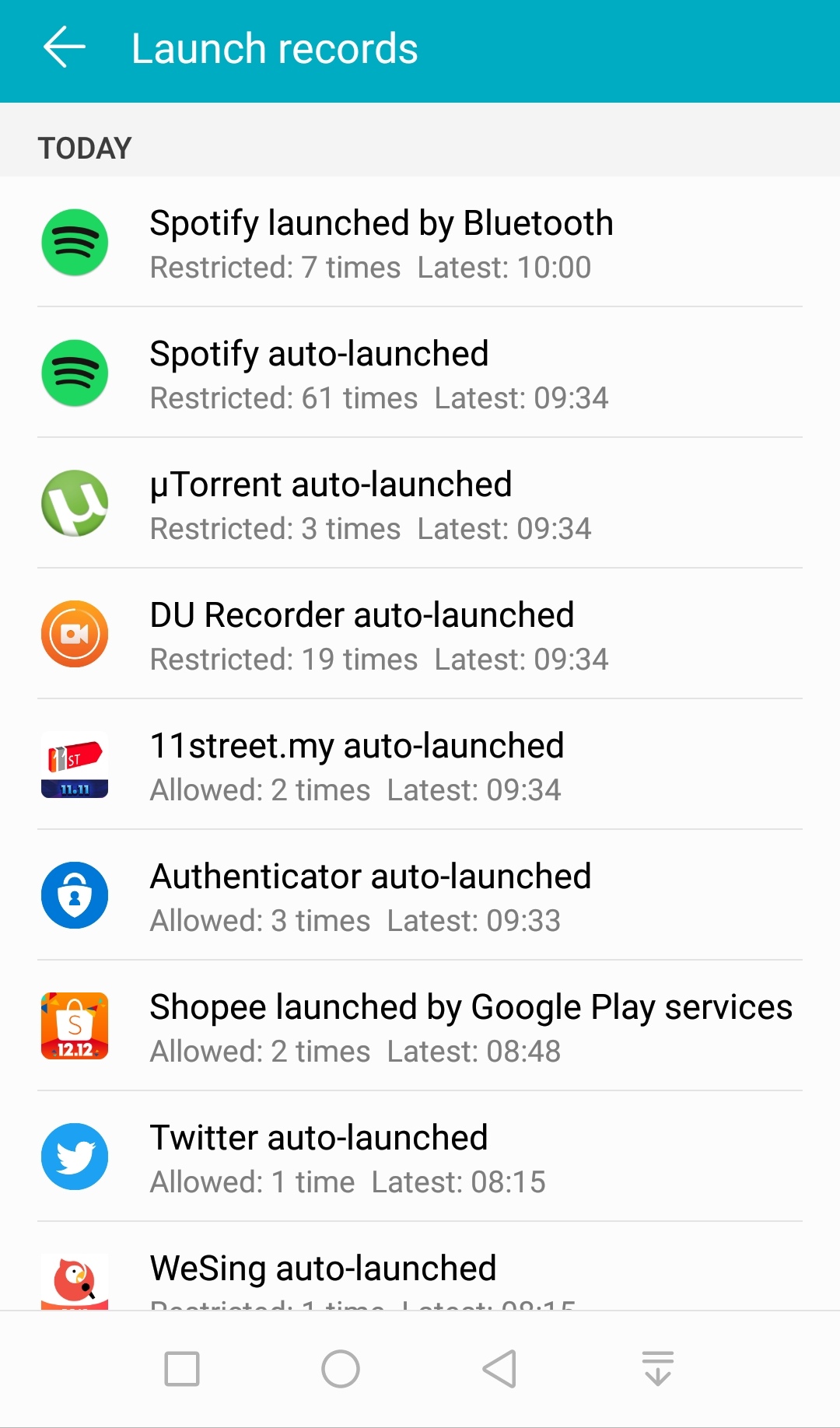
From the record, you can see Spotify was blocked (restricted) from starting up. A Bluetooth device tried to launch it. Spotify also tried to auto-launch (but blocked) 61 times.
You can also see that the 11street apps was allowed to launch twice.
This list allows you to actually see what is running on your phone.
Hope you liked this... If you do, please click on the LIKE/ LOVE/ HEART button. 


- Posts
- Following
- Followers
- Energy
-

Adrian
-
+ Follow

-
- 179 Posts
- 26 Following
- 223 Followers
- 19806 Energy


SUBSCRIPTION
I agree to receive the latest offers and information on HONOR products through email or IM (e.g. WhatsApp) provided below and advertisement on third-party platforms. I understand that I can unsubscribe anytime according to Chapter 5 of HONOR Platform Privacy Statement.
CONTACT

- Posts
- photo
- video

I can tell you many things I like about EMUI (and also a few things I don't like), like how EMUI allows us to customise the looks and feel to suit our taste and needs.
Another thing I like about EMUI is it lets us control what gets auto-launched in your phone. Less auto-launch = Faster phone start up. Less apps in background = Better battery usage (usually).
To manage what gets launched (at least on EMUI 8.0.0), go to Settings --> Battery --> Launch. You will see this:
Click on the apps you want to manage. You will see this:
Auto-lauch means the apps wull launch when phone starts up, or when there is a "timer" to wake it up. I like to disable this for most apps. But keep this enabled for your messaging and calendar apps, otherwise you get not messages and event notification.
Secondary launch means it can be launched by another apps. For example, you are browsing on Chrome and when you click a Lazada link, it can open up Lazada apps on your phone. If you want Chrome to be able to open Lazada apps, you must make sure Secondary launch is enabled for Lazada.
Run in background means after the screen is off, the apps will continue to run. Enable this for your messaging and calender apps so you can continue to receive messages/ notifications.
Another thing you can see from Settings --> Battery --> Launch screen is a record of what has been launched. Click on the clock icon at top right to see the list of apps launched. This is what you can see:
From the record, you can see Spotify was blocked (restricted) from starting up. A Bluetooth device tried to launch it. Spotify also tried to auto-launch (but blocked) 61 times.
You can also see that the 11street apps was allowed to launch twice.
This list allows you to actually see what is running on your phone.
Hope you liked this... If you do, please click on the LIKE/ LOVE/ HEART button.