

 More Products
 Compare










我的荣耀 开启荣耀之旅



 Disagree Terms
 Log out




[Tips & Tricks] Navigation, Gesture and Controls


 Last reply :
Change The Navigation: Gestures / Android Softkeys / Navigation Dock
The usual trio of Android softkeys – back, home, recent apps – is the default setup. If you would prefer Android Pie gesture control or Huawei's Navigation dock interface (a floating dock on the screen): swipe down from the top of the home screen > hit the settings cog icon > System > System navigation.
Smart Assistance
HiTouch, One-handed UI, Motion Control (with Knuckle Gesture), Voice Control, and Gloves/Mistouch modes are accessible. Swipe down from the top of the home screen > hit the settings cog icon > select Smart Assistance.
Motion Control
There are three options that can be independently switched on, off or adjusted for deeper customisation:
- Flip to mute the phone when it's ringing or the alarm is sounding.
- Pick Up to reduce ring/alarm volume by lifting the device.
- Raise to Ear which auto-answers calls.
Knuckle Gestures
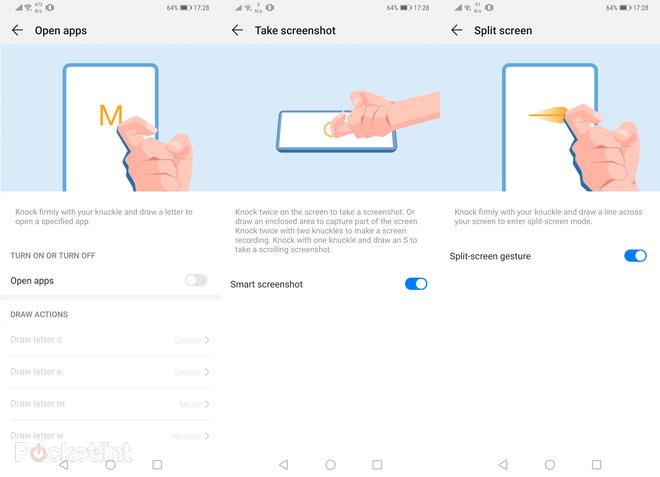
Found within Motion Control, this is a Huawei EMUI special. By using a hard knuckle to write on the screen rather than a softer finger, a second layer of commands can be instructed:
- Double-tap for screenshot (using one knuckle).
- Draw where knuckle-drawn letters activate apps (C for Camera, M for music, and so forth - each can be customised from a fuller list of apps).
- Split-screen gesture where a knuckle-drawn line across the screen when in an app screen will open the recent apps to the lower portion.
Screen Record
Capture your screen in real-time. Activated by tapping two knuckles twice on the screen or pressing-and-holding the power button and volume up key (not volume down as this will take a static screenshot). The resulting video is saved in your Files > Videos area.
What is HiTouch?
This is Huawei's contextual shopping concept. When activated, two thumbs pressed on screen will capture what's on screen – Google Lens style – identify it and then open Amazon Assistant (this app has to be installed) to go shop for the item. Problem is, it doesn't work very well at all.
Desktop Mode
Yes, certain model of HONOR smartphone canproject to a screen, like a full-on computer.


- Posts
- Following
- Followers
- Energy
-

Leon Jia Yee
-
+ Follow

-
- 200 Posts
- 15 Following
- 264 Followers
- 15570 Energy


SUBSCRIPTION
I agree to receive the latest offers and information on HONOR products through email or IM (e.g. WhatsApp) provided below and advertisement on third-party platforms. I understand that I can unsubscribe anytime according to Chapter 5 of HONOR Platform Privacy Statement.
CONTACT

- Posts
- photo
- video

Change The Navigation: Gestures / Android Softkeys / Navigation Dock
The usual trio of Android softkeys – back, home, recent apps – is the default setup. If you would prefer Android Pie gesture control or Huawei's Navigation dock interface (a floating dock on the screen): swipe down from the top of the home screen > hit the settings cog icon > System > System navigation.
Smart Assistance
HiTouch, One-handed UI, Motion Control (with Knuckle Gesture), Voice Control, and Gloves/Mistouch modes are accessible. Swipe down from the top of the home screen > hit the settings cog icon > select Smart Assistance.
Motion Control
There are three options that can be independently switched on, off or adjusted for deeper customisation:
Knuckle Gestures
Found within Motion Control, this is a Huawei EMUI special. By using a hard knuckle to write on the screen rather than a softer finger, a second layer of commands can be instructed:
Screen Record
Capture your screen in real-time. Activated by tapping two knuckles twice on the screen or pressing-and-holding the power button and volume up key (not volume down as this will take a static screenshot). The resulting video is saved in your Files > Videos area.
What is HiTouch?
This is Huawei's contextual shopping concept. When activated, two thumbs pressed on screen will capture what's on screen – Google Lens style – identify it and then open Amazon Assistant (this app has to be installed) to go shop for the item. Problem is, it doesn't work very well at all.
Desktop Mode
Yes, certain model of HONOR smartphone canproject to a screen, like a full-on computer.