

 More Products
 Compare















我的荣耀 开启荣耀之旅



 Disagree Terms
 Log out




[Tips & Tricks] Lock Screen Tips


 Last reply :
Get an Always-On Display
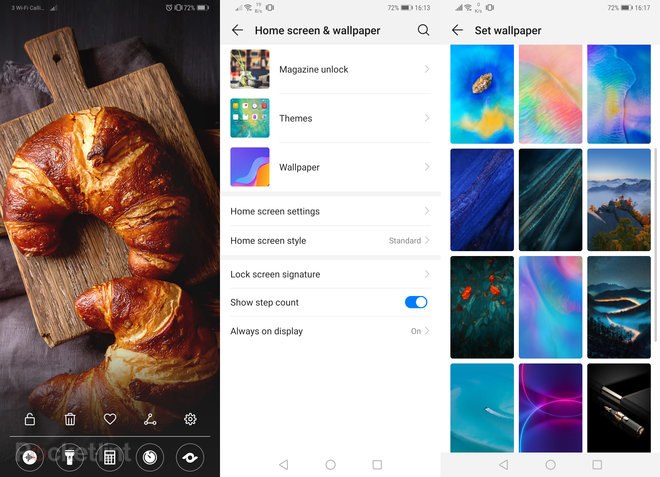
Only OLED screen smartphone offers a display on the homescreen even when the phone is inactive. However, this is off by default and not found in Display settings. Instead: swipe down from the top of the home screen > hit the settings cog icon > select Home Screen & Wallpaper > Always on Display. This can be scheduled to start/end or be on all day, as desired.
Change the lock screen wallpaper / screen saver / cover: Swipe down from the top of the home screen > hit the settings cog icon > select Home Screen & Wallpaper > Magazine Unlock. Here you can select pre-designated image banks, which are categorised, or add your own gallery. A different image will show each time you activate the phone.
Charging-Only Screen Saver
Outside of Magazine Unlock is a separate, personalised screen saver setup that only shows when the phone is recharging. Swipe down from the top of the home screen > hit the settings cog icon > select Display > More display settings > Screen saver. Here you can select galleries and set the duration for which a screen saver cycle runs.
Quick-Launch Shortcuts
From the lock screen it's possible (in a very Apple iOS-style) to swipe up to quick-launch shortcuts for five baked-in apps: Quick-access Recorder, Flashlight, Calculator, Stopwatch, QR code scanner. We don't like it being accessed from here, but some of you might.
Display personal signature/text: If you want a little personal message on the homescreen (it's default type only). swipe down from the top of the home screen > hit the settings cog icon > Home screen & wallpaper > Lock screen signature. Then type in the box and hit save.


- Posts
- Following
- Followers
- Energy
-

Leon Jia Yee
-
+ Follow

-
- 200 Posts
- 15 Following
- 264 Followers
- 15580 Energy


SUBSCRIPTION
I agree to receive the latest offers and information on HONOR products through email or IM (e.g. WhatsApp) provided below and advertisement on third-party platforms. I understand that I can unsubscribe anytime according to Chapter 5 of HONOR Platform Privacy Statement.
CONTACT

- Posts
- photo
- video

Get an Always-On Display
Only OLED screen smartphone offers a display on the homescreen even when the phone is inactive. However, this is off by default and not found in Display settings. Instead: swipe down from the top of the home screen > hit the settings cog icon > select Home Screen & Wallpaper > Always on Display. This can be scheduled to start/end or be on all day, as desired.
Change the lock screen wallpaper / screen saver / cover: Swipe down from the top of the home screen > hit the settings cog icon > select Home Screen & Wallpaper > Magazine Unlock. Here you can select pre-designated image banks, which are categorised, or add your own gallery. A different image will show each time you activate the phone.
Charging-Only Screen Saver
Outside of Magazine Unlock is a separate, personalised screen saver setup that only shows when the phone is recharging. Swipe down from the top of the home screen > hit the settings cog icon > select Display > More display settings > Screen saver. Here you can select galleries and set the duration for which a screen saver cycle runs.
Quick-Launch Shortcuts
From the lock screen it's possible (in a very Apple iOS-style) to swipe up to quick-launch shortcuts for five baked-in apps: Quick-access Recorder, Flashlight, Calculator, Stopwatch, QR code scanner. We don't like it being accessed from here, but some of you might.
Display personal signature/text: If you want a little personal message on the homescreen (it's default type only). swipe down from the top of the home screen > hit the settings cog icon > Home screen & wallpaper > Lock screen signature. Then type in the box and hit save.