

 More Products
 Compare













我的荣耀 开启荣耀之旅



 Disagree Terms
 Log out




[Tips & Tricks] How to reset your phone?


 Last reply :
Hello HONOR fans,
Do you feel that your phone is running slower than before? This is very annoying, right? Due to the long-term accumulation of caches and residual files, the phone will run slower. You can reset your phone to completely erase these cached files and restore your device's factory settings. Now let’s check out how to reset your phone.
• Reset network settings
This will restore Wi-Fi, mobile data network, and Bluetooth settings, including hotspot tethering and Bluetooth pairing information. It will not change other settings on your phone, nor will it delete any data or files.
Open Settings, go to System > Reset > Reset Network settings, touch Reset network settings, and follow the onscreen instructions to reset the settings.
• Reset all settings
This will restore your device's initial network settings, fingerprint data, face data, and lock screen passwords. It will not reset settings for Find my Phone or HUAWEI ID, nor will it delete any data or files.
Open Settings, go to System > Reset > Reset all settings, touch Reset all settings, and follow the onscreen instructions to reset the settings.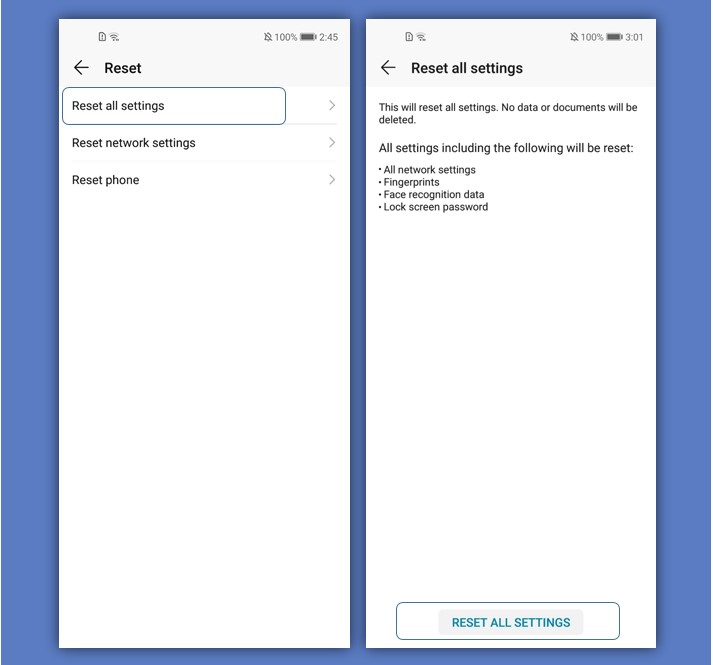
• Restore factory settings
This will delete all data in your device's memory and storage, including your account settings, system settings, app data, installed apps, music, images, and documents, and restore your phone to its original factory settings. Back up your data before restoring your device to factory settings.
Open Settings, go to System > Reset > Reset phone, touch Reset phone, and follow the onscreen instructions to reset the phone.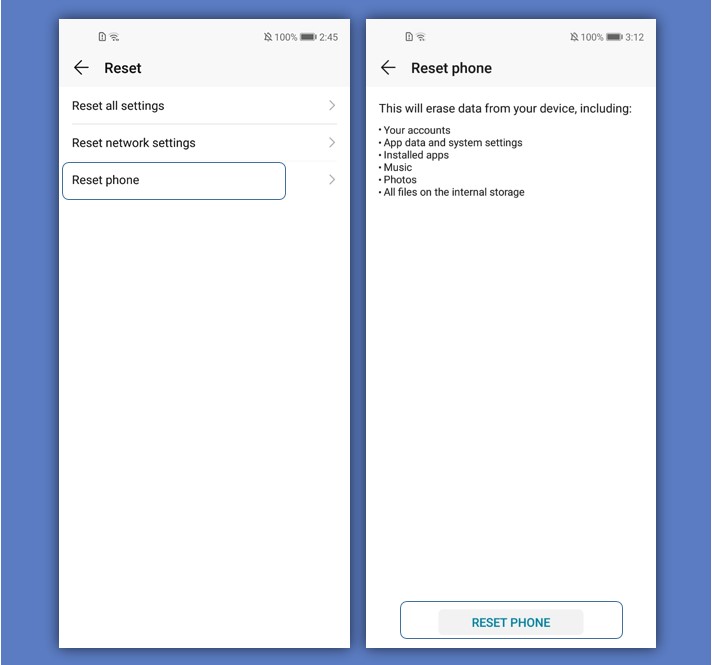
Tips: Before restoring your phone to factory settings, log out of your HUAWEI ID. Otherwise, you may not be able to activate your phone after the reset. (To log out, open Settings, enter HUAWEI ID in the search box to open Account center, and touch Log out at the bottom of the Account center screen.)


- Posts
- Following
- Followers
- Energy
-

Lyone
-
+ Follow

-
- 13 Posts
- 0 Following
- 10 Followers
- 176 Energy


SUBSCRIPTION
I agree to receive the latest offers and information on HONOR products through email or IM (e.g. WhatsApp) provided below and advertisement on third-party platforms. I understand that I can unsubscribe anytime according to Chapter 5 of HONOR Platform Privacy Statement.
CONTACT

- Posts
- photo
- video

Hello HONOR fans,



Do you feel that your phone is running slower than before? This is very annoying, right? Due to the long-term accumulation of caches and residual files, the phone will run slower. You can reset your phone to completely erase these cached files and restore your device's factory settings. Now let’s check out how to reset your phone.
• Reset network settings
This will restore Wi-Fi, mobile data network, and Bluetooth settings, including hotspot tethering and Bluetooth pairing information. It will not change other settings on your phone, nor will it delete any data or files.
Open Settings, go to System > Reset > Reset Network settings, touch Reset network settings, and follow the onscreen instructions to reset the settings.
• Reset all settings
This will restore your device's initial network settings, fingerprint data, face data, and lock screen passwords. It will not reset settings for Find my Phone or HUAWEI ID, nor will it delete any data or files.
Open Settings, go to System > Reset > Reset all settings, touch Reset all settings, and follow the onscreen instructions to reset the settings.
• Restore factory settings
This will delete all data in your device's memory and storage, including your account settings, system settings, app data, installed apps, music, images, and documents, and restore your phone to its original factory settings. Back up your data before restoring your device to factory settings.
Open Settings, go to System > Reset > Reset phone, touch Reset phone, and follow the onscreen instructions to reset the phone.
Tips: Before restoring your phone to factory settings, log out of your HUAWEI ID. Otherwise, you may not be able to activate your phone after the reset. (To log out, open Settings, enter HUAWEI ID in the search box to open Account center, and touch Log out at the bottom of the Account center screen.)