

 More Products
 Compare










我的荣耀 开启荣耀之旅



 Disagree Terms
 Log out




[Tips & Tricks] How to Install Top G-Apps in HONOR 9X Pro without GMS


 Last reply :
How to Install Top G-Apps in HONOR 9X Pro without GMS
I believe many people considered buying the HONOR 9X Pro from China but gave up because of the GMS issue. This week I got my brand new HONOR 9X Pro, and it is as perfect as I thought.
Before spending my money, I did a lot of research about GMS and checked what I would miss if I use an Android phone without GMS. It turns out this won’t be a deal-breaker for me since most apps I frequently use in daily life still works.
Here I will share with you how I install apps like Facebook and Spotify and use them with my HONOR 9X Pro. I hope this can help people who are still hesitant to buy the HONOR 9X Pro.
Preparation
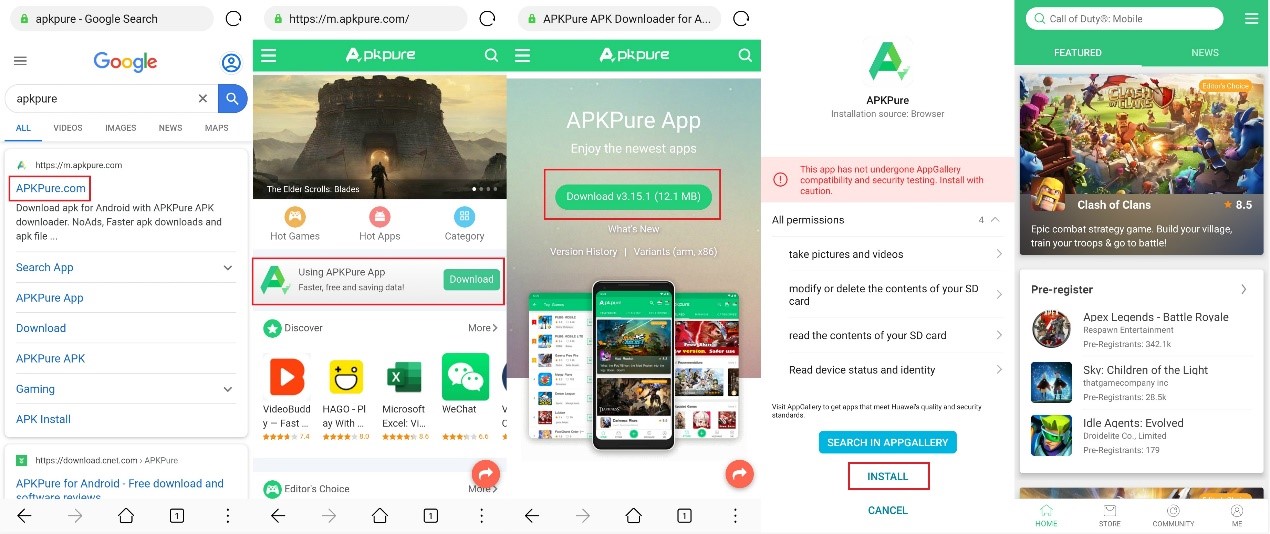
First of all, we need to download another app store since we won’t find many apps we need in the China version’s Huawei AppGallery. APK Pure is a great choice, and you can easily download the app through its official website.
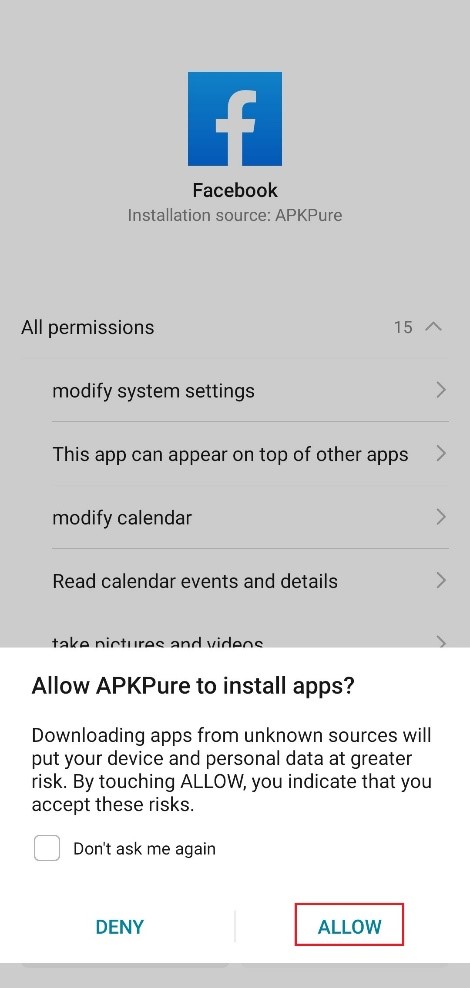
With APK Pure, you can not only download apps you need but also manage and update them. When you install the app which is downloaded from APK Pure for the first time, the HONOR 9X Pro will ask your permission to install apps from the APK Pure. This will only show up once, and it won’t bother you again.
Social
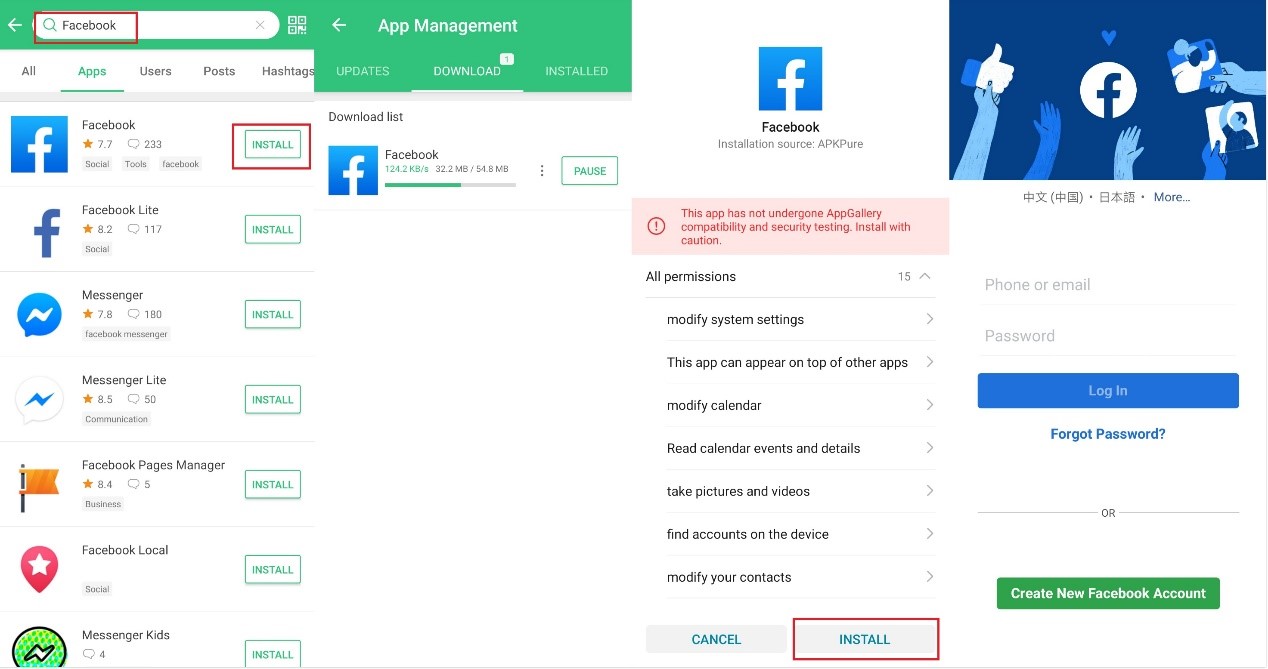
Just like everyone else, the apps I used most frequently every day is social network apps: Facebook, Twitter, and Instagram. Fortunately, you don’t need extra effort to use these three social apps. Just install them from the APK Pure, and you are good to go. There is only a small problem: Twitter requires GMS for location service, so you can’t use location-related features.
Linkedin is only a bit different from other social apps. You can also install it from APK Pure, and all of its features work fine. You won’t be able to use your Google account to login, but you can definitely login with your email.
Chat
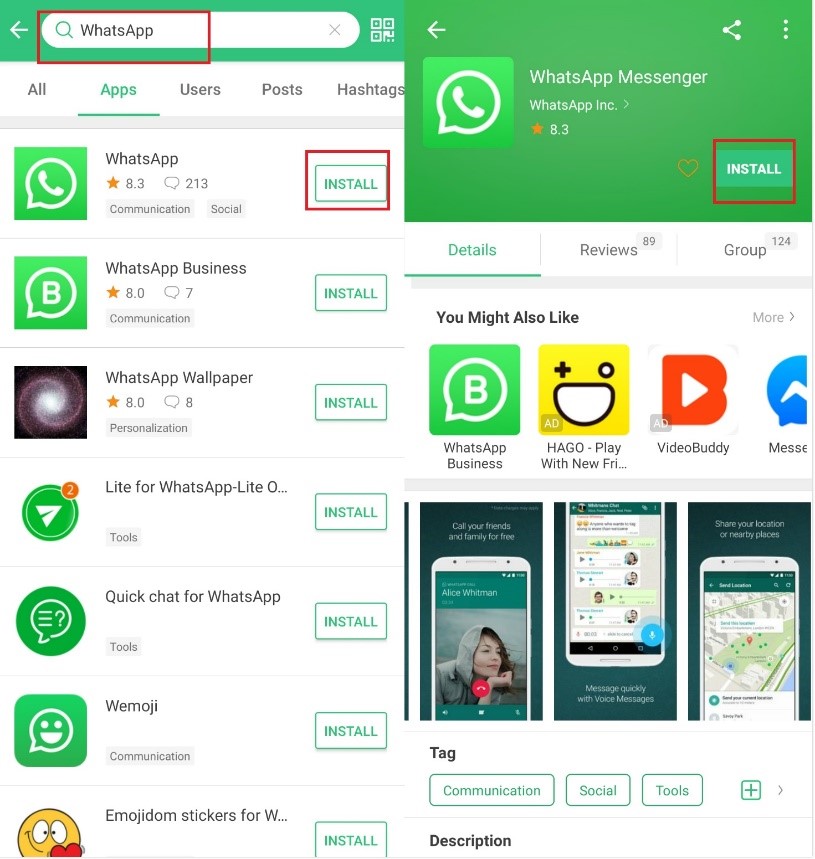
Two of the most popular chat apps, WhatsApp and Skype, don’t require GMS at all, making it quite simple to install them. Just search the name in the APK Pure and install it.
As for Telegram, another popular chat app, most of its features work perfectly without GMS. It has the same problem as Twitter, requiring GMS for location service.
Entertainment
Spotify also doesn’t require GMS so that you can use it without any trouble.
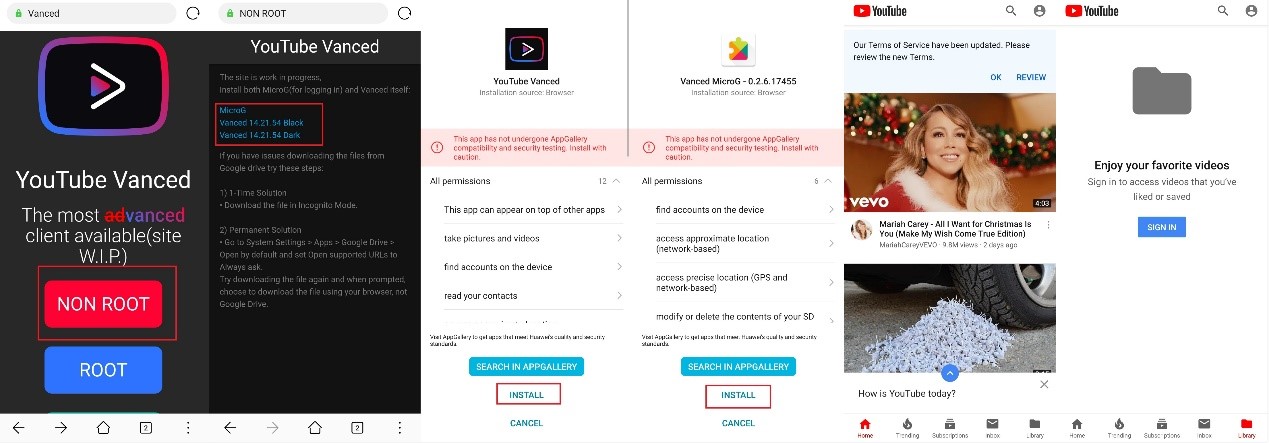
The thing gets a little complicated when you want to use YouTube. As we all know, YouTube is a Google app, and it seems we won’t be able to use it without GMS. However, you can use YouTube Vanced, which is a modded version of YouTube. The Vanced version looks just like the original YouTube, but it has a built-in ad-blocker and offers a better user experience. You can download the YouTube Vanced on the official website (https://vanced.app/). If the download links don’t work, you can try XDA’s link(https://www.xda-developers.com/youtube-vanced-apk/).
After installing the YouTube Vanced, you can use YouTube without any trouble. You can also install MicroG if you want to log in with your YouTube account.
Travel
Booking is similar to the Linkedin app. Both of them can be installed and used without GMS, but you can’t log in with Google account. Just download the Booking app with the APK Pure, and everything needed is ready.
That’s all for the tutorial! After using the HONOR 9X Pro for a while, I found it working as perfectly as I expected even without GMS! I’m glad I found the solution and hope this article can help you too. J


- Posts
- Following
- Followers
- Energy
-

Leon Jia Yee
-
+ Follow

-
- 200 Posts
- 15 Following
- 264 Followers
- 15570 Energy


SUBSCRIPTION
I agree to receive the latest offers and information on HONOR products through email or IM (e.g. WhatsApp) provided below and advertisement on third-party platforms. I understand that I can unsubscribe anytime according to Chapter 5 of HONOR Platform Privacy Statement.
CONTACT

- Posts
- photo
- video

How to Install Top G-Apps in HONOR 9X Pro without GMS
I believe many people considered buying the HONOR 9X Pro from China but gave up because of the GMS issue. This week I got my brand new HONOR 9X Pro, and it is as perfect as I thought.
Before spending my money, I did a lot of research about GMS and checked what I would miss if I use an Android phone without GMS. It turns out this won’t be a deal-breaker for me since most apps I frequently use in daily life still works.
Here I will share with you how I install apps like Facebook and Spotify and use them with my HONOR 9X Pro. I hope this can help people who are still hesitant to buy the HONOR 9X Pro.
Preparation
First of all, we need to download another app store since we won’t find many apps we need in the China version’s Huawei AppGallery. APK Pure is a great choice, and you can easily download the app through its official website.
With APK Pure, you can not only download apps you need but also manage and update them. When you install the app which is downloaded from APK Pure for the first time, the HONOR 9X Pro will ask your permission to install apps from the APK Pure. This will only show up once, and it won’t bother you again.
Social
Just like everyone else, the apps I used most frequently every day is social network apps: Facebook, Twitter, and Instagram. Fortunately, you don’t need extra effort to use these three social apps. Just install them from the APK Pure, and you are good to go. There is only a small problem: Twitter requires GMS for location service, so you can’t use location-related features.
Linkedin is only a bit different from other social apps. You can also install it from APK Pure, and all of its features work fine. You won’t be able to use your Google account to login, but you can definitely login with your email.
Chat
Two of the most popular chat apps, WhatsApp and Skype, don’t require GMS at all, making it quite simple to install them. Just search the name in the APK Pure and install it.
As for Telegram, another popular chat app, most of its features work perfectly without GMS. It has the same problem as Twitter, requiring GMS for location service.
Entertainment
Spotify also doesn’t require GMS so that you can use it without any trouble.
The thing gets a little complicated when you want to use YouTube. As we all know, YouTube is a Google app, and it seems we won’t be able to use it without GMS. However, you can use YouTube Vanced, which is a modded version of YouTube. The Vanced version looks just like the original YouTube, but it has a built-in ad-blocker and offers a better user experience. You can download the YouTube Vanced on the official website (https://vanced.app/). If the download links don’t work, you can try XDA’s link(https://www.xda-developers.com/youtube-vanced-apk/).
After installing the YouTube Vanced, you can use YouTube without any trouble. You can also install MicroG if you want to log in with your YouTube account.
Travel
Booking is similar to the Linkedin app. Both of them can be installed and used without GMS, but you can’t log in with Google account. Just download the Booking app with the APK Pure, and everything needed is ready.
That’s all for the tutorial! After using the HONOR 9X Pro for a while, I found it working as perfectly as I expected even without GMS! I’m glad I found the solution and hope this article can help you too. J