

 More Products
 Compare













我的荣耀 开启荣耀之旅


 Disagree Terms
 Log out




[Tips] How to use Party Mode in Honor 8X


 Last reply :
The party mode on Honor 8X a fantastic mode. It lets you sync music playback across multiple devices and it requires access to the phone, storage, location, NFC and camera permissions. Here, let's have a look at the steps to use Party Mode on Honor 8X.
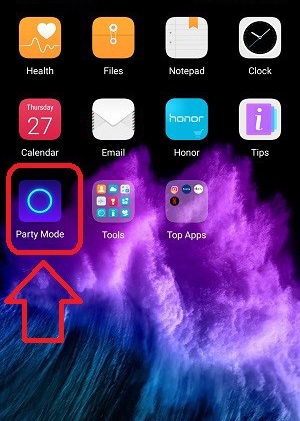
This feature is very special for all HONOR user, Party Mode is an application that will allow you to sync music between two or more HONOR devices using NFC/WiFi Hotspot. Once it's set up, you'll be able to play the same song simultaneously across devices. Now go on reading for the steps below:
Step 1
Choose any one of the HONOR phone you want to play songs to all devices. This device will act as a parent device which controls all devices that are connected with them. Go to Party Mode and agree the agreement to start.
Step 2
Click on START PARTY on the parent device and click JOIN PARTY on the second device to join us.
Step 3
Scan the QR code present on the parent device through the other device.
Step 4
Soon, it will connect automatically.
With the Party Mode, you can enjoy sync music playback across multiple phones to create an immersive surround sound effect.


- Posts
- Following
- Followers
- Energy
-

Honorfans31283
-
+ Follow

-
- 1 Posts
- 0 Following
- 0 Followers
- 7 Energy


SUBSCRIPTION
I agree to receive the latest offers and information on HONOR products through email or IM (e.g. WhatsApp) provided below and advertisement on third-party platforms. I understand that I can unsubscribe anytime according to Chapter 5 of HONOR Platform Privacy Statement.
CONTACT

- Posts
- photo
- video

The party mode on Honor 8X a fantastic mode. It lets you sync music playback across multiple devices and it requires access to the phone, storage, location, NFC and camera permissions. Here, let's have a look at the steps to use Party Mode on Honor 8X.
This feature is very special for all HONOR user, Party Mode is an application that will allow you to sync music between two or more HONOR devices using NFC/WiFi Hotspot. Once it's set up, you'll be able to play the same song simultaneously across devices. Now go on reading for the steps below:
Step 1
Choose any one of the HONOR phone you want to play songs to all devices. This device will act as a parent device which controls all devices that are connected with them. Go to Party Mode and agree the agreement to start.
Step 2
Click on START PARTY on the parent device and click JOIN PARTY on the second device to join us.
Step 3
Scan the QR code present on the parent device through the other device.
Step 4
Soon, it will connect automatically.
With the Party Mode, you can enjoy sync music playback across multiple phones to create an immersive surround sound effect.