

 More Products
 Compare










我的荣耀 开启荣耀之旅



 Disagree Terms
 Log out




[Tips] How to Take Scenery Photos Using Pro Mode in Honor 8X


 Last reply :
Want to make your scenic photos more vibrant and interesting? Use Pro mode to take unique and personalized scenic photos.
Open  Camera > More > Pro.
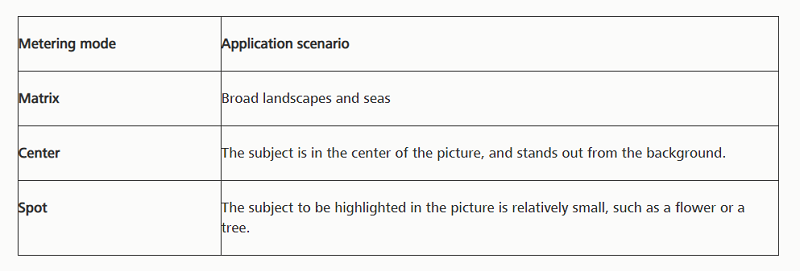
Select a metering mode based on the shooting subject: On the Pro mode screen, touch , and select a metering mode accordingly.
Adjust brightness based on the shooting environment:
Adjust ISO: On the Pro mode screen, touch , and swipe left or right on the ISO slider to adjust its value.
To avoid excessive noises, the recommended ISO is below 400. The recommended ISO for the daytime is between 100 and 200 and above 400 for night scenes.
Adjust the shutter speed:
On the Pro mode screen, touch

(shutter speed), slide on the shutter speed slider,
and drag your desired speed to the center.
The recommended shutter speed for static scenes (such as mountains) is between 1/80 and 1/125; and faster (less than 1 second) for moving subjects (such as waves). For the best result, using a tripod when shooting a moving subject.
Adjust EV compensation:
On the Pro mode screen, touch

, slide on the EV slider and drag the selected value to the center.
Adjust AWB: On the Pro mode screen, touch , slide on the AWB slider and drag the selected value to the center.
When shooting under sunlight, you can select

. In a weak light environment, you can select

.
Touch

to adjust the color temperature. If you want to give your photo a cozy, nostalgic tone, increase the K value. For a cold, calm or futuristic tone, select a lower K value.
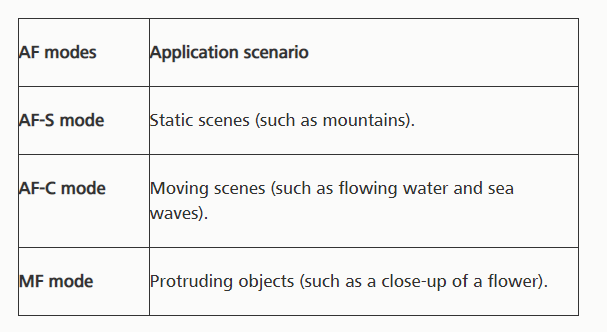
Adjust AF based on the shooting subject: On the Pro mode screen, touch , slide on the AF slider and drag your desired mode to the center.
Hold your device steady when shooting: On the Pro mode screen, touch and enable Horizontal level. After this feature is enabled, two assistive lines will appear in the viewfinder. When the dotted line overlaps with the solid line, it indicates that the camera is parallel to the horizontal level.
Save RAW format pictures: In the Pro mode, touch , and enable RAW format. After this feature is enabled, pictures taken in Pro mode will be saved in both RAW and standard JPG formats.
Some settings in Pro mode may change after you change a setting. You may adjust them based on your actual needs.
The recommended settings above are for reference only. You may adjust them based on the actual condition to achieve your desired effect.


- Posts
- Following
- Followers
- Energy
-

gloryKing
-
+ Follow

-
- 111 Posts
- 0 Following
- 23 Followers
- 527 Energy


SUBSCRIPTION
I agree to receive the latest offers and information on HONOR products through email or IM (e.g. WhatsApp) provided below and advertisement on third-party platforms. I understand that I can unsubscribe anytime according to Chapter 5 of HONOR Platform Privacy Statement.
CONTACT

- Posts
- photo
- video

Want to make your scenic photos more vibrant and interesting? Use Pro mode to take unique and personalized scenic photos.
Open Camera > More > Pro.
Select a metering mode based on the shooting subject: On the Pro mode screen, touch , and select a metering mode accordingly.
Adjust brightness based on the shooting environment:
Adjust ISO: On the Pro mode screen, touch , and swipe left or right on the ISO slider to adjust its value.
To avoid excessive noises, the recommended ISO is below 400. The recommended ISO for the daytime is between 100 and 200 and above 400 for night scenes.
Adjust the shutter speed:
On the Pro mode screen, touch
(shutter speed), slide on the shutter speed slider,
and drag your desired speed to the center.
The recommended shutter speed for static scenes (such as mountains) is between 1/80 and 1/125; and faster (less than 1 second) for moving subjects (such as waves). For the best result, using a tripod when shooting a moving subject.
Adjust EV compensation:
On the Pro mode screen, touch
, slide on the EV slider and drag the selected value to the center.
Adjust AWB: On the Pro mode screen, touch , slide on the AWB slider and drag the selected value to the center.
When shooting under sunlight, you can select
. In a weak light environment, you can select
.
Touch
to adjust the color temperature. If you want to give your photo a cozy, nostalgic tone, increase the K value. For a cold, calm or futuristic tone, select a lower K value.
Adjust AF based on the shooting subject: On the Pro mode screen, touch , slide on the AF slider and drag your desired mode to the center.
Hold your device steady when shooting: On the Pro mode screen, touch and enable Horizontal level. After this feature is enabled, two assistive lines will appear in the viewfinder. When the dotted line overlaps with the solid line, it indicates that the camera is parallel to the horizontal level.
Save RAW format pictures: In the Pro mode, touch , and enable RAW format. After this feature is enabled, pictures taken in Pro mode will be saved in both RAW and standard JPG formats.
Some settings in Pro mode may change after you change a setting. You may adjust them based on your actual needs.
The recommended settings above are for reference only. You may adjust them based on the actual condition to achieve your desired effect.