

 More Products
 Compare










我的荣耀 开启荣耀之旅



 Disagree Terms
 Log out




[Tips] How To Paraller Audio & Video on VLC Player??


 Last reply :
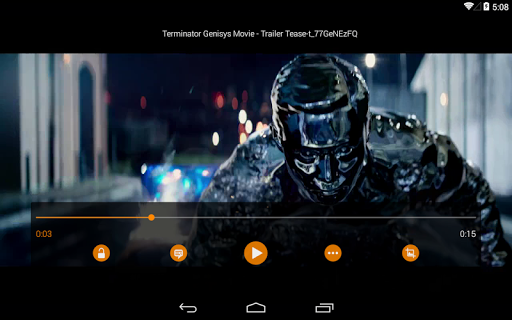
Watching videos that are not in tune with audio are pathetic. If you use the VLC video player (Android or computer) and are facing this problem, there is a way to fix it.
For VLC users on Android, you can do it the way;
- Open the video in the VLC app
- On the control display, click on point three button.
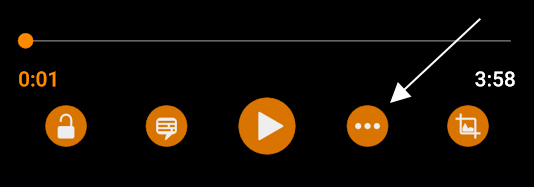
- Press the button shown below.
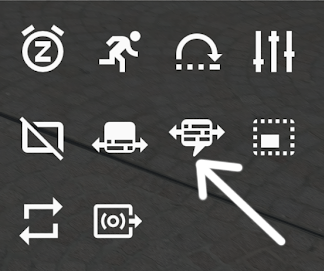
- Choose whether you want to fast or slow the audio.
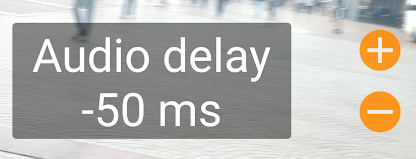
It is measured by millisecond unit (ms). If the sound is missed 1000ms then it will play after 1 seconds of video play.
To be easy to understand, when the sound sounds first from the video, adjust it with the + button while if the audio is slower than the video, it can be adjusted by the - button.
For computer VLC users, the way the settings for audio and video streaming can be done with ...
- Play the video on VLC player
- If your audio is too fast, press the ' K ' button on the keyboard to slow it down. If the video moves first, and the sound is slow, press the 'J' button.
- For Mac users, shortcut keys are 'G' and 'F' .
- The forward or slowed time display is shown on the top right.
You should also be aware that this setting is temporary, meaning that if you close the video and play back, this problem will happen again.
So, you can set it straight in the way;
- Go to the ☰ Menu
- Press Settings
- Under Extra Settings , press Video
- Mark the Save Audio Delay option
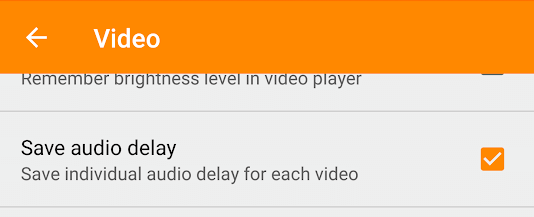
This setting will be saved for the video only. If another video encountered a similar problem, follow the steps above.
Source : Wiser.my


- Posts
- Following
- Followers
- Energy
-

 PeaceHunter
Community Team
PeaceHunter
Community Team
-
+ Follow

-
- 494 Posts
- 180 Following
- 2959 Followers
- 108744 Energy


SUBSCRIPTION
I agree to receive the latest offers and information on HONOR products through email or IM (e.g. WhatsApp) provided below and advertisement on third-party platforms. I understand that I can unsubscribe anytime according to Chapter 5 of HONOR Platform Privacy Statement.
CONTACT

- Posts
- photo
- video

Watching videos that are not in tune with audio are pathetic. If you use the VLC video player (Android or computer) and are facing this problem, there is a way to fix it.
For VLC users on Android, you can do it the way;
It is measured by millisecond unit (ms). If the sound is missed 1000ms then it will play after 1 seconds of video play.
To be easy to understand, when the sound sounds first from the video, adjust it with the + button while if the audio is slower than the video, it can be adjusted by the - button.
For computer VLC users, the way the settings for audio and video streaming can be done with ...
You should also be aware that this setting is temporary, meaning that if you close the video and play back, this problem will happen again.
So, you can set it straight in the way;
This setting will be saved for the video only. If another video encountered a similar problem, follow the steps above.
Source : Wiser.my