

 More Products
 Compare










我的荣耀 开启荣耀之旅


 Disagree Terms
 Log out




[Tips] How to Manage Home Screen Icons on HONOR 8X


 Last reply :
Is your home screen cluttered with app icons? You can move or delete icons from the home screen or sort and move them to folders for more convenient use.
Move a home screen icon: From the home screen, touch and hold an app icon until your Phone vibrates, then drag it to any position on the home screen.
Delete an app: From the home screen, touch and hold the icon of the app you want to uninstall until your Phone vibrates, and then drag it to . Follow the onscreen prompts to delete the app.
To ensure that the system runs normally, some preinstalled system apps cannot be uninstalled.
Create a folder: From the home screen, touch and hold an app icon until your Phone vibrates, then drag it on top of another icon. The two icons will now be placed in a new folder.
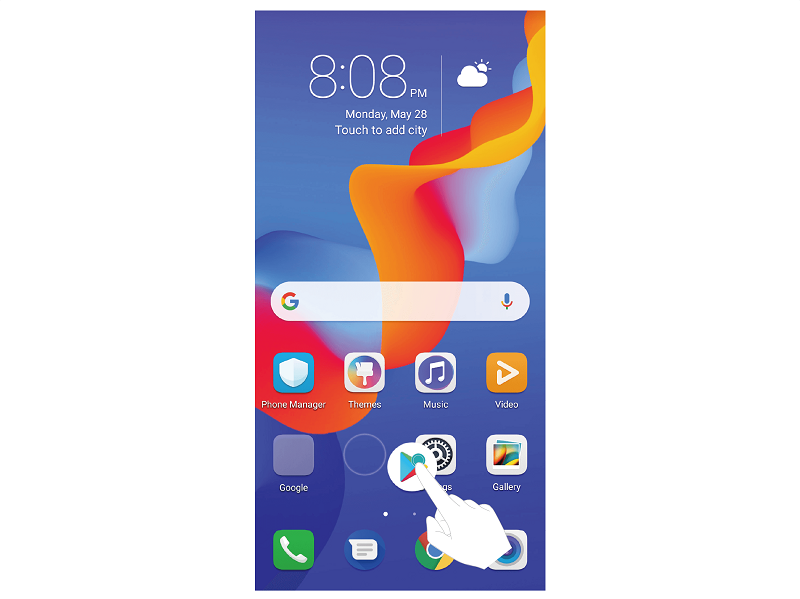
Delete a folder: Open the folder, touch , deselect all the apps, then touch OK. The folder will be deleted automatically and all the app icons in the folder will be moved to your home screen.
Rename a folder: Open the folder, touch the folder name and enter a new name.
Add or remove app icons from a folder: Open the folder, touch , select or deselect apps and then touch OK. The selected app icons will be automatically added to the folder while the deselected apps will be removed from the folder.
Another way to remove an app icon from a folder is to touch and hold the icon in the folder until your HONOR 8X vibrates, and then drag it to the home screen.


- Posts
- Following
- Followers
- Energy
-

Honorfans16477
-
+ Follow

-
- 33 Posts
- 0 Following
- 0 Followers
- 182 Energy


SUBSCRIPTION
I agree to receive the latest offers and information on HONOR products through email or IM (e.g. WhatsApp) provided below and advertisement on third-party platforms. I understand that I can unsubscribe anytime according to Chapter 5 of HONOR Platform Privacy Statement.
CONTACT

- Posts
- photo
- video

Is your home screen cluttered with app icons? You can move or delete icons from the home screen or sort and move them to folders for more convenient use.
Move a home screen icon: From the home screen, touch and hold an app icon until your Phone vibrates, then drag it to any position on the home screen.
Delete an app: From the home screen, touch and hold the icon of the app you want to uninstall until your Phone vibrates, and then drag it to . Follow the onscreen prompts to delete the app.
To ensure that the system runs normally, some preinstalled system apps cannot be uninstalled.
Create a folder: From the home screen, touch and hold an app icon until your Phone vibrates, then drag it on top of another icon. The two icons will now be placed in a new folder.
Delete a folder: Open the folder, touch , deselect all the apps, then touch OK. The folder will be deleted automatically and all the app icons in the folder will be moved to your home screen.
Rename a folder: Open the folder, touch the folder name and enter a new name.
Add or remove app icons from a folder: Open the folder, touch , select or deselect apps and then touch OK. The selected app icons will be automatically added to the folder while the deselected apps will be removed from the folder.
Another way to remove an app icon from a folder is to touch and hold the icon in the folder until your HONOR 8X vibrates, and then drag it to the home screen.