

 More Products
 Compare













我的荣耀 开启荣耀之旅


 Disagree Terms
 Log out




[Tips] How to Hide your photos on Honor 10


 Last reply :
Whenever encounter with cute wallpapers and pretty celebrity photos, we are so happy to share with little buddies. But dig into everybody’s mobile phone, there will hide a secret album that the owner is reluctant to share. And if someone coincidently sees it, we cannot imagine what thrilling outcomes will be followed! Luckily, I find a neat way to protect the security of mobile albums. It is much easier to operate than the private room and security lockers!
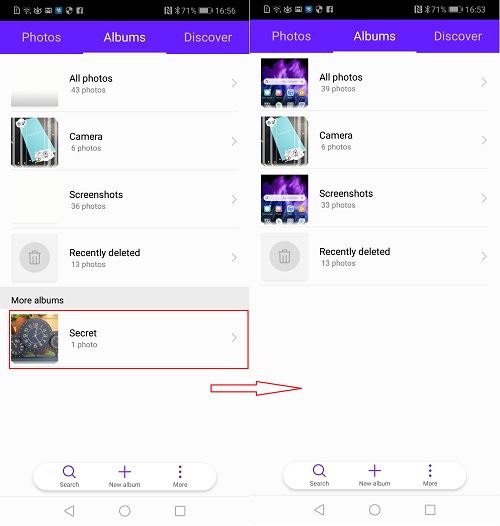
You may find that the secret album shown in the left picture above later disappears entirely in the right picture! How to make it? Wondering where it has gone?
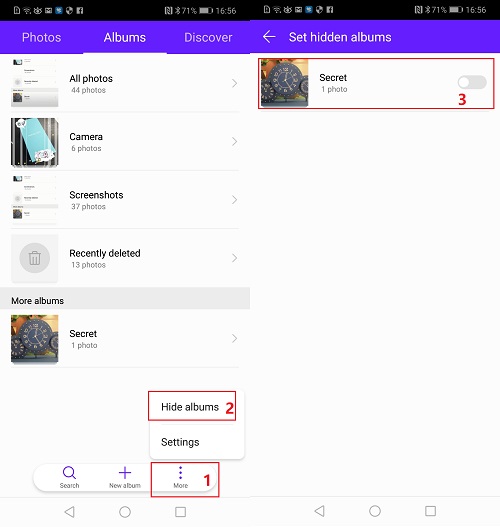
Please open the album, click “three dots” in the bottom right corner, hide album and unlock the album you want to hide.
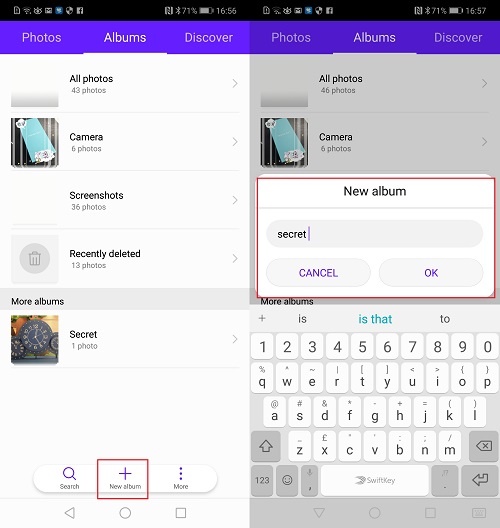
In addition, since the four default albums (All photos, Camera, Screenshots, Recently deleted) cannot be hidden, you can hide photos of the default albums by moving them to a new album.
If my share here is somewhat helpful to you, please move your lovely fingers to leave a comment. And if you give me a good mark, that would be the best reward for me. ~ Big thanks.


- Posts
- Following
- Followers
- Energy
-

Rane
-
+ Follow

-
- 42 Posts
- 0 Following
- 1 Followers
- 192 Energy


SUBSCRIPTION
I agree to receive the latest offers and information on HONOR products through email or IM (e.g. WhatsApp) provided below and advertisement on third-party platforms. I understand that I can unsubscribe anytime according to Chapter 5 of HONOR Platform Privacy Statement.
CONTACT

- Posts
- photo
- video

Whenever encounter with cute wallpapers and pretty celebrity photos, we are so happy to share with little buddies. But dig into everybody’s mobile phone, there will hide a secret album that the owner is reluctant to share. And if someone coincidently sees it, we cannot imagine what thrilling outcomes will be followed! Luckily, I find a neat way to protect the security of mobile albums. It is much easier to operate than the private room and security lockers!
You may find that the secret album shown in the left picture above later disappears entirely in the right picture! How to make it? Wondering where it has gone?
Please open the album, click “three dots” in the bottom right corner, hide album and unlock the album you want to hide.
In addition, since the four default albums (All photos, Camera, Screenshots, Recently deleted) cannot be hidden, you can hide photos of the default albums by moving them to a new album.
If my share here is somewhat helpful to you, please move your lovely fingers to leave a comment. And if you give me a good mark, that would be the best reward for me. ~ Big thanks.