

 More Products
 Compare










我的荣耀 开启荣耀之旅


 Disagree Terms
 Log out




[Tips] How to hide apps on android


 Last reply :
Here are some of the best ways to hide apps on android.
(To avoid some misoperation causing you unable to find the applications in the main screen, the EMUI 5.0 and above system cancels the function of Hidden application icons by gestures on the main screen.)
APP Lock
If you want to protect some applications, I recommend you use the App lock. It will keep prying eyes out of your certain Android applications. Go to the Settings -> Security & Privacy -> App lock. Then set a 4-digit Pin for App lock and lock/unlock apps by tapping on switch icon. After you've confirmed your locking password, you and else need to enter the password every time before opening the selected app.
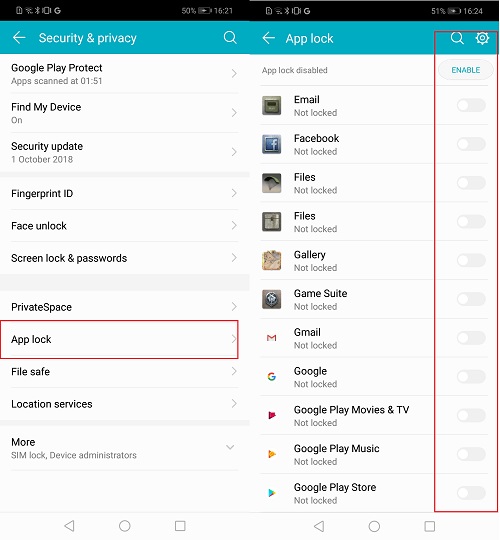
In addition, the Fingerprint and face unlock function can be used to access the locked apps.
PrivateSpace
PrivateSpace is another feature for you to protect your data. Also, you can use this feature as guest mode while handing over the device to others.
Go straight to Settings -> Security & Privacy -> PrivateSpace, enable it and the phone will allow you to set a password and a fingerprint different from the one you use to unlock the MainSpace. Once you have confirmed all setup, what you will find before your eyes is a clean home screen, as if you had just done a reset of the device.
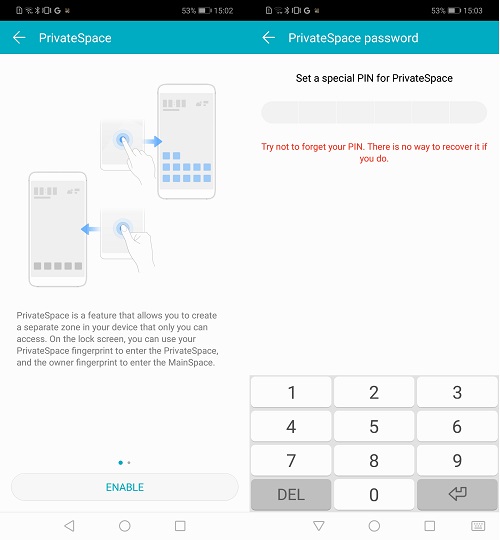
Now, in the PrivateSpace, access your ‘secret’ account, connect it to the Play Store, download apps you want to hide and use the device as you normally would do. By the way, the app could be installed both in your MainSpace and PrivateSpace, but they are completely independent of each other.
Tweaker for Huawei
To enable this function, you require the assistance of one third-party application - Tweaker for Huawei.
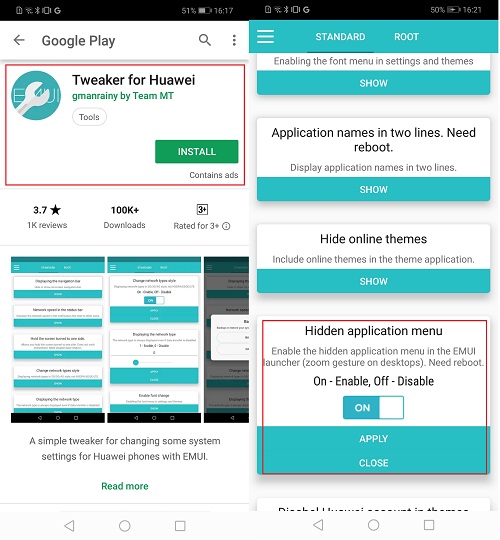
Open it, find ‘Hidden application menu’, click SHOW, select ON, tap APPLY and then reboot the mobile phone. Without root, you will get the 'hidden apps' screen enabled using the pinch zoom action.


- Posts
- Following
- Followers
- Energy
-

Rane
-
+ Follow

-
- 42 Posts
- 0 Following
- 1 Followers
- 192 Energy


SUBSCRIPTION
I agree to receive the latest offers and information on HONOR products through email or IM (e.g. WhatsApp) provided below and advertisement on third-party platforms. I understand that I can unsubscribe anytime according to Chapter 5 of HONOR Platform Privacy Statement.
CONTACT

- Posts
- photo
- video

Here are some of the best ways to hide apps on android.
(To avoid some misoperation causing you unable to find the applications in the main screen, the EMUI 5.0 and above system cancels the function of Hidden application icons by gestures on the main screen.)
APP Lock
If you want to protect some applications, I recommend you use the App lock. It will keep prying eyes out of your certain Android applications. Go to the Settings -> Security & Privacy -> App lock. Then set a 4-digit Pin for App lock and lock/unlock apps by tapping on switch icon. After you've confirmed your locking password, you and else need to enter the password every time before opening the selected app.
In addition, the Fingerprint and face unlock function can be used to access the locked apps.
PrivateSpace
PrivateSpace is another feature for you to protect your data. Also, you can use this feature as guest mode while handing over the device to others.
Go straight to Settings -> Security & Privacy -> PrivateSpace, enable it and the phone will allow you to set a password and a fingerprint different from the one you use to unlock the MainSpace. Once you have confirmed all setup, what you will find before your eyes is a clean home screen, as if you had just done a reset of the device.
Now, in the PrivateSpace, access your ‘secret’ account, connect it to the Play Store, download apps you want to hide and use the device as you normally would do. By the way, the app could be installed both in your MainSpace and PrivateSpace, but they are completely independent of each other.
Tweaker for Huawei
To enable this function, you require the assistance of one third-party application - Tweaker for Huawei.
Open it, find ‘Hidden application menu’, click SHOW, select ON, tap APPLY and then reboot the mobile phone. Without root, you will get the 'hidden apps' screen enabled using the pinch zoom action.