

 More Products
 Compare










我的荣耀 开启荣耀之旅



 Disagree Terms
 Log out




[Tips] Honor 8X: Phone Backup and Restore


 Last reply :
Restore your backup data from your HONOR 8X’s USB storage devices, depending on the original backup location.
Open  Backup, then touch Restore.
Select the location from which your backup data will be restored, and touch Next.
Restore data from a computer: Ensure that your Phone has been connected to the computer, and use HiSuite to restore data to your device.
Restore data from a USB storage device: Ensure that your Phone is connected to the USB storage device.
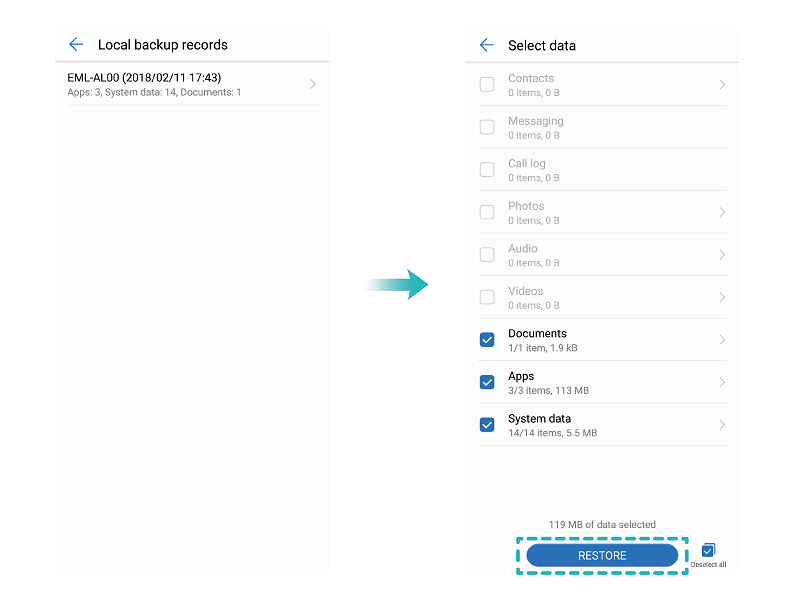
Select the data to be restored and touch Restore. You can touch Select all in the bottom right corner to restore all data, or select individual data files to restore.


- Posts
- Following
- Followers
- Energy
-

gloryKing
-
+ Follow

-
- 111 Posts
- 0 Following
- 23 Followers
- 527 Energy


SUBSCRIPTION
I agree to receive the latest offers and information on HONOR products through email or IM (e.g. WhatsApp) provided below and advertisement on third-party platforms. I understand that I can unsubscribe anytime according to Chapter 5 of HONOR Platform Privacy Statement.
CONTACT

- Posts
- photo
- video

Restore your backup data from your HONOR 8X’s USB storage devices, depending on the original backup location.
Open Backup, then touch Restore.
Select the location from which your backup data will be restored, and touch Next.
Restore data from a computer: Ensure that your Phone has been connected to the computer, and use HiSuite to restore data to your device.
Restore data from a USB storage device: Ensure that your Phone is connected to the USB storage device.
Select the data to be restored and touch Restore. You can touch Select all in the bottom right corner to restore all data, or select individual data files to restore.