

 More Products
 Compare










我的荣耀 开启荣耀之旅



 Disagree Terms
 Log out




[Tips] Change Lock Screen of HONOR 10/HONOR Play


 Last reply :
Now in the technology world, the use of our mobile phones is not like the past, when mobile phones can only make calls and send text messages, there are some very useful and practical small features hidden in the phone! Did you know everything?
Show steps on lock screen
I don't know if you have a habit of walking in the spare time. For the guys who love to walk, this function can be quite useful, you don’t need to install any third party app from Google Play to count your steps.
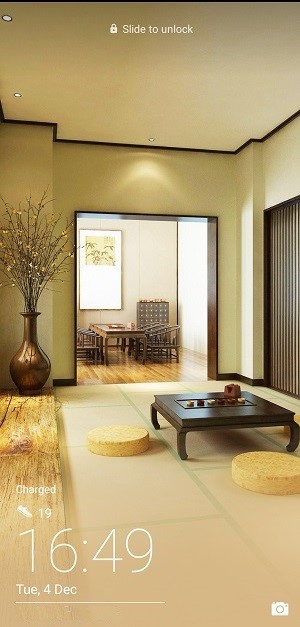
So let's see how to set it up?
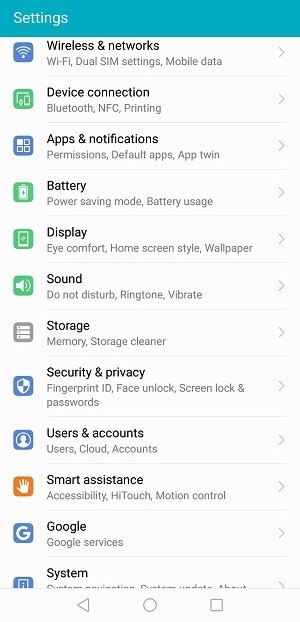
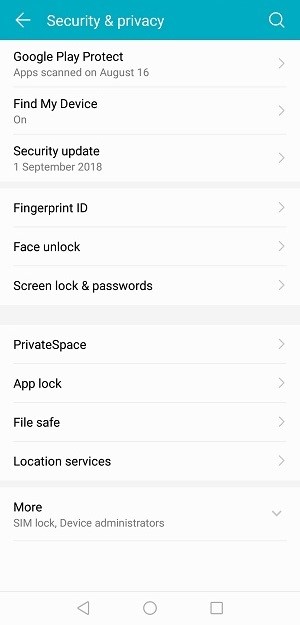
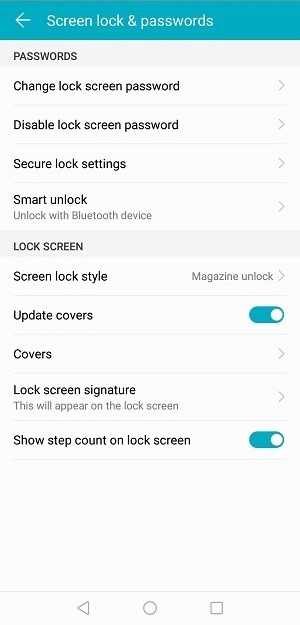
Go to Settings > Security & Privacy > Screen lock & passwords,in the last screen, turn on Show step count on lock screen.

Change lock screen with magazine covers
Some mobile phone lock screens may really be just a lock screen, but the lock screen of Honor 10 is really not just as simple as a lock screen, it can hide a world for you. So what exactly is it? Let’s take a look!
By selecting magazine as the locking screen, the pictures on your locking screen will change each time you click the power button while the phone is powered on.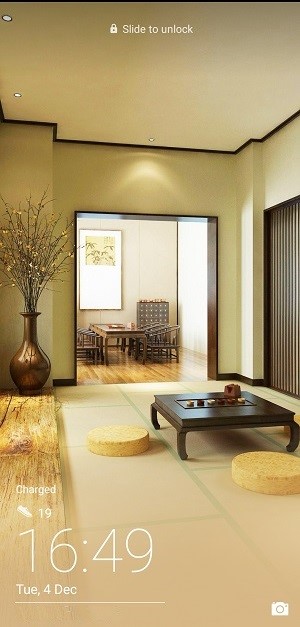
How to apply the magazine covers on locking screen? The steps are easy. Go to Settings > Security & Privacy > Screen lock & passwords, in the last screen, click Screen lock style and
Add your own photos to lock screen
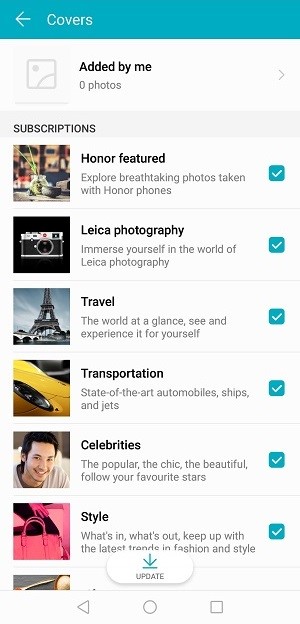
When the screen is locked, select the Settings button, then click on the magazine lock screen. In the subscription below, choose to Added by me to add your photos into the magazine cover list which is going to show on your lock screen. You can also choose the different subscriptions of magazine folders according to your preference.
Well, the above is the simple sharing today, I hope that you can find it useful!


- Posts
- Following
- Followers
- Energy
-

gloryFighter
-
+ Follow

-
- 28 Posts
- 0 Following
- 5 Followers
- 124 Energy


SUBSCRIPTION
I agree to receive the latest offers and information on HONOR products through email or IM (e.g. WhatsApp) provided below and advertisement on third-party platforms. I understand that I can unsubscribe anytime according to Chapter 5 of HONOR Platform Privacy Statement.
CONTACT

- Posts
- photo
- video

Now in the technology world, the use of our mobile phones is not like the past, when mobile phones can only make calls and send text messages, there are some very useful and practical small features hidden in the phone! Did you know everything?
Show steps on lock screen
I don't know if you have a habit of walking in the spare time. For the guys who love to walk, this function can be quite useful, you don’t need to install any third party app from Google Play to count your steps.
So let's see how to set it up?
Go to Settings > Security & Privacy > Screen lock & passwords,in the last screen, turn on Show step count on lock screen.
Change lock screen with magazine covers
Some mobile phone lock screens may really be just a lock screen, but the lock screen of Honor 10 is really not just as simple as a lock screen, it can hide a world for you. So what exactly is it? Let’s take a look!
By selecting magazine as the locking screen, the pictures on your locking screen will change each time you click the power button while the phone is powered on.

How to apply the magazine covers on locking screen? The steps are easy. Go to Settings > Security & Privacy > Screen lock & passwords, in the last screen, click Screen lock style and
Add your own photos to lock screen
When the screen is locked, select the Settings button, then click on the magazine lock screen. In the subscription below, choose to Added by me to add your photos into the magazine cover list which is going to show on your lock screen. You can also choose the different subscriptions of magazine folders according to your preference.
Well, the above is the simple sharing today, I hope that you can find it useful!