

 More Products
 Compare













我的荣耀 开启荣耀之旅



 Disagree Terms
 Log out




[Theme Share] Blue is Gold Animated Theme for EMUI Theme for EMUI 10/11 By Aniket Kumar


 Last reply :
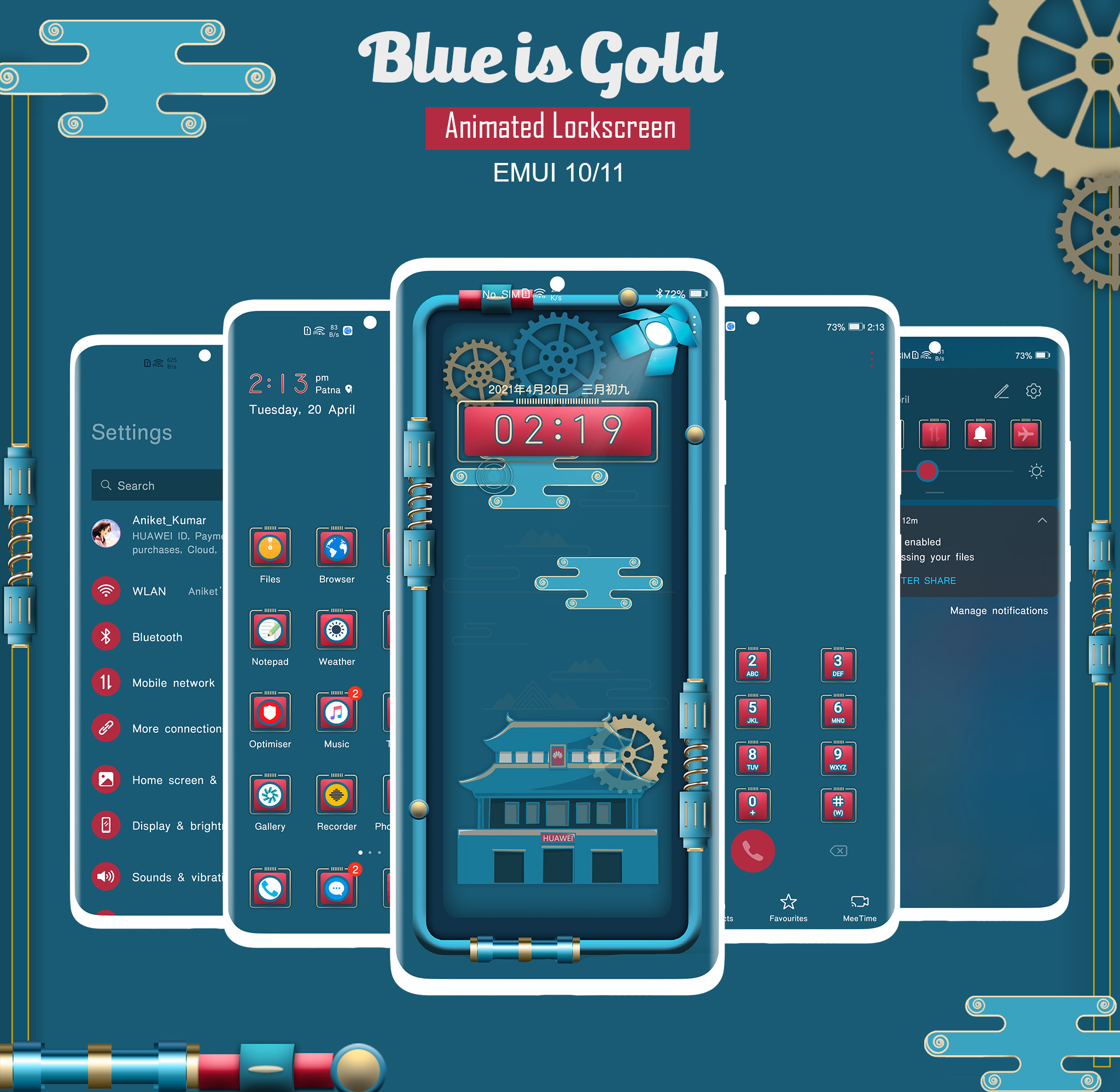
"Blue is Gold Animated" theme for EMUI 10/11 Users,
Huawei/Honor EMUI Theme is the tool to personalize your EMUI Powered device that reflects your taste and Style
All content available in this app with Theme has been carefully created by us
Note:
**Internet Connection Required to Open the Programme**
Now it supports EMUI 10/11 version Please check your EMUI version before proceeding to Download
How to Fix Common issues?
Battery issue?
-Restart your device
How to Apply?
Download the .hwt theme file.
Copy the .hwt files to the internal storage themes folder.
Then open the “Theme” app ⇒ go to My Themes and apply the themes.
Features:
- Dark themed System Ui
- Precisely crafted Icons
- Dark System Application
- Animated Lockscreen
- Supports EMUI 10/11
For any suggestions please contact us or comment below this Post
Not Showing theme in Theme Store?
Make sure you have properly pasted the Theme File under Theme Folder [File manager]
-Restart your device
-Open Theme Application
[Make sure you have Turned on the Mobile Data]
- Select the theme and hit the Apply button
Still facing the issue Please do let us know in the comment section
ATTENTION:
- Above theme is designed for EMUI 10/11, Please check your device EMUI version before installing it on your device -



- Posts
- Following
- Followers
- Energy
-
 PeaceHunter
Community Team
PeaceHunter
Community Team
-
+ Follow

-
- 494 Posts
- 180 Following
- 2964 Followers
- 108748 Energy


SUBSCRIPTION
I agree to receive the latest offers and information on HONOR products through email or IM (e.g. WhatsApp) provided below and advertisement on third-party platforms. I understand that I can unsubscribe anytime according to Chapter 5 of HONOR Platform Privacy Statement.
CONTACT

- Posts
- photo
- video

"Blue is Gold Animated" theme for EMUI 10/11 Users,
Huawei/Honor EMUI Theme is the tool to personalize your EMUI Powered device that reflects your taste and Style
All content available in this app with Theme has been carefully created by us
Note:
**Internet Connection Required to Open the Programme**
Now it supports EMUI 10/11 version Please check your EMUI version before proceeding to Download
How to Fix Common issues?
Battery issue?
-Restart your device
How to Apply?
Download the .hwt theme file.
Copy the .hwt files to the internal storage themes folder.
Then open the “Theme” app ⇒ go to My Themes and apply the themes.
Features:
- Dark themed System Ui
- Precisely crafted Icons
- Dark System Application
- Animated Lockscreen
- Supports EMUI 10/11
For any suggestions please contact us or comment below this Post
Not Showing theme in Theme Store?
Make sure you have properly pasted the Theme File under Theme Folder [File manager]
-Restart your device
-Open Theme Application
[Make sure you have Turned on the Mobile Data]
- Select the theme and hit the Apply button
Still facing the issue Please do let us know in the comment section
ATTENTION:
- Above theme is designed for EMUI 10/11, Please check your device EMUI version before installing it on your device -