

 More Products
 Compare










我的荣耀 开启荣耀之旅



 Disagree Terms
 Log out




The Best Screen Mirroring App for Huawei/Honor Devices


 Last reply :
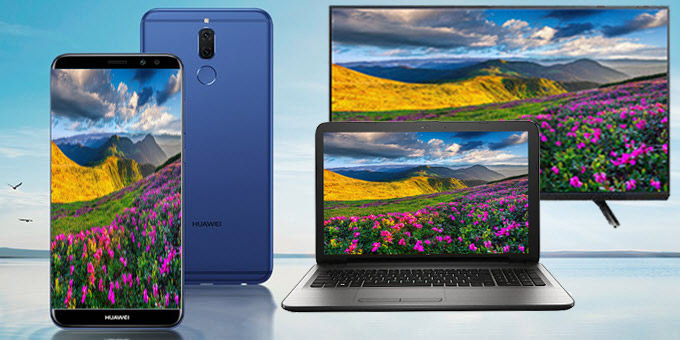
Huawei is one of the largest mobile providers that produce quality smartphones all over the world. The company has released different units which support excellent quality display and resolution. Due to this, Huawei mobile phones are perfect for viewing films, movies, and playing games. However, we still can’t deny the pleasure of watching digital content on a bigger screen. Actually, there are many ways to cast your phone on computer or television, but most of them require complex and repetitive steps. This post will save you from that matter as it introduces best methods on screen mirroring for Huawei. What are you waiting for? Take a look at the applications recommended in the article.
Top 3 Solutions to Screen Mirroring for Huawei
ApowerMirror
MirrorShare
HiSuite
ApowerMirror – Popular Screen Mirroring App for Huawei
ApowerMirror is a mature application that enables Android and iOS users to mirror their screen to their Windows PC and Mac. It supports different types of devices including the most popular ones from Samsung, Huawei, LG, and HTC. With this tool, you can stream music, videos, pictures, games, and applications stored on your phone. Not only can it screen mirror Huawei phones to computer, but it can also mirror Android phone to PC. Furthermore, enabling the control mode from PC, you can manage your device using your mouse and keyboard. In addition, there are capturing buttons on the side menu which can take screenshot, record screen activities, and highlight or draw symbols and figures. Here’s the guide on how to use this screen mirroring app for Huawei.
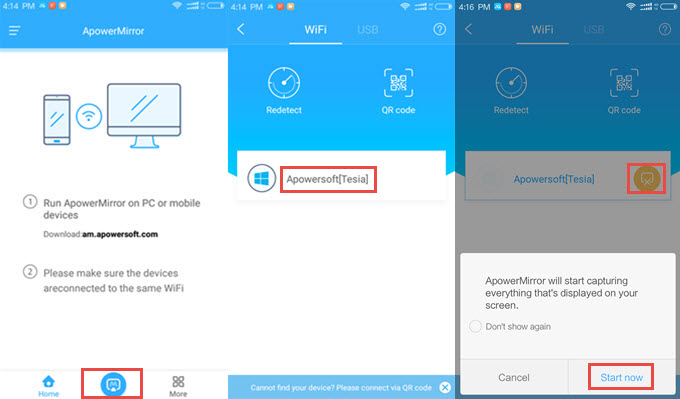
- Download and open ApowerMirror on your computer. Download Link : https://download.airmore.com/down.php?softid=apowermirror
- Install and launch the app on your Android device.
- Ensure that your phone and computer are connected to the same WiFi network to build a successful connection.
- Simply open the app on your mobile and afterwards press the M blue button located at the bottom of your Android screen. When your computer is detected, tap on it to establish connection.
- When a box pops up on your phone, click “Start Now” to begin screen mirroring Huawei on your computer. You will see that your Huawei screen is being casted to your PC in the real time.
- Disable the connection on your Android by clicking the yellow icon beside your computer’s name.
MirrorShare – The Default Huawei Screen Mirroring Application
Another way to accomplish screen mirroring is through the default feature found on your Huawei devices which is MirrorShare. While ApowerMirror helps you to connect your phone to PC, this app can send your Android screen to smart TV. It allows you to project movies, videos, pictures, and gameplay on your smartphones. Hence, you can share your favorite films to your colleagues or make a tutorial. To screen mirror Huawei with this, read the process below.
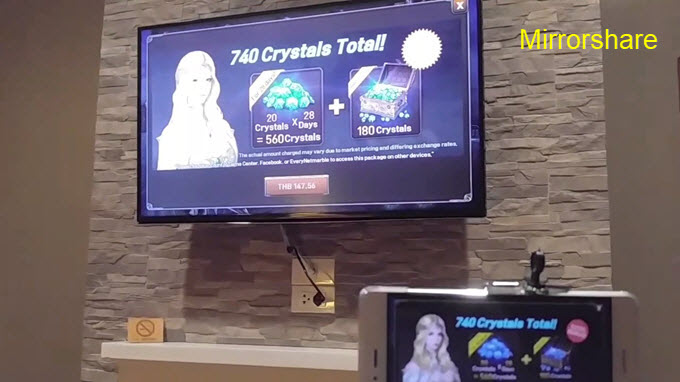
- To begin, press the Menu button on the remote control of your TV.
- From the options, select “Network” > “AllShare Settings” > “Screen Mirroring”.
- After that, open your Android and navigate to its “Settings” > “Advanced Settings” > “MirrorShare”.
- Once your source has been detected, tap on it and wait for the connection to be established.
HiSuite – Screen Mirroring for Huawei
If you think the above two applications are not yet enough, you can try HiSuite. It is a phone manager designed specifically for phones manufactured by Huawei. This tool is essentially designed for managing and organizing files on mobile devices including transferring files. Moreover, it has other useful features and you can turn it into a Huawei screen mirroring app. In order to use this program to cast your device to PC, check out the instruction here.
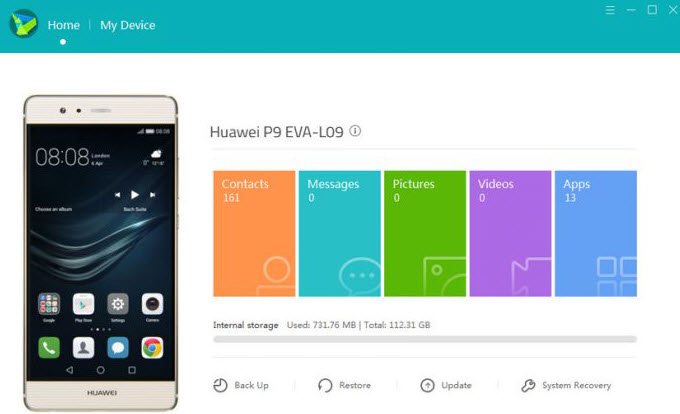
- Download and install HiSuite on your computer.
- Once installed, launch the program and enable the USB debugging mode on your Android.
- Get your USB cable and plug in one end to your computer and the other to your Huawei.
- Upon establishing the connection with your device, you will see your mirrored screen on the left side of the application.
Conclusion
These three applications mentioned above provide you various ways for understanding how to screen mirror Huawei to different sources. To conclude, casting your devices should not be tiresome and tedious. If you only choose the right tool for screen mirroring Huawei, you don’t have to waste your time and effort. For instance, ApowerMirror offers a simple and straightforward way to project Android devices on Mac and Windows PC.
Source from airmore.com


- Posts
- Following
- Followers
- Energy
-

 Kenny Khor
HONOR Content Crew
Kenny Khor
HONOR Content Crew
-
+ Follow

-
- 288 Posts
- 14 Following
- 982 Followers
- 32507 Energy


SUBSCRIPTION
I agree to receive the latest offers and information on HONOR products through email or IM (e.g. WhatsApp) provided below and advertisement on third-party platforms. I understand that I can unsubscribe anytime according to Chapter 5 of HONOR Platform Privacy Statement.
CONTACT

- Posts
- photo
- video

Huawei is one of the largest mobile providers that produce quality smartphones all over the world. The company has released different units which support excellent quality display and resolution. Due to this, Huawei mobile phones are perfect for viewing films, movies, and playing games. However, we still can’t deny the pleasure of watching digital content on a bigger screen. Actually, there are many ways to cast your phone on computer or television, but most of them require complex and repetitive steps. This post will save you from that matter as it introduces best methods on screen mirroring for Huawei. What are you waiting for? Take a look at the applications recommended in the article.
Top 3 Solutions to Screen Mirroring for Huawei
ApowerMirror
MirrorShare
HiSuite
ApowerMirror – Popular Screen Mirroring App for Huawei
ApowerMirror is a mature application that enables Android and iOS users to mirror their screen to their Windows PC and Mac. It supports different types of devices including the most popular ones from Samsung, Huawei, LG, and HTC. With this tool, you can stream music, videos, pictures, games, and applications stored on your phone. Not only can it screen mirror Huawei phones to computer, but it can also mirror Android phone to PC. Furthermore, enabling the control mode from PC, you can manage your device using your mouse and keyboard. In addition, there are capturing buttons on the side menu which can take screenshot, record screen activities, and highlight or draw symbols and figures. Here’s the guide on how to use this screen mirroring app for Huawei.
MirrorShare – The Default Huawei Screen Mirroring Application
Another way to accomplish screen mirroring is through the default feature found on your Huawei devices which is MirrorShare. While ApowerMirror helps you to connect your phone to PC, this app can send your Android screen to smart TV. It allows you to project movies, videos, pictures, and gameplay on your smartphones. Hence, you can share your favorite films to your colleagues or make a tutorial. To screen mirror Huawei with this, read the process below.
HiSuite – Screen Mirroring for Huawei
If you think the above two applications are not yet enough, you can try HiSuite. It is a phone manager designed specifically for phones manufactured by Huawei. This tool is essentially designed for managing and organizing files on mobile devices including transferring files. Moreover, it has other useful features and you can turn it into a Huawei screen mirroring app. In order to use this program to cast your device to PC, check out the instruction here.
Conclusion
These three applications mentioned above provide you various ways for understanding how to screen mirror Huawei to different sources. To conclude, casting your devices should not be tiresome and tedious. If you only choose the right tool for screen mirroring Huawei, you don’t have to waste your time and effort. For instance, ApowerMirror offers a simple and straightforward way to project Android devices on Mac and Windows PC.
Source from airmore.com