

 More Products
 Compare










我的荣耀 开启荣耀之旅



 Disagree Terms
 Log out




[Sharing] HONOR 9X Pro APP Guide – ALL The Ways to Get APPs You Need


 Last reply :
Hi Everyone:
This is a comprehensive guide for app installation for HONOR 9X PRO, and if you are new user of HONOR phone, I think it will be very helpful. If you are old user of HONOR 10, View 10 etc., you may also find something new here.
What you are going to read:
#1 [What apps work on HONOR 9X PRO]
#2 [The easiest way to get APP: HUAWEI AppGallery]
#3 [Phone Clone: Clone your daily used app from your old phone to HONOR 9X PRO in finger tips]
#4 [Other alternatives: Huawei browser and some third-party app store you can try]

#1 [What apps work on HONOR 9X PRO Series] ?
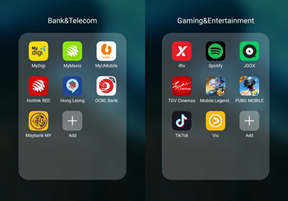
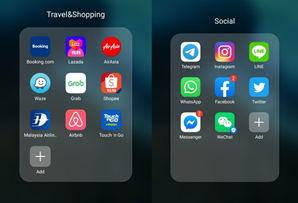
These are the Apps I used in daily life, and they work on my HONOR phone and fulfill my daily needs.

#2 [The easiest way to get APP: HUAWEI AppGallery] ?
Huawei AppGallery is preinstalled, and easy to find in your phone. If you use it first time, you will be surprised at the available apps inside. You can easily search the app you need or goes to the categories, then find the apps. Huawei AppGallery even provide a wish list if you can’t find some apps inside.
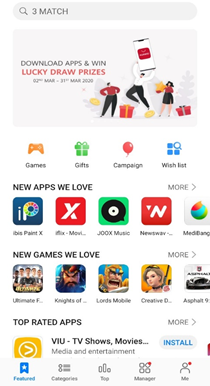
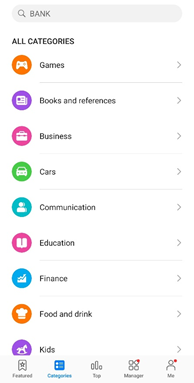
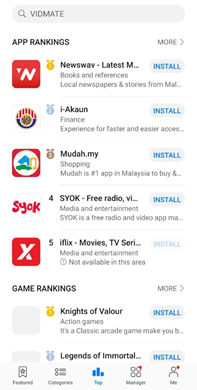
Here is a list of popular apps available on HUAWEI AppGallery, such as booking, shoppe , agoda, Tiktok etc. The number of apps are growing fast.
Popular Apps Available on HUAWEI AppGallery
TRAVEL:
Agoda
Booking
Trip.com
SOCIAL:
Viber
WeChat
Weibo
ENTERTAINMENT:
TikTok
Kwai
Viu
Joox
SHOPPING:
Lazada
Shopee
Zalora
AliExpress
GAMING:
Ninja Legend
Call of Modern War
Drag Racing
BANKING:
Maybank
Hong Leong Bank
RHB Bank
E-WALLET:
Touch 'n Go eWallet
Boost
More and more is uploding to AppGallery.

#3 [Phone Clone: Clone your daily used app from your old phone to HONOR 9X PRO in finger tips] ?
I have to say HONOR phone clone is really helpful when you want to transfer data and apps from your old phone
to a new phone. So just open the phone clone in your old phone and new phone, then follow the steps below:
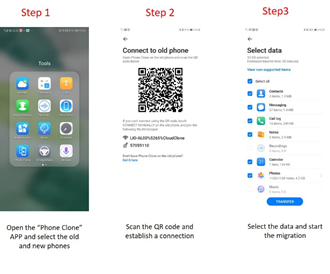
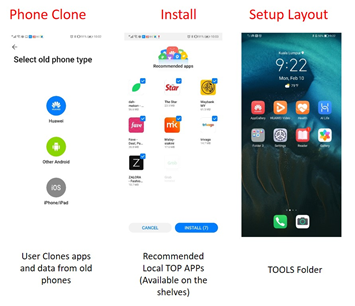
Just a reminder: While most of the Apps like Facebook, Instagram, Google map can be transferred by this way,
there are still a few Apps especially like banking apps can’t be transferred by phoned clone.

#4 [Other alternatives: Huawei browser and some third-party app store you can try]

The HUAWEI Browser comes with a shortcut function on its homepage which allows you to customize and set up your preferred mobile browsing services.
Some apps that you would like to use may not be available on the HUAWEI AppGallery yet, it is usable in your phone, provided that you find the right platform to download the apps.
On that note, you could also set up shortcuts on the home page of HUAWEI Browser to several third-party APK downloading websites such as APKPure, APKMonk, AppTaken and others. These APK websites offer a whole variety of apps for you to add to your phones.
For example, if you need a navigation app, you could download the Waze APK through APKPure, install it into your phone and voila! You are ready to go. Although it is no longer pre-installed into your phone, you could always download the APK and install it with a few simple clicks.

When you install the app which is downloaded from APK Pure for the first time, the HONOR 9X Pro will ask your permission to install apps from the APK Pure. This will only show up once, and it won’t bother you again.
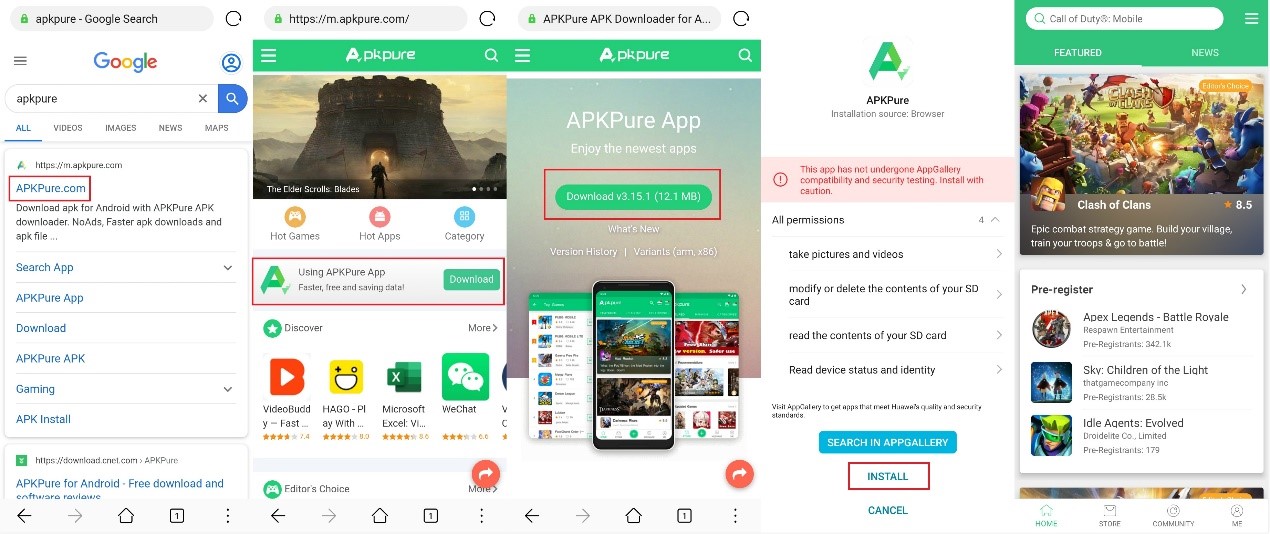
I’ll show you how to get some app I daily use in the screenshots below.
Waze
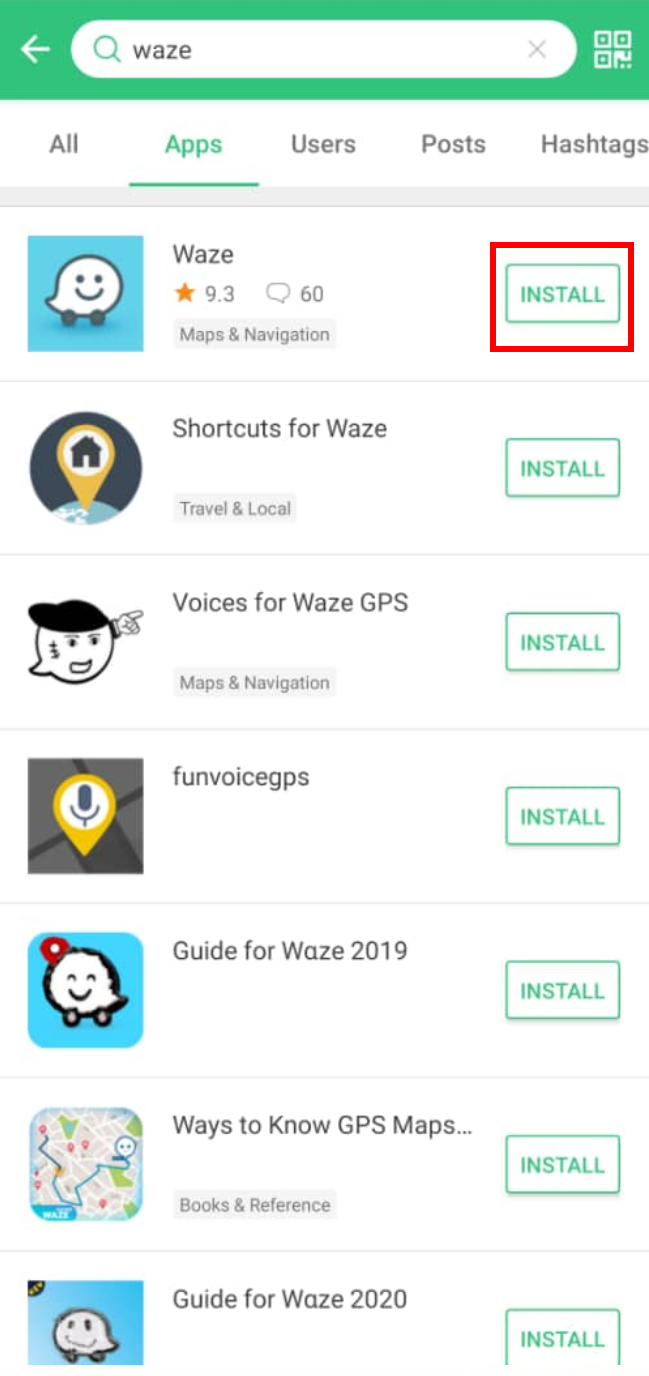
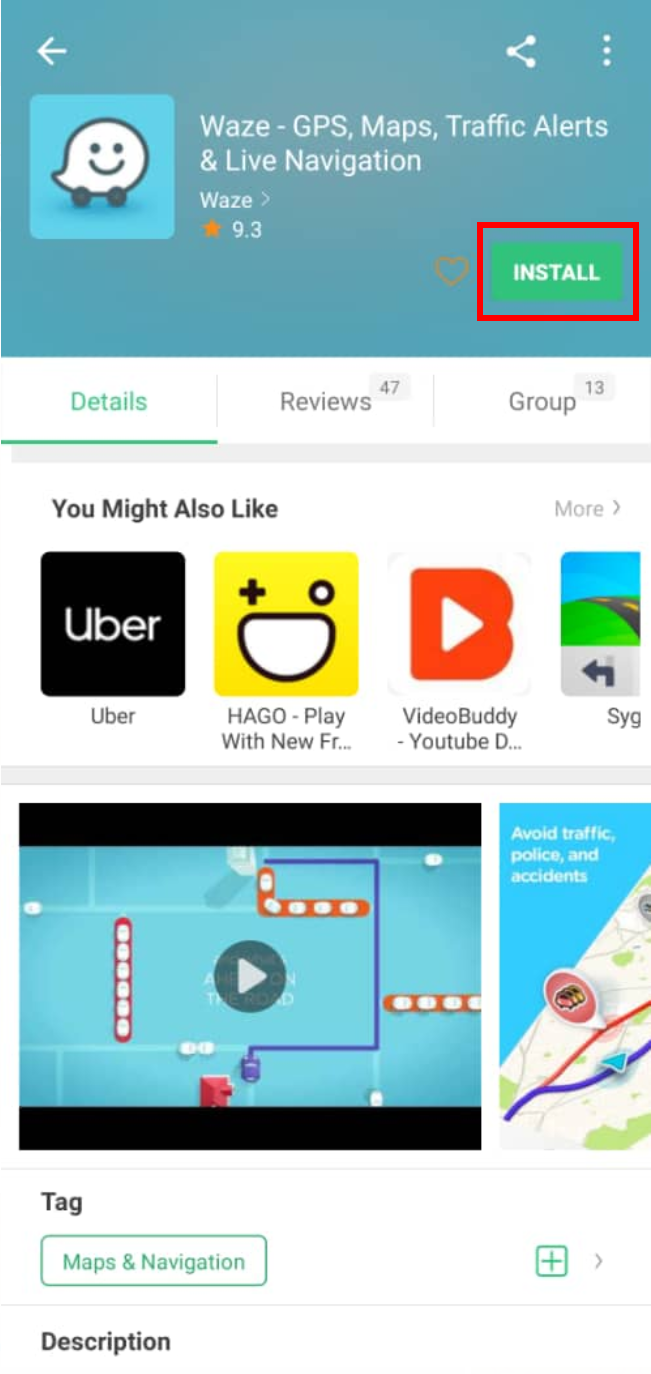
You can easily download waze from APK pure and working perfectly from HONOR 9X Pro
Youtube Vanced

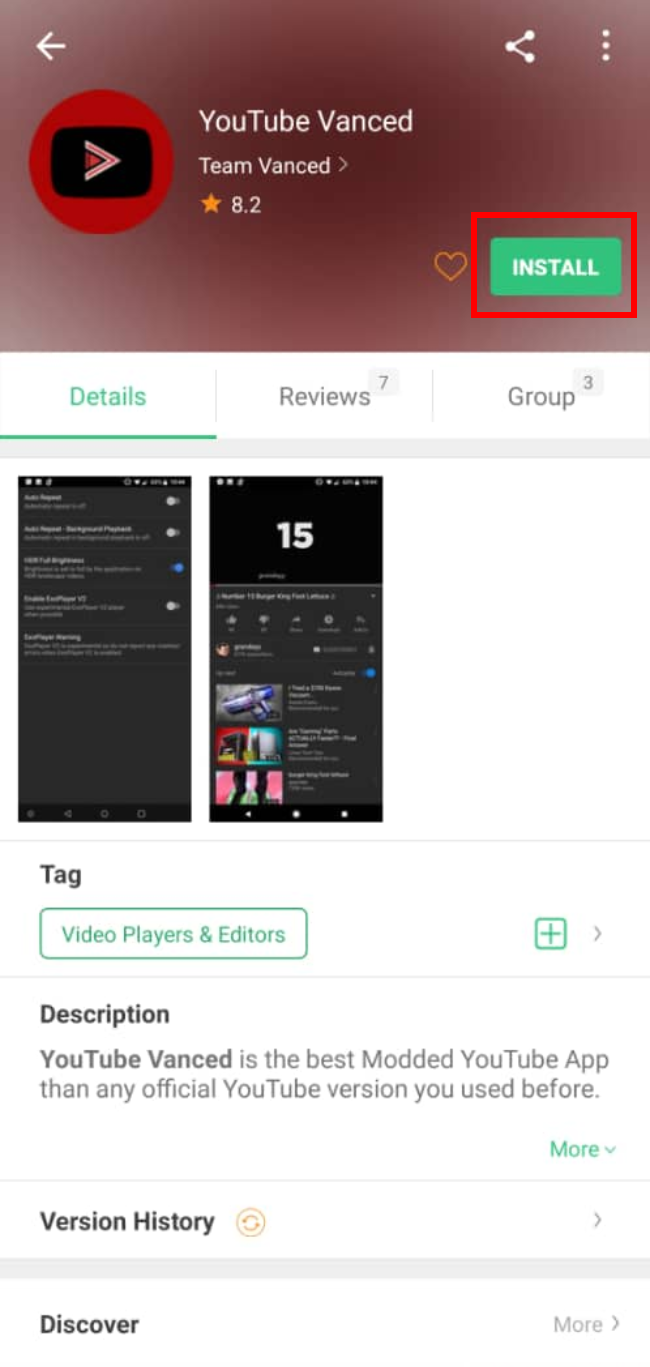
You also can use YouTube Vanced that download from APK Pure, there a lot of feature on YouTube Vanced, you can run your youtube video on the background and its come with ads skipping feature too! Recommend this app to all HONOR fans.
Well above are the ways to guide you get all the apps you need. Plus, all methods do not only work for the HONOR 9X Pro but also other HONOR new phones in the future. Do you have better ways or do you have any questions? Share with us!


- Posts
- Following
- Followers
- Energy
-

 Redbeanice
Community Team
Redbeanice
Community Team
-
+ Follow

-
- 60 Posts
- 19 Following
- 218 Followers
- 4185 Energy


SUBSCRIPTION
I agree to receive the latest offers and information on HONOR products through email or IM (e.g. WhatsApp) provided below and advertisement on third-party platforms. I understand that I can unsubscribe anytime according to Chapter 5 of HONOR Platform Privacy Statement.
CONTACT

- Posts
- photo
- video

Hi Everyone:
This is a comprehensive guide for app installation for HONOR 9X PRO, and if you are new user of HONOR phone, I think it will be very helpful. If you are old user of HONOR 10, View 10 etc., you may also find something new here.
What you are going to read:
#1 [What apps work on HONOR 9X PRO]
#2 [The easiest way to get APP: HUAWEI AppGallery]
#3 [Phone Clone: Clone your daily used app from your old phone to HONOR 9X PRO in finger tips]
#4 [Other alternatives: Huawei browser and some third-party app store you can try]
#1 [What apps work on HONOR 9X PRO Series] ?
These are the Apps I used in daily life, and they work on my HONOR phone and fulfill my daily needs.
#2 [The easiest way to get APP: HUAWEI AppGallery] ?
Huawei AppGallery is preinstalled, and easy to find in your phone. If you use it first time, you will be surprised at the available apps inside. You can easily search the app you need or goes to the categories, then find the apps. Huawei AppGallery even provide a wish list if you can’t find some apps inside.
Here is a list of popular apps available on HUAWEI AppGallery, such as booking, shoppe , agoda, Tiktok etc. The number of apps are growing fast.
Popular Apps Available on HUAWEI AppGallery
TRAVEL:
Agoda
Booking
Trip.com
SOCIAL:
Viber
WeChat
Weibo
ENTERTAINMENT:
TikTok
Kwai
Viu
Joox
SHOPPING:
Lazada
Shopee
Zalora
AliExpress
GAMING:
Ninja Legend
Call of Modern War
Drag Racing
BANKING:
Maybank
Hong Leong Bank
RHB Bank
E-WALLET:
Touch 'n Go eWallet
Boost
More and more is uploding to AppGallery.
#3 [Phone Clone: Clone your daily used app from your old phone to HONOR 9X PRO in finger tips] ?
I have to say HONOR phone clone is really helpful when you want to transfer data and apps from your old phone
to a new phone. So just open the phone clone in your old phone and new phone, then follow the steps below:
Just a reminder: While most of the Apps like Facebook, Instagram, Google map can be transferred by this way,
there are still a few Apps especially like banking apps can’t be transferred by phoned clone.
#4 [Other alternatives: Huawei browser and some third-party app store you can try]
The HUAWEI Browser comes with a shortcut function on its homepage which allows you to customize and set up your preferred mobile browsing services.
Some apps that you would like to use may not be available on the HUAWEI AppGallery yet, it is usable in your phone, provided that you find the right platform to download the apps.
On that note, you could also set up shortcuts on the home page of HUAWEI Browser to several third-party APK downloading websites such as APKPure, APKMonk, AppTaken and others. These APK websites offer a whole variety of apps for you to add to your phones.
For example, if you need a navigation app, you could download the Waze APK through APKPure, install it into your phone and voila! You are ready to go. Although it is no longer pre-installed into your phone, you could always download the APK and install it with a few simple clicks.
When you install the app which is downloaded from APK Pure for the first time, the HONOR 9X Pro will ask your permission to install apps from the APK Pure. This will only show up once, and it won’t bother you again.
I’ll show you how to get some app I daily use in the screenshots below.
Waze
You can easily download waze from APK pure and working perfectly from HONOR 9X Pro
Youtube Vanced
You also can use YouTube Vanced that download from APK Pure, there a lot of feature on YouTube Vanced, you can run your youtube video on the background and its come with ads skipping feature too! Recommend this app to all HONOR fans.
Well above are the ways to guide you get all the apps you need. Plus, all methods do not only work for the HONOR 9X Pro but also other HONOR new phones in the future. Do you have better ways or do you have any questions? Share with us!