

 More Products
 Compare










我的荣耀 开启荣耀之旅



 Disagree Terms
 Log out




Honor 20 Gaming Performance: Testing the Top Android Games on Google Play


 Last reply :
Honor 20 Gaming Performance: Testing the Top Android Games on Google Play

Dear fans:
High-Tech forum XDA made a game performance review for HONOR 20, because the Games are too many we separate this deeply review in two episodes.
Here is the original article:
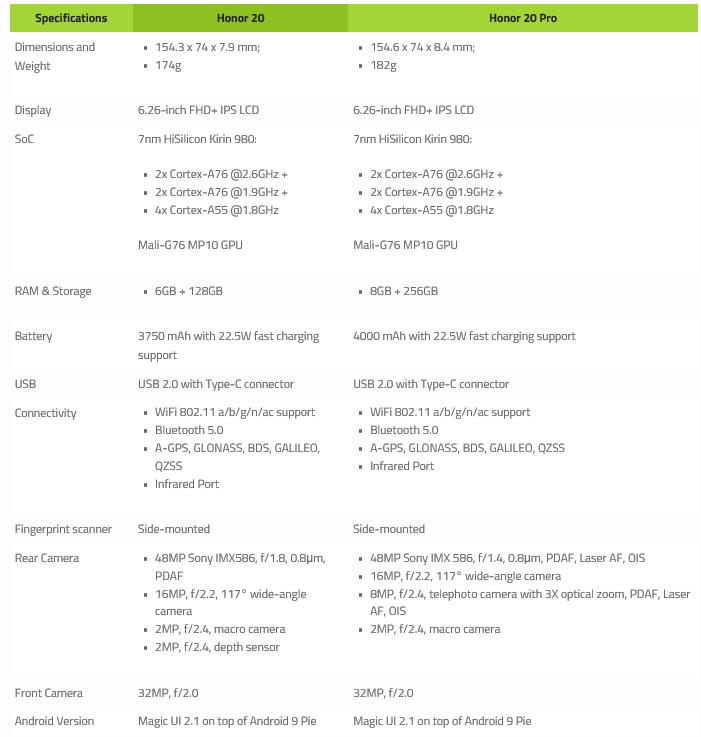
The Honor 20 and Honor 20 Pro are the newest flagship phones from Honor. They have the latest specs, latest technology, and the latest software. All of this should mean it has some of the best performance of any phone, right? We put this to the test to see if it’s possible to get flagship performance at around half the cost of flagships from other major OEMs.
Disclaimer: Honor provided the Honor 20 for this review. Honor is also a sponsor of XDA, however, Honor’s influence on this article was recommending the games to test. We also included our own collection of games to test. All of the results were taken in Game Bench and Honor has not seen any results before publication.
Honor is one of the few companies that sell phones with the Kirin chipset from HiSilicon. The only other company is Huawei, which, of course, owns the Honor brand. These chips have generally been pretty good in CPU performance and efficiency, providing an insanely good battery with great speeds. In the past, they have really lacked in the GPU department. As we saw with the Honor View20, the GPU performance on the Kirin 980, the chip included in the Honor 20, is amazing. It provided a stable framerate in almost every game we tested on it.
Since the Honor View20 launch earlier this year, Honor has had time to refine the software that runs on the Kirin 980 and create GPU Turbo 3.o. This allows the Honor 20 to cut power usage by up to 10% and optimize the underlying system to provide more stable gameplay with lower temperatures and longer battery life. While the tests below don’t include temperatures or battery stats, it will include the performance and personal anecdotes of what I experienced while testing each game.
In these tests, I only tested the Honor 20 instead of both the Honor 20 and Honor 20 Pro. This is because of the underlying cooling system and hardware. It is almost identical in both devices, so testing both wouldn’t tell us much besides that they are the same.
Honor 20 Gaming Performance
Before we get into the games and their stats, I want to talk about what each stat means, starting with Median FPS. This is the average fps the game played at during the testing duration. Higher is better, of course. Next up is FPS Stability (or Frame Stability), which is the percentage of time the frames per second was not drastically fluctuating and staying at a constant FPS. Again, higher is better. CPU Usage is the amount of strain the game is putting on the CPU. This isn’t as important as the former categories, but anything under 25% is great. Next is the Average Memory Usage and Peak Memory Usage. This shows how much RAM the game is using at its peak and the average. The Honor 20 has 6GBs of RAM, so anything under 3GBs is great. Finally, we have Total Data Downloaded and Total Data Uploaded. This is the amount of data in megabytes it uploads or downloads on your network, an important stat if you have a data cap on your Wi-Fi or limited data on your cellular plan.
The Honor 20 and Honor 20 Pro both have something Honor calls GPU Turbo 3.0. This optimizes the game and underlying system for better performance and heat. I’m not going to mention this much because there is no way to enable or disable it as it’s all in the background. That means it’s enabled for all the tests and it should be enabled if you pick up an Honor 20 to use.
The following gameplay performance data was recorded using GameBench, an excellent service that helps you analyze gaming performance on Android and iOS. GameBench has desktop clients and mobile clients. We used the desktop client for our review.

Fortnite
Unlike most games I tested on the Honor 20, Fortnite does not work with Gamebench. So instead of performance numbers, you’ll have to trust my experience. A good way to describe it is “okay.” The Honor 20 is supposed to support 60fps in Fortnite, but whether it was the phone’s software or Fortnite, both of which were fully updated, it was capped at 30fps. At 30fps, there is nothing to call home about. The phone didn’t get overly hot and had very little touch latency. I would consider it an adequate phone for playing Fortnite, but not the best I’ve used.
PUBG Mobile
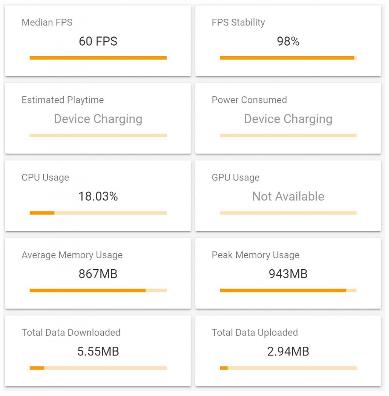
In PUBG, we get a smooth 60fps with frame stability of 98%. This means there were very few frame dips below 60fps. The CPU usage was around 18% which is low for the number of frames the GPU was pushing out. The only thing about this game was the device heat. While Gamebench doesn’t show the GPU temperature, I can feel the body of the phone. It was very hot.
During this test, I was almost unable to hold the phone. It got so hot I wasn’t able to play comfortably. Now, this could have been because of the HDR and Extreme FPS setting, which makes sense. At the temperature it was, I don’t think that 60fps would have lasted long before throttling down.

DOTA Underlords
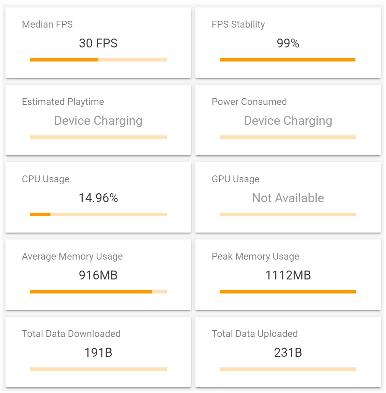
Underlords got a nice 30fps with frame stability of 99%. Unlike some of the other games we tested, Underlords is capped at 30fps. The game didn’t have any options to change texture quality or frame rate, so I was stuck at whatever it downloaded. The quality on the display looked really good, so I assume it’s using HD textures. The Honor 20 is more than capable of playing DOTA Underlords.
The device didn’t get very hot while playing Underlords. It felt a little warm at the end of my play session, but not to the point where I was worried about holding the phone, like with PUBG Mobile.

Honkai Impact 3rd
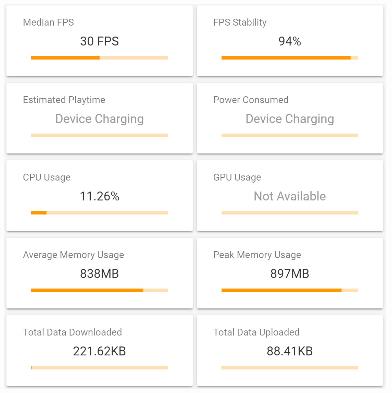
Honkai Impact 3rd got a pretty stable 30fps with a solid frame stability of 94%. I didn’t notice any of the frame drops during my play session, so I would consider this a great experience. For Honkai, I downloaded the HD texture pack just to push it to its limits. Again, there was no option to enable 60fps, so it was capped at 30fps.
The phone didn’t get too hot either. It stayed pretty warm, but again, not so hot that I was worried about holding my phone.

Shadowgun Legends
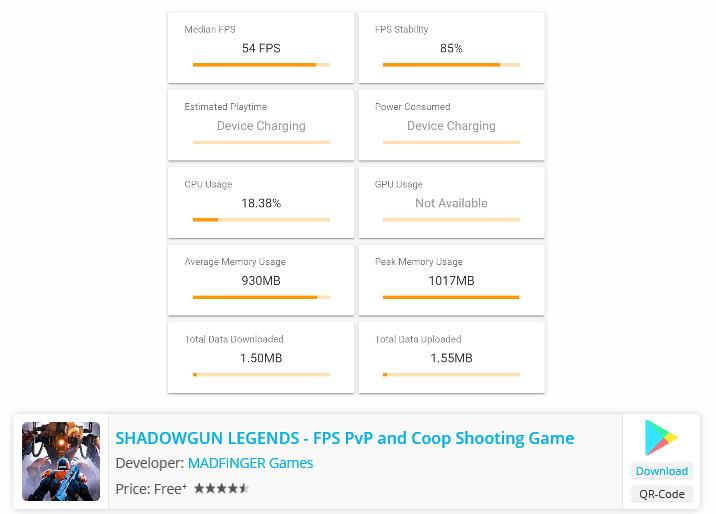
Shadowgun Legends is one of the first games where I noticed thermal throttling come into play. As you can see, it got a framerate of around 54fps average and fps stability of 85%. When I first launched the game and set the graphics settings, I enabled high graphics and 60fps. For the first 10 minutes, it was running at a smooth 60fps with no issues. It was getting very hot during this time though, so by the end of the test, which was about 20 minutes, the framerate was noticeably dropping.
ARK: Survival Evolved
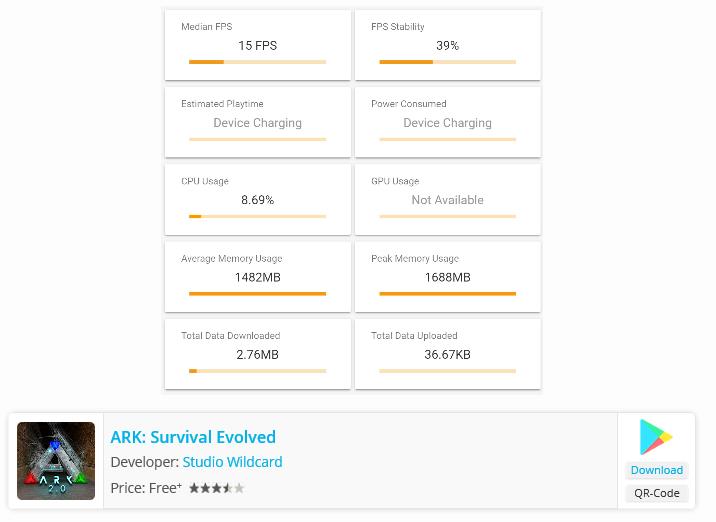
ARK is one of the more interesting tests because of the very low 15fps result. ARK is capped at 30fps, so I expected to get around 30fps. When I did actually get 30fps it only lasted for around 3 minutes until the phone started to overheat and throttle a lot. The framerate slowly drop from around 30 to 12fps with the median being around 15fps. This is what most gamers say is “unplayable.” This was most likely due to thermal throttling.
Guns of Boom
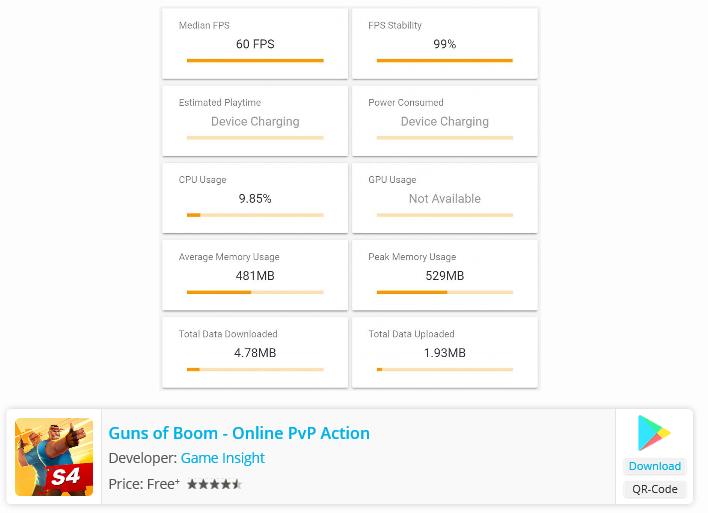
Guns of Boom got a great and smooth 60fps with 99% frame stability. I had the game set to high quality and 60fps framerate during the test as well. The Honor 20 was able to handle it with no problem at all. It didn’t even get that warm. Guns of Boom isn’t the most intensive mobile game ever, but it still manages to push the phone a bit.
Now, we have test six games, how are you feeling? Share your idea. The other games’ review and final conclusion will in next episode. See you.


- Posts
- Following
- Followers
- Energy
-

 Kenny Khor
HONOR Content Crew
Kenny Khor
HONOR Content Crew
-
+ Follow

-
- 288 Posts
- 14 Following
- 982 Followers
- 32507 Energy


SUBSCRIPTION
I agree to receive the latest offers and information on HONOR products through email or IM (e.g. WhatsApp) provided below and advertisement on third-party platforms. I understand that I can unsubscribe anytime according to Chapter 5 of HONOR Platform Privacy Statement.
CONTACT

- Posts
- photo
- video

Honor 20 Gaming Performance: Testing the Top Android Games on Google Play
Dear fans:
High-Tech forum XDA made a game performance review for HONOR 20, because the Games are too many we separate this deeply review in two episodes.
Here is the original article:
The Honor 20 and Honor 20 Pro are the newest flagship phones from Honor. They have the latest specs, latest technology, and the latest software. All of this should mean it has some of the best performance of any phone, right? We put this to the test to see if it’s possible to get flagship performance at around half the cost of flagships from other major OEMs.
Disclaimer: Honor provided the Honor 20 for this review. Honor is also a sponsor of XDA, however, Honor’s influence on this article was recommending the games to test. We also included our own collection of games to test. All of the results were taken in Game Bench and Honor has not seen any results before publication.
Honor is one of the few companies that sell phones with the Kirin chipset from HiSilicon. The only other company is Huawei, which, of course, owns the Honor brand. These chips have generally been pretty good in CPU performance and efficiency, providing an insanely good battery with great speeds. In the past, they have really lacked in the GPU department. As we saw with the Honor View20, the GPU performance on the Kirin 980, the chip included in the Honor 20, is amazing. It provided a stable framerate in almost every game we tested on it.
Since the Honor View20 launch earlier this year, Honor has had time to refine the software that runs on the Kirin 980 and create GPU Turbo 3.o. This allows the Honor 20 to cut power usage by up to 10% and optimize the underlying system to provide more stable gameplay with lower temperatures and longer battery life. While the tests below don’t include temperatures or battery stats, it will include the performance and personal anecdotes of what I experienced while testing each game.
In these tests, I only tested the Honor 20 instead of both the Honor 20 and Honor 20 Pro. This is because of the underlying cooling system and hardware. It is almost identical in both devices, so testing both wouldn’t tell us much besides that they are the same.
Honor 20 Gaming Performance
Before we get into the games and their stats, I want to talk about what each stat means, starting with Median FPS. This is the average fps the game played at during the testing duration. Higher is better, of course. Next up is FPS Stability (or Frame Stability), which is the percentage of time the frames per second was not drastically fluctuating and staying at a constant FPS. Again, higher is better. CPU Usage is the amount of strain the game is putting on the CPU. This isn’t as important as the former categories, but anything under 25% is great. Next is the Average Memory Usage and Peak Memory Usage. This shows how much RAM the game is using at its peak and the average. The Honor 20 has 6GBs of RAM, so anything under 3GBs is great. Finally, we have Total Data Downloaded and Total Data Uploaded. This is the amount of data in megabytes it uploads or downloads on your network, an important stat if you have a data cap on your Wi-Fi or limited data on your cellular plan.
The Honor 20 and Honor 20 Pro both have something Honor calls GPU Turbo 3.0. This optimizes the game and underlying system for better performance and heat. I’m not going to mention this much because there is no way to enable or disable it as it’s all in the background. That means it’s enabled for all the tests and it should be enabled if you pick up an Honor 20 to use.
The following gameplay performance data was recorded using GameBench, an excellent service that helps you analyze gaming performance on Android and iOS. GameBench has desktop clients and mobile clients. We used the desktop client for our review.
Fortnite
Unlike most games I tested on the Honor 20, Fortnite does not work with Gamebench. So instead of performance numbers, you’ll have to trust my experience. A good way to describe it is “okay.” The Honor 20 is supposed to support 60fps in Fortnite, but whether it was the phone’s software or Fortnite, both of which were fully updated, it was capped at 30fps. At 30fps, there is nothing to call home about. The phone didn’t get overly hot and had very little touch latency. I would consider it an adequate phone for playing Fortnite, but not the best I’ve used.
PUBG Mobile
In PUBG, we get a smooth 60fps with frame stability of 98%. This means there were very few frame dips below 60fps. The CPU usage was around 18% which is low for the number of frames the GPU was pushing out. The only thing about this game was the device heat. While Gamebench doesn’t show the GPU temperature, I can feel the body of the phone. It was very hot.
During this test, I was almost unable to hold the phone. It got so hot I wasn’t able to play comfortably. Now, this could have been because of the HDR and Extreme FPS setting, which makes sense. At the temperature it was, I don’t think that 60fps would have lasted long before throttling down.
DOTA Underlords
Underlords got a nice 30fps with frame stability of 99%. Unlike some of the other games we tested, Underlords is capped at 30fps. The game didn’t have any options to change texture quality or frame rate, so I was stuck at whatever it downloaded. The quality on the display looked really good, so I assume it’s using HD textures. The Honor 20 is more than capable of playing DOTA Underlords.
The device didn’t get very hot while playing Underlords. It felt a little warm at the end of my play session, but not to the point where I was worried about holding the phone, like with PUBG Mobile.
Honkai Impact 3rd
Honkai Impact 3rd got a pretty stable 30fps with a solid frame stability of 94%. I didn’t notice any of the frame drops during my play session, so I would consider this a great experience. For Honkai, I downloaded the HD texture pack just to push it to its limits. Again, there was no option to enable 60fps, so it was capped at 30fps.
The phone didn’t get too hot either. It stayed pretty warm, but again, not so hot that I was worried about holding my phone.
Shadowgun Legends
Shadowgun Legends is one of the first games where I noticed thermal throttling come into play. As you can see, it got a framerate of around 54fps average and fps stability of 85%. When I first launched the game and set the graphics settings, I enabled high graphics and 60fps. For the first 10 minutes, it was running at a smooth 60fps with no issues. It was getting very hot during this time though, so by the end of the test, which was about 20 minutes, the framerate was noticeably dropping.
ARK: Survival Evolved
ARK is one of the more interesting tests because of the very low 15fps result. ARK is capped at 30fps, so I expected to get around 30fps. When I did actually get 30fps it only lasted for around 3 minutes until the phone started to overheat and throttle a lot. The framerate slowly drop from around 30 to 12fps with the median being around 15fps. This is what most gamers say is “unplayable.” This was most likely due to thermal throttling.
Guns of Boom
Guns of Boom got a great and smooth 60fps with 99% frame stability. I had the game set to high quality and 60fps framerate during the test as well. The Honor 20 was able to handle it with no problem at all. It didn’t even get that warm. Guns of Boom isn’t the most intensive mobile game ever, but it still manages to push the phone a bit.
Now, we have test six games, how are you feeling? Share your idea. The other games’ review and final conclusion will in next episode. See you.