

 More Products
 Compare













我的荣耀 开启荣耀之旅



 Disagree Terms
 Log out




[FAQ] [Tutorial] [EMUI Features] App Twin : Double Up Your Social Presence


 Last reply :
App Twin- Double Up Your Social Presence
App twin is yet another great inbuilt feature available in EMUI where you can use your two social accounts at a time without switching between them by Logging in and Logging out. As the name suggests, App twin meaning is to use two copies of an app. Once enabled, you can see same App icon twice. This will make s easy to access your two social accounts, whether it is Facebook or WhatsApp.
App twin feature is very useful to the users who are very active on social application platform and handling more than one profile. App twin is basically cloning of App so that you can have two running instances of the App at the same time in same device.
Sounds interesting?
Say, if you have 2 whatsApp accounts active, one for personal use and one for public use, but at a time, you can use only 1 account in your device. In this case, it is quite difficult to look for other whatsApp account notifications as you cannot use multiple accounts in the same device. If you enable App Twin, you can use 2 whatsApp accounts at a time without any need of carrying additional device or re-installing the app.
Many users have asked some questions about the use of App Twin in Honor community. So here is my small FAQ *** tutorial that will help to resolve their queries.
Find few common FAQs below that will resolve your queries about App Twin feature.
Question 1:
Does my device support App Twin?
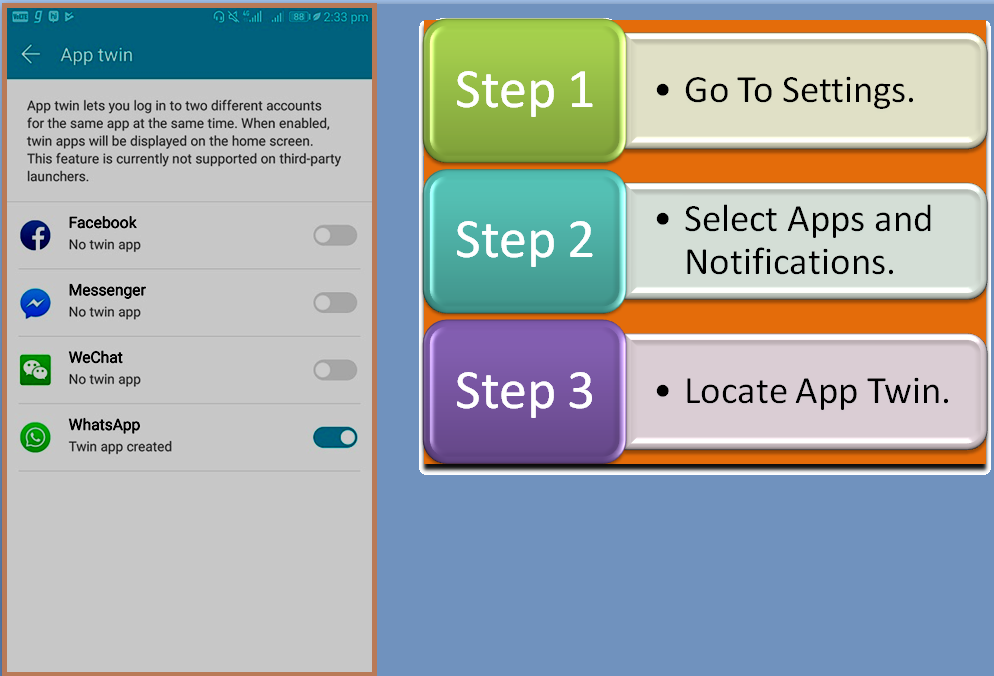
There are many Honor devices which support App Twin. To check if your device has App Twin feature, find the steps mentioned below.
Question 2:
How to enable App Twin?
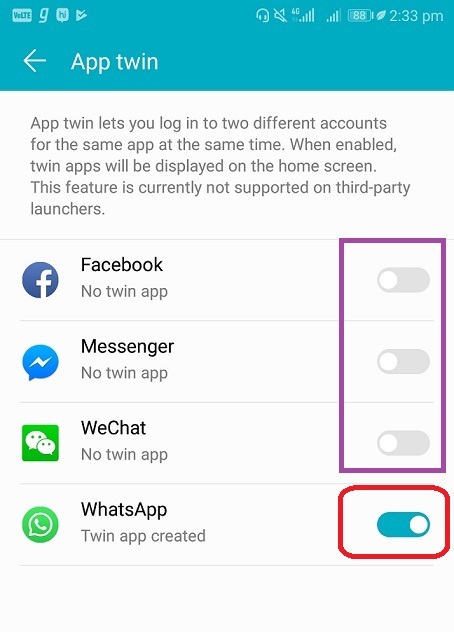
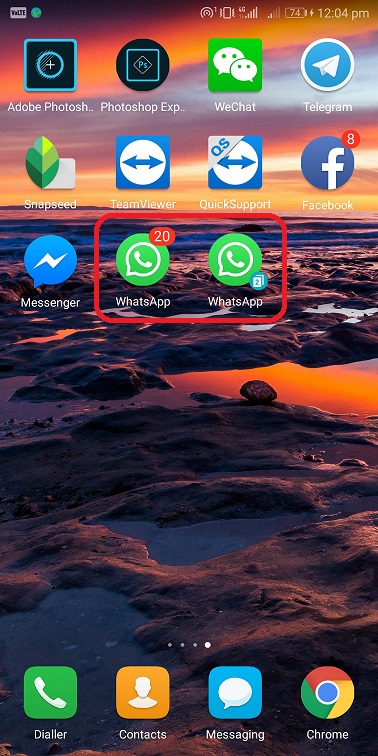
Enabling App Twin is very simple and one touch process. Go to Settings – Apps and Notifications – App Twin again and tap on the icon as marked in the image. By default, it is disabled. Single tap will enable the App twin feature. Refer the image below where I have enabled App twin for WhatsApp. Rest are disabled. Now, you can see the two instances of WhatsApp with twin App icon have small number two in it.
Question 3:
How to disable the App Twin?
Do the reverse procedure of enable App Twin to disable this feature. That is tap again when it is enabled. Once disabled, App Twin icon will be removed from your device.
Note: All App Data information for your Twin App will be wiped out from your device. Hence, it is necessary to take backup before you disable twin app. Default App will continue to run without any issues.
Question 4:
Which Applications supports App Twin?
There are many social accounts that supports App Twin feature. You can see the list of supporting Apps once you enable App Twin feature. It will look like this.
Some of the apps that supports App Twin:
Facebook Messenger
Line
Question 5:
Is it safe to use App Twin?
It is completely safe to use App twin and there is no risk involved with any of your accounts and data.
Note:
App twin will not work if you are using third party launchers. So, ensure that you are using default launcher so that you won’t face any issues.
Source : Vaibhav_268
Disclaimer: This is a reproduced article and the copyright rests with the original author. If there is any disagreement, please contact the Forum Management Team to delete it.


- Posts
- Following
- Followers
- Energy
-

 PeaceHunter
Community Team
PeaceHunter
Community Team
-
+ Follow

-
- 494 Posts
- 180 Following
- 2965 Followers
- 108750 Energy


SUBSCRIPTION
I agree to receive the latest offers and information on HONOR products through email or IM (e.g. WhatsApp) provided below and advertisement on third-party platforms. I understand that I can unsubscribe anytime according to Chapter 5 of HONOR Platform Privacy Statement.
CONTACT

- Posts
- photo
- video

App Twin- Double Up Your Social Presence
App twin is yet another great inbuilt feature available in EMUI where you can use your two social accounts at a time without switching between them by Logging in and Logging out. As the name suggests, App twin meaning is to use two copies of an app. Once enabled, you can see same App icon twice. This will make s easy to access your two social accounts, whether it is Facebook or WhatsApp.
App twin feature is very useful to the users who are very active on social application platform and handling more than one profile. App twin is basically cloning of App so that you can have two running instances of the App at the same time in same device.
Sounds interesting?
Say, if you have 2 whatsApp accounts active, one for personal use and one for public use, but at a time, you can use only 1 account in your device. In this case, it is quite difficult to look for other whatsApp account notifications as you cannot use multiple accounts in the same device. If you enable App Twin, you can use 2 whatsApp accounts at a time without any need of carrying additional device or re-installing the app.
Many users have asked some questions about the use of App Twin in Honor community. So here is my small FAQ *** tutorial that will help to resolve their queries.
Find few common FAQs below that will resolve your queries about App Twin feature.
Question 1:
Does my device support App Twin?
There are many Honor devices which support App Twin. To check if your device has App Twin feature, find the steps mentioned below.
Question 2:
How to enable App Twin?
Enabling App Twin is very simple and one touch process. Go to Settings – Apps and Notifications – App Twin again and tap on the icon as marked in the image. By default, it is disabled. Single tap will enable the App twin feature. Refer the image below where I have enabled App twin for WhatsApp. Rest are disabled. Now, you can see the two instances of WhatsApp with twin App icon have small number two in it.
Question 3:
How to disable the App Twin?
Do the reverse procedure of enable App Twin to disable this feature. That is tap again when it is enabled. Once disabled, App Twin icon will be removed from your device.
Note: All App Data information for your Twin App will be wiped out from your device. Hence, it is necessary to take backup before you disable twin app. Default App will continue to run without any issues.
Question 4:
Which Applications supports App Twin?
There are many social accounts that supports App Twin feature. You can see the list of supporting Apps once you enable App Twin feature. It will look like this.
Some of the apps that supports App Twin:
Facebook Messenger
WeChat
WhatsApp
Line
Question 5:
Is it safe to use App Twin?
It is completely safe to use App twin and there is no risk involved with any of your accounts and data.
Note:
App twin will not work if you are using third party launchers. So, ensure that you are using default launcher so that you won’t face any issues.
Source : Vaibhav_268
Disclaimer: This is a reproduced article and the copyright rests with the original author. If there is any disagreement, please contact the Forum Management Team to delete it.