

 More Products
 Compare













我的荣耀 开启荣耀之旅



 Disagree Terms
 Log out




[Battery Tips] Understanding Huawei's App Launch


 Last reply :
App Launch can be accessed on Emui 8 and 9 devices by opening SETTINGS > BATTERY > APP LAUNCH. This feature may or may not be available for all devices or labeled differently.
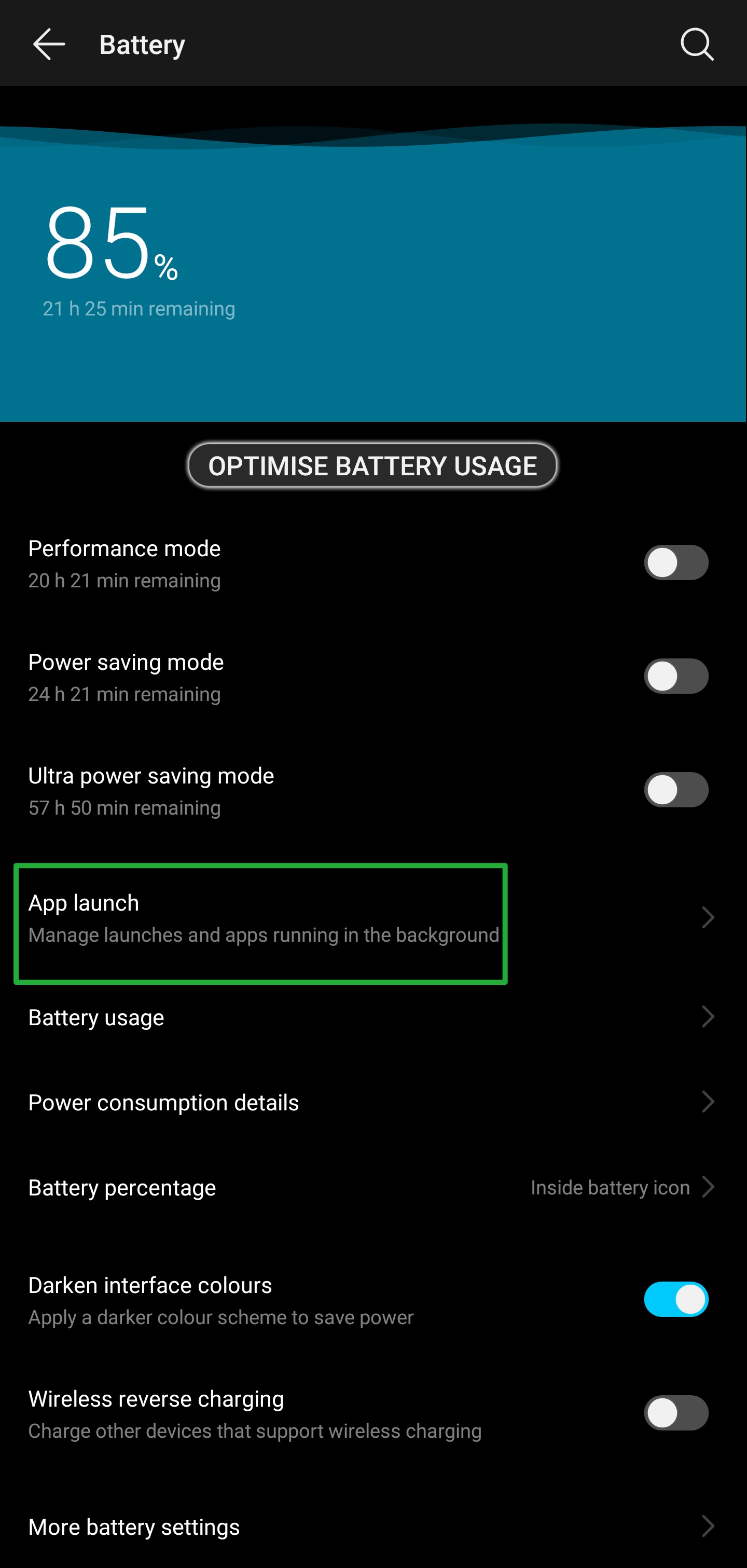
What does it do? App Launch manages the apps you use and those that run in the background. It helps in keeping apps running or closes them when not in use. EMUI’s learning algorithms + AI can be part of this system.

What can it do?**
It can help in saving your battery by limiting apps from automatically opening especially when you do not need them. This can also keep your apps from closing when you turn off the screen or when the phone is idle.
** This varies from person to person. Some of the examples may or may not be applicable. Please use according to your personal usage.
Manage
Automatically
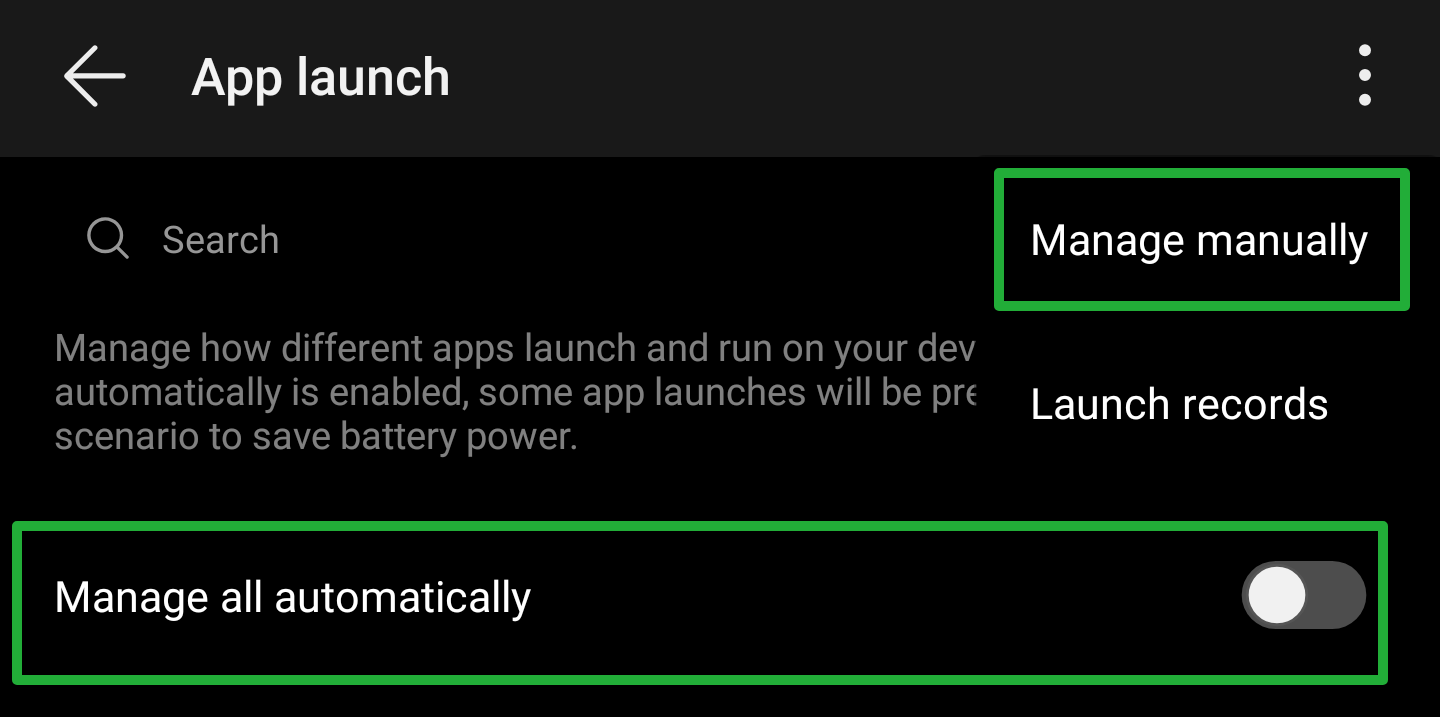
This should be self-explanatory. Aside for you/user opening and closing apps, you are allowing the phone/EMUI/Android/A.I to decide whether to keep the app running in the background or closing it completely to save battery
Scenario: Messaging/Chat apps require to be open or running in the background for us to receive the notifications. The same applies to Email Apps that you might be using. Other apps like your web browsers, games, downloaded icons and themes, etc. may not be set to automatic and is really up to you/the user to decide.
Other apps may include your Music Player and will definitely require to be set on automatic to avoid being closed while you are listening to music.
Manage
Manually
When you decide to switch an app from automatic to manual, a sub menu pops up with additional options.
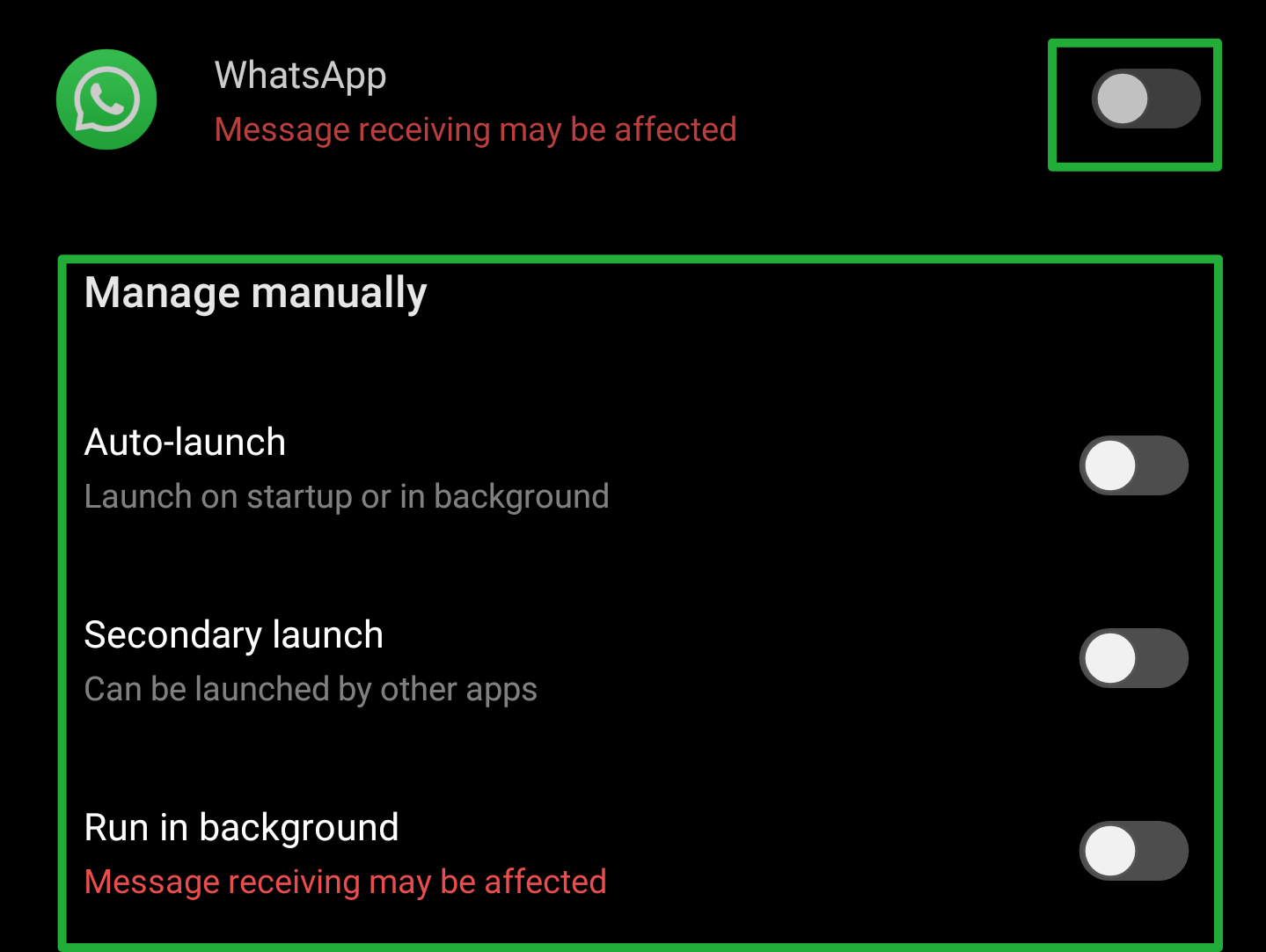
Auto-
launch: is similar to Manage Automatically but this time the user manually selects it
Secondary
launch: the app can be opened by another app - Spotify link sent using Facebook - opens Spotify
Run
in
background: keeps the app from being closed especially when the user returns to the homescreen or the screen is switched off/device is locked. - Usually downloaders, VPN clients and some phone monitoring tools need to be running in the background to complete tasks.
The
3-
dot
menu
button opens 2 additional windows:
Manage
manually and
Launch
records.
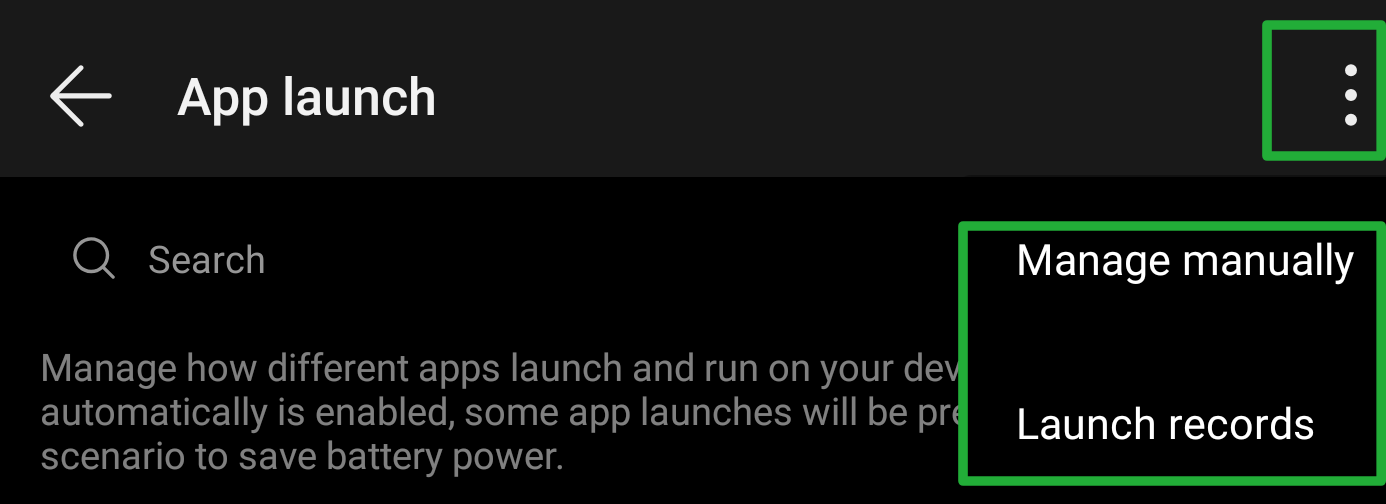
Manage manually opens the list of all the apps on your phone and allows you to control the 3 options I mentioned earlier: Auto-launch, Secondary and Run in background. This window allows the user to select the apps and the launch type they are allowed to use.
Personally almost all of my apps are set to manual. This keeps them from opening and consuming battery power. I only keep a handful of apps on auto which includes my SMS app and the clock widget.
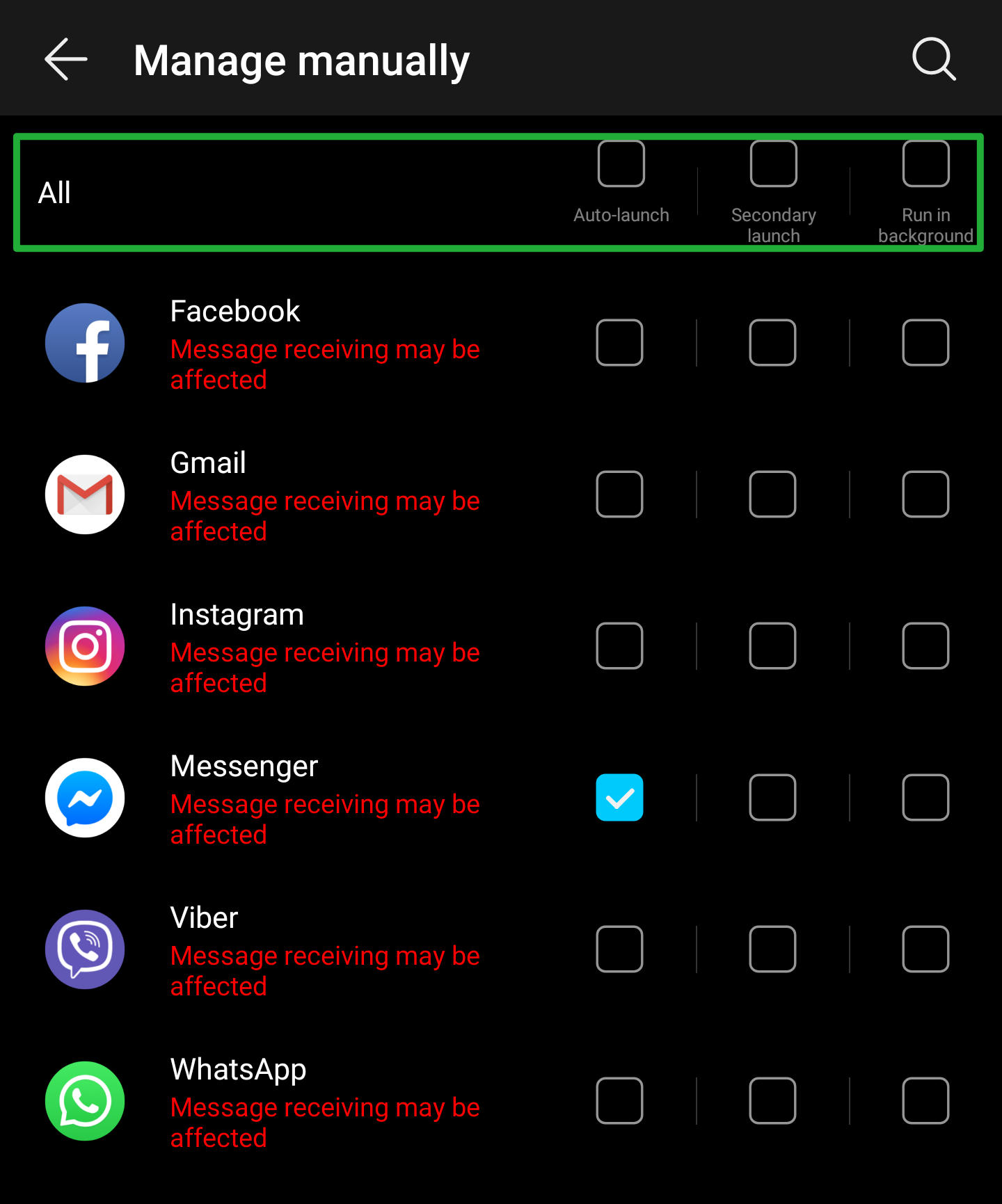
The top bar let's you select all the apps at once and assign the permission/s you choose. Not selecting any option especially for some apps like the example will give you a warning and as I said earlier, will affect your notifications. Chances are you will not get an alert if you receive a message until you directly/manually open the app.
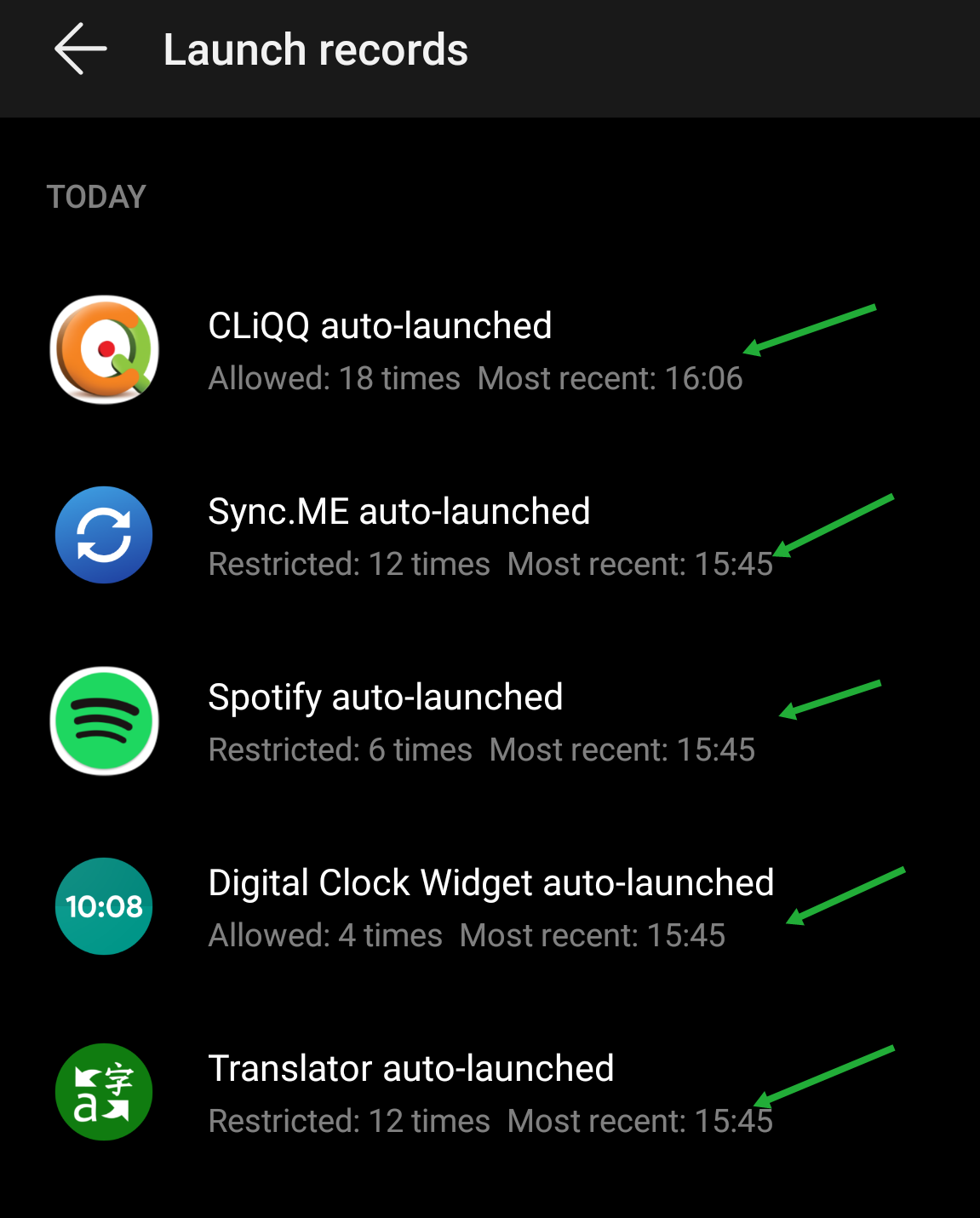
Launch records will give you a summary of the apps that have been running or opened (by yourself or automatically by the phone). You can probably use this as a reference of which apps you would want to be on automatic or managed manually.
Conclusion: These options have an impact on your phone's battery consumption. You can save from minutes to hours depending on your settings as well as have a shorter battery life if you keep a lot of apps running in the background. Take time to understand some of the details and refer to your own app usage and habits so you would know how to manage most of your apps


- Posts
- Following
- Followers
- Energy
-

 Kenny Khor
HONOR Content Crew
Kenny Khor
HONOR Content Crew
-
+ Follow

-
- 288 Posts
- 14 Following
- 982 Followers
- 32507 Energy


SUBSCRIPTION
I agree to receive the latest offers and information on HONOR products through email or IM (e.g. WhatsApp) provided below and advertisement on third-party platforms. I understand that I can unsubscribe anytime according to Chapter 5 of HONOR Platform Privacy Statement.
CONTACT

- Posts
- photo
- video

App Launch can be accessed on Emui 8 and 9 devices by opening SETTINGS > BATTERY > APP LAUNCH. This feature may or may not be available for all devices or labeled differently.
What does it do? App Launch manages the apps you use and those that run in the background. It helps in keeping apps running or closes them when not in use. EMUI’s learning algorithms + AI can be part of this system.
What can it do?**
It can help in saving your battery by limiting apps from automatically opening especially when you do not need them. This can also keep your apps from closing when you turn off the screen or when the phone is idle.
** This varies from person to person. Some of the examples may or may not be applicable. Please use according to your personal usage.
Manage
Automatically
This should be self-explanatory. Aside for you/user opening and closing apps, you are allowing the phone/EMUI/Android/A.I to decide whether to keep the app running in the background or closing it completely to save battery
Scenario: Messaging/Chat apps require to be open or running in the background for us to receive the notifications. The same applies to Email Apps that you might be using. Other apps like your web browsers, games, downloaded icons and themes, etc. may not be set to automatic and is really up to you/the user to decide.
Other apps may include your Music Player and will definitely require to be set on automatic to avoid being closed while you are listening to music.
Manage
Manually
When you decide to switch an app from automatic to manual, a sub menu pops up with additional options.
Auto-
launch: is similar to Manage Automatically but this time the user manually selects it
Secondary
launch: the app can be opened by another app - Spotify link sent using Facebook - opens Spotify
Run
in
background: keeps the app from being closed especially when the user returns to the homescreen or the screen is switched off/device is locked. - Usually downloaders, VPN clients and some phone monitoring tools need to be running in the background to complete tasks.
The
3-
dot
menu
button opens 2 additional windows:
Manage
manually and
Launch
records.
Manage manually opens the list of all the apps on your phone and allows you to control the 3 options I mentioned earlier: Auto-launch, Secondary and Run in background. This window allows the user to select the apps and the launch type they are allowed to use.
Personally almost all of my apps are set to manual. This keeps them from opening and consuming battery power. I only keep a handful of apps on auto which includes my SMS app and the clock widget.
The top bar let's you select all the apps at once and assign the permission/s you choose. Not selecting any option especially for some apps like the example will give you a warning and as I said earlier, will affect your notifications. Chances are you will not get an alert if you receive a message until you directly/manually open the app.
Launch records will give you a summary of the apps that have been running or opened (by yourself or automatically by the phone). You can probably use this as a reference of which apps you would want to be on automatic or managed manually.
Conclusion: These options have an impact on your phone's battery consumption. You can save from minutes to hours depending on your settings as well as have a shorter battery life if you keep a lot of apps running in the background. Take time to understand some of the details and refer to your own app usage and habits so you would know how to manage most of your apps