



 More Products
 Compare














我的荣耀 开启荣耀之旅



 Disagree Terms
 Log out




[Weekly FAQ Vol.18] Bluetooth Problems Troubleshooting


 Last reply :
Dear HONOR Fans,
Today I will share with you some general knowledge on Bluetooth problems. Hope these are helpful to you.
Q1: Unable to enable or disable Bluetooth
Enable the Airplane mode and then disable it. Then try to enable or disable Bluetooth.
- Restart your phone and try again.
- If the issue persists, open Settings, search for and access Reset network settings, then reset the network of your phone. (Note: This will delete all your Wi-Fi and Bluetooth connection records.)
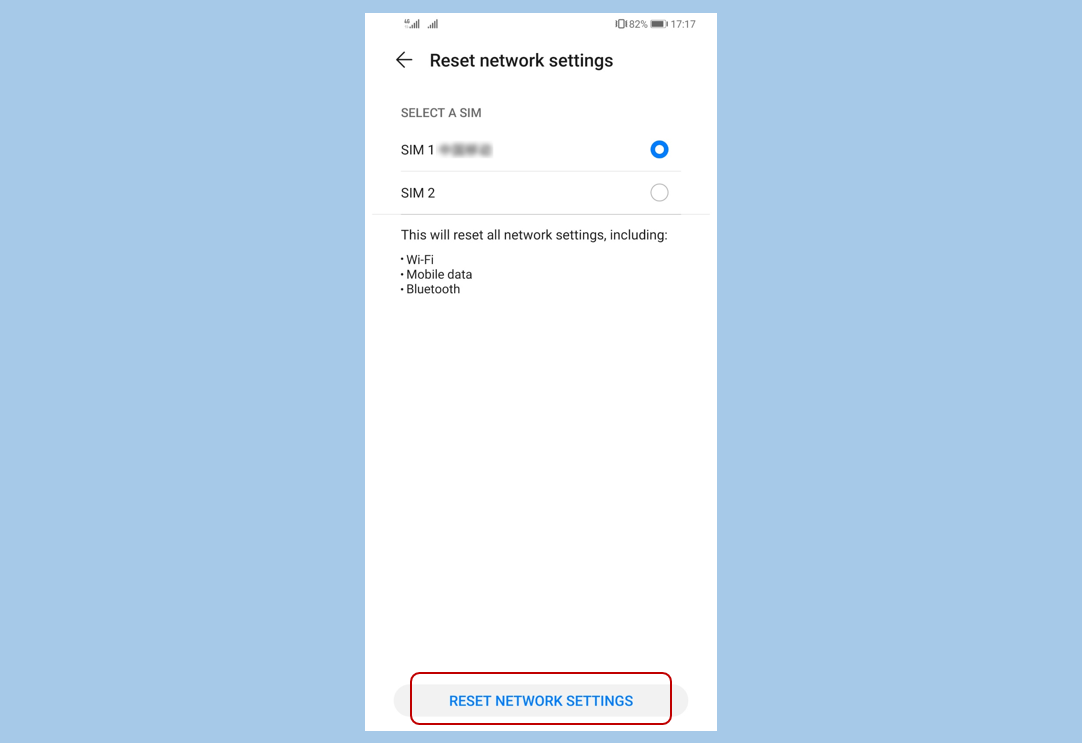
If it still does not work, back up your data, open Settings, search for and access Factory data reset, and then restore your phone to its factory settings. (Note: This will delete all of your data.)
If the issue persists, back up your data and take your device and proof of purchase to an authorized HUAWEI Customer Service Center for assistance.
Q2:Bluetooth is repeatedly turned on after I turn it off
This may be because an application running in the background is using Bluetooth. In this case, the app will automatically enable Bluetooth once it is detected that Bluetooth has been disabled.
Solutions:
You are advised to uninstall apps that automatically re-enable Bluetooth, such as Android Auto.
- Bluetooth power consumption is relatively low. You are advised to keep the Bluetooth switch on under normal conditions.
Q3:Unable to search for the Bluetooth selfie stick, Bluetooth mouse, or Bluetooth keyboard on my phone
Make sure the Bluetooth device has sufficient power and is within 10 meters of your phone.
- Make sure the Bluetooth device is powered on and discoverable.
- Install the app for the Bluetooth watch or band. Swipe down from the status bar to open the notification panel, and turn on the Location. Then open Settings, search for and access Permissions, then touch location, find the relevant app, and enable Location.
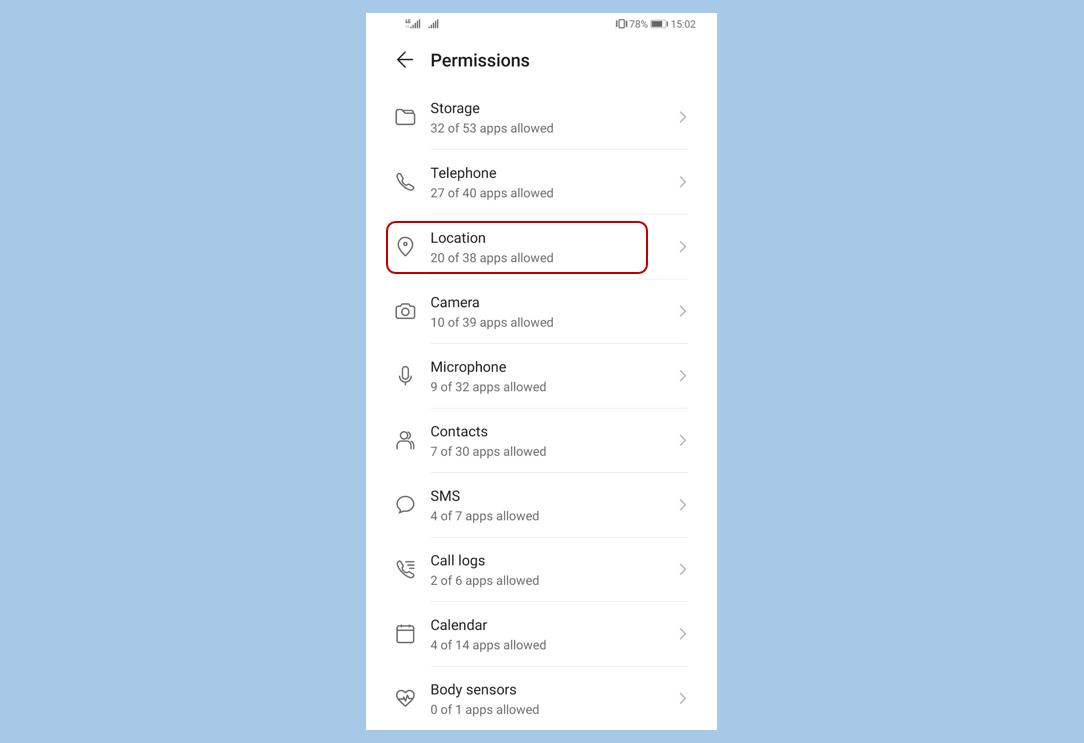
Make sure the Bluetooth device is not connected to another device. If connected, unpair the two device.
- Turn off the Bluetooth switch and then turn it on to try again.
Tips: If the device is found but the connection fails, contact the customer service of the Bluetooth device manufacturer to check whether the Bluetooth device is compatible with your phone.
Q4:Failure to pair a HUAWEI watch with my phone
Make sure the mobile data or Wi-Fi network is working properly, and both Bluetooth and GPS are turned on.
- Go to the Bluetooth settings interface of your phone to check the paired devices list. If the Bluetooth device name of the HUAWEI Watch is included in the list, touch the settings icon next to the watch name to see the details screen, and touch Unpair.
- To enter pairing mode:
On the watch, go to Settings > System > Disconnect & reset.
On the previous phone that was paired with the watch, open the Wear OS App and go to Advanced settings > Forget watch.
Tips: After the operation is completed, it will take a while to reset the watch to factory settings, and then leave the dial on the page with the watch name.
Update the Wear OS app on your phone to the latest version, and touch Start Setup. Then search for the watch name, and touch it to start the pairing. When the message Continue setup on phone is displayed on the watch, follow the onscreen instructions in the HUAWEI Wear OS to operate.
Note: During the pairing process, do not perform any other operations on your phone, and keep the Wear OS app running in the foreground.


- Posts
- Following
- Followers
- Energy
-

Yummy_Engineer
-
+ Follow

-
- 22 Posts
- 0 Following
- 36 Followers
- 752 Energy



- Posts
- photo
- video

Dear HONOR Fans,
Today I will share with you some general knowledge on Bluetooth problems. Hope these are helpful to you.
Q1: Unable to enable or disable Bluetooth
Enable the Airplane mode and then disable it. Then try to enable or disable Bluetooth.
If it still does not work, back up your data, open Settings, search for and access Factory data reset, and then restore your phone to its factory settings. (Note: This will delete all of your data.)
If the issue persists, back up your data and take your device and proof of purchase to an authorized HUAWEI Customer Service Center for assistance.
Q2:Bluetooth is repeatedly turned on after I turn it off
This may be because an application running in the background is using Bluetooth. In this case, the app will automatically enable Bluetooth once it is detected that Bluetooth has been disabled.
Solutions:
You are advised to uninstall apps that automatically re-enable Bluetooth, such as Android Auto.
Q3:Unable to search for the Bluetooth selfie stick, Bluetooth mouse, or Bluetooth keyboard on my phone
Make sure the Bluetooth device has sufficient power and is within 10 meters of your phone.
Make sure the Bluetooth device is not connected to another device. If connected, unpair the two device.
Tips: If the device is found but the connection fails, contact the customer service of the Bluetooth device manufacturer to check whether the Bluetooth device is compatible with your phone.
Q4:Failure to pair a HUAWEI watch with my phone
Make sure the mobile data or Wi-Fi network is working properly, and both Bluetooth and GPS are turned on.
On the watch, go to Settings > System > Disconnect & reset.
On the previous phone that was paired with the watch, open the Wear OS App and go to Advanced settings > Forget watch.
Tips: After the operation is completed, it will take a while to reset the watch to factory settings, and then leave the dial on the page with the watch name.
Update the Wear OS app on your phone to the latest version, and touch Start Setup. Then search for the watch name, and touch it to start the pairing. When the message Continue setup on phone is displayed on the watch, follow the onscreen instructions in the HUAWEI Wear OS to operate.
Note: During the pairing process, do not perform any other operations on your phone, and keep the Wear OS app running in the foreground.