



 More Products
 Compare














我的荣耀 开启荣耀之旅



 Disagree Terms
 Log out




[Weekly FAQ Vol.13] How to transfer data from my old Android phone to my new HUAWEI phone?


 Last reply :
Hi HONOR Fans,
When you got a new HUAWEI phone, do you know how to transfer data from your old phone to the new HUAWEI phone?
HUAWEI Phone Clone app supports data to be quickly transmitted between two mobiles via a WLAN hotspot. Currently, Phone Clone supports data transfer from an Android or iOS phone to a HUAWEI phone. This article will teach you how to transfer data from an Android phone to a new HUAWEI phone with Phone Clone.
Preparations
1. Install Phone Clone on the new and old phones.
2. If you open Phone Clone for the first time, the Phone Clone Terms of Service is displayed. Click AGREE.
3. After you agree to the terms of service, the app will ask you for certain permissions, select OK.
Tips: Because different types of data need to be transferred, Phone Clone needs the permissions to read the data first.
Transfer data from an Android phone to a HUAWEI phone
1. Open Phone Clone on the new phone, and choose THIS IS THE NEW PHONE, select Huawei or Other Android. The page for connecting to the old phone is displayed, as shown in the following figure.
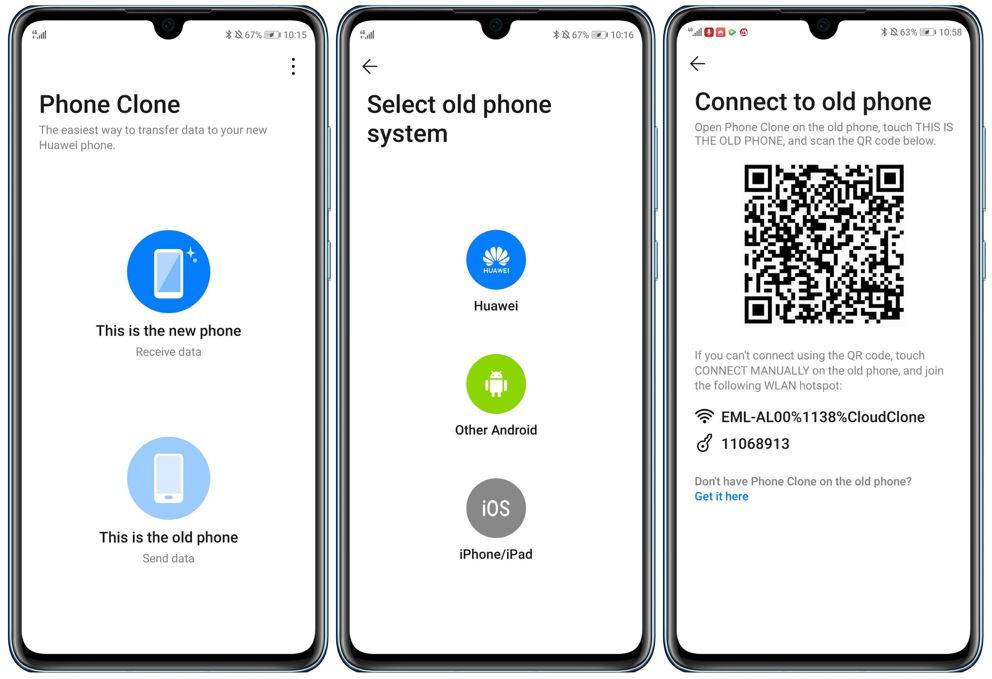
2. Open Phone Clone on the old phone, and choose THIS IS THE OLD PHONE. The phone will invoke the camera function, scan the QR code on the new phone to establish the connection between two phones.
Tips: If the Wi-Fi of your old phone is disabled, a reminder to request Wi-Fi permission will pop up, click OK.
3. After the connection is established, the new phone displays Connected to old device, waiting for the old phone to send data to the new phone.
4. Select the data you want to transfer on the old phone and click TRANSFER.
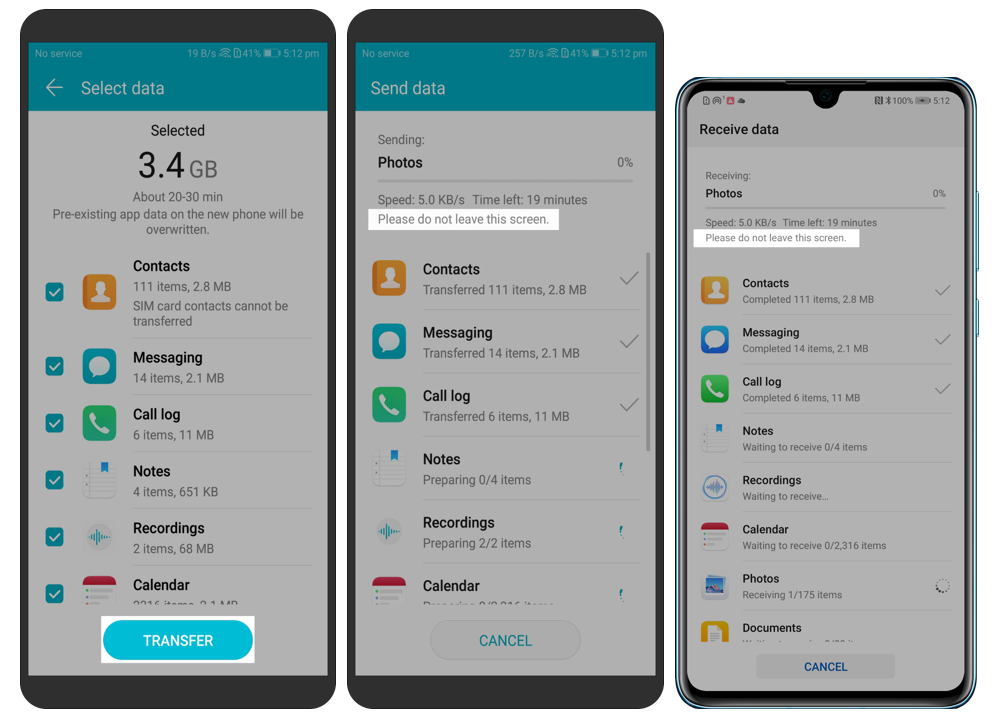
Tips: Do not perform other operations on the two devices during cloning. Otherwise, the connection will be disconnected and the data cloning will be interrupted.
5. Wait until the message "Transfer complete" is displayed on the new phone. Tap DONE to complete the data cloning.
Note: The above interfaces are for reference only. The actual interface may differ from this.
The next topic of our weekly FAQ is how to transfer data from iOS to a new HUAWEI phone? See you next week!


- Posts
- Following
- Followers
- Energy
-

Yummy_Engineer
-
+ Follow

-
- 22 Posts
- 0 Following
- 36 Followers
- 752 Energy



- Posts
- photo
- video

Hi HONOR Fans,
When you got a new HUAWEI phone, do you know how to transfer data from your old phone to the new HUAWEI phone?
HUAWEI Phone Clone app supports data to be quickly transmitted between two mobiles via a WLAN hotspot. Currently, Phone Clone supports data transfer from an Android or iOS phone to a HUAWEI phone. This article will teach you how to transfer data from an Android phone to a new HUAWEI phone with Phone Clone.
Preparations
1. Install Phone Clone on the new and old phones.
2. If you open Phone Clone for the first time, the Phone Clone Terms of Service is displayed. Click AGREE.
3. After you agree to the terms of service, the app will ask you for certain permissions, select OK.
Tips: Because different types of data need to be transferred, Phone Clone needs the permissions to read the data first.
Transfer data from an Android phone to a HUAWEI phone
1. Open Phone Clone on the new phone, and choose THIS IS THE NEW PHONE, select Huawei or Other Android. The page for connecting to the old phone is displayed, as shown in the following figure.
2. Open Phone Clone on the old phone, and choose THIS IS THE OLD PHONE. The phone will invoke the camera function, scan the QR code on the new phone to establish the connection between two phones.
Tips: If the Wi-Fi of your old phone is disabled, a reminder to request Wi-Fi permission will pop up, click OK.
3. After the connection is established, the new phone displays Connected to old device, waiting for the old phone to send data to the new phone.
4. Select the data you want to transfer on the old phone and click TRANSFER.
Tips: Do not perform other operations on the two devices during cloning. Otherwise, the connection will be disconnected and the data cloning will be interrupted.
5. Wait until the message "Transfer complete" is displayed on the new phone. Tap DONE to complete the data cloning.
Note: The above interfaces are for reference only. The actual interface may differ from this.
The next topic of our weekly FAQ is how to transfer data from iOS to a new HUAWEI phone? See you next week!