



 More Products
 Compare


ABOUT HONOR
Events













我的荣耀 开启荣耀之旅



 Disagree Terms
 Log out




[Weekly FAQ Vol.12] How to fix lagging and freezing problems on your phone?


 Last reply :
Hello HONOR Fans,
Today we are going to discuss the lagging and freezing problems of phone. What causes lagging and freezing on your phone? How to fix this problem? Please follow the tips below to troubleshoot.
1. Clear all background apps.
If the virtual navigation bar is enabled, touch
 to show all apps running in the background, and then touch
 to close them all.
- If your phone supports navigation gestures, swipe up from the bottom of the screen and hold to show all apps running in the background, and then touch
 to close them all.
 - If a front navigation button is available, swipe left or right on the button to show all apps running in the background, and then touch
 to close them all.
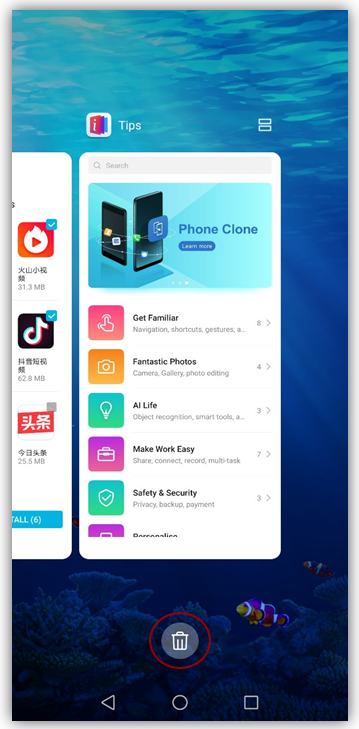
If you don't want to close all apps, touch on the apps that you want to keep open. (In EMUI 9.0, swipe down on an app card to lock it.)
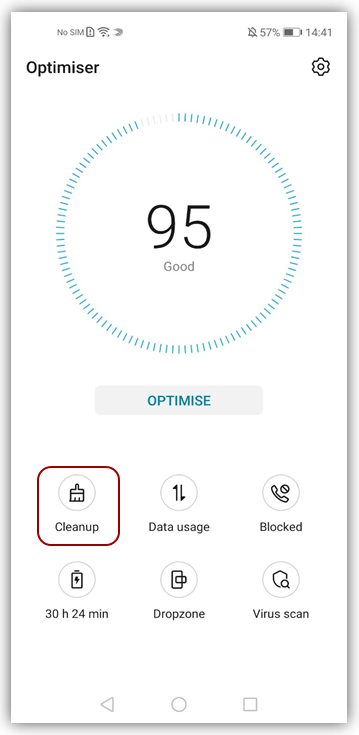
2. Clean up residual files and free up at least 20% of the phone storage by going to Phone Manager/Optimiser > Cleanup.
3. Check whether you have installed a third-party phone manager software. If so, uninstall it to prevent multiple manager apps from running at the same time.
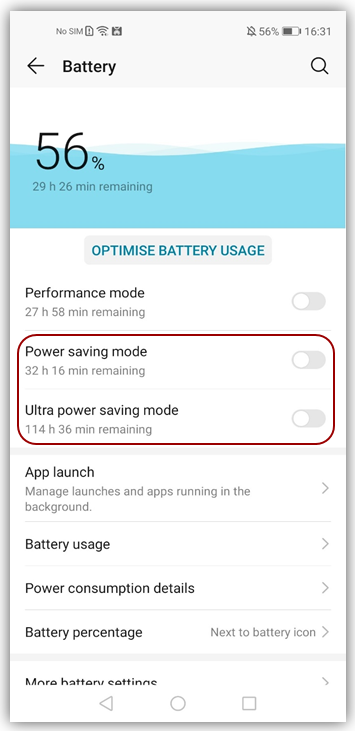
4. Go to Settings > Battery, disable Power saving mode or Ultra power saving mode, and ensure that the battery level is higher than 20%. If Power saving mode is enabled or the battery is low, some phone features will be restricted to work in order to extend the battery life.
5. Check whether it is overheating. If so, the high temperature protection will be enabled and may affect your phone's performance. Lower the screen brightness and close idle or power-intensive apps, such as Bluetooth and NFC.
6. You are advised to restart your phone every 2 to 3 days. It can help clear the cache and speed up system performance.
7. If the memory card is full, the file access speed will be reduced and the phone will lag or freeze. In this case, replace your memory card.
8. Make sure your phone system is up-to-date, as system updates may resolve some known issues.
9. If the above measures cannot resolve the problem, back up your data and restore your phone to its factory settings.
10. If the problem persists after restoring the factory settings, take your device and proof of purchase to an authorized HUAWEI Customer Service Center for assistance.


- Posts
- Following
- Followers
- Energy
-

Yummy_Engineer
-
+ Follow

-
- 22 Posts
- 0 Following
- 36 Followers
- 752 Energy



- Posts
- photo
- video

Hello HONOR Fans,
Today we are going to discuss the lagging and freezing problems of phone. What causes lagging and freezing on your phone? How to fix this problem? Please follow the tips below to troubleshoot.
1. Clear all background apps.
If the virtual navigation bar is enabled, touch to show all apps running in the background, and then touch
 to close them all.
If you don't want to close all apps, touch on the apps that you want to keep open. (In EMUI 9.0, swipe down on an app card to lock it.)
2. Clean up residual files and free up at least 20% of the phone storage by going to Phone Manager/Optimiser > Cleanup.
3. Check whether you have installed a third-party phone manager software. If so, uninstall it to prevent multiple manager apps from running at the same time.
4. Go to Settings > Battery, disable Power saving mode or Ultra power saving mode, and ensure that the battery level is higher than 20%. If Power saving mode is enabled or the battery is low, some phone features will be restricted to work in order to extend the battery life.
5. Check whether it is overheating. If so, the high temperature protection will be enabled and may affect your phone's performance. Lower the screen brightness and close idle or power-intensive apps, such as Bluetooth and NFC.
6. You are advised to restart your phone every 2 to 3 days. It can help clear the cache and speed up system performance.
7. If the memory card is full, the file access speed will be reduced and the phone will lag or freeze. In this case, replace your memory card.
8. Make sure your phone system is up-to-date, as system updates may resolve some known issues.
9. If the above measures cannot resolve the problem, back up your data and restore your phone to its factory settings.
10. If the problem persists after restoring the factory settings, take your device and proof of purchase to an authorized HUAWEI Customer Service Center for assistance.