



 More Products
 Compare














我的荣耀 开启荣耀之旅



 Disagree Terms
 Log out




[Update] Dark Mode in HONOR's Magic UI 3.0: A Bright New Feature for Night Users


 Last reply :
Dark Mode in HONOR's Magic UI 3.0: A Bright New Feature for Night Users
Dark mode is now available for all HONOR smartphones with Magic UI 3.0 system. Finish this post to know more about dark mode and learn how to enable dark mode on your HONOR phones.
Why we need dark mode?
For better or for worse, modern living revolves around the smartphone. This is true in all scenarios, and at all hours. Even at midnight in a dark room, many of us can't resist the impulse to continue playing around on our phones. Though some people may grow accustomed to the glare from the screen after a short while, many of us find that the illuminated display is constantly irritating on the eyes. Regardless of how low you adjust the screen brightness level, it still sticks out like a sore thumb, rather than blending in with the dark surroundings.
About Dark mode offered by Magic UI 3.0
That's the issue Dark mode — Magic UI 3.0's new feature — addresses in a completely novel way. However, the solution is not nearly as straightforward as it appears to be: Dark mode on EMUI 10 doesn't simply change the background from light to dark, or invert the color of everything on screen (making the background pitch-black and text white), as you might expect.
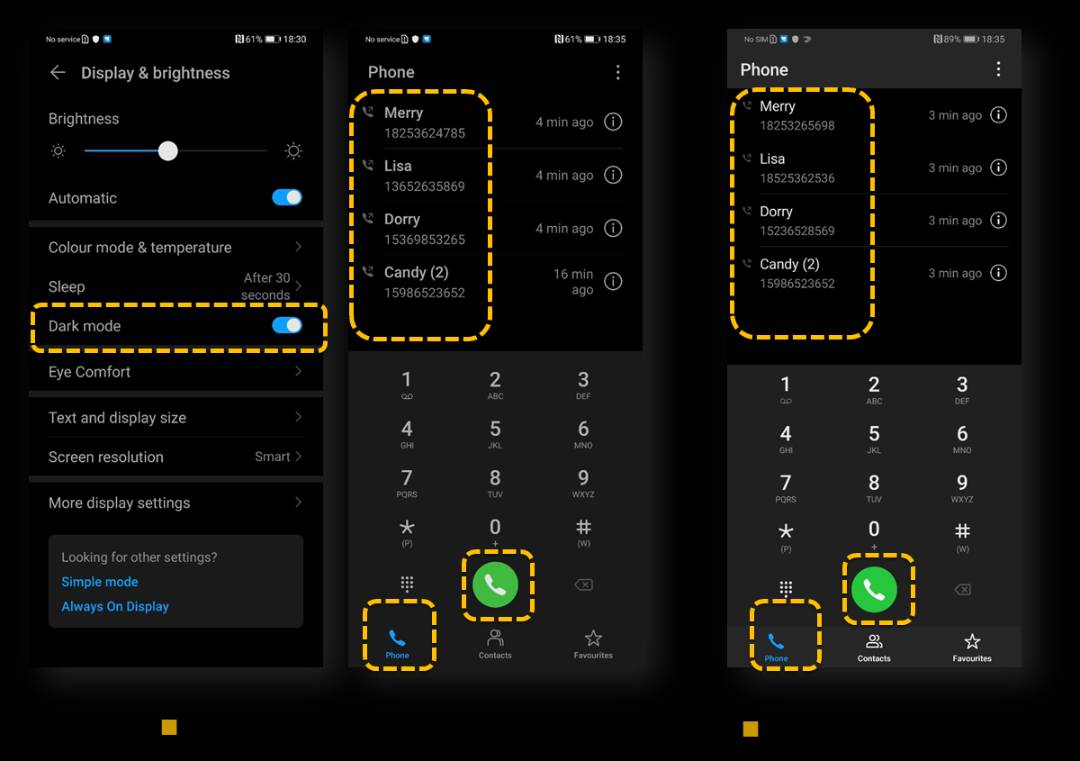
an image to show the dark mode from Magic UI 3.0
Instead, basing their conclusions on extensive human factors research, an in-depth look at how best to design electronics in accordance with human behavior and cognition, HONOR designers determined that our eyes perceive the brightness and saturation for the same color difference when it is set against light and dark backgrounds. That's why, in Dark Mode, the on-screen text has been carefully rendered in a kind of light gray. This soft tone forms an optimal contrast against the dark background, ensuring consistent visual comfort and readability. Likewise, system icons and elements are furnished in subtle hues, with fine-tuned adjustments, so that the nighttime display stands out in brilliant color, but without the slightest glare.
The night may have "a thousand eyes", but you can rest assured that your phone treats the pair of eyes that matter most, those that you depend on with the utmost care.
How to enable dark mode?
Step one: go to settings, and search for "dark mode".
Step two: Click "dark mode" then enable that on the next page. You will find the phone in a dark mode right away.
Here is a video tutorial to help you enable dark mode:
What to do if you want to use dark mode, but that is not available on your phone?
To buy another phone to get the dark mode may not be workable for everyone. If dark mode is currently not available on your phone, first go to settings---about to check if another firmware update is available. If yes, update.
In case dark mode is still not available, you can search for dark mode in the web browser then install an app on the phone.
Thank you! Share in the comment section if you also find dark mode useful.


- Posts
- Following
- Followers
- Energy
-

 Gracy
Moderator Intern
Gracy
Moderator Intern
-
+ Follow

-
- 80 Posts
- 19 Following
- 318 Followers
- 8689 Energy










- Posts
- photo
- video

Dark Mode in HONOR's Magic UI 3.0: A Bright New Feature for Night Users
Dark mode is now available for all HONOR smartphones with Magic UI 3.0 system. Finish this post to know more about dark mode and learn how to enable dark mode on your HONOR phones.
Why we need dark mode?
For better or for worse, modern living revolves around the smartphone. This is true in all scenarios, and at all hours. Even at midnight in a dark room, many of us can't resist the impulse to continue playing around on our phones. Though some people may grow accustomed to the glare from the screen after a short while, many of us find that the illuminated display is constantly irritating on the eyes. Regardless of how low you adjust the screen brightness level, it still sticks out like a sore thumb, rather than blending in with the dark surroundings.
About Dark mode offered by Magic UI 3.0
That's the issue Dark mode — Magic UI 3.0's new feature — addresses in a completely novel way. However, the solution is not nearly as straightforward as it appears to be: Dark mode on EMUI 10 doesn't simply change the background from light to dark, or invert the color of everything on screen (making the background pitch-black and text white), as you might expect.
an image to show the dark mode from Magic UI 3.0
Instead, basing their conclusions on extensive human factors research, an in-depth look at how best to design electronics in accordance with human behavior and cognition, HONOR designers determined that our eyes perceive the brightness and saturation for the same color difference when it is set against light and dark backgrounds. That's why, in Dark Mode, the on-screen text has been carefully rendered in a kind of light gray. This soft tone forms an optimal contrast against the dark background, ensuring consistent visual comfort and readability. Likewise, system icons and elements are furnished in subtle hues, with fine-tuned adjustments, so that the nighttime display stands out in brilliant color, but without the slightest glare.
The night may have "a thousand eyes", but you can rest assured that your phone treats the pair of eyes that matter most, those that you depend on with the utmost care.
How to enable dark mode?
Step one: go to settings, and search for "dark mode".
Step two: Click "dark mode" then enable that on the next page. You will find the phone in a dark mode right away.
Here is a video tutorial to help you enable dark mode:
What to do if you want to use dark mode, but that is not available on your phone?
To buy another phone to get the dark mode may not be workable for everyone. If dark mode is currently not available on your phone, first go to settings---about to check if another firmware update is available. If yes, update.
In case dark mode is still not available, you can search for dark mode in the web browser then install an app on the phone.
Thank you! Share in the comment section if you also find dark mode useful.