



 More Products
 Compare














我的荣耀 开启荣耀之旅



 Disagree Terms
 Log out




[Tutorial] How to use PrivateSpace?


 Last reply :
Hi everyone,
Today I would like to share with you an article explaining to you How to use PrivateSpace.
What is PrivateSpace? How to use it?
PrivateSpace means creating a new system space on your phone, and then putting your private information (such as contacts, images, messages) here, so that you can hide the information that you don’t want others to see.
1. How to enable PrivateSpace?
Open Settings > Security & Privacy > PrivateSpace, follow the prompts to set a privacy password and fingerprint to create a private space.
Note: Only one PrivateSpace can be established.
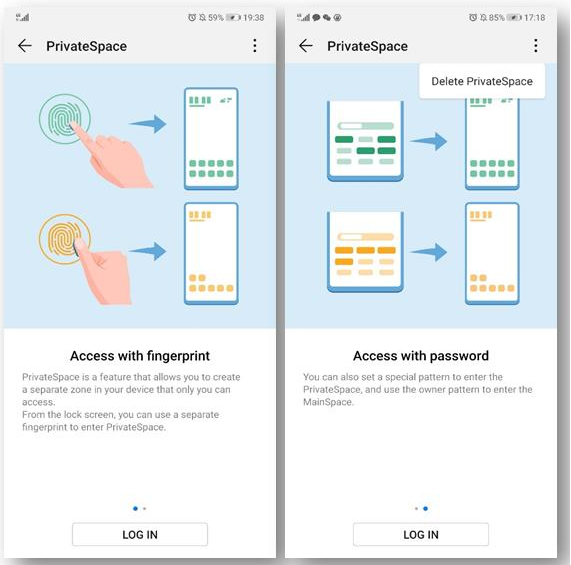
2. How to enter PrivateSpace?
- In the lock screen interface: Use the exclusive fingerprints or passwords which were set before.
- On the main space: Open Settings > Security & Privacy > PrivateSpace, then choose to exit.
3. How to delete PrivateSpace?
Deleting PrivateSpace will delete all apps and data stored in this space and is unrecoverable. You can choose any of the following methods to delete it:
- In the main space, open Settings > Security & Privacy > PrivateSpace and click the three dots at the upper right corner, then choose to delete.
- In the PrivateSpace, open Settings > Security & Privacy > PrivateSpace and choose to delete directly.
4. How to switch quickly between the main space and PrivateSpace?
In the lock screen interface, you can quickly switch by fingerprint or password. After restarting the phone, you must first enter the main space through password verification, and then switch the space from the lock screen interface.
5. How to transfer files between the main space and the private space?
- In the PrivateSpace, open Settings > Security & Privacy > PrivateSpace
- Choose “MainSpace to PrivateSpace” or “PrivateSpace to MainSpace”
- Choose the file you need to transfer.

Note: Memory cards cannot be used in the privacy space, so only files stored on the phone can be transferred from the private space to the main space.
Finally,
6. How to hide the Privacy Space entry?
In the PrivateSpace, open Settings > Security & Privacy > PrivateSpace, then choose Hide PrivateSpace.
Did you get it? If you have private information on your phone that you don’t want others to see, creating a private space is a good idea.
Don’t forget to keep following me and if you have any other questions, please comment on the section below.
Thanks!
Source:


- Posts
- Following
- Followers
- Energy
-

GeekyMarshmallow
-
+ Follow

-
- 114 Posts
- 445 Following
- 649 Followers
- 10729 Energy



- Posts
- photo
- video

Hi everyone,
Today I would like to share with you an article explaining to you How to use PrivateSpace.
What is PrivateSpace? How to use it?
PrivateSpace means creating a new system space on your phone, and then putting your private information (such as contacts, images, messages) here, so that you can hide the information that you don’t want others to see.
1. How to enable PrivateSpace?
Open Settings > Security & Privacy > PrivateSpace, follow the prompts to set a privacy password and fingerprint to create a private space.
Note: Only one PrivateSpace can be established.
2. How to enter PrivateSpace?
- In the lock screen interface: Use the exclusive fingerprints or passwords which were set before.
- On the main space: Open Settings > Security & Privacy > PrivateSpace, then choose to exit.
3. How to delete PrivateSpace?
Deleting PrivateSpace will delete all apps and data stored in this space and is unrecoverable. You can choose any of the following methods to delete it:
- In the main space, open Settings > Security & Privacy > PrivateSpace and click the three dots at the upper right corner, then choose to delete.
- In the PrivateSpace, open Settings > Security & Privacy > PrivateSpace and choose to delete directly.
4. How to switch quickly between the main space and PrivateSpace?
In the lock screen interface, you can quickly switch by fingerprint or password. After restarting the phone, you must first enter the main space through password verification, and then switch the space from the lock screen interface.
5. How to transfer files between the main space and the private space?
- In the PrivateSpace, open Settings > Security & Privacy > PrivateSpace
- Choose “MainSpace to PrivateSpace” or “PrivateSpace to MainSpace”
- Choose the file you need to transfer.
Note: Memory cards cannot be used in the privacy space, so only files stored on the phone can be transferred from the private space to the main space.
Finally,
6. How to hide the Privacy Space entry?
In the PrivateSpace, open Settings > Security & Privacy > PrivateSpace, then choose Hide PrivateSpace.
Did you get it? If you have private information on your phone that you don’t want others to see, creating a private space is a good idea.
Don’t forget to keep following me and if you have any other questions, please comment on the section below.
Thanks!
Source:
https://www.androidpit.com