



 More Products
 Compare














我的荣耀 开启荣耀之旅



 Disagree Terms
 Log out




[Tutorial] How to enable navigation dock


 Last reply :
Hello Fans,
The screen of the mobile phone is getting bigger and bigger, people enjoy the visual benefits brought by the big screen, but the troubles of inconvenient operation also follow. In fact, there is a versatile "small white point" that makes it easier to operate a mobile phone with one hand that is a navigation dock.
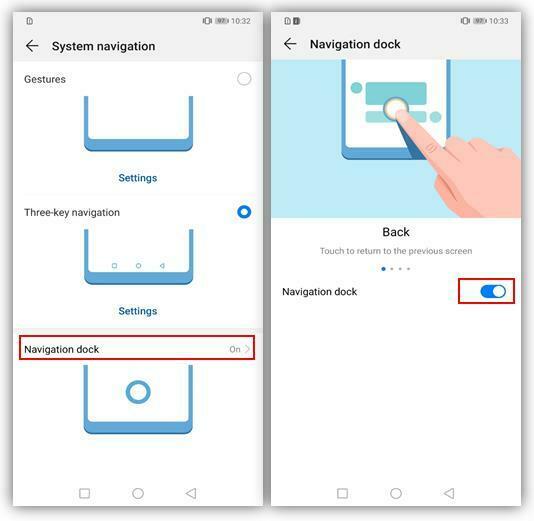
How to enable navigation dock?
Go to settings > System > System Navigation > Navigation dock, turn on the navigation dock switch.
Introduction to navigation dock operations:
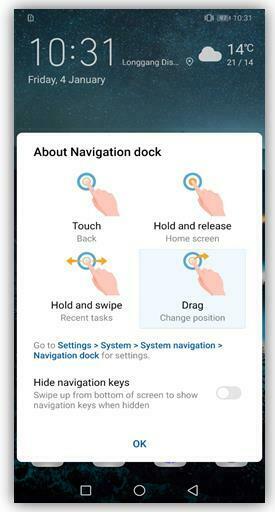
Back to the previous: Touch the navigation dock ball.
Back to the home screen: Long press the navigation ball and release.
View recent tasks: Long press the navigation dock ball and swipe left or right.
Change position: Press and hold the navigation dock ball to drag to the convenient position


- Posts
- Following
- Followers
- Energy
-

Sebastian
-
+ Follow

-
- 139 Posts
- 390 Following
- 424 Followers
- 10125 Energy



- Posts
- photo
- video

Hello Fans,
The screen of the mobile phone is getting bigger and bigger, people enjoy the visual benefits brought by the big screen, but the troubles of inconvenient operation also follow. In fact, there is a versatile "small white point" that makes it easier to operate a mobile phone with one hand that is a navigation dock.
How to enable navigation dock?
Go to settings > System > System Navigation > Navigation dock, turn on the navigation dock switch.
Introduction to navigation dock operations:
Back to the previous: Touch the navigation dock ball.
Back to the home screen: Long press the navigation ball and release.
View recent tasks: Long press the navigation dock ball and swipe left or right.
Change position: Press and hold the navigation dock ball to drag to the convenient position