



 More Products
 Compare














我的荣耀 开启荣耀之旅



 Disagree Terms
 Log out




[Tutorial] How to enable HUAWEI Quick Apps Centre | Manage and Use Quick Apps without Installing it!


 Last reply :
Hello HONOR Fans'
I hope you all doing great ;)
Today, I'm going to share a tutorial on "How to Enable and Use - QUICK App Centre from HUAWEI" is an alternative to Google Instant Apps!
Quick Apps Centre:
+ Allows you to use and manage Quick Apps without the Installation of the App
+ Allows you to create shortcuts for your Quick Apps on the Home Screen for easier access in a single tap
+ Quick Apps won't use much space and the Quick Apps are updated automatically to provide native experience to the users.
HUAWEI AppGallery
Quick App Centre - Download Now!!!
Size: 41.1 MB
Version: v2.2.1.300
How to enable Quick App Manager?
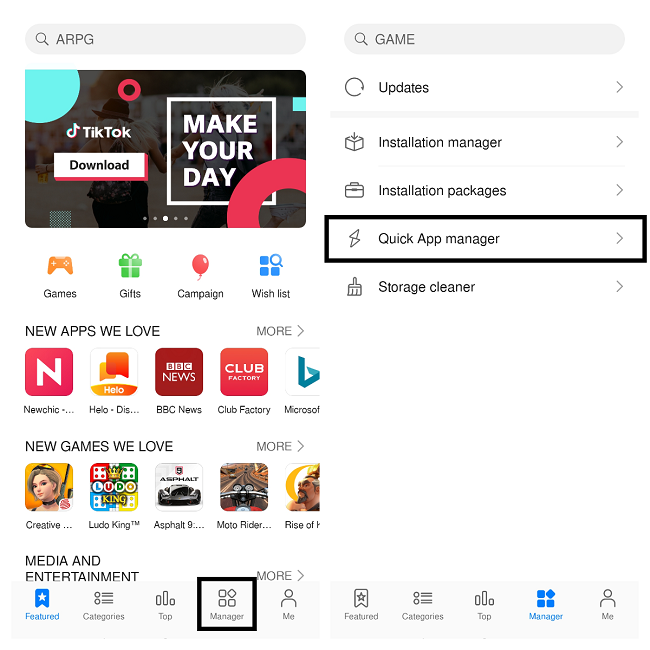
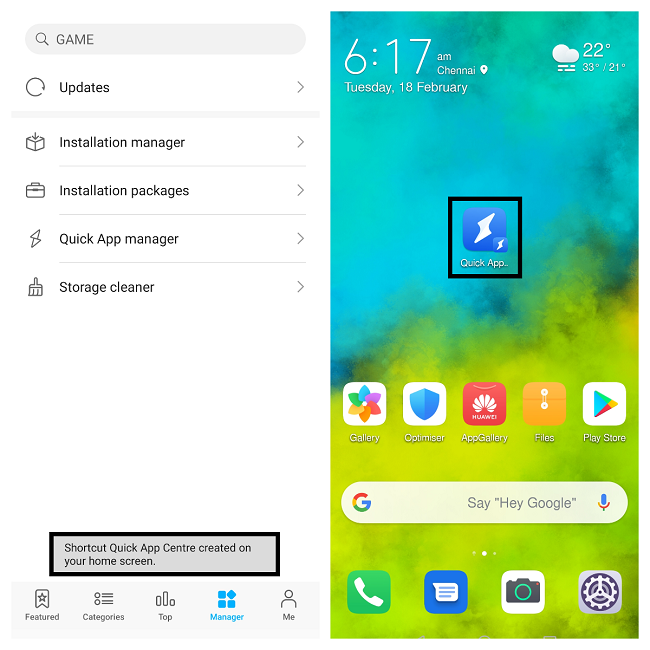
+ Open HUAWEI AppGallery - navigate to Manager option and Tap on "Quick App Manager"
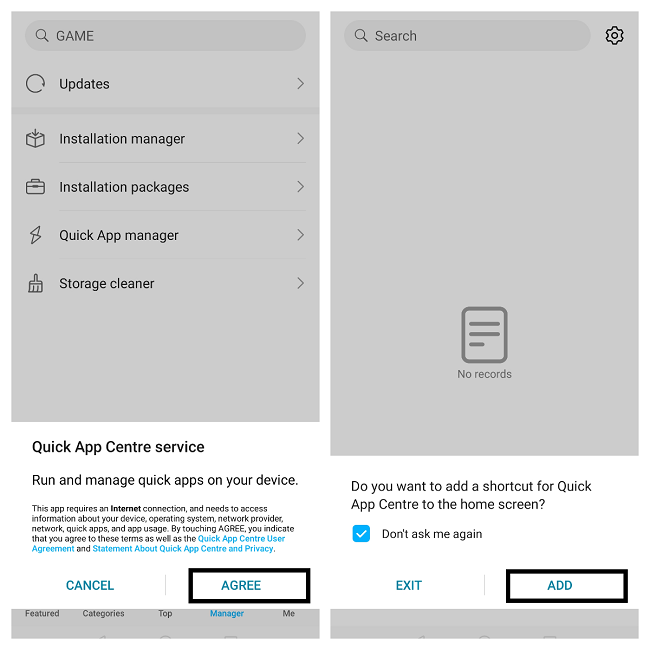
+ Agree to the Service and "Add" shortcut to the Homescreen
NOTE: Internet Connection is required to run Quick Apps
+ That's it , You've successfully enabled and created the Quick Apps shortcut on your Homescreen for easier access to it .
How to Add Apps to Quick Apps and Use it?
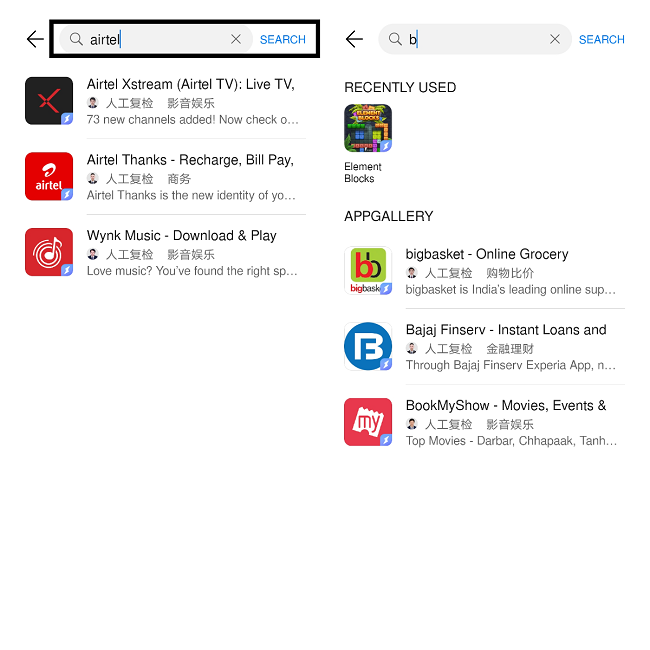
+ Open the Quick App shortcut and search for your favorite Apps or Games
+ If available - All your Apps and Games will show up and Just Tap on the App and Use it without installing it.
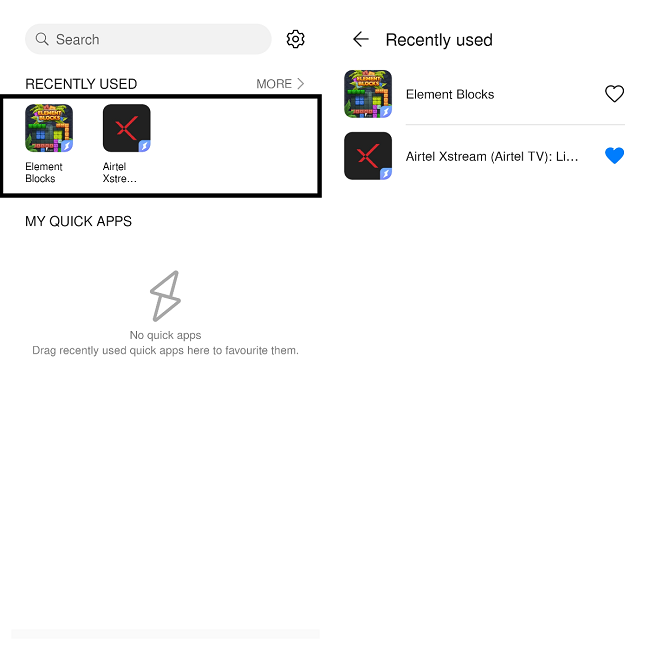
+ Once used any Apps or Games - It will be shown under Recently Used tab
Features - HUAWEI Quick Apps Manager
Favorite your Quick Apps
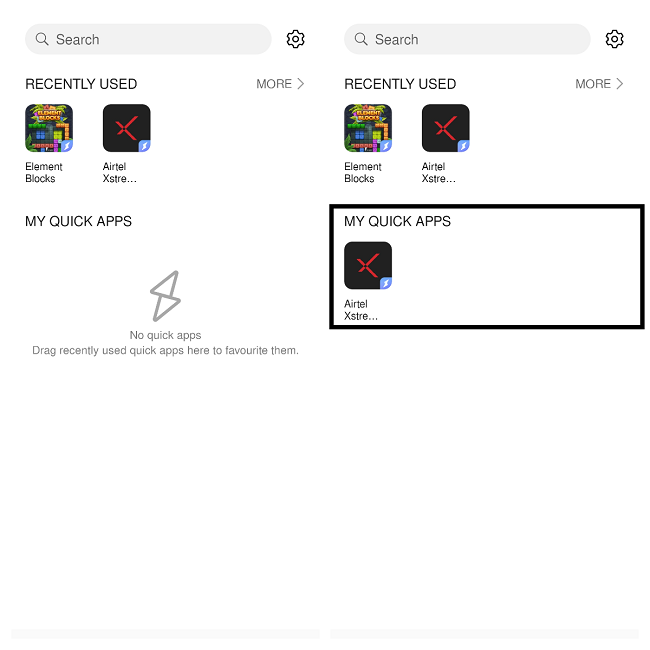
+ In Quick App Manager - Tap on More and Add or Simply drag any recently Apps to My Quick Apps
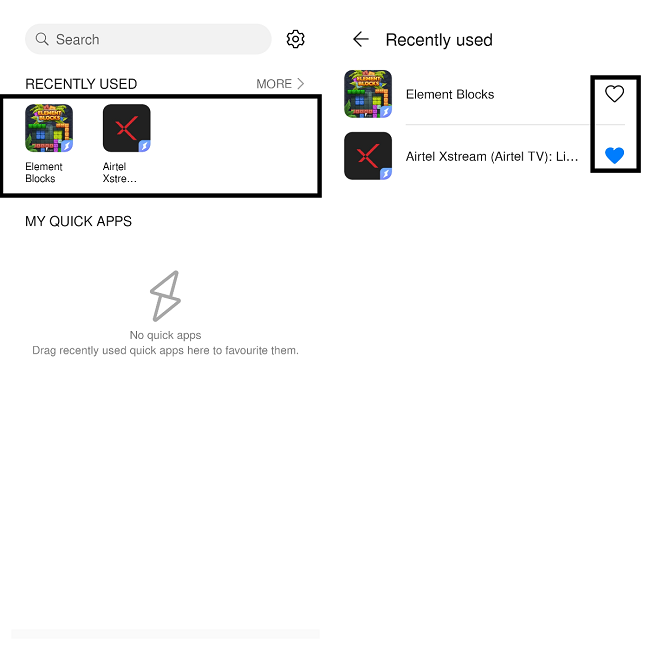
+ Once Added - All your Quick Apps will be added to "My Quick Apps" section!
The MORE section
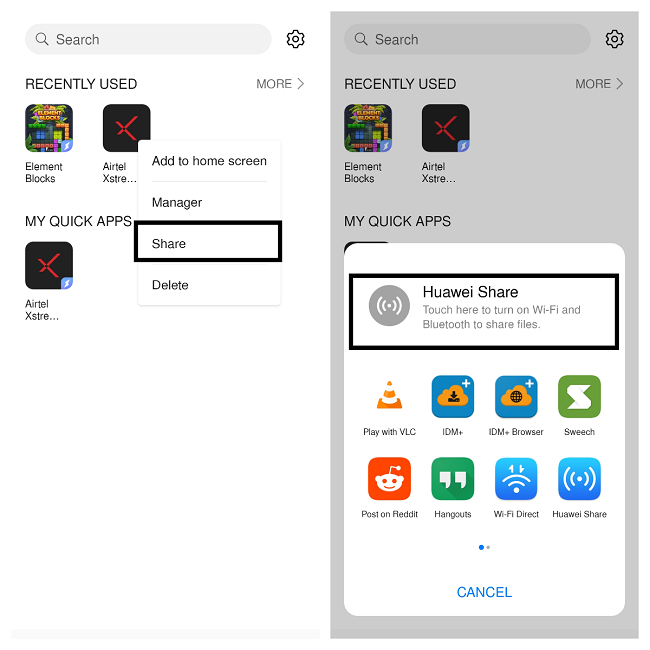
+ Open Quick App Manager - navigate to "MORE" section to get options like Add to home screen, Manager, Share and Delete
Shortcuts to Homescreen
+ Under More option - Touch and hold on the App and tap Add to Home screen | You can also add shortcuts by pressing App icons in Quick Apps Recently Used tab
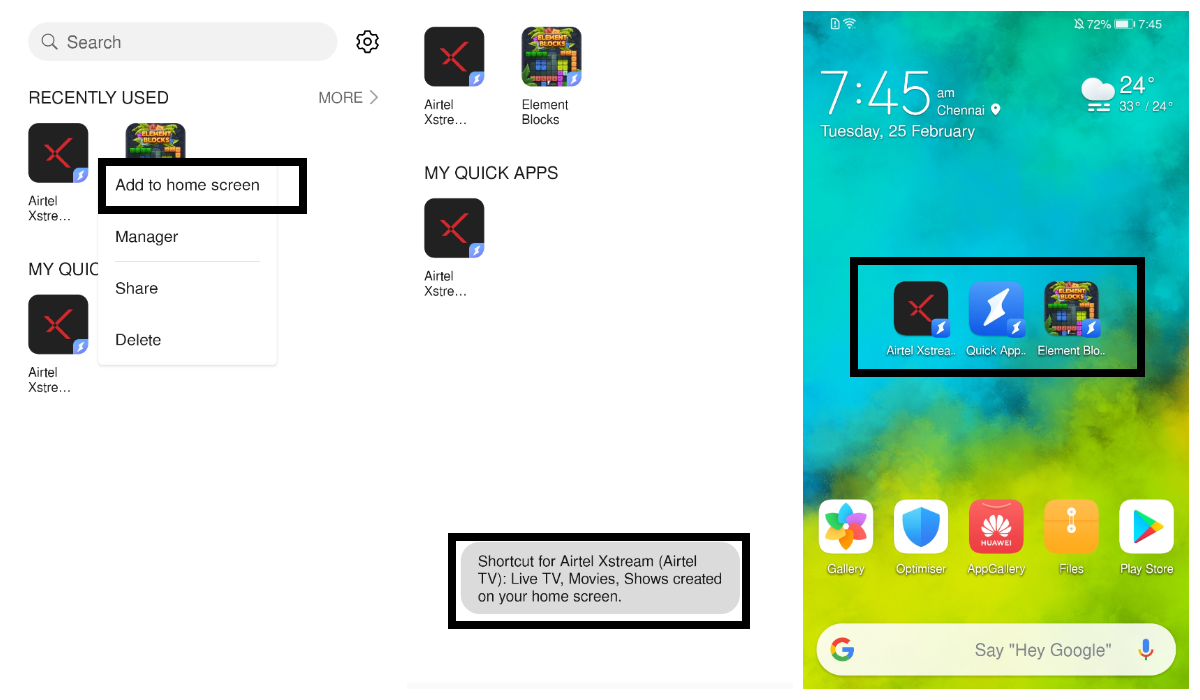
+ All your Quick Apps shortcuts will be added to your Homescreen
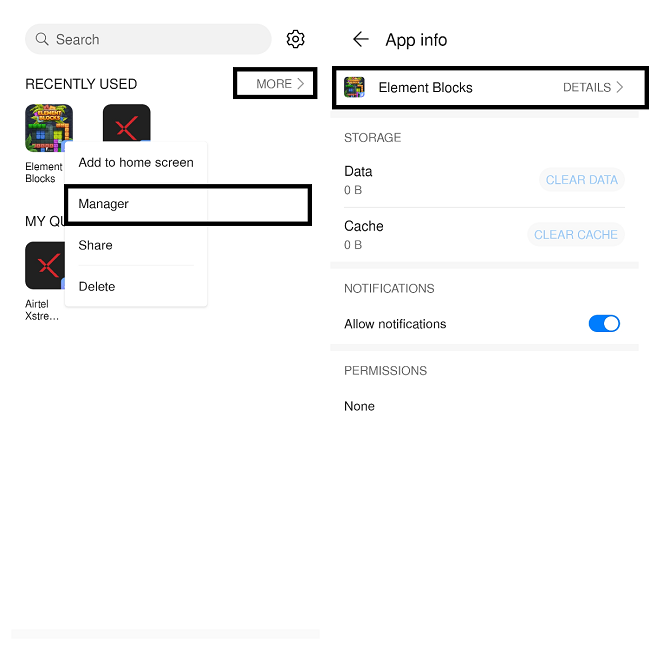
Manager
+ This option will let you know about your Quick Apps details like Data, Cache, Notifications etc
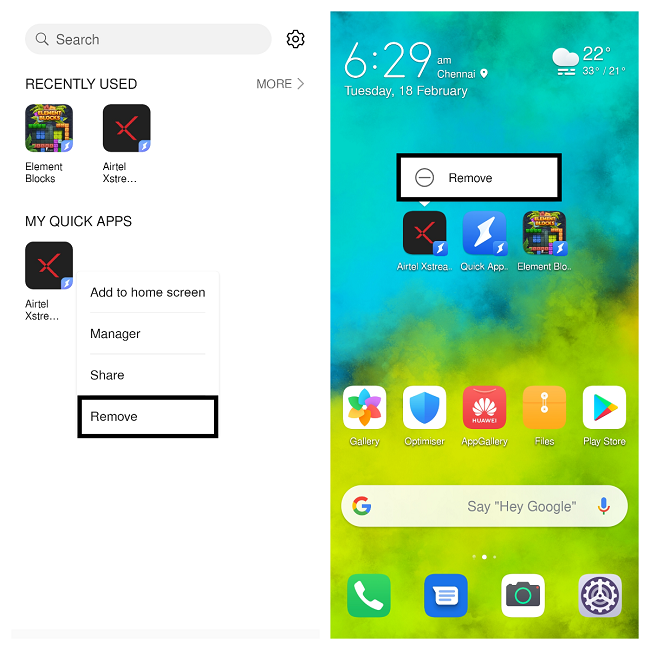
Remove Shortcuts
+ You can Remove Quick Apps and it's shortcuts either in Quick App Manager or from Homescreen itself
Share
+ Open Quick App Manager - navigate to "MORE" section
+ Touch and hold your preferred Quick Apps to Share
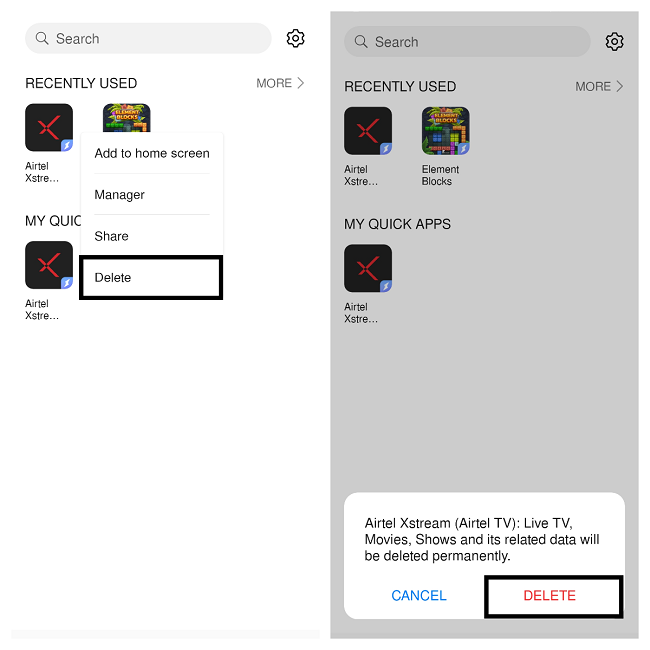
Delete
+ Delete will remove all related data of your Quick Apps permanently
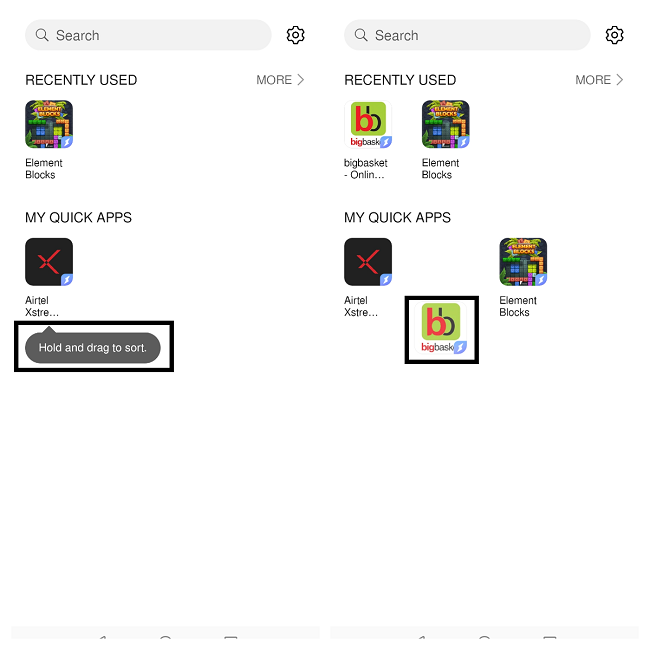
Sorting Quick Apps
+ You can Hold and Drag to sort all your favorite Quick Apps as per your preference
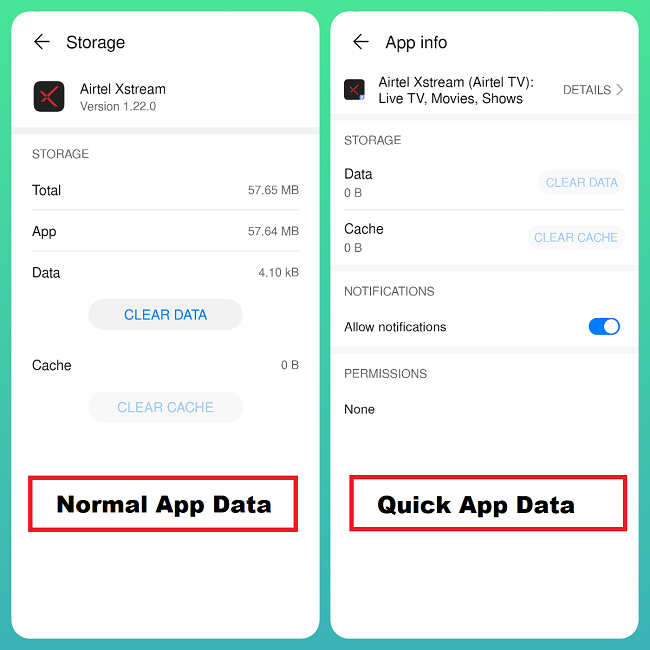
Quick App Data Comparison
+ Saves Space and faster installation compare to Normal Apps
Disable Quick App Centre
+ If you don't want to use Quick Apps Centre anymore - navigate to About option in Quick App Settings menu and tap on Disable Quick App Centre
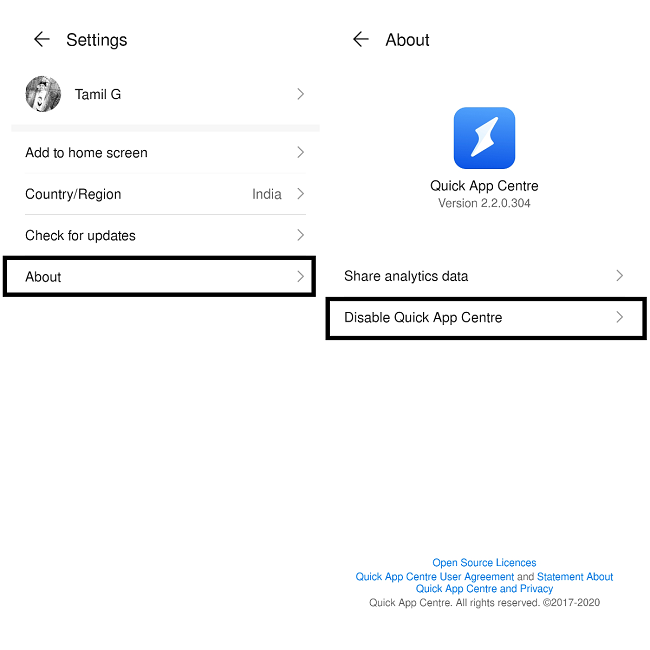
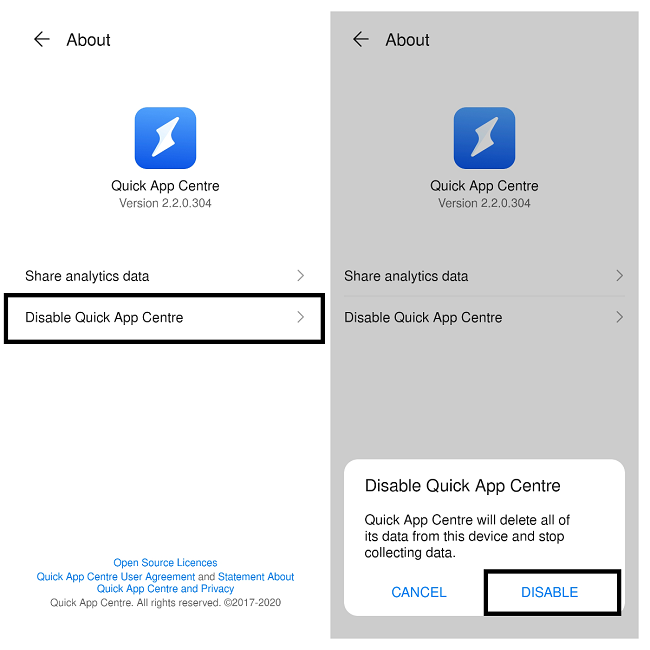
NOTE: Disabling will delete all of Quick App Centre data from your device
HUAWEI Quick Apps is a way faster and smoother than Instant Apps from Google, In comparison it saves your Storage, Faster access to your favorite Apps etc
As per XDA - Android app only saw 10% of the users reached installing the app, while the Quick App saw 72% of users reached experiencing the Quick App, indicating a very substantial effect.
As days progress - HUAWEI Mobile Services (HMS Core) becomes more User-Friendly ecosystem!
That's it guys - Hope you all find this post useful | Thank you for reading ;)


- Posts
- Following
- Followers
- Energy
-
 Tamil G
Moderator Intern
Tamil G
Moderator Intern
-
+ Follow

-
- 542 Posts
- 49 Following
- 881 Followers
- 39795 Energy

-
 New Comer
-
 Followers reach 50
-
 Followers reach 100
-
 Followers reach 200
-
 7 Days Check-in
-
 30 Days Check-in
-
 100 Days Check-in
-
 Moderator
-
 Halloween 2020
-
 HONOR STAR 2020
-
 New Year 2021
-
 Animal Photography
-
 Plant Photography
-
 Red Photography
-
 Survey Medal!
-
 Water Photography
-
 World Cycling & Running Day
-
 Product Photography
-
 Sky Photography
-
 Activity Photography Medal
-
 Autumn Photography
-
 Rain Photography
-
 HONOR 50: Best Shot!
-
 Monthly Photo Sharing #1 Landscape
-
 HONOR Magic4 Pro
-
 Monthly Photo Sharing #2 People
-
 Monthly Photo Sharing #3 Spring
-
 Monthly Photo Sharing #4 Animal



- Posts
- photo
- video

Hello HONOR Fans'
I hope you all doing great ;)
Today, I'm going to share a tutorial on "How to Enable and Use - QUICK App Centre from HUAWEI" is an alternative to Google Instant Apps!
Quick Apps Centre:
+ Allows you to use and manage Quick Apps without the Installation of the App
+ Allows you to create shortcuts for your Quick Apps on the Home Screen for easier access in a single tap
+ Quick Apps won't use much space and the Quick Apps are updated automatically to provide native experience to the users.
HUAWEI AppGallery
Quick App Centre - Download Now!!!
Size: 41.1 MB
Version: v2.2.1.300
How to enable Quick App Manager?
+ Open HUAWEI AppGallery - navigate to Manager option and Tap on "Quick App Manager"
+ Agree to the Service and "Add" shortcut to the Homescreen
NOTE: Internet Connection is required to run Quick Apps
+ That's it , You've successfully enabled and created the Quick Apps shortcut on your Homescreen for easier access to it .
How to Add Apps to Quick Apps and Use it?
+ Open the Quick App shortcut and search for your favorite Apps or Games
+ If available - All your Apps and Games will show up and Just Tap on the App and Use it without installing it.
+ Once used any Apps or Games - It will be shown under Recently Used tab
Features - HUAWEI Quick Apps Manager
Favorite your Quick Apps
+ In Quick App Manager - Tap on More and Add or Simply drag any recently Apps to My Quick Apps
+ Once Added - All your Quick Apps will be added to "My Quick Apps" section!
The MORE section
+ Open Quick App Manager - navigate to "MORE" section to get options like Add to home screen, Manager, Share and Delete
Shortcuts to Homescreen
+ Under More option - Touch and hold on the App and tap Add to Home screen | You can also add shortcuts by pressing App icons in Quick Apps Recently Used tab
+ All your Quick Apps shortcuts will be added to your Homescreen
Manager
+ This option will let you know about your Quick Apps details like Data, Cache, Notifications etc
Remove Shortcuts
+ You can Remove Quick Apps and it's shortcuts either in Quick App Manager or from Homescreen itself
Share
+ Open Quick App Manager - navigate to "MORE" section
+ Touch and hold your preferred Quick Apps to Share
Delete
+ Delete will remove all related data of your Quick Apps permanently
Sorting Quick Apps
+ You can Hold and Drag to sort all your favorite Quick Apps as per your preference
Quick App Data Comparison
+ Saves Space and faster installation compare to Normal Apps
Disable Quick App Centre
+ If you don't want to use Quick Apps Centre anymore - navigate to About option in Quick App Settings menu and tap on Disable Quick App Centre
NOTE: Disabling will delete all of Quick App Centre data from your device
HUAWEI Quick Apps is a way faster and smoother than Instant Apps from Google, In comparison it saves your Storage, Faster access to your favorite Apps etc
As per XDA - Android app only saw 10% of the users reached installing the app, while the Quick App saw 72% of users reached experiencing the Quick App, indicating a very substantial effect.
As days progress - HUAWEI Mobile Services (HMS Core) becomes more User-Friendly ecosystem!
That's it guys - Hope you all find this post useful | Thank you for reading ;)