



 More Products
 Compare














我的荣耀 开启荣耀之旅



 Disagree Terms
 Log out




[Tutorial] How to configure and use Wi-Fi Bridge


 Last reply :
Hello Honor Fans,
Hope you all had a weekend by the way, Today am going to share a tutorial on How to configure and use Wi-Fi bridge on your HONOR devices.
What is Wi-Fi bridge?
Sometimes, your Wi-Fi router signals doesn’t reach every rooms in your entire home, which results in getting a Wi-Fi repeaters or Wi-Fi extenders . But with supported HONOR devices you can extend with the feature called Wi-Fi Bridge!
Wi-Fi bridge is used to extend the coverage area of your current Wi-Fi network. It works by receiving your existing Wi-Fi signal, then transmitting the stimulated signal by amplifying it to cover your entire home at maximum level.
Let's take a look on how to configure and enable it:
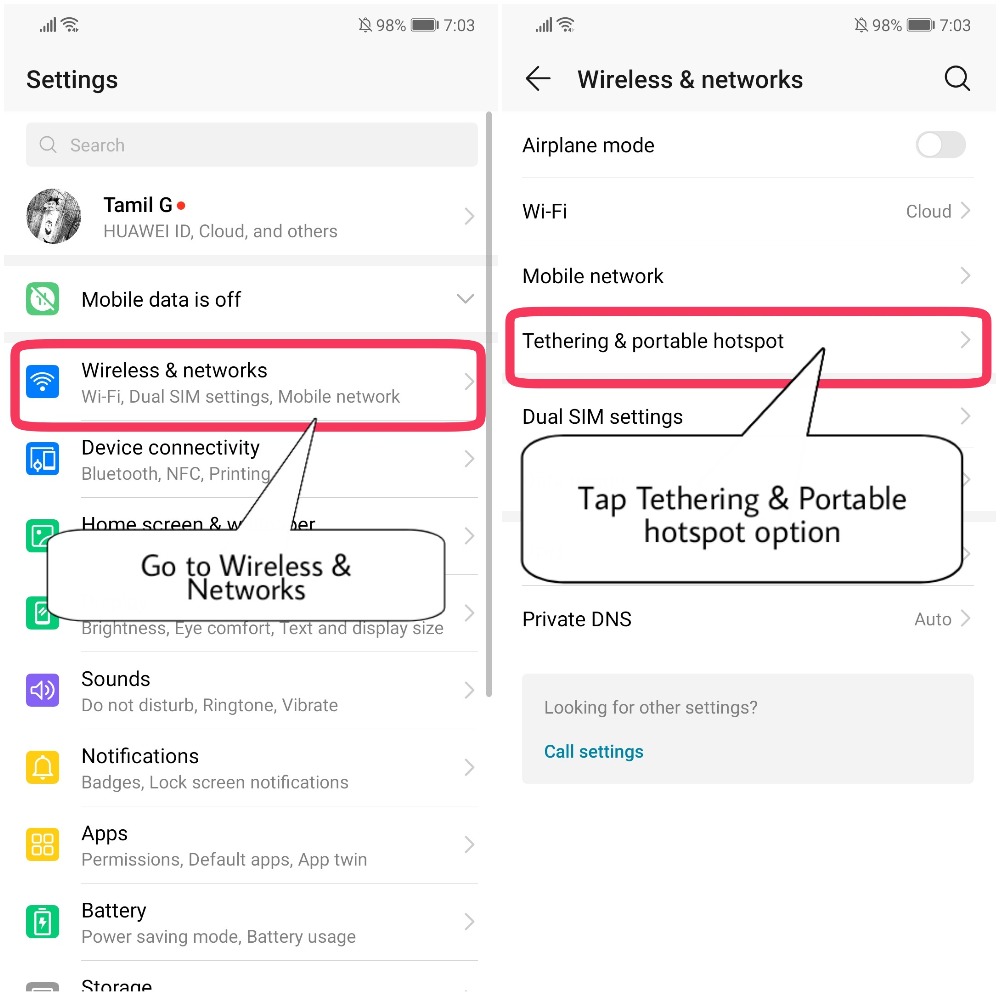
Go to Settings > Open Wireless & networks, Tap on Tethering & portable hotspot
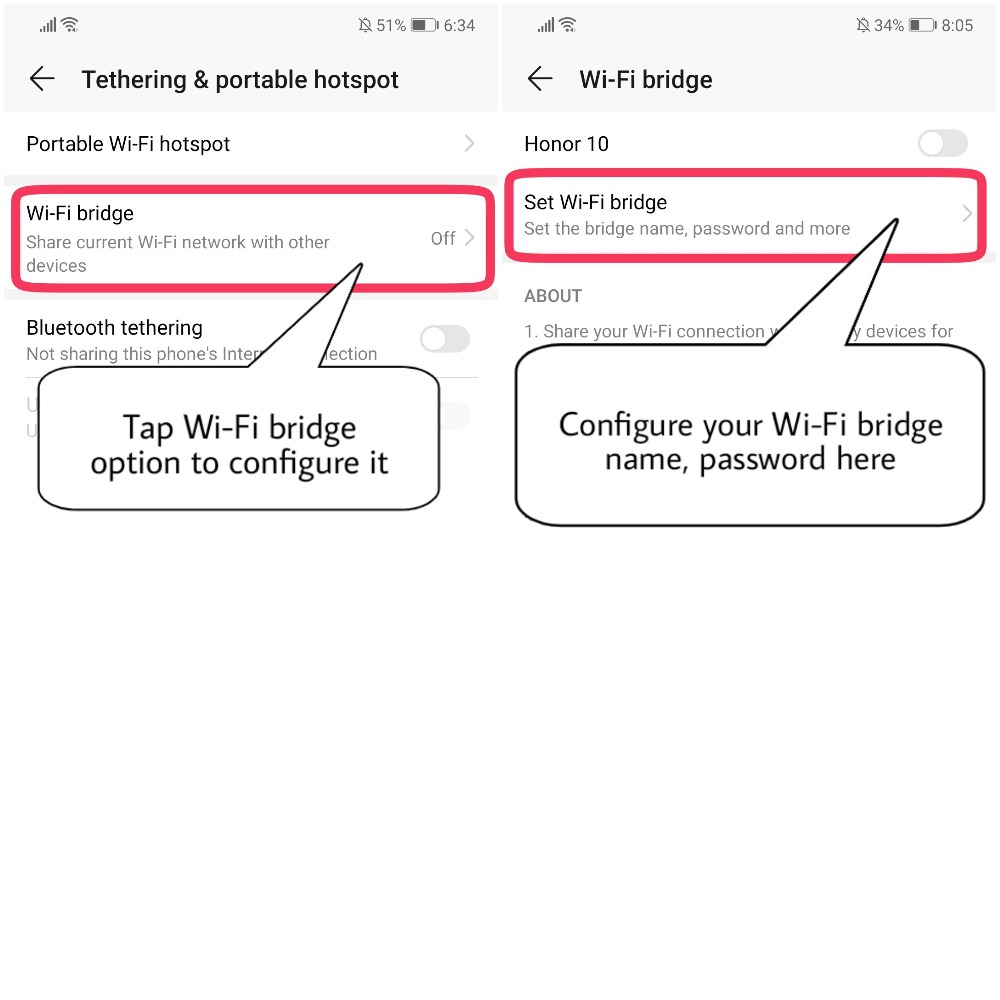
Once you navigated to Tethering & portable hotspot section, you will see the option "Wi-Fi bridge"
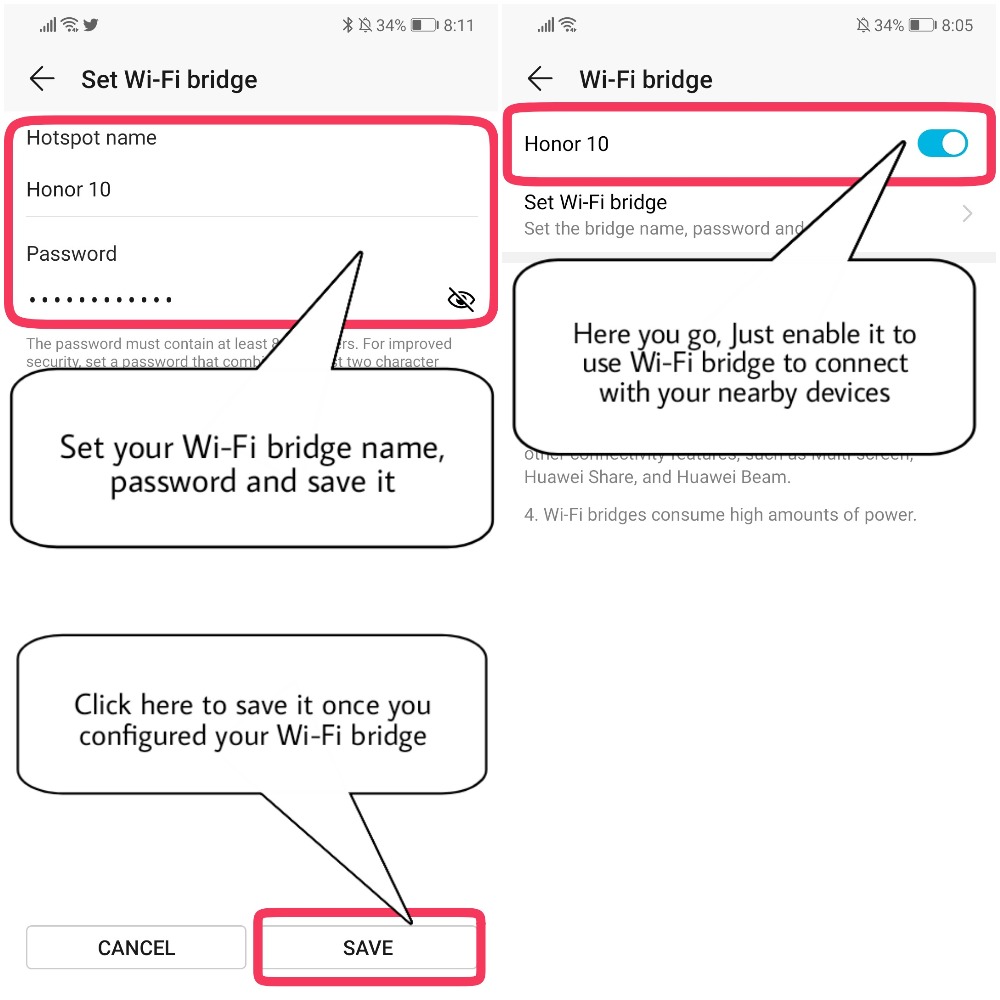
Now Configure your Wi-Fi bridge Name, Password and don't forget to Save it and Enable it
Tips:
1) Without sharing the password, Other devices will be connected to your WiFi network through WiFi Bridge
2) Maximum of 4 devices will be supported at a time.
3) Warning! WiFi Bridge will consume more battery which results in faster battery draining, heating up of a device etc.
4) WiFi Bridge cannot be accessed at the same when other connectivity features are in use, such as Multi-screen, Huawei Share and Huawei Beam. So make sure you check and turn off these features before using WiFi bridge.
That's it, now you have successfully configured and enabled Wi-Fi bridge on your HONOR devices!
Thank you for reading ;)


- Posts
- Following
- Followers
- Energy
-
 Tamil G
Moderator Intern
Tamil G
Moderator Intern
-
+ Follow

-
- 542 Posts
- 49 Following
- 881 Followers
- 39795 Energy

-
 New Comer
-
 Followers reach 50
-
 Followers reach 100
-
 Followers reach 200
-
 7 Days Check-in
-
 30 Days Check-in
-
 100 Days Check-in
-
 Moderator
-
 Halloween 2020
-
 HONOR STAR 2020
-
 New Year 2021
-
 Animal Photography
-
 Plant Photography
-
 Red Photography
-
 Survey Medal!
-
 Water Photography
-
 World Cycling & Running Day
-
 Product Photography
-
 Sky Photography
-
 Activity Photography Medal
-
 Autumn Photography
-
 Rain Photography
-
 HONOR 50: Best Shot!
-
 Monthly Photo Sharing #1 Landscape
-
 HONOR Magic4 Pro
-
 Monthly Photo Sharing #2 People
-
 Monthly Photo Sharing #3 Spring
-
 Monthly Photo Sharing #4 Animal



- Posts
- photo
- video

Hello Honor Fans,
Hope you all had a weekend by the way, Today am going to share a tutorial on How to configure and use Wi-Fi bridge on your HONOR devices.
What is Wi-Fi bridge?
Sometimes, your Wi-Fi router signals doesn’t reach every rooms in your entire home, which results in getting a Wi-Fi repeaters or Wi-Fi extenders . But with supported HONOR devices you can extend with the feature called Wi-Fi Bridge!
Wi-Fi bridge is used to extend the coverage area of your current Wi-Fi network. It works by receiving your existing Wi-Fi signal, then transmitting the stimulated signal by amplifying it to cover your entire home at maximum level.
Let's take a look on how to configure and enable it:
Go to Settings > Open Wireless & networks, Tap on Tethering & portable hotspot
Once you navigated to Tethering & portable hotspot section, you will see the option "Wi-Fi bridge"
Now Configure your Wi-Fi bridge Name, Password and don't forget to Save it and Enable it
Tips:
1) Without sharing the password, Other devices will be connected to your WiFi network through WiFi Bridge
2) Maximum of 4 devices will be supported at a time.
3) Warning! WiFi Bridge will consume more battery which results in faster battery draining, heating up of a device etc.
4) WiFi Bridge cannot be accessed at the same when other connectivity features are in use, such as Multi-screen, Huawei Share and Huawei Beam. So make sure you check and turn off these features before using WiFi bridge.
That's it, now you have successfully configured and enabled Wi-Fi bridge on your HONOR devices!
Thank you for reading ;)