



 More Products
 Compare














我的荣耀 开启荣耀之旅



 Disagree Terms
 Log out




[Tutorial] How to capture light trails with your smartphone


 Last reply :
Hello guys I am back with another post. Today I am going to explain how to capture light trails with your smartphone.
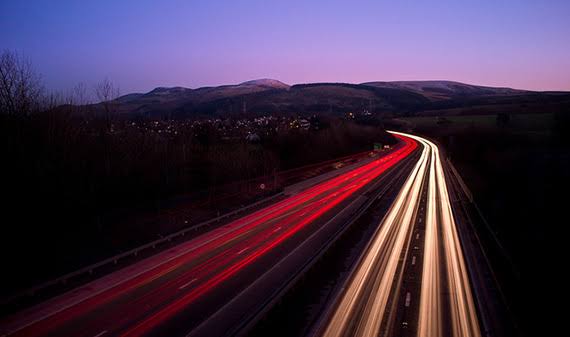
Stabilize your smartphone and photograph cars as they drive by at night. In photography, this is described as long exposure photography. If you want to make your own light trail photos, you need a tripod designed for your phone to stabilize the device. The more stable your phone is, the better the outcome from its camera. In mobile photography, camera shake or handshake can ruin your well-planned shots.
Photographing light trails involves finding a spot where you’ll see the light trails created by cars. You secure your mobile phone, set a long exposure setting on the phone with an app, and shoot at a time when cars are going by to create the trail of light. It’s a little more complicated than it sounds, but the idea behind it is that longer exposures allow the cars that create the trails to move through the image.
Slow Shutter Cam App
Download the Slow Shutter Cam app. It offers some cool features that you can play around with to get those awesome light trails.
The Slow Shutter Cam app takes a series of photos and stitches them together into a single image. This single image shows the continuous trail of light. It is important to stabilize your mobile phone so that these series of images don’t produce any anomalies. Preparations are important. Here's how to capture your first light trails image:
Turn the mobile phone’s camera flash off.
Launch the Slow Shutter Cam app and give it access to your camera, if asked to do so.
Tap the Settings icon in the Slow Shutter Cam app. It resembles a gear.
Tap Light Trail in the Capture Mode section.
Move the Shutter Speed slider all the way to the right, until it says bulb. This setting lets you control when the shutter opens and closes manually.
Select a setting for Light Sensitivityand ISO. Until you become more familiar with the app and light trails, select a midrange setting for each.
Place the phone on a tripod or stable surface and frame the image.
Tap the Shutter button to start capturing.
Tap the Shutter button again to stop capturing.
Tap Save.
Timing is everything, so get all set up before you expect cars. Then, when you see cars approach, tap the shutter button.
About Exposure
If you are photographing cars, you want to leave it open as long as it takes a car in the distance to pass your phone to capture a full trail.
If you are using the long-exposure setting to film something like a flickering fire, you can use a shorter exposure time.
Site :lifewire
Source :https://www.lifewire.com/light-trails-tutorial-2378393
Thank you all........


- Posts
- Following
- Followers
- Energy
-

JackGrim
-
+ Follow

-
- 84 Posts
- 6 Following
- 209 Followers
- 9988 Energy







- Posts
- photo
- video

Hello guys I am back with another post. Today I am going to explain how to capture light trails with your smartphone.
Stabilize your smartphone and photograph cars as they drive by at night. In photography, this is described as long exposure photography. If you want to make your own light trail photos, you need a tripod designed for your phone to stabilize the device. The more stable your phone is, the better the outcome from its camera. In mobile photography, camera shake or handshake can ruin your well-planned shots.
Photographing light trails involves finding a spot where you’ll see the light trails created by cars. You secure your mobile phone, set a long exposure setting on the phone with an app, and shoot at a time when cars are going by to create the trail of light. It’s a little more complicated than it sounds, but the idea behind it is that longer exposures allow the cars that create the trails to move through the image.
Slow Shutter Cam App
Download the Slow Shutter Cam app. It offers some cool features that you can play around with to get those awesome light trails.
The Slow Shutter Cam app takes a series of photos and stitches them together into a single image. This single image shows the continuous trail of light. It is important to stabilize your mobile phone so that these series of images don’t produce any anomalies. Preparations are important. Here's how to capture your first light trails image:
Turn the mobile phone’s camera flash off.
Launch the Slow Shutter Cam app and give it access to your camera, if asked to do so.
Tap the Settings icon in the Slow Shutter Cam app. It resembles a gear.
Tap Light Trail in the Capture Mode section.
Move the Shutter Speed slider all the way to the right, until it says bulb. This setting lets you control when the shutter opens and closes manually.
Select a setting for Light Sensitivityand ISO. Until you become more familiar with the app and light trails, select a midrange setting for each.
Place the phone on a tripod or stable surface and frame the image.
Tap the Shutter button to start capturing.
Tap the Shutter button again to stop capturing.
Tap Save.
Timing is everything, so get all set up before you expect cars. Then, when you see cars approach, tap the shutter button.
About Exposure
If you are photographing cars, you want to leave it open as long as it takes a car in the distance to pass your phone to capture a full trail.
If you are using the long-exposure setting to film something like a flickering fire, you can use a shorter exposure time.
Site :lifewire
Source :https://www.lifewire.com/light-trails-tutorial-2378393
Thank you all........