



 More Products
 Compare














我的荣耀 开启荣耀之旅



 Disagree Terms
 Log out




[Tutorial] Enable Eye Comfort Mode at Set Times


 Last reply :
Hello guys,
Do your eyes get tired and sore after looking at your phone for a long time? Well, today I would like to introduce this feature Eye Comfort Mode that can effectively reduce blue-light and adjust the screen to warmer colors, relieving eye fatigue and protecting your eyesight.
So let’s start…
What is Eye Comfort mode?
Almost everyone is having problems with eye strain due to the amount of time they spend in front of screens. To prevent Eye Strain, Huawei introduced Eye Comfort mode, which can effectively reduce blue-light and adjust the screen to warmer colors, relieving eye fatigue and protecting your eyesight.
How to Turn On Eye Comfort mode?
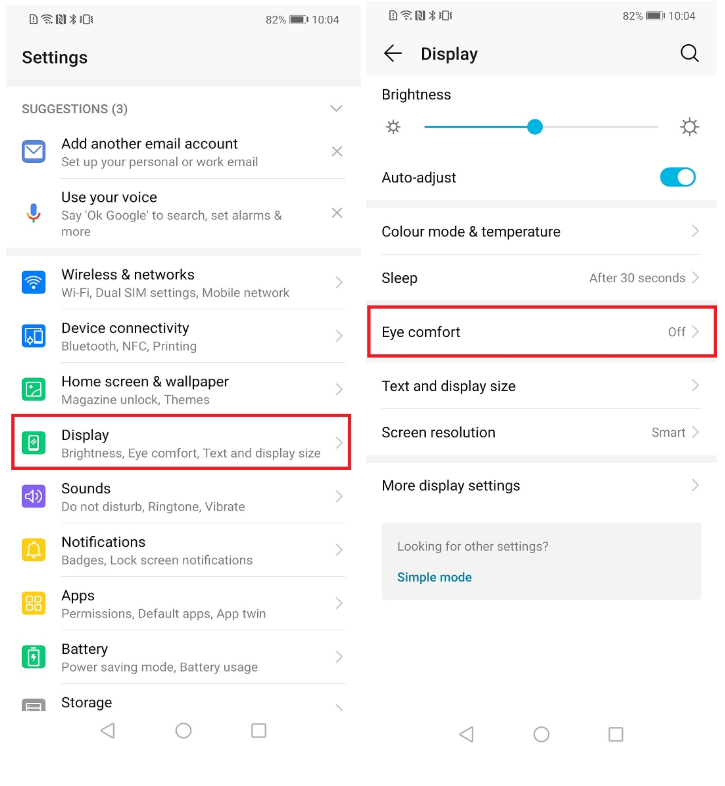
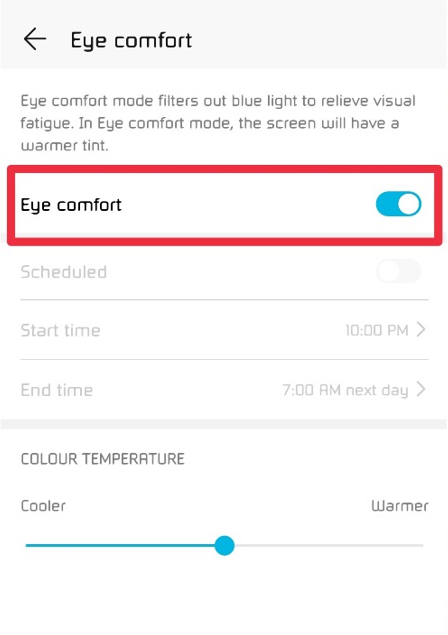
Open Settings, go to Display --> Eye comfort, and enable Eye comfort. The Eye Comfort mode icon will be displayed in the status bar. Once Eye comfort mode is enabled, the blue light will be filtered out and the screen will take on a yellow tint.
How to quickly enable/disable Eye Comfort mode?
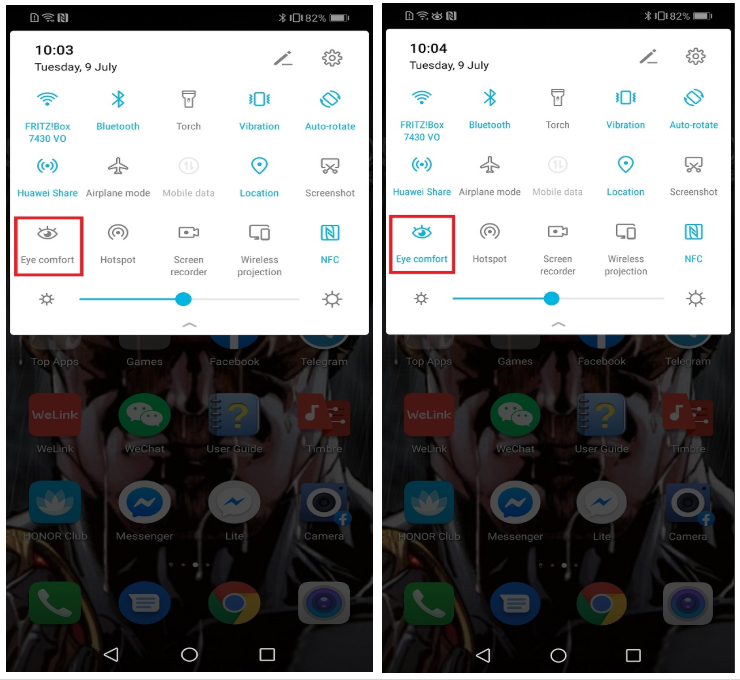
Swipe down from the status bar to open the notification panel. From the notification panel, touch to expand the shortcuts panel, then enable or disable.
How to Enable Eye comfort mode at set times?
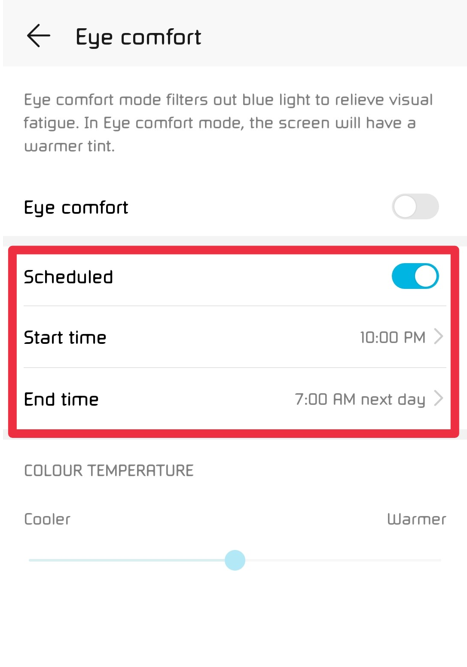
You can configure your Phone to enable Eye comfort mode for a set period of time each day. When Eye comfort mode is disabled, open Settings, go to Display --> Eye comfort, and enable Schedule, then set your desired Start time and End time.
How to Adjust Eye comfort mode color temperature?
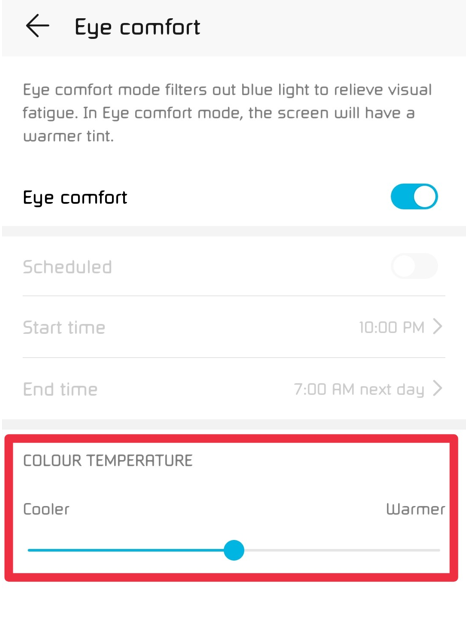
Once Eye comfort mode is enabled, the blue light will be filtered out and the screen will take on a mild yellow tint. You can adjust the color temperature as needed. After you have enabled Eye comfort, you can adjust the color temperature slider for a cooler or warmer screen color.
That's it guys, prevent your Eye Strain by enabling Eye Comfort mode. If you have other questions, please comment below this post. Hope you all find this post useful.
Cheers!


- Posts
- Following
- Followers
- Energy
-

Sebastian
-
+ Follow

-
- 139 Posts
- 390 Following
- 424 Followers
- 10125 Energy



- Posts
- photo
- video

Hello guys,
Do your eyes get tired and sore after looking at your phone for a long time? Well, today I would like to introduce this feature Eye Comfort Mode that can effectively reduce blue-light and adjust the screen to warmer colors, relieving eye fatigue and protecting your eyesight.
So let’s start…
What is Eye Comfort mode?
Almost everyone is having problems with eye strain due to the amount of time they spend in front of screens. To prevent Eye Strain, Huawei introduced Eye Comfort mode, which can effectively reduce blue-light and adjust the screen to warmer colors, relieving eye fatigue and protecting your eyesight.
How to Turn On Eye Comfort mode?
Open Settings, go to Display --> Eye comfort, and enable Eye comfort. The Eye Comfort mode icon will be displayed in the status bar. Once Eye comfort mode is enabled, the blue light will be filtered out and the screen will take on a yellow tint.
How to quickly enable/disable Eye Comfort mode?
Swipe down from the status bar to open the notification panel. From the notification panel, touch to expand the shortcuts panel, then enable or disable.
How to Enable Eye comfort mode at set times?
You can configure your Phone to enable Eye comfort mode for a set period of time each day. When Eye comfort mode is disabled, open Settings, go to Display --> Eye comfort, and enable Schedule, then set your desired Start time and End time.
How to Adjust Eye comfort mode color temperature?
Once Eye comfort mode is enabled, the blue light will be filtered out and the screen will take on a mild yellow tint. You can adjust the color temperature as needed. After you have enabled Eye comfort, you can adjust the color temperature slider for a cooler or warmer screen color.
That's it guys, prevent your Eye Strain by enabling Eye Comfort mode. If you have other questions, please comment below this post. Hope you all find this post useful.
Cheers!