



 More Products
 Compare














我的荣耀 开启荣耀之旅



 Disagree Terms
 Log out




[Tips & Tricks] Wi-Fi Bridge on HONOR EMUI to Extend WiFi Range


 Last reply :
Hello Fans,
I hope that you all are doing great and enjoying your weekend. I would like to start this post with a short story when a friend came to my house and asked me to use my home Wi-Fi source. I don't want to tell the password of my device and my friend asked twice but then an EMUI feature came in my mind which can solve the problem "HONOR WI-FI BRIDGE". This interesting feature came with EMUI 9.0 updates. I connected my phone to my home Wi-Fi and provide my phone signals to my friend without sharing the password of the Wi-Fi source.
This feature can be used in another scenario when your Wi-Fi router doesn’t cover each and every corner of the house. So, you don't need not buy Wi-Fi repeaters or Wi-Fi extenders when you already have an HONOR device.
A Wi-Fi bridge is used to extend the coverage area of your Wi-Fi network. It works by receiving your existing Wi-Fi signal, amplifying it and then transmitting the boosted signal. The most interesting point of Wi-Fi Bridge is that you can share your Wi-Fi with your friend and family without sharing your source password. You can connect up to 4 devices with the Wi-Fi bridge network which provides you the ultimate and flawless Wi-Fi experience as you are directly connected to your Wi-Fi source. Some people mistakenly think that it can be used with other connectivity features such as HONOR Beam, HONOR Share, and Multi-screen but this feature can only be used at a time. I would like to recommend to everyone that Wi-Fi Bridge should only be used when it is necessary because it consumes the battery of your phone.
Configuration of Wi-Fi Bridge
1. Launch the Settings app on your device.
2. Tap on Wireless & networks and select “Tethering & portable hotspot”.
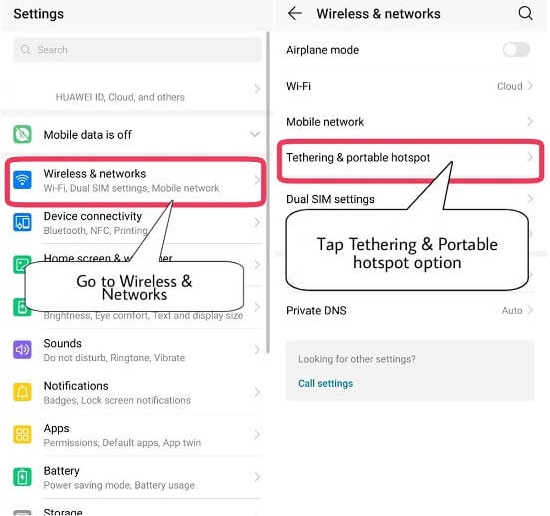
3. Tap on “Wi-Fi Bridge”.
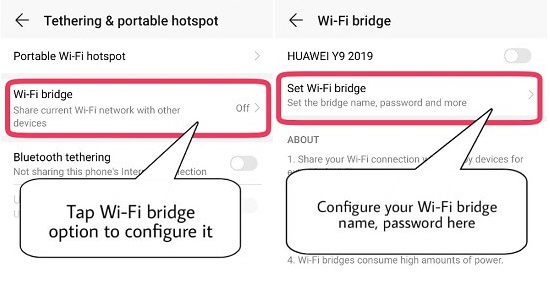
4. Enter the Wi-Fi Bridge Name and Password.
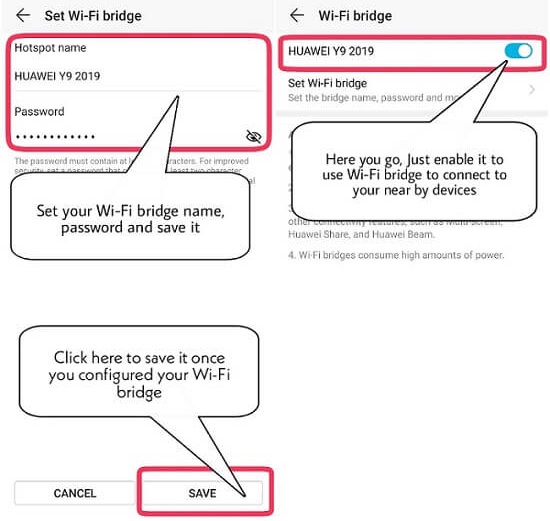
5. Save it, enable it, and here you go.
Start expanding the Wi-Fi signal through your HONOR device, for any queries or issues, feel free to comment below.
Well, I hope you enjoyed and like this article. Don't forget to keep linking and comment below if you have any other questions!
Cheers and till next week!


- Posts
- Following
- Followers
- Energy
-

Sebastian
-
+ Follow

-
- 139 Posts
- 390 Following
- 424 Followers
- 10125 Energy



- Posts
- photo
- video

Hello Fans,
I hope that you all are doing great and enjoying your weekend. I would like to start this post with a short story when a friend came to my house and asked me to use my home Wi-Fi source. I don't want to tell the password of my device and my friend asked twice but then an EMUI feature came in my mind which can solve the problem "HONOR WI-FI BRIDGE". This interesting feature came with EMUI 9.0 updates. I connected my phone to my home Wi-Fi and provide my phone signals to my friend without sharing the password of the Wi-Fi source.
This feature can be used in another scenario when your Wi-Fi router doesn’t cover each and every corner of the house. So, you don't need not buy Wi-Fi repeaters or Wi-Fi extenders when you already have an HONOR device.
A Wi-Fi bridge is used to extend the coverage area of your Wi-Fi network. It works by receiving your existing Wi-Fi signal, amplifying it and then transmitting the boosted signal. The most interesting point of Wi-Fi Bridge is that you can share your Wi-Fi with your friend and family without sharing your source password. You can connect up to 4 devices with the Wi-Fi bridge network which provides you the ultimate and flawless Wi-Fi experience as you are directly connected to your Wi-Fi source. Some people mistakenly think that it can be used with other connectivity features such as HONOR Beam, HONOR Share, and Multi-screen but this feature can only be used at a time. I would like to recommend to everyone that Wi-Fi Bridge should only be used when it is necessary because it consumes the battery of your phone.
Configuration of Wi-Fi Bridge
1. Launch the Settings app on your device.
2. Tap on Wireless & networks and select “Tethering & portable hotspot”.
3. Tap on “Wi-Fi Bridge”.
4. Enter the Wi-Fi Bridge Name and Password.
5. Save it, enable it, and here you go.
Start expanding the Wi-Fi signal through your HONOR device, for any queries or issues, feel free to comment below.
Well, I hope you enjoyed and like this article. Don't forget to keep linking and comment below if you have any other questions!
Cheers and till next week!