



 More Products
 Compare


ABOUT HONOR
Events









我的荣耀 开启荣耀之旅



 Disagree Terms
 Log out




[Tips & Tricks] What to do when you are unable to turn "ON" USB debugging switch?


 Last reply :
Hey there! HONOR Fans'
Hope you all doing good, Today in this post am going to share a Tip on "What to do when you are unable to turn "ON" USB debugging switch?"
What is USB Debugging?
USB Debugging is a way for an Android device to communicate with the Android SDK (Software Developer Kit) over a USB connection. Which allows your Android device to receive commands, files, and the like from the PC, and allows the PC to pull crucial information like log files from the Android device etc
When connecting your phone with a computer, after choosing Charge only, the USB debugging switch will not be turned on if allow ADB debugging in charge only mode is not enabled.
"Please Note: Upon connecting your phone to a computer with charge only mode then the USB debugging switch will not be turned on if allow ADB debugging in charge only mode is not enabled."
Here's the steps to Fix:
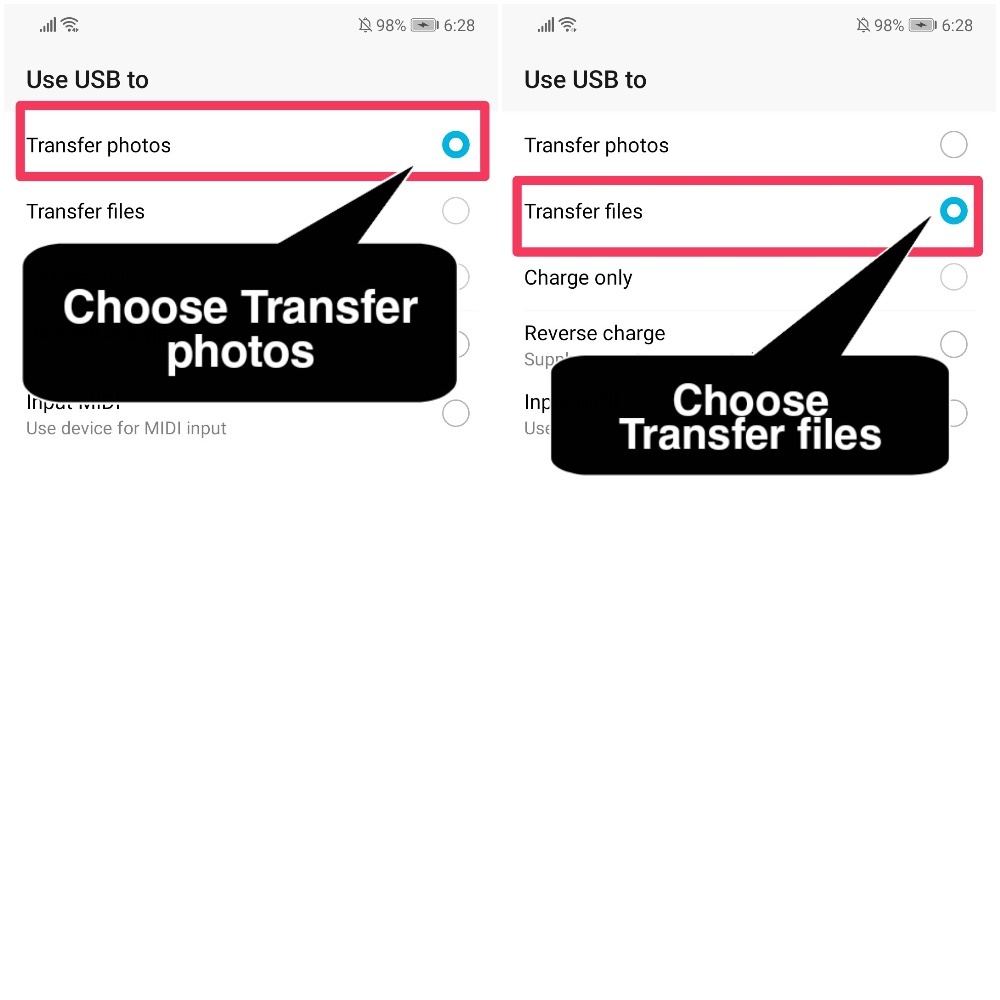
1) Change the USB connection mode to "Transfer photos or Transfer files."
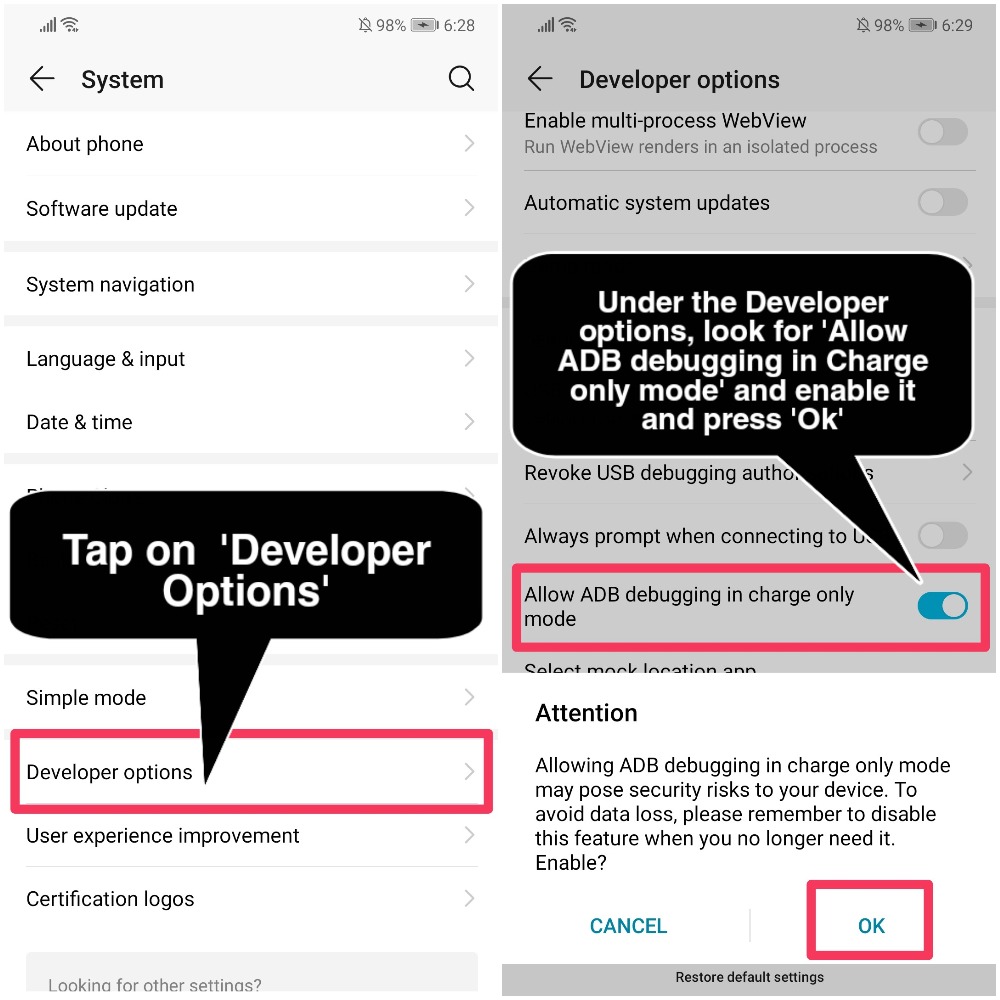
2) If not, enable Allow ADB debugging in charge only mode when the USB connection mode is Charge only in Developer options
Different Ways to Configure USB Mode When connecting to Desktop/Laptop:
First way is
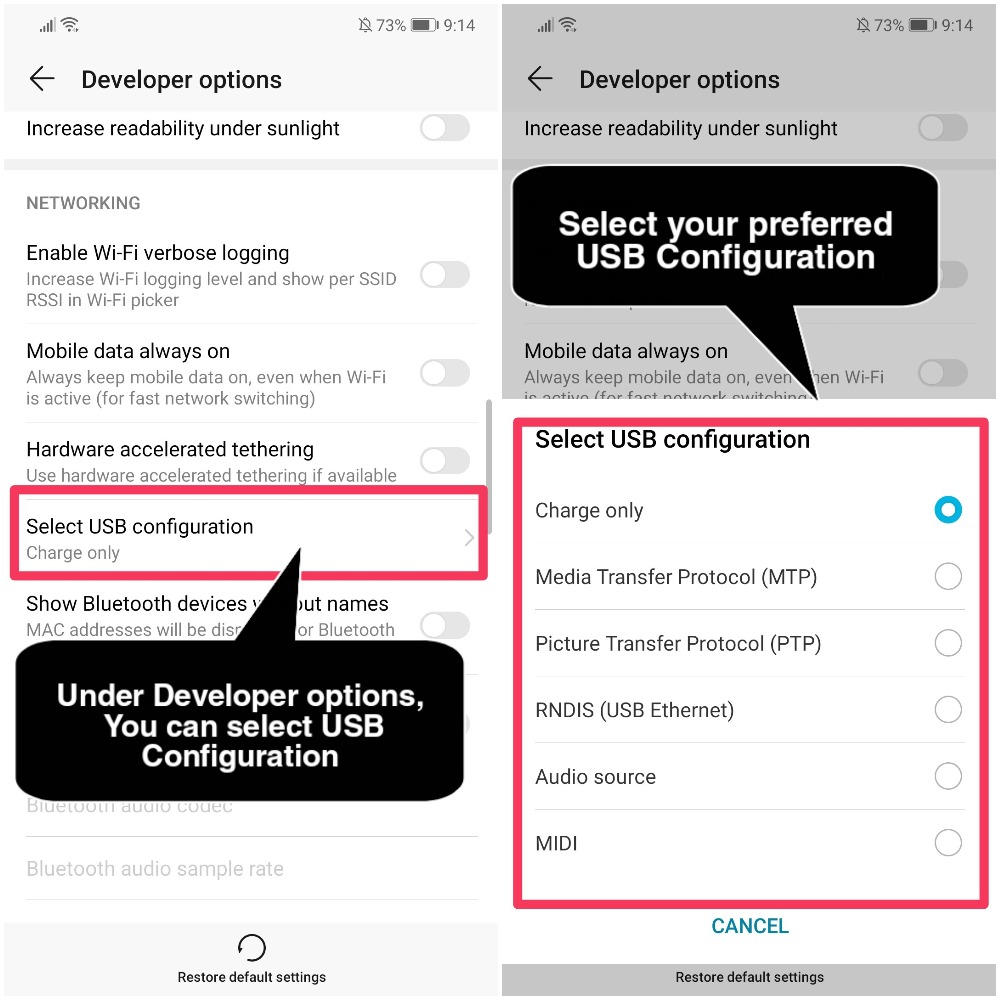
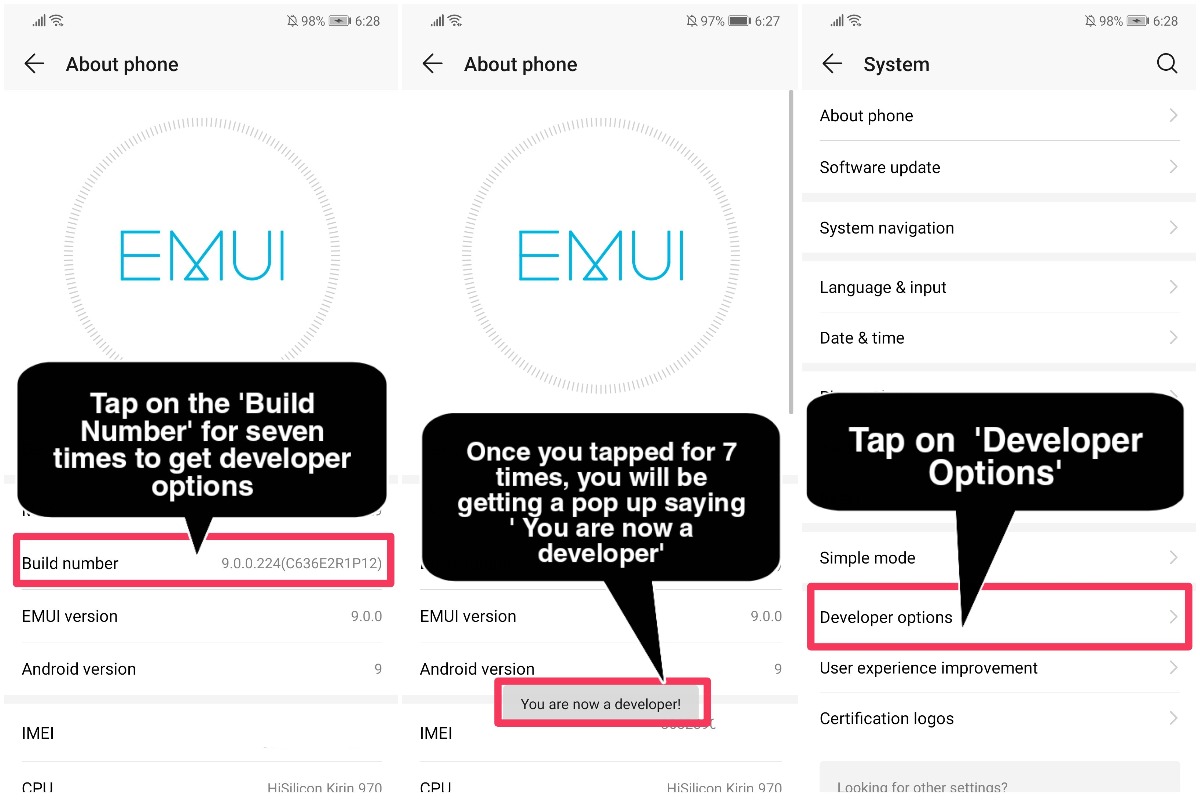
Go to "Settings", navigate to "System options" and Tap on the "Developer Options"
Under the developer options, look for "Select USB Configyration"
From there, Select your prefered "USB Configuration"
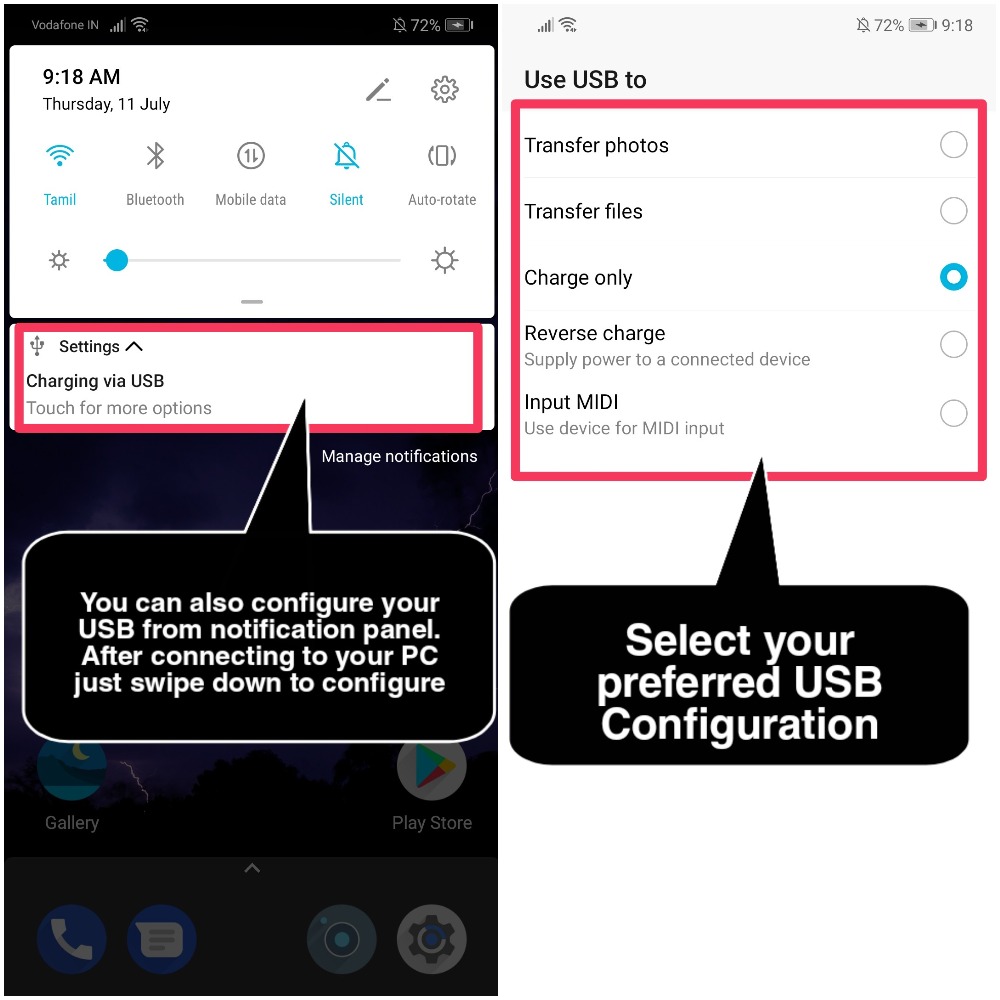
Alternatively you can Configure your USB from Notification Panel/Status Bar
After connecting your device to Desktop/Laptop, Just Swipe Down your screen to get USB configure settings.
Can't find Developer Options under System options? Here's the steps to enable it!
Go to "Settings", then navigate to "System options"
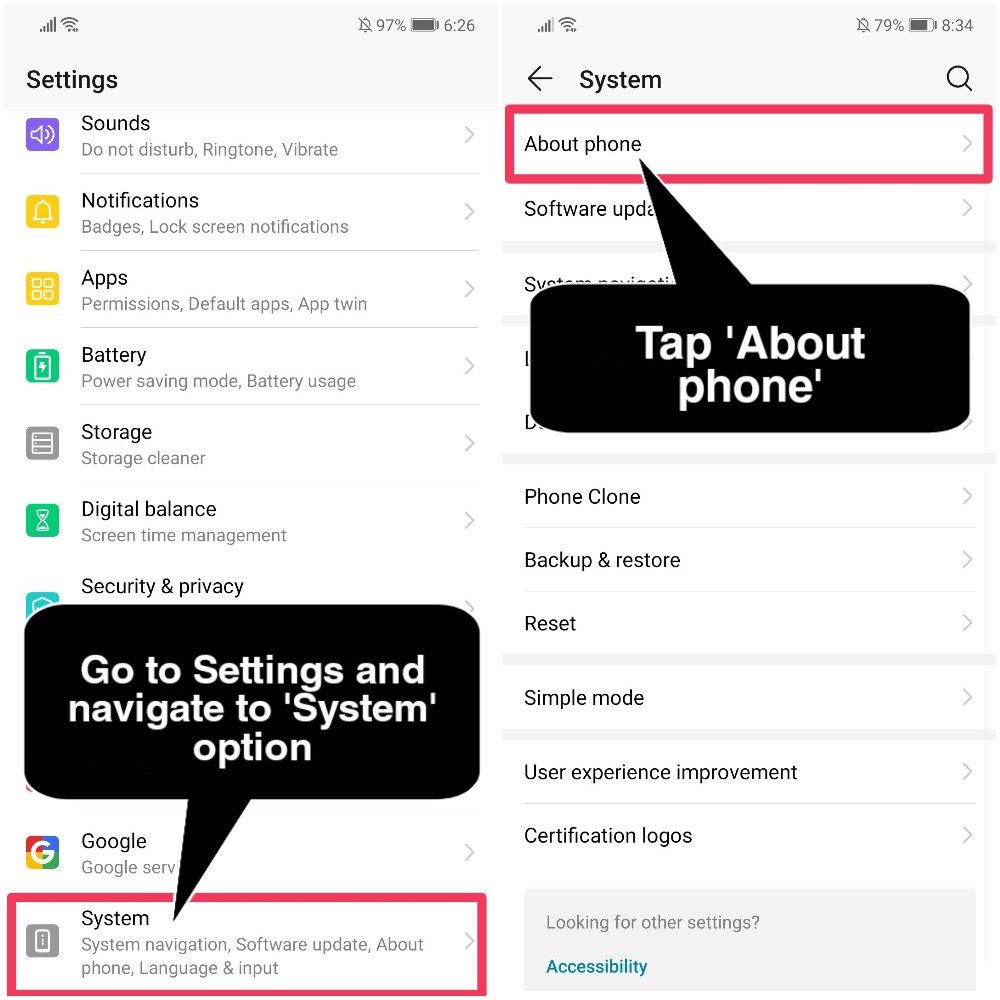
Then tap on "About Phone" to get the details of your device which includes (Android version, Build Number, Security Patch Month, IMEI numbers etc)
Once you are in About Phone section, Tap the "Build Number" for "Seven times" to get the settings "Developer Options under System Settings"
That's it guys, Hope you all find this post useful
Thank you for reading ;)


- Posts
- Following
- Followers
- Energy
-
 Tamil G
Moderator Intern
Tamil G
Moderator Intern
-
+ Follow

-
- 542 Posts
- 49 Following
- 886 Followers
- 39811 Energy

-
 New Comer
-
 Followers reach 50
-
 Followers reach 100
-
 Followers reach 200
-
 7 Days Check-in
-
 30 Days Check-in
-
 100 Days Check-in
-
 Moderator
-
 Halloween 2020
-
 HONOR STAR 2020
-
 New Year 2021
-
 Animal Photography
-
 Plant Photography
-
 Red Photography
-
 Survey Medal!
-
 Water Photography
-
 World Cycling & Running Day
-
 Product Photography
-
 Sky Photography
-
 Activity Photography Medal
-
 Autumn Photography
-
 Rain Photography
-
 HONOR 50: Best Shot!
-
 Monthly Photo Sharing #1 Landscape
-
 HONOR Magic4 Pro
-
 Monthly Photo Sharing #2 People
-
 Monthly Photo Sharing #3 Spring
-
 Monthly Photo Sharing #4 Animal



- Posts
- photo
- video

Hey there! HONOR Fans'
Hope you all doing good, Today in this post am going to share a Tip on "What to do when you are unable to turn "ON" USB debugging switch?"
What is USB Debugging?
USB Debugging is a way for an Android device to communicate with the Android SDK (Software Developer Kit) over a USB connection. Which allows your Android device to receive commands, files, and the like from the PC, and allows the PC to pull crucial information like log files from the Android device etc
When connecting your phone with a computer, after choosing Charge only, the USB debugging switch will not be turned on if allow ADB debugging in charge only mode is not enabled.
"Please Note: Upon connecting your phone to a computer with charge only mode then the USB debugging switch will not be turned on if allow ADB debugging in charge only mode is not enabled."
Here's the steps to Fix:
1) Change the USB connection mode to "Transfer photos or Transfer files."
2) If not, enable Allow ADB debugging in charge only mode when the USB connection mode is Charge only in Developer options
Different Ways to Configure USB Mode When connecting to Desktop/Laptop:
First way is
Go to "Settings", navigate to "System options" and Tap on the "Developer Options"
Under the developer options, look for "Select USB Configyration"
From there, Select your prefered "USB Configuration"
Alternatively you can Configure your USB from Notification Panel/Status Bar
After connecting your device to Desktop/Laptop, Just Swipe Down your screen to get USB configure settings.
Can't find Developer Options under System options? Here's the steps to enable it!
Go to "Settings", then navigate to "System options"
Then tap on "About Phone" to get the details of your device which includes (Android version, Build Number, Security Patch Month, IMEI numbers etc)
Once you are in About Phone section, Tap the "Build Number" for "Seven times" to get the settings "Developer Options under System Settings"
That's it guys, Hope you all find this post useful
Thank you for reading ;)