



 More Products
 Compare














我的荣耀 开启荣耀之旅



 Disagree Terms
 Log out




[Tips & Tricks] What to do when unable to activate Auto-sync data?


 Last reply :
Hello HONOR Fans'
Hope you all had a great Weekend ;)
Today, we are going to see "What to do when unable to activate Auto-sync data?"
The Auto-Sync essentially syncs he data from your phone onto the repective service's servers such as Google, Facebook etc. Moreover you are moving to a new phone or factory resetting your device means where you have not taken a backup , then the Auto-sync option wouuld really comes in handy to sync the device settings, datas' of Apps etc
Steps to do:
Auto-sync data won’t work when Power Saving Mode or Battery Saver is enabled, please disable these modes and try again!
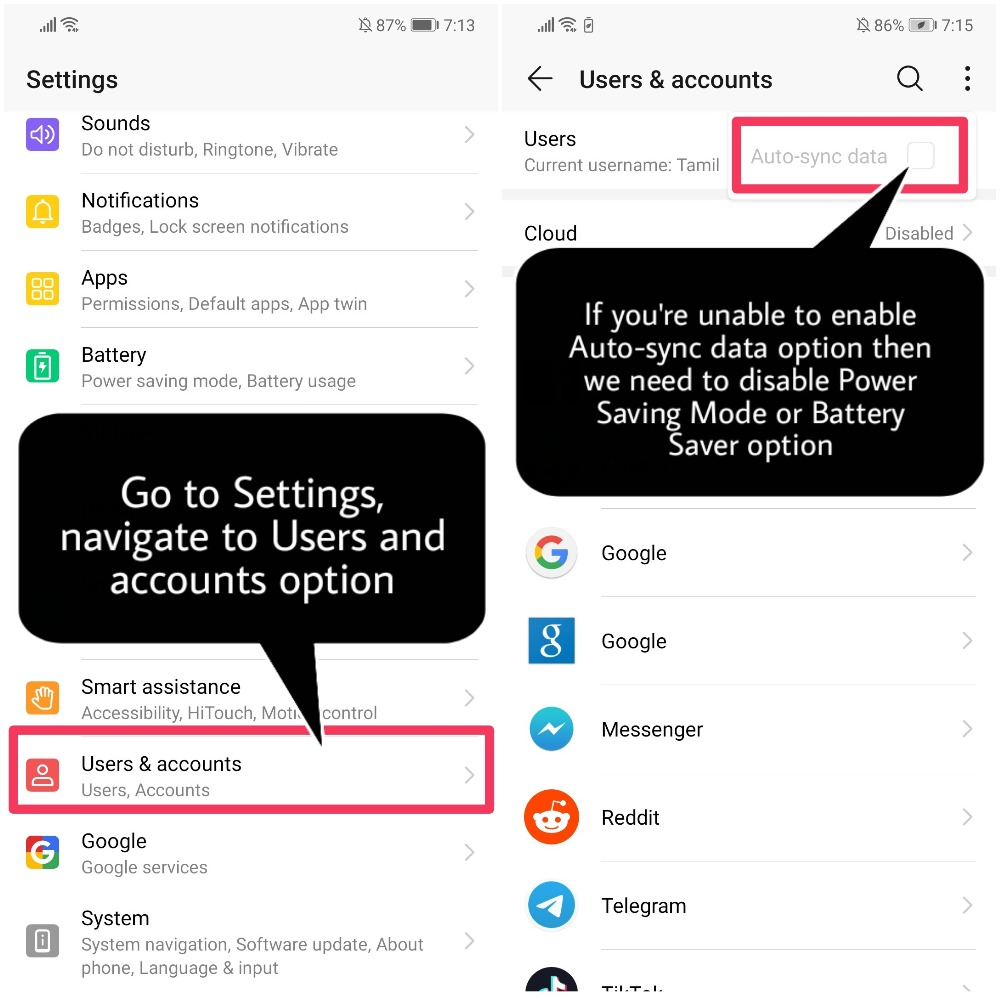
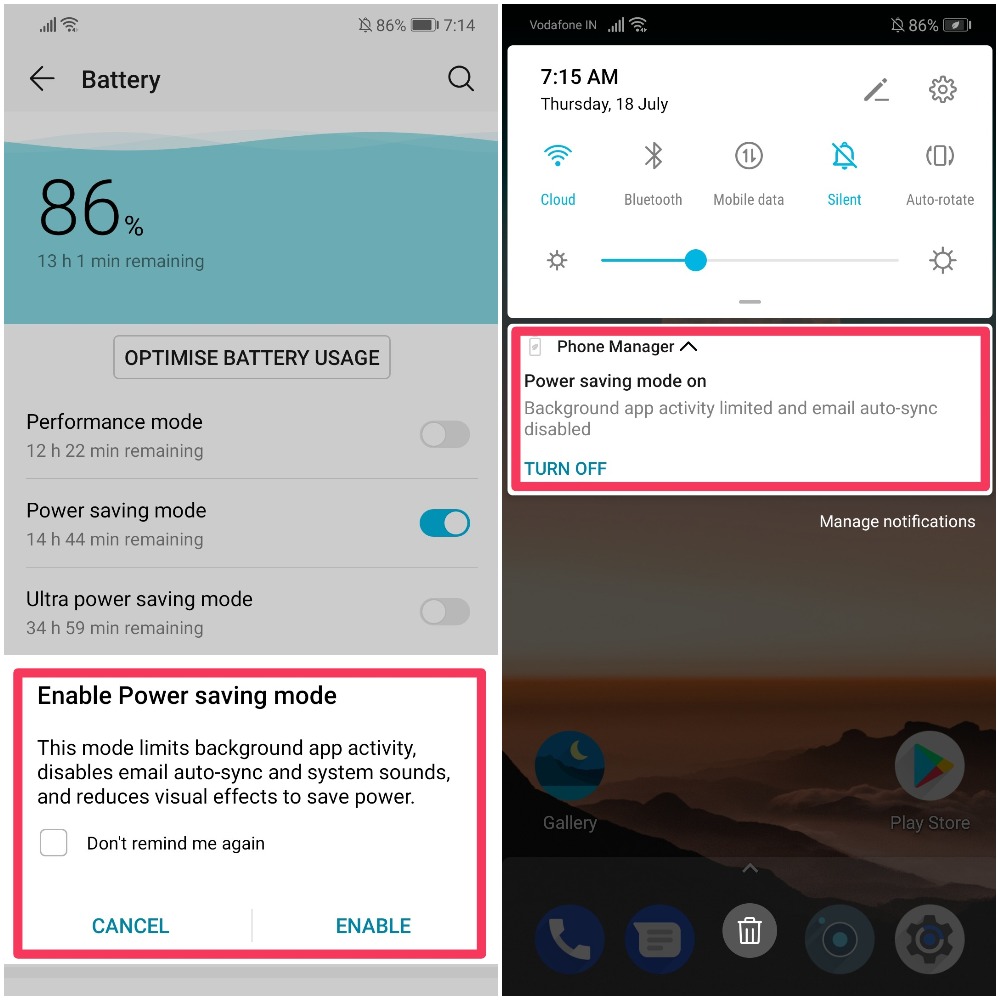
Go to Battery > Turn Off Power Saving mode!

If Power saving mode is enabled you can "Turn It Off" by swiping down from the notification panel as well
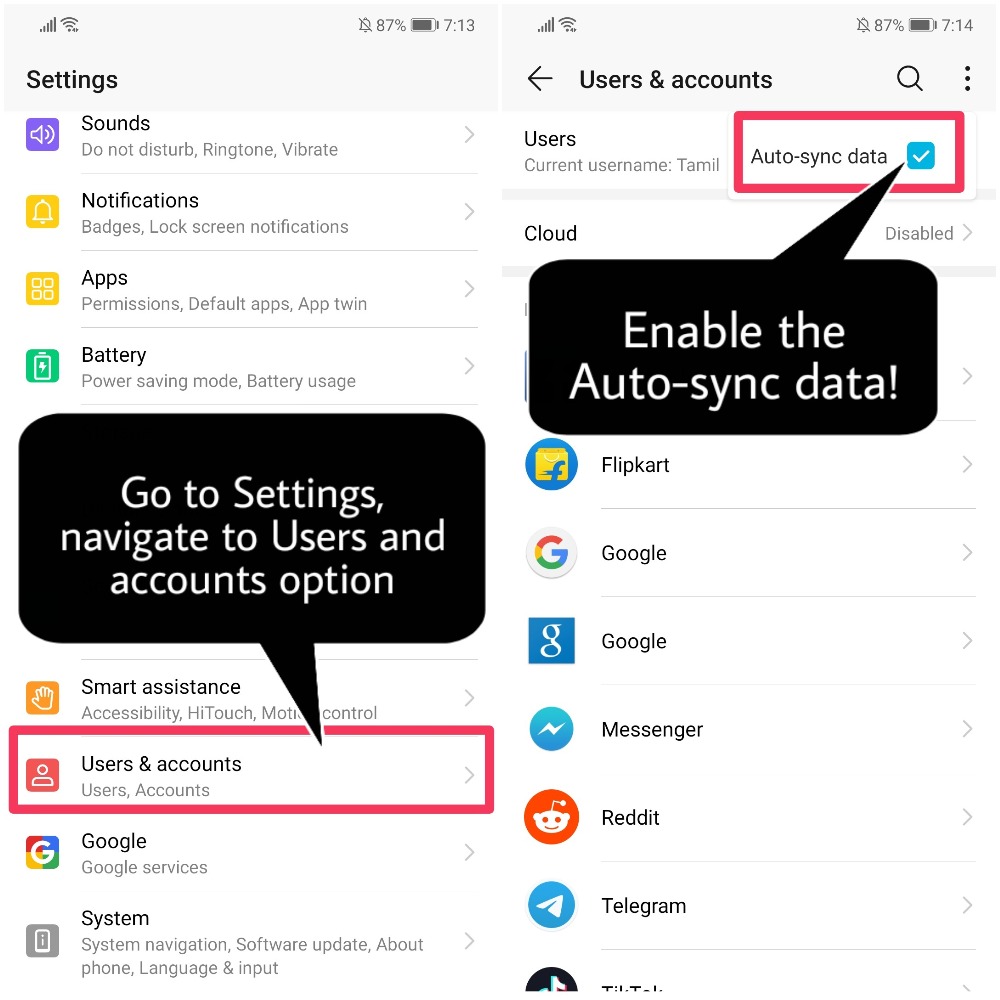
NOTE:
When enabling the Power Saving Mode or Battery saver, You will be prompted with message stating Auto-sync, Background data, Visual effects will be limited!
That's it for today, Hope you all find this post useful!
Thank you for reading ;)


- Posts
- Following
- Followers
- Energy
-
 Tamil G
Moderator Intern
Tamil G
Moderator Intern
-
+ Follow

-
- 542 Posts
- 49 Following
- 881 Followers
- 39795 Energy

-
 New Comer
-
 Followers reach 50
-
 Followers reach 100
-
 Followers reach 200
-
 7 Days Check-in
-
 30 Days Check-in
-
 100 Days Check-in
-
 Moderator
-
 Halloween 2020
-
 HONOR STAR 2020
-
 New Year 2021
-
 Animal Photography
-
 Plant Photography
-
 Red Photography
-
 Survey Medal!
-
 Water Photography
-
 World Cycling & Running Day
-
 Product Photography
-
 Sky Photography
-
 Activity Photography Medal
-
 Autumn Photography
-
 Rain Photography
-
 HONOR 50: Best Shot!
-
 Monthly Photo Sharing #1 Landscape
-
 HONOR Magic4 Pro
-
 Monthly Photo Sharing #2 People
-
 Monthly Photo Sharing #3 Spring
-
 Monthly Photo Sharing #4 Animal



- Posts
- photo
- video

Hello HONOR Fans'
Hope you all had a great Weekend ;)
Today, we are going to see "What to do when unable to activate Auto-sync data?"
The Auto-Sync essentially syncs he data from your phone onto the repective service's servers such as Google, Facebook etc. Moreover you are moving to a new phone or factory resetting your device means where you have not taken a backup , then the Auto-sync option wouuld really comes in handy to sync the device settings, datas' of Apps etc
Steps to do:
Auto-sync data won’t work when Power Saving Mode or Battery Saver is enabled, please disable these modes and try again!
Go to Battery > Turn Off Power Saving mode!
If Power saving mode is enabled you can "Turn It Off" by swiping down from the notification panel as well
NOTE:
When enabling the Power Saving Mode or Battery saver, You will be prompted with message stating Auto-sync, Background data, Visual effects will be limited!
That's it for today, Hope you all find this post useful!
Thank you for reading ;)