



 More Products
 Compare














我的荣耀 开启荣耀之旅



 Disagree Terms
 Log out




[Tips & Tricks] What to do if your Smartphone gets stolen or lost?


 Last reply :
Hello Fans' ;)
I hope you all doing good, Today am going to share a post on "What to do if your Smartphone gets stolen or lost?"
Whether it's the value of the phone or all the personal data it holds that has you worried, having a missing phone is always bad news. Nevertheless, it's important to act quickly if you want to get it back. Here are the first steps you should take if your phone is stolen or lost. However, what should worry you most is not the loss of valuable hardware, but rather the data contained on it. Emails, contacts, photos, business documents, bank account details, it's important to destroy the sensitive data saved on your device immediately if it gets stolen or lost.
How to find your Smartphone?
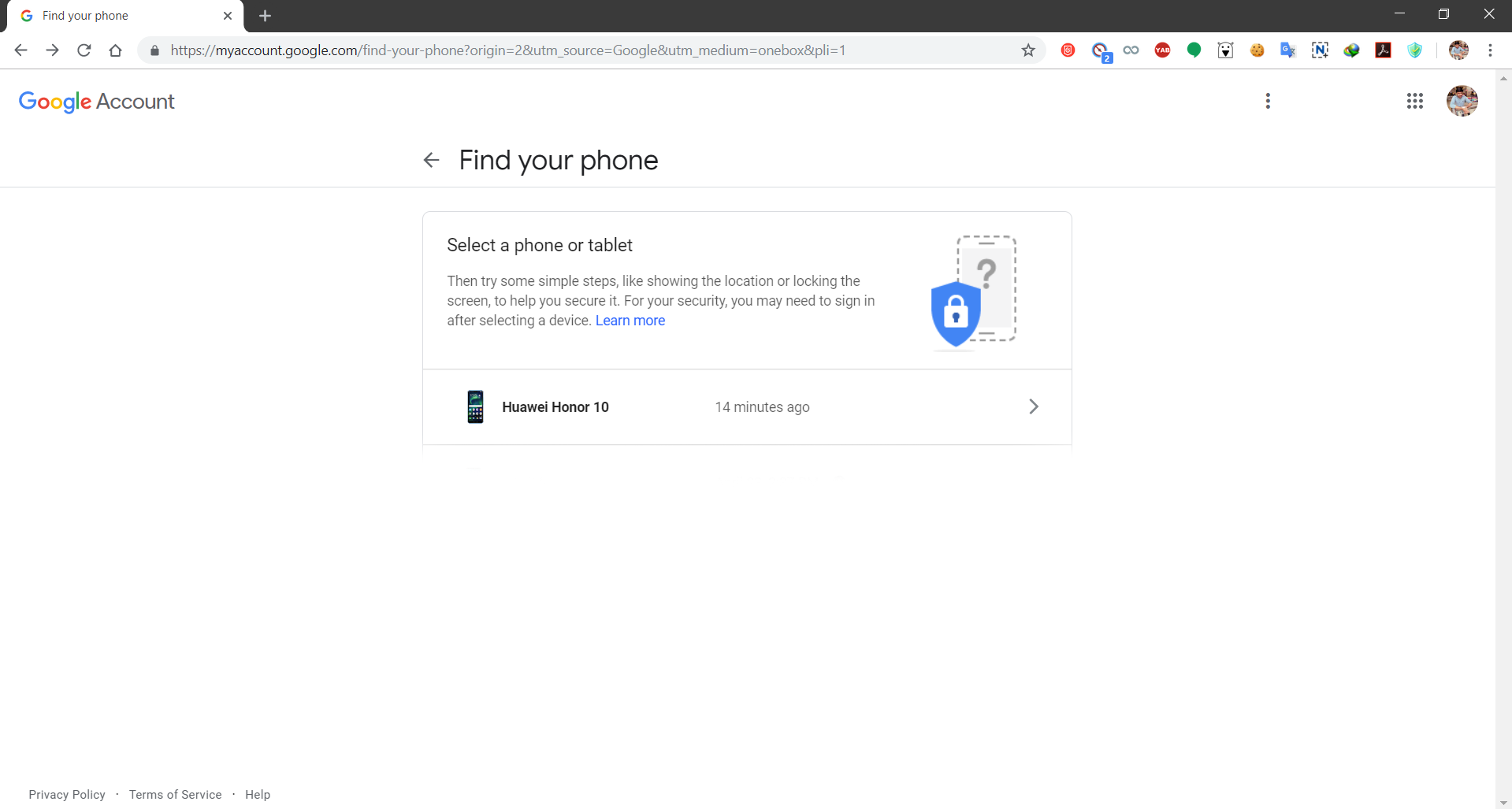
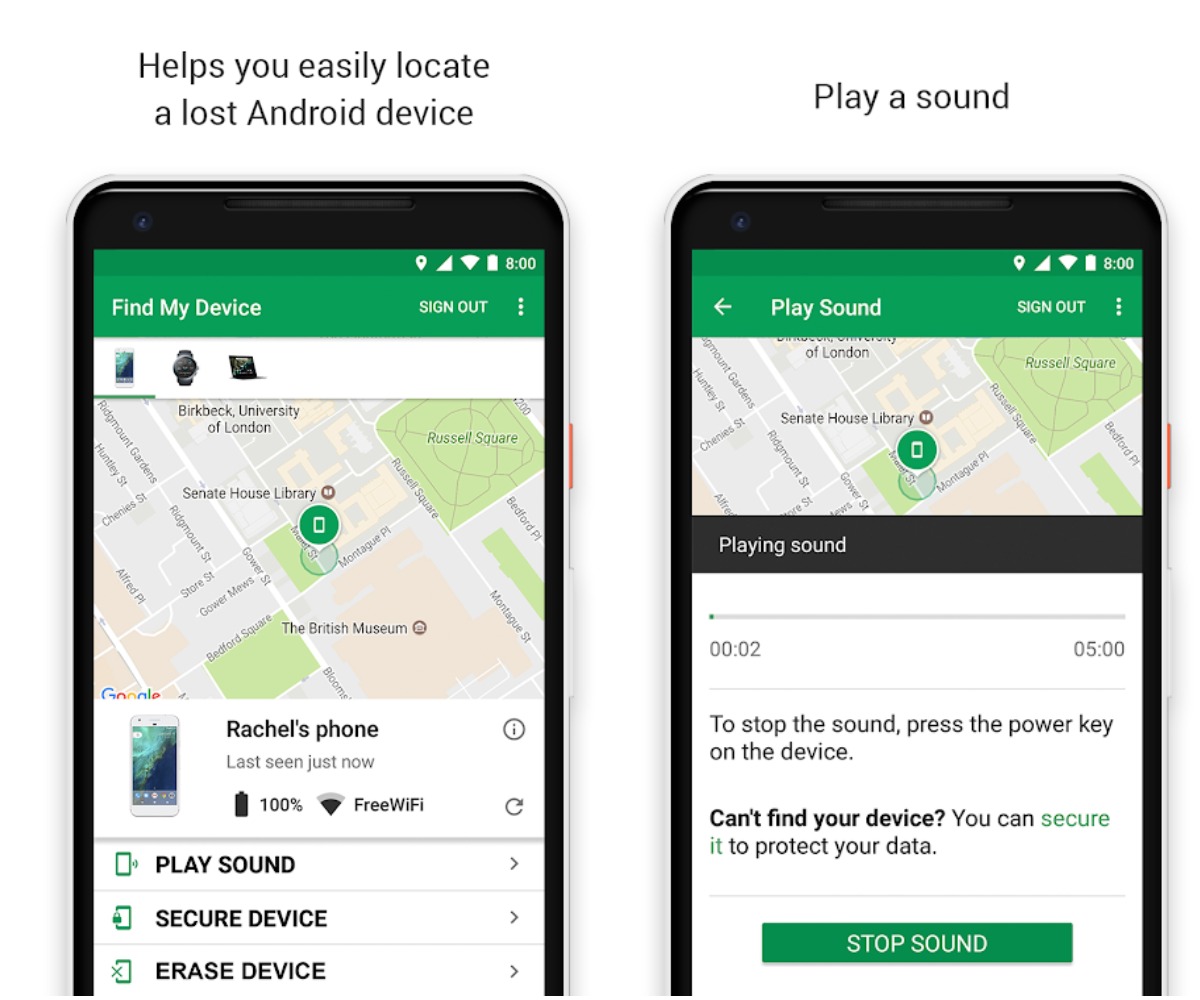
Android offers several ways to find your lost or stolen smartphone. The best-known one is Google's Find My Device, which you can access from the Android website on your computer or the app from the Google Play Store.

How to use Find My Device?
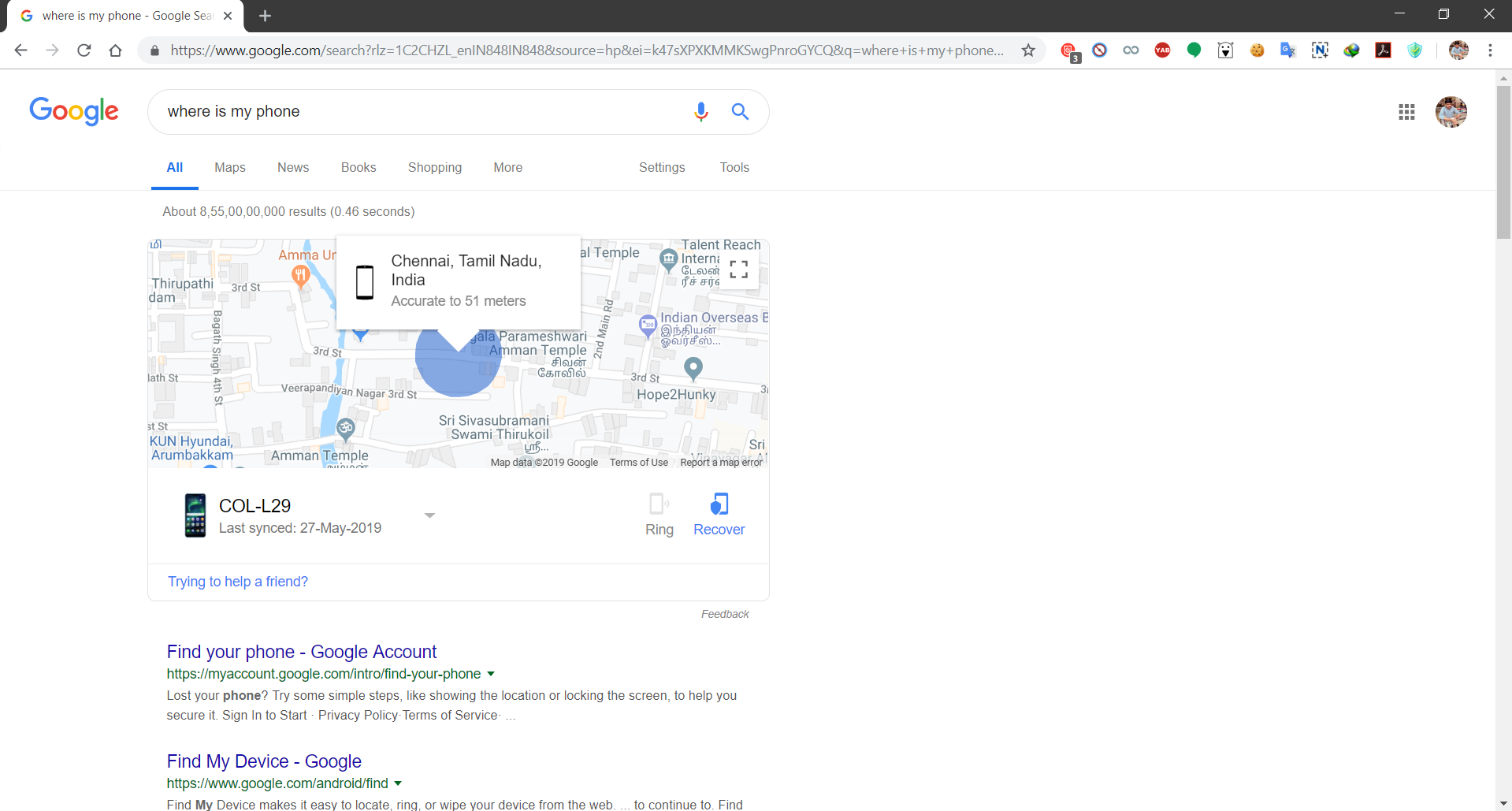
However, one of the easiest ways is typing "Where is my phone" into Google search. If you are logged into the same Google account on both your PC and your smartphone, you can easily track your phone from there. You will be able to see the Wifi network the phone is connected to, as well as its battery percentage. You are also able to make the phone ring at full volume even if it was previously on silent or wipe your data remotely. The key point to be noted here is that your Location has to be set to high accuracy for the best results or else the location need to addressed won't be accurate!
Locate your smartphone with your Smartwatch:
A useful tool to find your smartphone again is a smartwatch. Wear OS' on-board tools make it easy to locate the paired phone. Just activate the Google Assistant and say "Find my smartphone". The watch then searches for the paired phone and lets it sound an alarm, even if it is actually set to silent. The location can also be triggered via the Wear OS menu without a voice command.
With Bluetooth connectivity, this option is hardly useful in the event of theft, unless the thief is still nearby. The smartwatch feature is designed to locate a lost smartphone without having to turn your whole apartment upside down looking for it.
If you've lost your phone on public transportation, it's also a good idea to contact the local transportation authority to see if it's been found. The local police may also be holding it for you if a good citizen has turned it in.
How to wipe your smartphone data remotely:
If you're unable to recover your smartphone, Android gives you the option to erase the data on the phone remotely using the Find My Device service mentioned above. If only takes a few seconds to reset the phone (and the thief won't be able to stop it once it's started), but remember it's irreversible, so consider this option carefully before doing it.
This is why recommend to always do regular backups of important documents, photos etc.

How to report your Smartphone as stolen:
If your phone is stolen, it is important to report the theft to the police as soon as possible within 48 hours at most. This is especially important if your phone is covered by insurance. The police report will allow the authorities to block the phone from being used on other networks.
To report your phone as stolen to the police, you'll need the following information:
1) The IMEI number of the smartphone, which can be found on the box or in the About section of the phone's settings menu. It is like a 15-digit license plate for your smartphone. Keep it written down somewhere.
2) The model of your smartphone and any stolen accessories. Note the brand, version and color.
3) Your phone number and the name of your mobile network.
4) The circumstances of the theft, specifying the date, time and location of the theft.
5) It is very important to know the IMEI number of your smartphone.
6) If your phone is covered against theft by an insurance policy, it's necessary to notify the company as soon as possible so you stay aware of the procedure to follow and the benefits you're entitled to. Pay close attention to what you tell them, as it could mean the difference between seeing the benefits of your policy or being left with no recourse.
How to disable your Mobile phone service:
You need to notify your service provider that your phone has been lost or stolen as soon as possible. Then, your mobile provider can shut off your phone service. You can suspend service to your number by visiting the nearest branch of your mobile service provider or by calling customer service. If you suspend your service, it will stop working instantly, thus avoiding fraudulent use.
To protect your phone in case it gets stolen, or at least mitigate the damage, you should take basic precautions like setting up Find My Device (also known as Android Device Manager), a lock screen passcode and/or the fingerprint scanner etc.
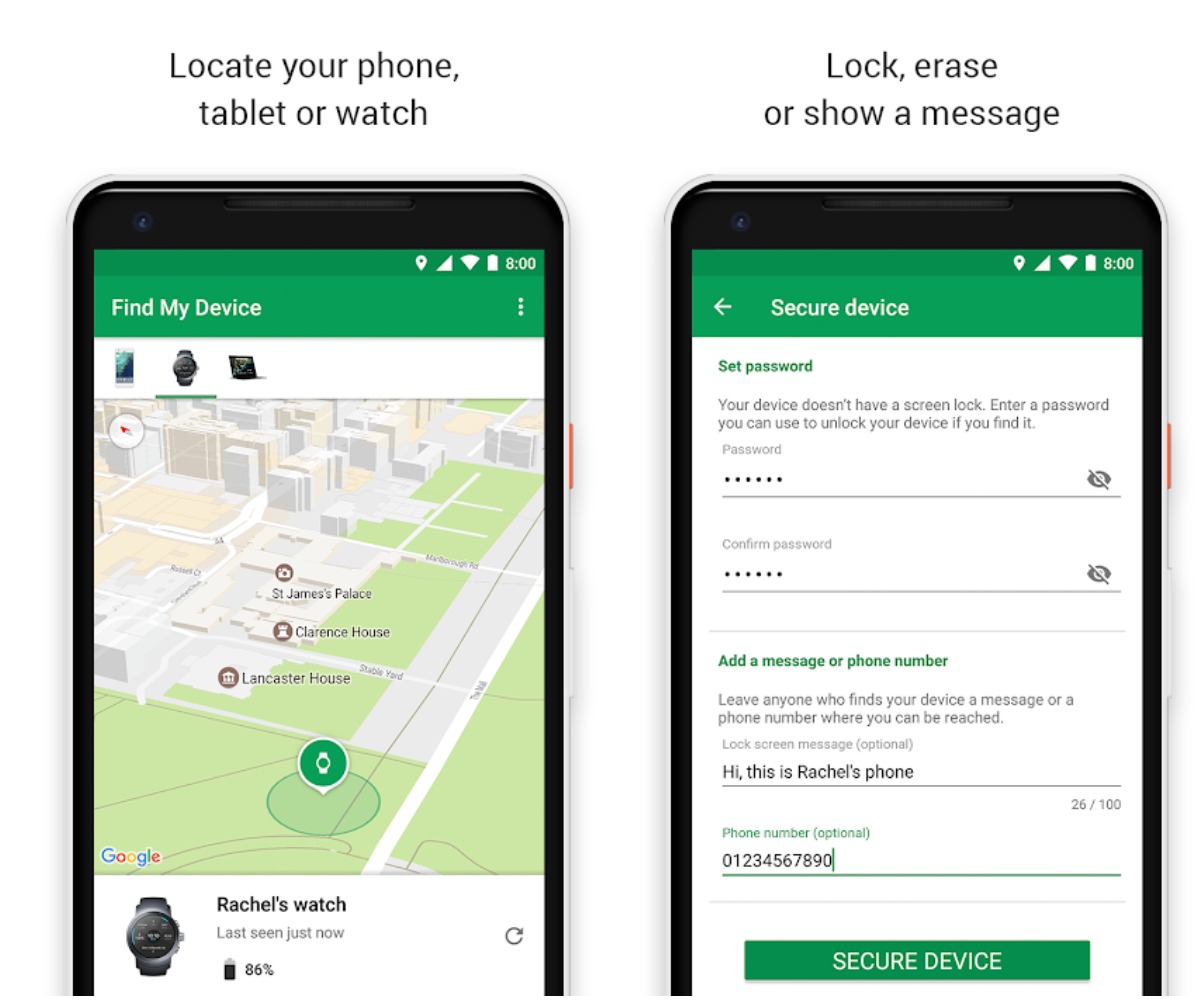
Link to Find My Device:
https://play.google.com/store/apps/details?id=com.google.android.apps.adm&hl=en
That's it fans', Hopefully, you’ll never need this list, but at least you’re prepared just in case!
Have a good day ;)
Source & Image Credits:
https://play.google.com/store/apps/details?id=com.google.android.apps.adm&hl=en
https://contents.asurion.com/wp-content/uploads/2019/02/findPhone-2.jpg


- Posts
- Following
- Followers
- Energy
-
 Tamil G
Moderator Intern
Tamil G
Moderator Intern
-
+ Follow

-
- 542 Posts
- 49 Following
- 881 Followers
- 39795 Energy

-
 New Comer
-
 Followers reach 50
-
 Followers reach 100
-
 Followers reach 200
-
 7 Days Check-in
-
 30 Days Check-in
-
 100 Days Check-in
-
 Moderator
-
 Halloween 2020
-
 HONOR STAR 2020
-
 New Year 2021
-
 Animal Photography
-
 Plant Photography
-
 Red Photography
-
 Survey Medal!
-
 Water Photography
-
 World Cycling & Running Day
-
 Product Photography
-
 Sky Photography
-
 Activity Photography Medal
-
 Autumn Photography
-
 Rain Photography
-
 HONOR 50: Best Shot!
-
 Monthly Photo Sharing #1 Landscape
-
 HONOR Magic4 Pro
-
 Monthly Photo Sharing #2 People
-
 Monthly Photo Sharing #3 Spring
-
 Monthly Photo Sharing #4 Animal



- Posts
- photo
- video

Hello Fans' ;)
I hope you all doing good, Today am going to share a post on "What to do if your Smartphone gets stolen or lost?"
Whether it's the value of the phone or all the personal data it holds that has you worried, having a missing phone is always bad news. Nevertheless, it's important to act quickly if you want to get it back. Here are the first steps you should take if your phone is stolen or lost. However, what should worry you most is not the loss of valuable hardware, but rather the data contained on it. Emails, contacts, photos, business documents, bank account details, it's important to destroy the sensitive data saved on your device immediately if it gets stolen or lost.
How to find your Smartphone?
Android offers several ways to find your lost or stolen smartphone. The best-known one is Google's Find My Device, which you can access from the Android website on your computer or the app from the Google Play Store.
How to use Find My Device?
However, one of the easiest ways is typing "Where is my phone" into Google search. If you are logged into the same Google account on both your PC and your smartphone, you can easily track your phone from there. You will be able to see the Wifi network the phone is connected to, as well as its battery percentage. You are also able to make the phone ring at full volume even if it was previously on silent or wipe your data remotely. The key point to be noted here is that your Location has to be set to high accuracy for the best results or else the location need to addressed won't be accurate!
Locate your smartphone with your Smartwatch:
A useful tool to find your smartphone again is a smartwatch. Wear OS' on-board tools make it easy to locate the paired phone. Just activate the Google Assistant and say "Find my smartphone". The watch then searches for the paired phone and lets it sound an alarm, even if it is actually set to silent. The location can also be triggered via the Wear OS menu without a voice command.
With Bluetooth connectivity, this option is hardly useful in the event of theft, unless the thief is still nearby. The smartwatch feature is designed to locate a lost smartphone without having to turn your whole apartment upside down looking for it.
If you've lost your phone on public transportation, it's also a good idea to contact the local transportation authority to see if it's been found. The local police may also be holding it for you if a good citizen has turned it in.
How to wipe your smartphone data remotely:
If you're unable to recover your smartphone, Android gives you the option to erase the data on the phone remotely using the Find My Device service mentioned above. If only takes a few seconds to reset the phone (and the thief won't be able to stop it once it's started), but remember it's irreversible, so consider this option carefully before doing it.
This is why recommend to always do regular backups of important documents, photos etc.
How to report your Smartphone as stolen:
If your phone is stolen, it is important to report the theft to the police as soon as possible within 48 hours at most. This is especially important if your phone is covered by insurance. The police report will allow the authorities to block the phone from being used on other networks.
To report your phone as stolen to the police, you'll need the following information:
1) The IMEI number of the smartphone, which can be found on the box or in the About section of the phone's settings menu. It is like a 15-digit license plate for your smartphone. Keep it written down somewhere.
2) The model of your smartphone and any stolen accessories. Note the brand, version and color.
3) Your phone number and the name of your mobile network.
4) The circumstances of the theft, specifying the date, time and location of the theft.
5) It is very important to know the IMEI number of your smartphone.
6) If your phone is covered against theft by an insurance policy, it's necessary to notify the company as soon as possible so you stay aware of the procedure to follow and the benefits you're entitled to. Pay close attention to what you tell them, as it could mean the difference between seeing the benefits of your policy or being left with no recourse.
How to disable your Mobile phone service:
You need to notify your service provider that your phone has been lost or stolen as soon as possible. Then, your mobile provider can shut off your phone service. You can suspend service to your number by visiting the nearest branch of your mobile service provider or by calling customer service. If you suspend your service, it will stop working instantly, thus avoiding fraudulent use.
To protect your phone in case it gets stolen, or at least mitigate the damage, you should take basic precautions like setting up Find My Device (also known as Android Device Manager), a lock screen passcode and/or the fingerprint scanner etc.
Link to Find My Device:
https://play.google.com/store/apps/details?id=com.google.android.apps.adm&hl=en
That's it fans', Hopefully, you’ll never need this list, but at least you’re prepared just in case!
Have a good day ;)
Source & Image Credits:
https://play.google.com/store/apps/details?id=com.google.android.apps.adm&hl=en
https://contents.asurion.com/wp-content/uploads/2019/02/findPhone-2.jpg