



 More Products
 Compare










我的荣耀 开启荣耀之旅



 Disagree Terms
 Log out




[Tips & Tricks] What is the purpose of Disable USB audio routing in Developer options?


 Last reply :
Hello HONOR Fans'
I'm back with another article, it's about "Disable USB audio routing" in Developer options?
What is Disable USB audio routing?
To disable automatic routing to external audio devices connected to a PC through a USB port.
Purpose of Disable USB audio routing?
Enabling this will disable automatic routing to USB audio peripherals, like a USB DAC. In other words a USB sound card over OTG without any tweaks, just simple line out and mic in
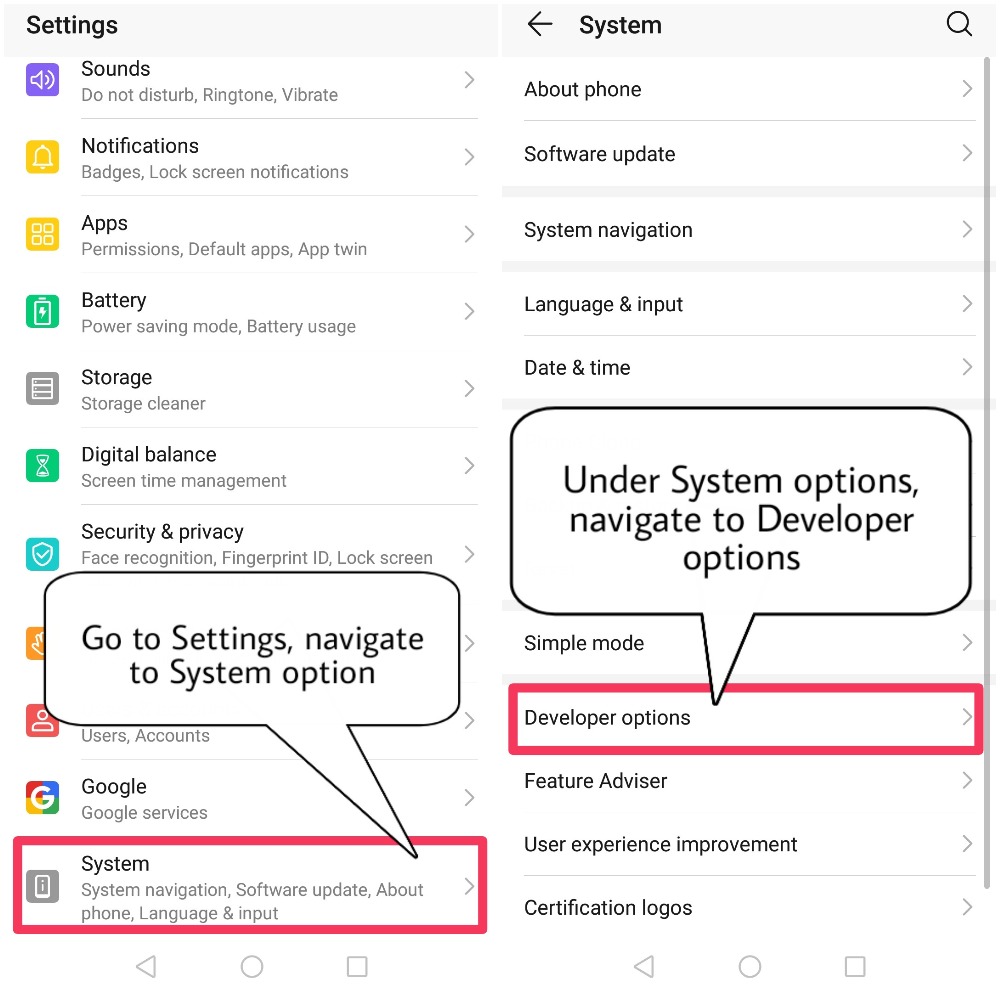
To access Disable USB audio routing option, we need to navigate to Developer options under System menu.
How to enable Developer options if it's not enabled?
1) Open Settings, navigate to System options
2) Tap on About phone
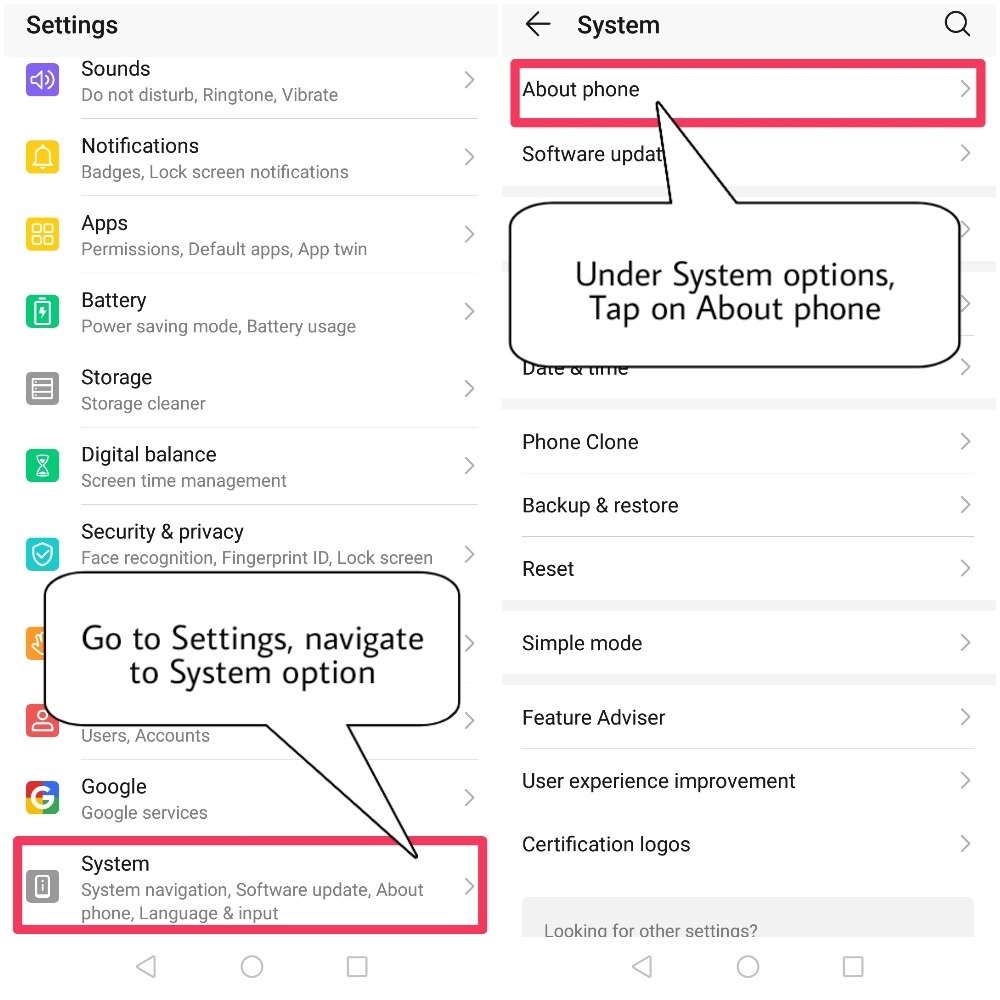
3) Under About phone, Tap on Build number for "7" times to enable Developer options
4) After tapping "7" times, Screen unlock will be promted for security purpose. Just go ahead and that's it
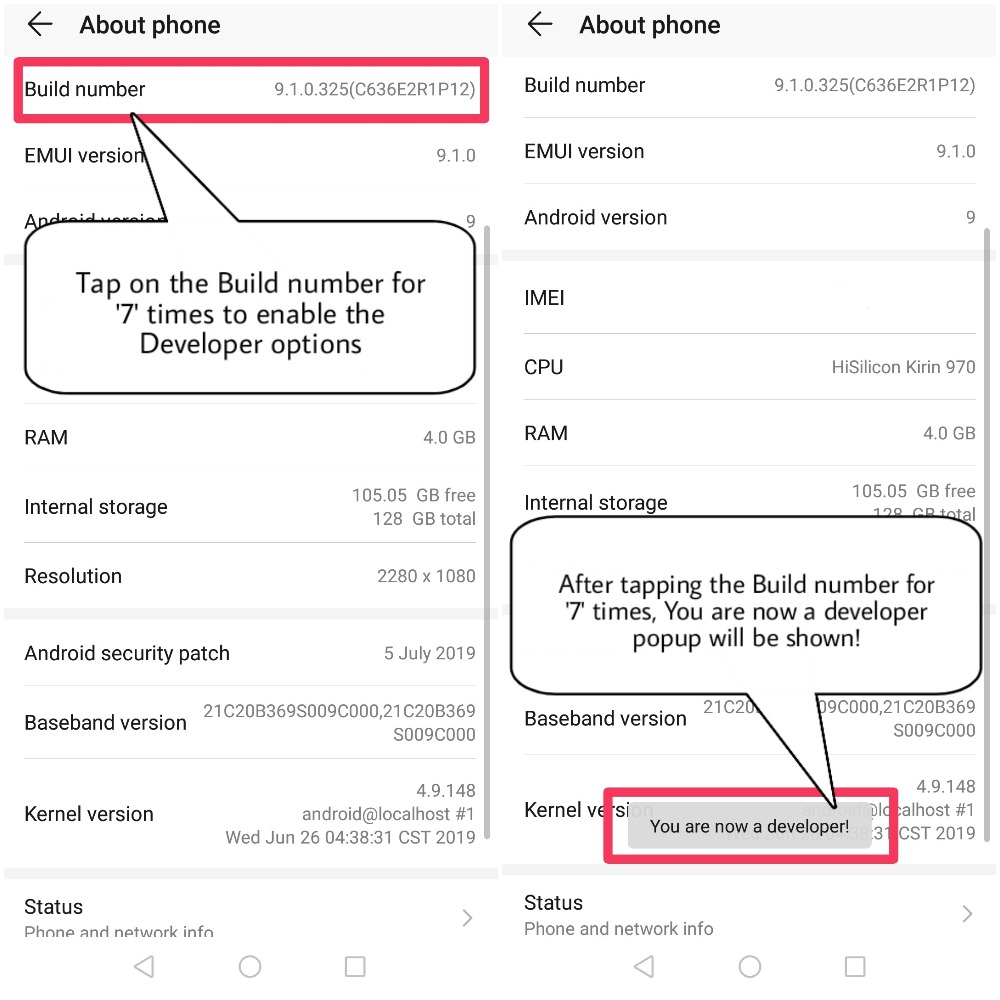
5) Users will be prompted with "You are now a developer" Popup
How to enable Disable USB audio routing?
1) Go to Settings, navigate to Developer options
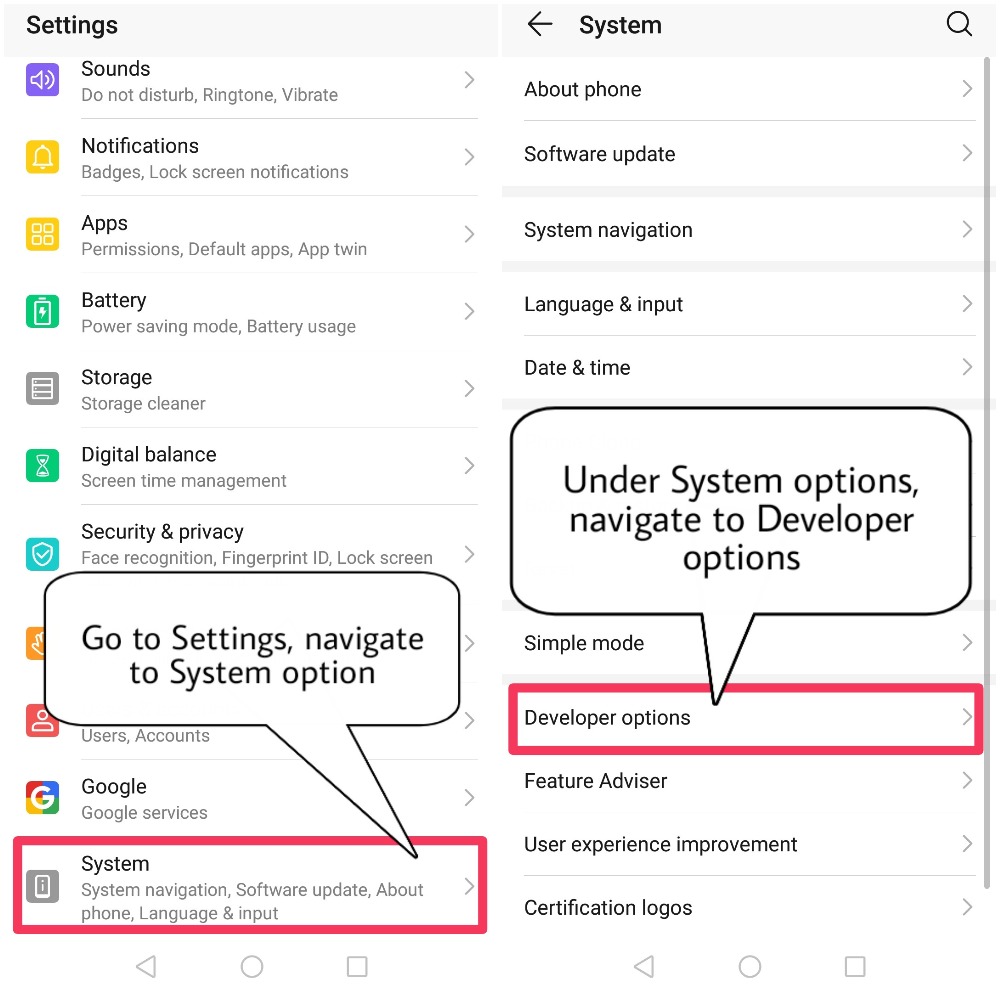
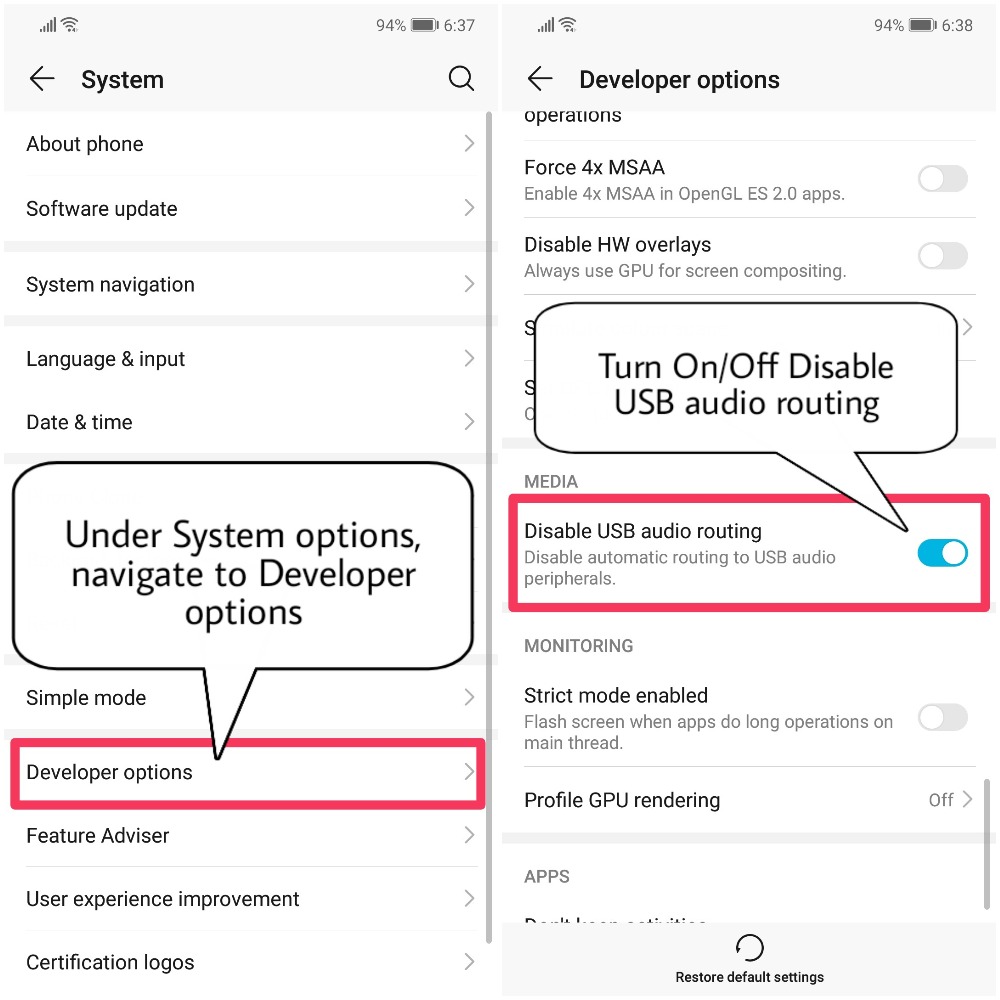
2) Look out for an option "Disable USB audio routing"
3) Toggle this option to enable/disable this function
How to Select USB Configuration as Audio source?
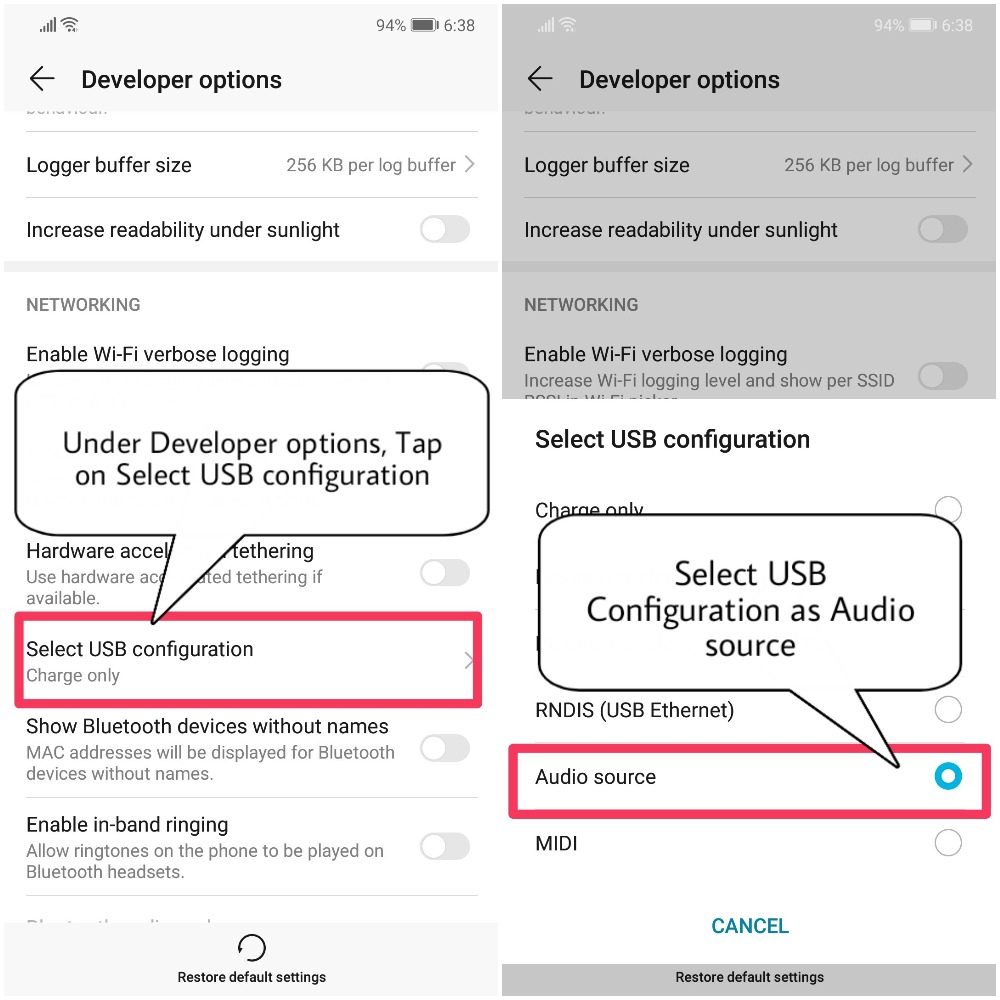
1) Go to Settings, navigate to Developer options
2) Look out for an option "Select USB Configuration"
3) Select USB Configuration as "Audio source"
Uses of Disable USB audio routing
Enables Audio through USB in your Android device to work with external DAC
Able to USB OTG Audio DAC as Audio source
There are no APIs specific to USB digital audio. For advanced usage, the automatic routing may interfere with applications that are USB-aware. For such applications, disable automatic routing via the corresponding control in the Media section of Settings / Developer Options.
Typical USB host mode audio applications include:
Music listening
Telephony
Instant messaging and voice chat
Recording
For all of these applications, Android detects a compatible USB digital audio peripheral, and automatically routes audio playback and capture appropriately, based on the audio policy rules. Stereo content is played on the first two channels of the peripheral.
Hope you all find this post useful, Thank you for reading ;)


- Posts
- Following
- Followers
- Energy
-
 Tamil G
Moderator Intern
Tamil G
Moderator Intern
-
+ Follow

-
- 542 Posts
- 49 Following
- 879 Followers
- 39793 Energy

-
 New Comer
-
 Followers reach 50
-
 Followers reach 100
-
 Followers reach 200
-
 7 Days Check-in
-
 30 Days Check-in
-
 100 Days Check-in
-
 Moderator
-
 Halloween 2020
-
 HONOR STAR 2020
-
 New Year 2021
-
 Animal Photography
-
 Plant Photography
-
 Red Photography
-
 Survey Medal!
-
 Water Photography
-
 World Cycling & Running Day
-
 Product Photography
-
 Sky Photography
-
 Activity Photography Medal
-
 Autumn Photography
-
 Rain Photography
-
 HONOR 50: Best Shot!
-
 Monthly Photo Sharing #1 Landscape
-
 HONOR Magic4 Pro
-
 Monthly Photo Sharing #2 People
-
 Monthly Photo Sharing #3 Spring
-
 Monthly Photo Sharing #4 Animal



- Posts
- photo
- video

Hello HONOR Fans'
I'm back with another article, it's about "Disable USB audio routing" in Developer options?
What is Disable USB audio routing?
To disable automatic routing to external audio devices connected to a PC through a USB port.
Purpose of Disable USB audio routing?
Enabling this will disable automatic routing to USB audio peripherals, like a USB DAC. In other words a USB sound card over OTG without any tweaks, just simple line out and mic in
To access Disable USB audio routing option, we need to navigate to Developer options under System menu.
How to enable Developer options if it's not enabled?
1) Open Settings, navigate to System options
2) Tap on About phone
3) Under About phone, Tap on Build number for "7" times to enable Developer options
4) After tapping "7" times, Screen unlock will be promted for security purpose. Just go ahead and that's it
5) Users will be prompted with "You are now a developer" Popup
How to enable Disable USB audio routing?
1) Go to Settings, navigate to Developer options
2) Look out for an option "Disable USB audio routing"
3) Toggle this option to enable/disable this function
How to Select USB Configuration as Audio source?
1) Go to Settings, navigate to Developer options
2) Look out for an option "Select USB Configuration"
3) Select USB Configuration as "Audio source"
Uses of Disable USB audio routing
Enables Audio through USB in your Android device to work with external DAC
Able to USB OTG Audio DAC as Audio source
There are no APIs specific to USB digital audio. For advanced usage, the automatic routing may interfere with applications that are USB-aware. For such applications, disable automatic routing via the corresponding control in the Media section of Settings / Developer Options.
Typical USB host mode audio applications include:
Music listening
Telephony
Instant messaging and voice chat
Recording
For all of these applications, Android detects a compatible USB digital audio peripheral, and automatically routes audio playback and capture appropriately, based on the audio policy rules. Stereo content is played on the first two channels of the peripheral.
Hope you all find this post useful, Thank you for reading ;)