



 More Products
 Compare














我的荣耀 开启荣耀之旅



 Disagree Terms
 Log out




[Tips & Tricks] Use Moon Mode to Take Photos of the Moon!


 Last reply :
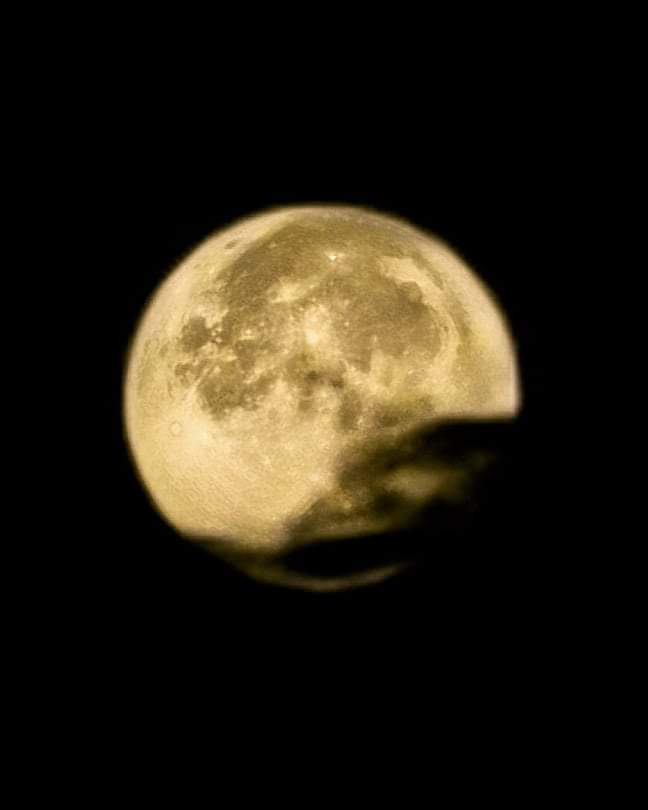
Moon Mode is such an incredible feature and I definitely love it. Here's 1 image zec_mendes took to the moon earlier... Some clouds appeared but Honor 20 Pro AI Moon Mode was able to detect the moon anyways!
You can take photos of the moon, with an Honor 20 Pro (or similar phone) using either of the following modes:
Moon mode:
Open ? Camera.
In Photo mode, aim the camera at the moon and spread your fingers on the viewfinder to adjust the zoom to 10x or more.
After identifying the moon, your camera will automatically recommend the Moon mode to help optimize your shot.
Touch ⚪ to take a photo.
Notes:
To ensure your camera can identify the scene correctly, make sure that AI is turned ON.
Moon mode can only identify the moon if it is at least almost half full.
Moon mode may not be triggered if the moon is shrouded by clouds. If this is the case, touch the viewfinder to focus, then drag the slider beside ? to adjust the settings manually.
Pro mode:
Open ? Camera and touch Pro.
Aim the camera at the moon and spread your fingers on the viewfinder to adjust the zoom to 10x or more.
Touch [ISO] (light sensitivity) and drag the slider to a lower value.
Touch [S] (shutter speed) and drag the slider to around 1/200.
Touch [EV] (exposure compensation) and drag the slider to the lowest value.
Focus on the moon, then touch ⚪.
zec_mendes usually use the moon mode, cause it is simpler and really good. Also using a tripod for this could give a better performance. Another thing is he usually makes 30x zoom, you can try with different zoom and see the one you like the most.
Creator: @zec_mendes
Credits: https://iforum-sg.c.hihonor.com/global/topicdetail/%EF%BD%A2TUTORIAL%EF%BD%A3-Use-Moon-Mode-to-Take-Photos-of-the-Moon/topicId-66410/


- Posts
- Following
- Followers
- Energy
-

Revolt
-
+ Follow

-
- 131 Posts
- 23 Following
- 252 Followers
- 8524 Energy






- Posts
- photo
- video

Moon Mode is such an incredible feature and I definitely love it. Here's 1 image zec_mendes took to the moon earlier... Some clouds appeared but Honor 20 Pro AI Moon Mode was able to detect the moon anyways!
You can take photos of the moon, with an Honor 20 Pro (or similar phone) using either of the following modes:
Moon mode:
Open ? Camera.
In Photo mode, aim the camera at the moon and spread your fingers on the viewfinder to adjust the zoom to 10x or more.
After identifying the moon, your camera will automatically recommend the Moon mode to help optimize your shot.
Touch ⚪ to take a photo.
Notes:
To ensure your camera can identify the scene correctly, make sure that AI is turned ON.
Moon mode can only identify the moon if it is at least almost half full.
Moon mode may not be triggered if the moon is shrouded by clouds. If this is the case, touch the viewfinder to focus, then drag the slider beside ? to adjust the settings manually.
Pro mode:
Open ? Camera and touch Pro.
Aim the camera at the moon and spread your fingers on the viewfinder to adjust the zoom to 10x or more.
Touch [ISO] (light sensitivity) and drag the slider to a lower value.
Touch [S] (shutter speed) and drag the slider to around 1/200.
Touch [EV] (exposure compensation) and drag the slider to the lowest value.
Focus on the moon, then touch ⚪.
zec_mendes usually use the moon mode, cause it is simpler and really good. Also using a tripod for this could give a better performance. Another thing is he usually makes 30x zoom, you can try with different zoom and see the one you like the most.
Creator: @zec_mendes
Credits: https://iforum-sg.c.hihonor.com/global/topicdetail/%EF%BD%A2TUTORIAL%EF%BD%A3-Use-Moon-Mode-to-Take-Photos-of-the-Moon/topicId-66410/