



 More Products
 Compare














我的荣耀 开启荣耀之旅



 Disagree Terms
 Log out




[Tips & Tricks] Simple way to transfer data using Phone clone


 Last reply :
[Tips & Tricks] Simple way to transfering data using Phone clone
Transfering data from old device to new device is simple and incurs just a few steps. The use of Phone Clone can be achieved with both an iOS or Android phone and the instructions are exactly the same.
Wi-Fi or a data connection is not needed. A simple QR code scan is all you need for the transfer and as it’s with secured wireless network encryption, you can be rest assured that all your data is secure and safe.
Just follow the steps below:
Step 1: Find Phone Clone in Huawei AppGallery on your new phone and find the phone clone app on your old device’s app store and download both then open.
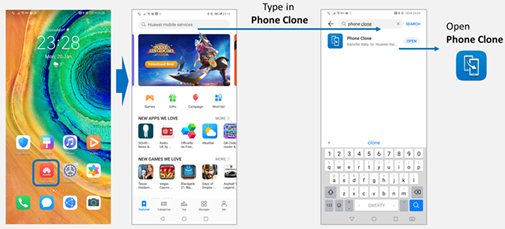
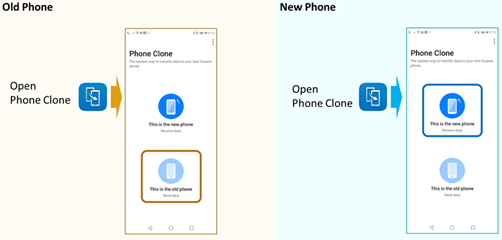
Step 2: Open Phone Clone on both the Old phone and New phone, and choose the “old phone/new phone” respectively.
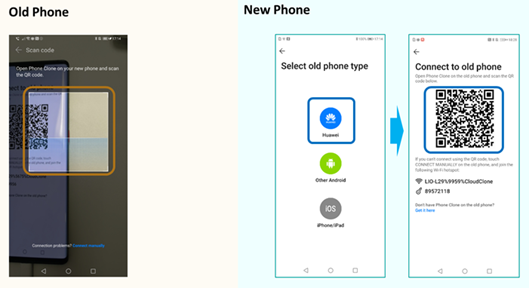
Step 3: Select “Huawei” on the New phone, and use the Old phone to scan the QR code on the New phone.
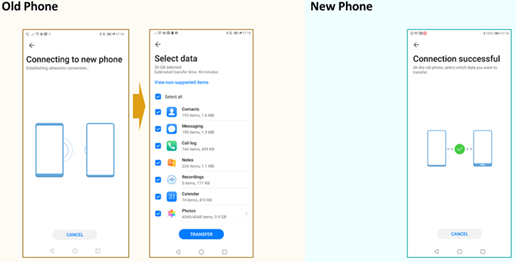
Step 4: After the connection between the Old phone and the New phone is successfully established, select all the data you want to transfer on the Old phone.
Step 5: Please wait for all the selected data from the Old phone to be transferred to the New phone.
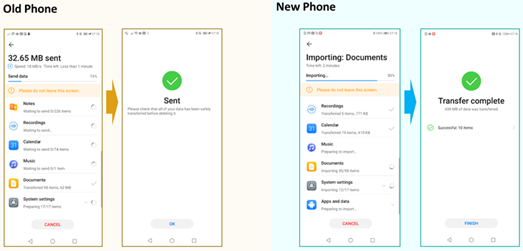
Step 6: Check all the data on the New phone, e.g. WhatsApp, Contact, Call history, etc.






- Posts
- photo
- video

[Tips & Tricks] Simple way to transfering data using Phone clone
Transfering data from old device to new device is simple and incurs just a few steps. The use of Phone Clone can be achieved with both an iOS or Android phone and the instructions are exactly the same.
Wi-Fi or a data connection is not needed. A simple QR code scan is all you need for the transfer and as it’s with secured wireless network encryption, you can be rest assured that all your data is secure and safe.
Just follow the steps below:
Step 1: Find Phone Clone in Huawei AppGallery on your new phone and find the phone clone app on your old device’s app store and download both then open.
Step 2: Open Phone Clone on both the Old phone and New phone, and choose the “old phone/new phone” respectively.
Step 3: Select “Huawei” on the New phone, and use the Old phone to scan the QR code on the New phone.
Step 4: After the connection between the Old phone and the New phone is successfully established, select all the data you want to transfer on the Old phone.
Step 5: Please wait for all the selected data from the Old phone to be transferred to the New phone.
Step 6: Check all the data on the New phone, e.g. WhatsApp, Contact, Call history, etc.