



 More Products
 Compare














我的荣耀 开启荣耀之旅



 Disagree Terms
 Log out




[Tips&Tricks] Magic UI 2.1 for Your HONOR 20 Pro & HONOR 20


 Last reply :
Hi Guys,
HONOR 20 Pro and the HONOR 20 are here, and they are the best choice for those who want to buy a new smartphone now. Both of them provided the best user experience and are packed with quad-camera, Kirin 980, and Magic UI 2.1 based on Android 9.
The Magic UI comes with many useful tricks and features, and some of them might not be easy to find out. So here are some tips for you.
App drawer
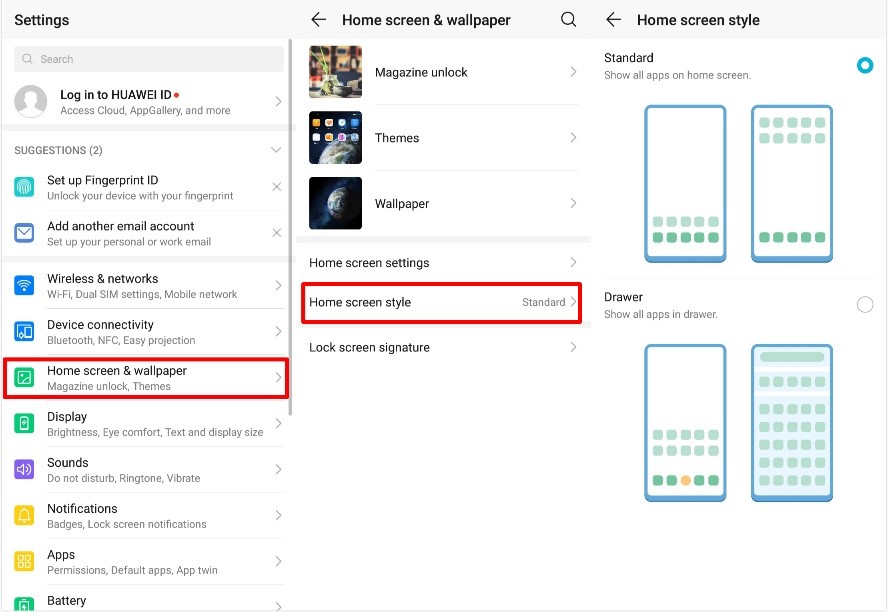
If you have many apps and want your home screen simple, the HONOR 20 provides app drawer beside the standard home screen style, which shows all the apps on the home screen.
Go Setting > Home screen & wallpaper > Home screen style, and choose the drawer.
Shortcuts & gestures
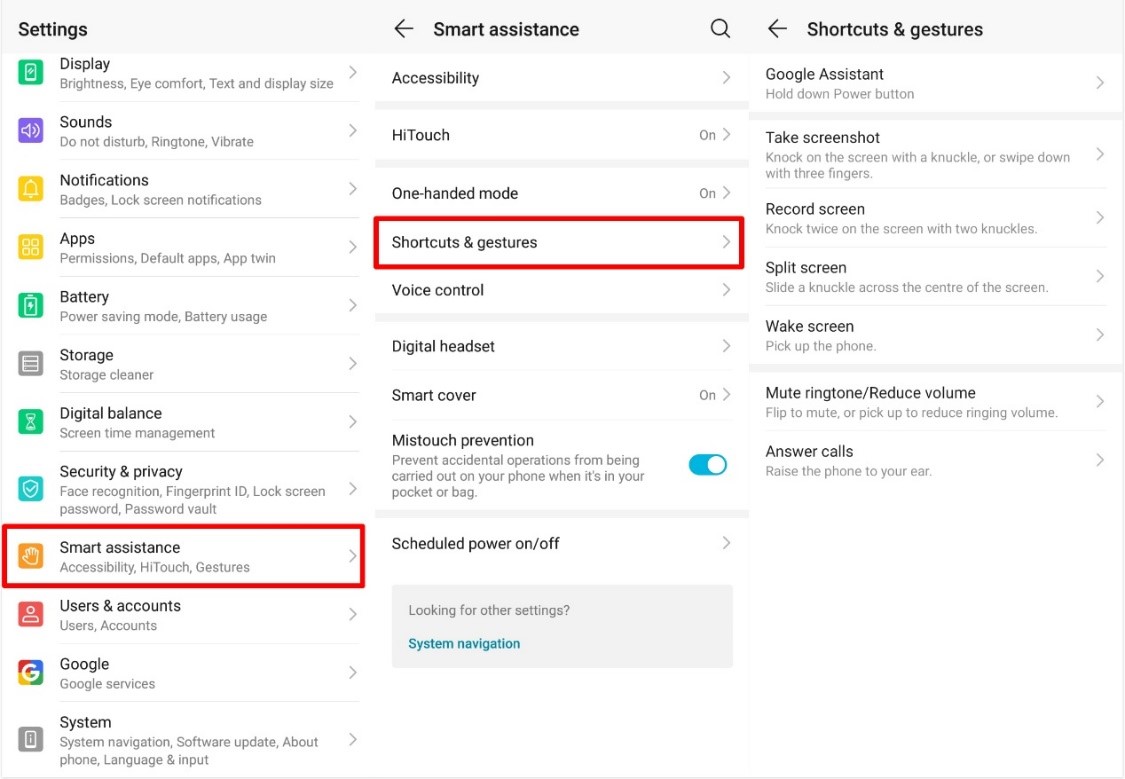
If you are an expert in HONOR 20’s shortcuts and gestures, it can save you lots of time. You can use three fingers to swipe down on the screen to take a screenshot or knock twice with two knuckles then you can turn on the screen recording.
Plus, you can wake the screen when you pick the phone, which is very useful when you want to take a quick look at the time or messages but does not want to unlock the phone.
All these can be set up on the Setting > Smart assistance > Shortcuts & gestures.
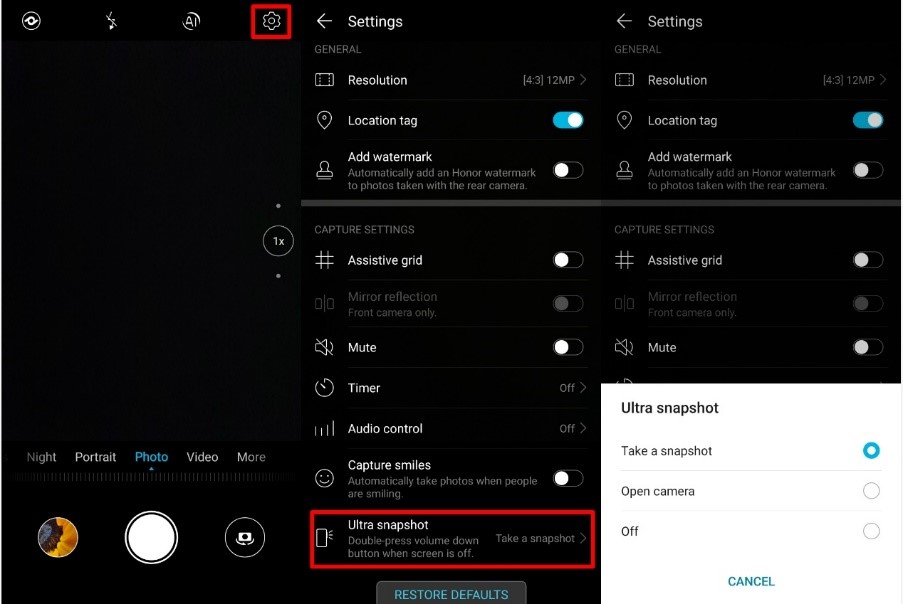
Plus, there is also a shortcut for the camera: You can double-press the volume down button when the screen is off to take a snapshot or open camera. To enable this shortcut, you can go Camera > Setting > Ultra snapshot
Now you all know everything about it; what’s your favorite Magic UI features? Let me know in the comments below!
Have a nice weekend!!


- Posts
- Following
- Followers
- Energy
-

GeekyMarshmallow
-
+ Follow

-
- 114 Posts
- 445 Following
- 649 Followers
- 10729 Energy



- Posts
- photo
- video

Hi Guys,
HONOR 20 Pro and the HONOR 20 are here, and they are the best choice for those who want to buy a new smartphone now. Both of them provided the best user experience and are packed with quad-camera, Kirin 980, and Magic UI 2.1 based on Android 9.
The Magic UI comes with many useful tricks and features, and some of them might not be easy to find out. So here are some tips for you.
App drawer
If you have many apps and want your home screen simple, the HONOR 20 provides app drawer beside the standard home screen style, which shows all the apps on the home screen.
Go Setting > Home screen & wallpaper > Home screen style, and choose the drawer.
Shortcuts & gestures
If you are an expert in HONOR 20’s shortcuts and gestures, it can save you lots of time. You can use three fingers to swipe down on the screen to take a screenshot or knock twice with two knuckles then you can turn on the screen recording.
Plus, you can wake the screen when you pick the phone, which is very useful when you want to take a quick look at the time or messages but does not want to unlock the phone.
All these can be set up on the Setting > Smart assistance > Shortcuts & gestures.
Plus, there is also a shortcut for the camera: You can double-press the volume down button when the screen is off to take a snapshot or open camera. To enable this shortcut, you can go Camera > Setting > Ultra snapshot
Now you all know everything about it; what’s your favorite Magic UI features? Let me know in the comments below!
Have a nice weekend!!