



 More Products
 Compare














我的荣耀 开启荣耀之旅



 Disagree Terms
 Log out




[Tips & Tricks] How to view Apps Memory Usage on HONOR devices?


 Last reply :
Hello HONOR Fans'
I hope all is well with everyone ;)
Today, I'm going to share a tutorial on "How to view Apps Usage Memory on HONOR devices" running EMUI 9.1 (Android 9 Pie) or EMUI 10 (Android 10).
NOTE:
Before going into the tutorial - please enable "Developer options" on your device
How to enable it?
Go to Settings > About phone, Tap on Build number for "7" times to enable Developer options
Let's check it out on how to do it;
Step:1
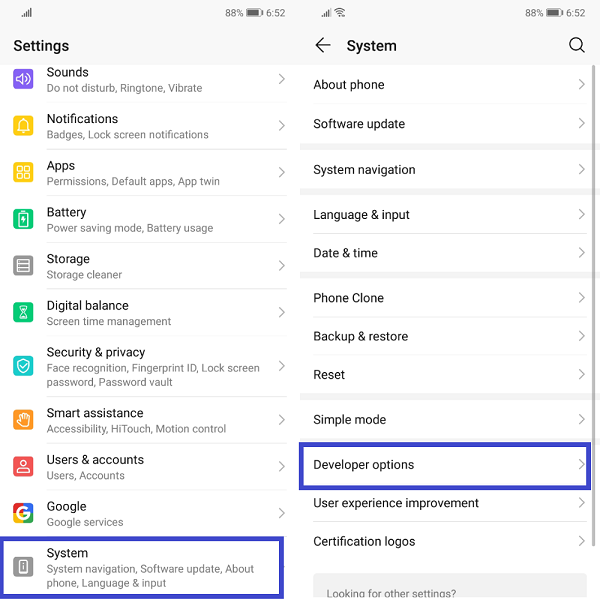
For EMUI 9.1 devices
- Go to Settings, navigate to System options and tap on "Developer options"
Step:2
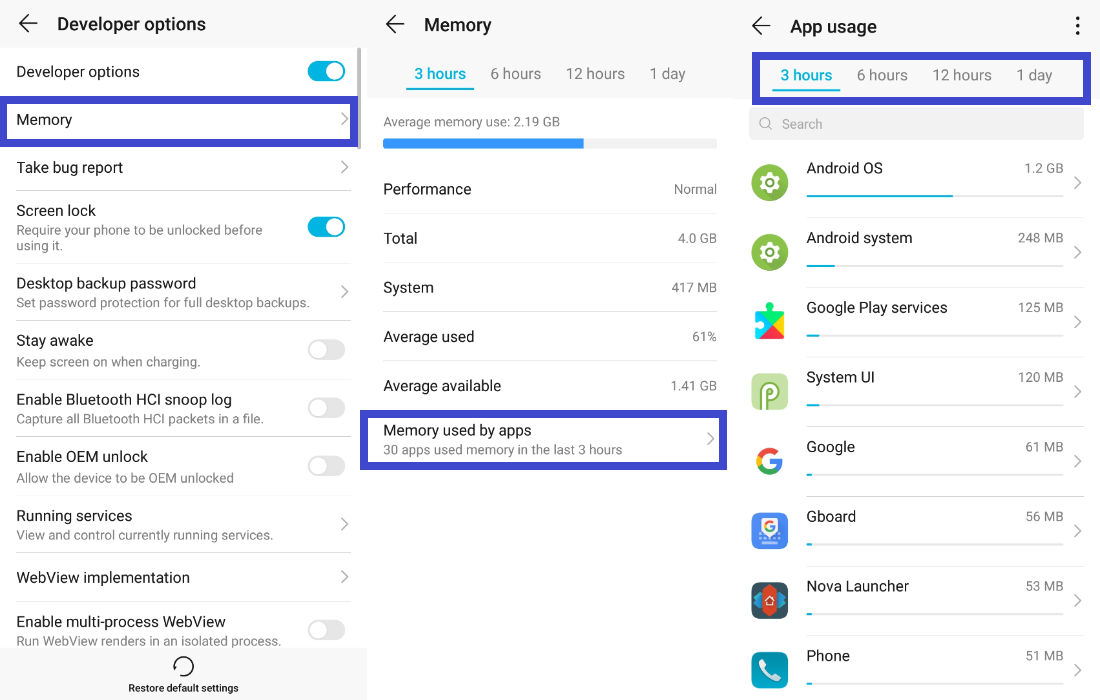
- Under Developer options, navigate to "Memory" to view your Apps memory usage
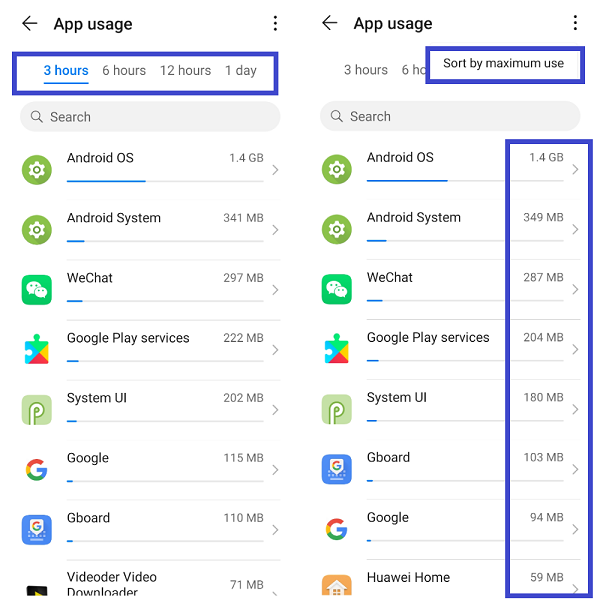
- Apps memory usage can be viewed from 3 hours to 1 day
For EMUI 10 devices
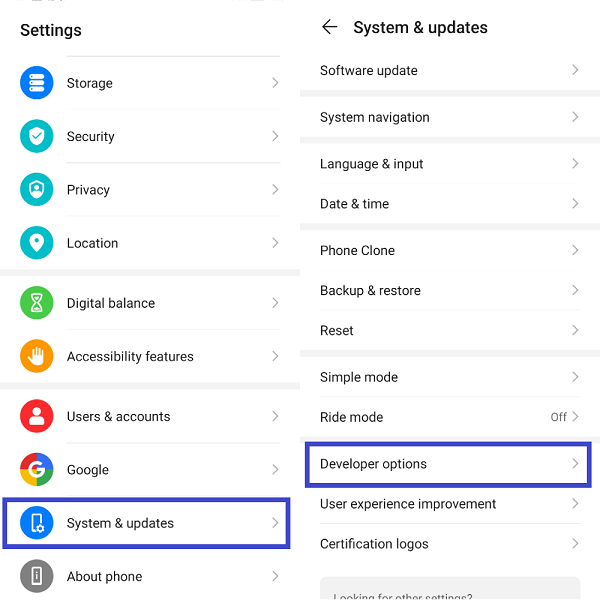
Step:1
- Go to Settings, navigate to System & updates options and tap on "Developer options"
Step:2
- Under Developer options, navigate to "Memory" to view your Apps memory usage
- Apps memory usage can be viewed from 3 hours to 1 day
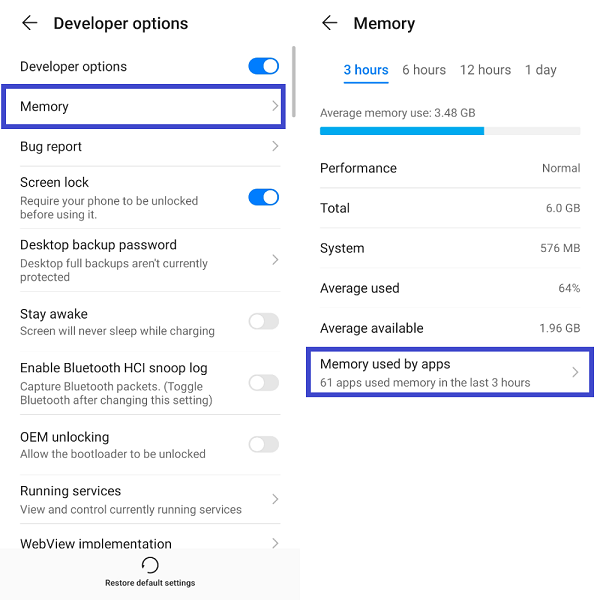
- Select your preferred hours to view your Apps memory usage
- You can also able to sort the Apps memory usage by "Maximum use"
- To view the detailed App memory usage, just tap on the App that you want to get the usage details
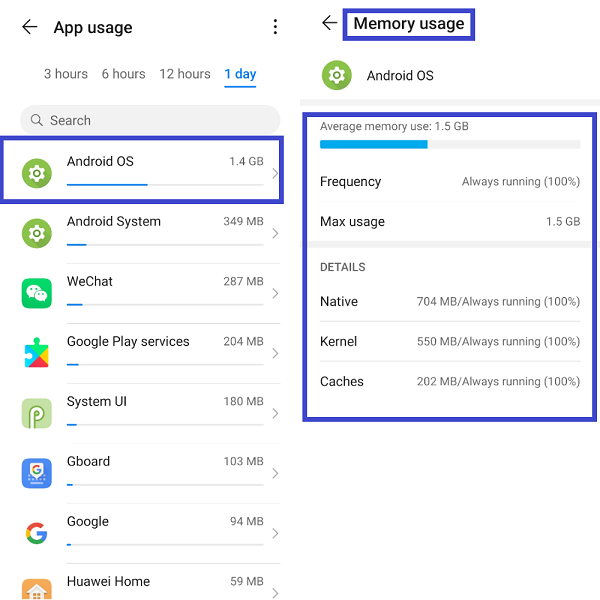
That's it, now you can able to view your Apps Memory Usage for your reference on which Apps eating up your phone memory causing lags, freezes etc - Hope you all find this post useful.
Thank you for reading ;)


- Posts
- Following
- Followers
- Energy
-
 Tamil G
Moderator Intern
Tamil G
Moderator Intern
-
+ Follow

-
- 542 Posts
- 49 Following
- 881 Followers
- 39795 Energy

-
 New Comer
-
 Followers reach 50
-
 Followers reach 100
-
 Followers reach 200
-
 7 Days Check-in
-
 30 Days Check-in
-
 100 Days Check-in
-
 Moderator
-
 Halloween 2020
-
 HONOR STAR 2020
-
 New Year 2021
-
 Animal Photography
-
 Plant Photography
-
 Red Photography
-
 Survey Medal!
-
 Water Photography
-
 World Cycling & Running Day
-
 Product Photography
-
 Sky Photography
-
 Activity Photography Medal
-
 Autumn Photography
-
 Rain Photography
-
 HONOR 50: Best Shot!
-
 Monthly Photo Sharing #1 Landscape
-
 HONOR Magic4 Pro
-
 Monthly Photo Sharing #2 People
-
 Monthly Photo Sharing #3 Spring
-
 Monthly Photo Sharing #4 Animal



- Posts
- photo
- video

Hello HONOR Fans'
I hope all is well with everyone ;)
Today, I'm going to share a tutorial on "How to view Apps Usage Memory on HONOR devices" running EMUI 9.1 (Android 9 Pie) or EMUI 10 (Android 10).
NOTE:
Before going into the tutorial - please enable "Developer options" on your device
How to enable it?
Go to Settings > About phone, Tap on Build number for "7" times to enable Developer options
Let's check it out on how to do it;
Step:1
For EMUI 9.1 devices
- Go to Settings, navigate to System options and tap on "Developer options"
Step:2
- Under Developer options, navigate to "Memory" to view your Apps memory usage
- Apps memory usage can be viewed from 3 hours to 1 day
For EMUI 10 devices
Step:1
- Go to Settings, navigate to System & updates options and tap on "Developer options"
Step:2
- Under Developer options, navigate to "Memory" to view your Apps memory usage
- Apps memory usage can be viewed from 3 hours to 1 day
- Select your preferred hours to view your Apps memory usage
- You can also able to sort the Apps memory usage by "Maximum use"
- To view the detailed App memory usage, just tap on the App that you want to get the usage details
That's it, now you can able to view your Apps Memory Usage for your reference on which Apps eating up your phone memory causing lags, freezes etc - Hope you all find this post useful.
Thank you for reading ;)