



 More Products
 Compare














我的荣耀 开启荣耀之旅



 Disagree Terms
 Log out




[Tips & Tricks] How to protect your phone privacy while sleeping


 Last reply :
Hello Fans,
Fingerprint unlocking and face unlocking are the most common ways to unlock phones, as it is more convenient than unlocking with a password. But, what if someone unlocks your phone with your fingerprint when you are sleeping?
Well, this article will teach you a little trick to help you solve this problem.
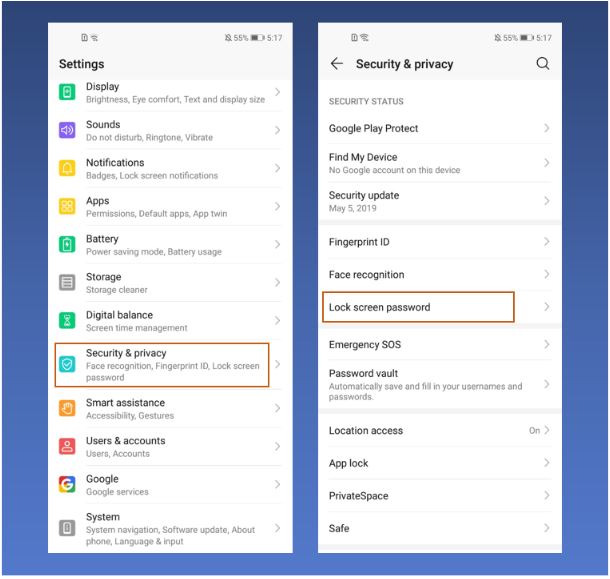
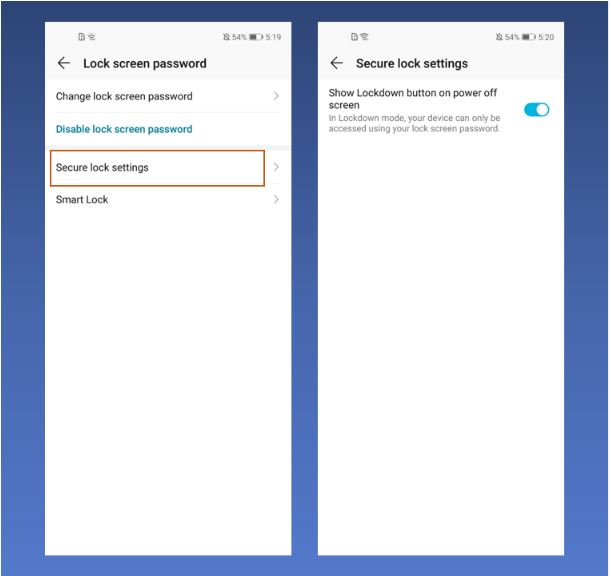
First, go to Settings > Security & Privacy > Lock Screen Password > Secure Lock Settings > Show Lockdown button on Power off Screen, turn the switch on.
After turning this function on, long-press the power button to enter the shutdown interface, and the Lockdown button will appear. When the Lockdown mode is turned on, the phone can only be unlocked with a password (as shown below), and the fingerprint unlocking and face unlocking are invalid.
Note:This function will be disabled when the screen is locked again after unlocking with a password, and the fingerprint and face unlocking can be used normally. To use the lockdown mode again, you need to long-press the power button to reset it.
Very useful, right? So, when you are going to sleep, you can turn this mode on to protect your privacy.
For any other question, just drop me a comment on the section below!
Thank you and have a great weekend!


- Posts
- Following
- Followers
- Energy
-

GeekyMarshmallow
-
+ Follow

-
- 114 Posts
- 445 Following
- 649 Followers
- 10729 Energy



- Posts
- photo
- video

Hello Fans,
Fingerprint unlocking and face unlocking are the most common ways to unlock phones, as it is more convenient than unlocking with a password. But, what if someone unlocks your phone with your fingerprint when you are sleeping?
Well, this article will teach you a little trick to help you solve this problem.
First, go to Settings > Security & Privacy > Lock Screen Password > Secure Lock Settings > Show Lockdown button on Power off Screen, turn the switch on.
After turning this function on, long-press the power button to enter the shutdown interface, and the Lockdown button will appear. When the Lockdown mode is turned on, the phone can only be unlocked with a password (as shown below), and the fingerprint unlocking and face unlocking are invalid.
Note:This function will be disabled when the screen is locked again after unlocking with a password, and the fingerprint and face unlocking can be used normally. To use the lockdown mode again, you need to long-press the power button to reset it.
Very useful, right? So, when you are going to sleep, you can turn this mode on to protect your privacy.
For any other question, just drop me a comment on the section below!
Thank you and have a great weekend!