



 More Products
 Compare










我的荣耀 开启荣耀之旅



 Disagree Terms
 Log out




[Tips & Tricks] Enable Call Recording on MagicUI 2+/3/3.1


 Last reply :
Recently, many HONOR models were updated to EMUI 10.1 or Magic UI 3.1 and the user started complaining about call recorder not working anymore with the latest version of EMUI. Of course, there were ways to get it done by a downgrade to EMUI 10 or EMUI 9 but it was not at all possible with EMUI 10.1. We have got some good news for our users that now they can do the call recording with EMUI 10.1 or Magic UI 3.1 with an inbuilt call recorder.

You need to download the call recorder apk from this post and install it as any regular apk and you are done. After installing the APK, you just need to enable the auto call record or manual as per your need.
STEPS-
1- Install the apk
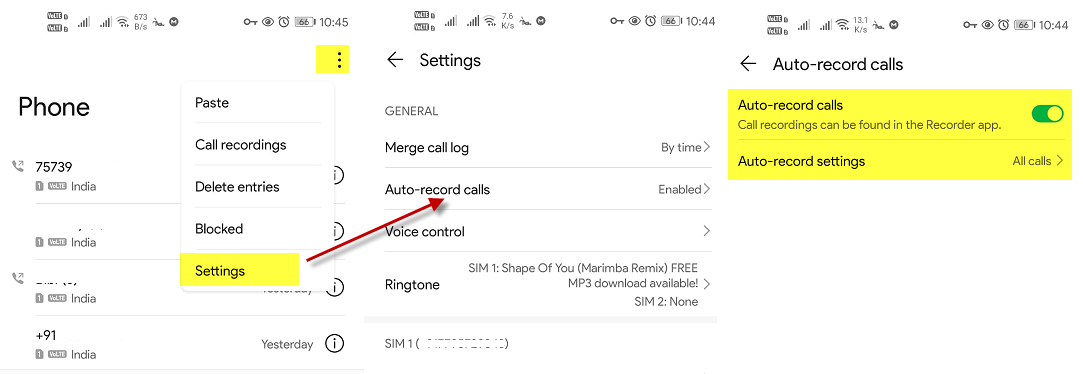
2- Open phone dialer
3- Go to settings
4- Enable call recording as per your need.
Download the APK from the below link and install it as a regular app.
Enable call recording-
After installation of APK, go to your phone settings and enable as per the instruction in the below image.
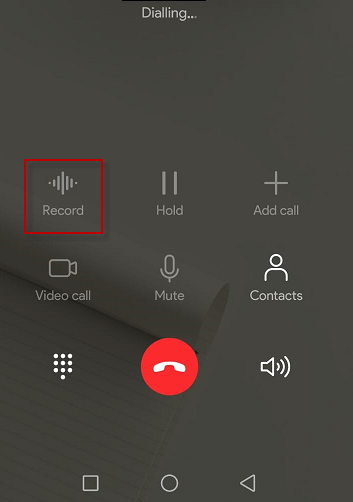
Make or receive a call and you will see an option to record the call.
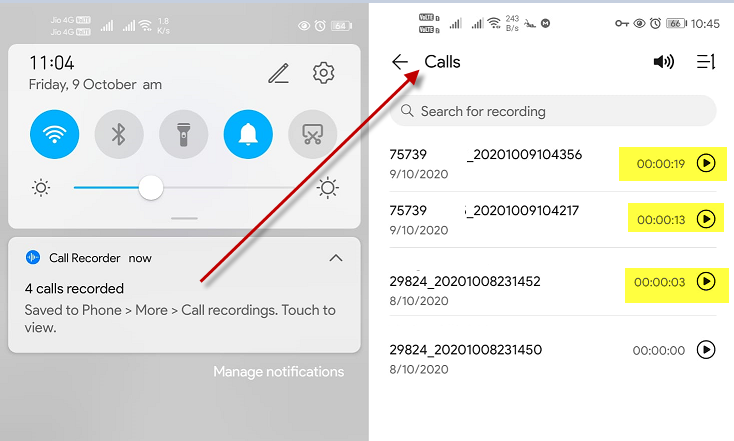
Once the call is over and recording is completed, you will see a notification of the same (you can enable/disable as per your need).
Once you click on the recording notification, it will open up the recorded call history.
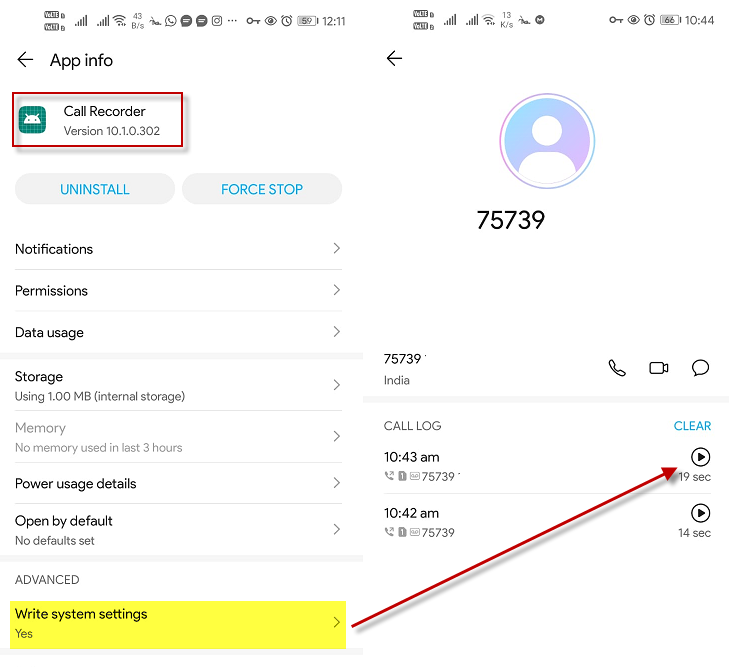
Note- If you are unable to see the recorded calls in the user contacts or call history, enable the system to write permission for the call recording app and you should be good with it.
Download:


- Posts
- Following
- Followers
- Energy
-

Revolt
-
+ Follow

-
- 131 Posts
- 23 Following
- 251 Followers
- 8522 Energy






- Posts
- photo
- video

Recently, many HONOR models were updated to EMUI 10.1 or Magic UI 3.1 and the user started complaining about call recorder not working anymore with the latest version of EMUI. Of course, there were ways to get it done by a downgrade to EMUI 10 or EMUI 9 but it was not at all possible with EMUI 10.1. We have got some good news for our users that now they can do the call recording with EMUI 10.1 or Magic UI 3.1 with an inbuilt call recorder.
You need to download the call recorder apk from this post and install it as any regular apk and you are done. After installing the APK, you just need to enable the auto call record or manual as per your need.
STEPS-
1- Install the apk
2- Open phone dialer
3- Go to settings
4- Enable call recording as per your need.
Download the APK from the below link and install it as a regular app.
Enable call recording-
After installation of APK, go to your phone settings and enable as per the instruction in the below image.
Make or receive a call and you will see an option to record the call.
Once the call is over and recording is completed, you will see a notification of the same (you can enable/disable as per your need).
Once you click on the recording notification, it will open up the recorded call history.
Note- If you are unable to see the recorded calls in the user contacts or call history, enable the system to write permission for the call recording app and you should be good with it.
Download: