



 More Products
 Compare














我的荣耀 开启荣耀之旅



 Disagree Terms
 Log out




[Tips & Tricks] Amazing Usage of the Translation Function in Smart Vision


 Last reply :
Hello Fans,
In today’s post, I would like to share with all of you how to use the translation function in Smart Vision.
How many of you can quickly turn a paper document into an electronic document?
You might think of taking photos and scanning, but if you want to edit the document, these two methods are not feasible.
Well, in this article I would like to introduce you a little trick to make your paper document into an editable electronic document in one second.
The steps are as follow:
1. Turn on the camera and click on the Smart Vision button in the upper left corner of the camera interface (or drop down the search and click on the Smart Vision button on the right side of the search box).
2. Click the Translate icon below
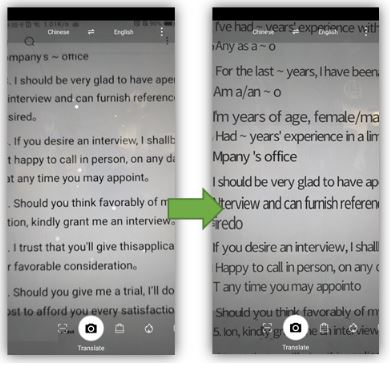
After the translation is complete, click the screen to fix the translation result. A copy button will appear in the lower right corner of the screen.
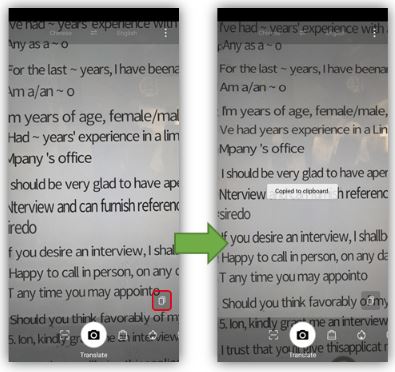
3. Click the copy button and paste the copied content into the document file (such as notepad, word, etc)
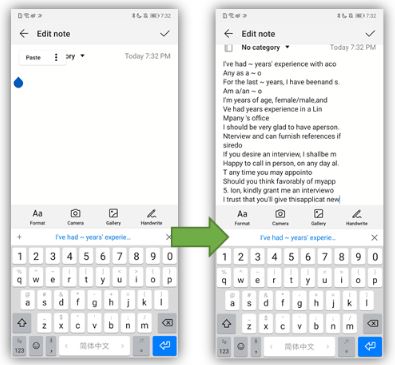
Well, this is all for today now you can edit all your documents in a very simple way.
I hope you like this trick and don’t forget to like/comment below if you have any other questions.
Cheers!


- Posts
- Following
- Followers
- Energy
-

Sebastian
-
+ Follow

-
- 139 Posts
- 390 Following
- 424 Followers
- 10125 Energy



- Posts
- photo
- video

Hello Fans,
In today’s post, I would like to share with all of you how to use the translation function in Smart Vision.
How many of you can quickly turn a paper document into an electronic document?
You might think of taking photos and scanning, but if you want to edit the document, these two methods are not feasible.
Well, in this article I would like to introduce you a little trick to make your paper document into an editable electronic document in one second.
The steps are as follow:
1. Turn on the camera and click on the Smart Vision button in the upper left corner of the camera interface (or drop down the search and click on the Smart Vision button on the right side of the search box).
2. Click the Translate icon below
After the translation is complete, click the screen to fix the translation result. A copy button will appear in the lower right corner of the screen.
3. Click the copy button and paste the copied content into the document file (such as notepad, word, etc)
Well, this is all for today now you can edit all your documents in a very simple way.
I hope you like this trick and don’t forget to like/comment below if you have any other questions.
Cheers!