



 More Products
 Compare














我的荣耀 开启荣耀之旅



 Disagree Terms
 Log out




[Tips & Tricks] 5 Hidden features of your Honor smartphone


 Last reply :
1.Call Recording and Call Forwarding on Honor Phones
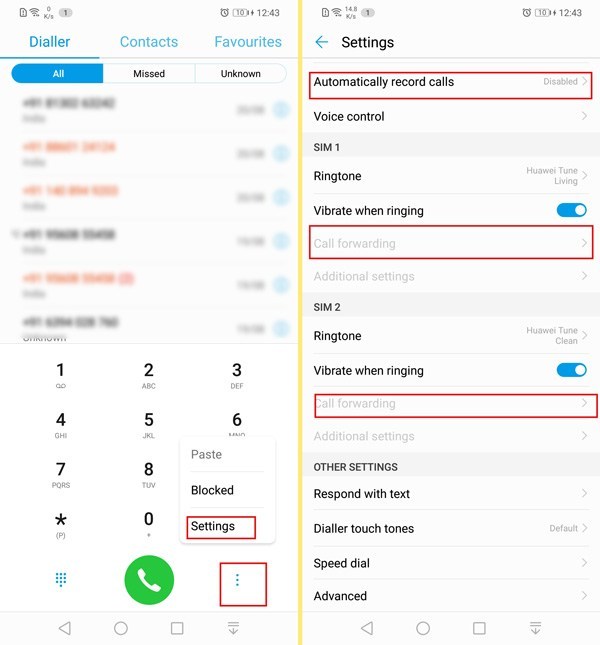
To enable call recording ,Auto call recording or call forwarding ,just open the dial app.Now press on the triple dot menu icon to access settings.From the next menu, you can customize all call-related settings.Here you'll notice options for call recording, Call forwarding, to set Speed dial,for setting individual ringtones for both SIM cards and more.
2. Launcher settings - Add/remove App drawer,customise search
A launcher is the UI element that you'd interact with the most.In case you don't wish to third party launchers on EMUI 8.2, you can also ways customize the default one.
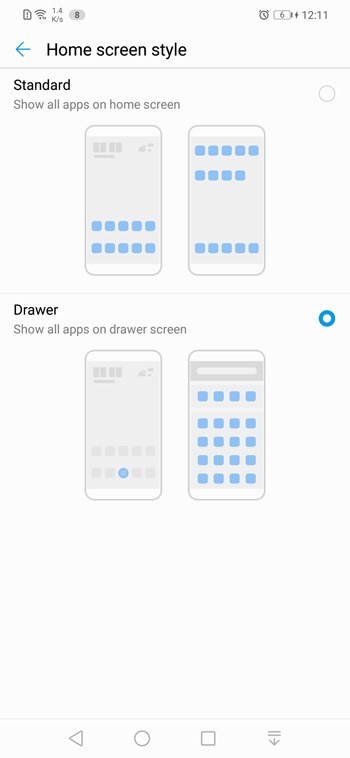
If you wish to add or remove app drawer, head to Settings>>Display>>Home screen style.
To access other launcher settings, just long press anywhere on the home screen and select settings.
 Remove Google feed from home screen
Now, you can turn off Google feed on the left pane, and customize 'Search Results'.This search refers to the option that appears with 'swipe down gesture' on the home screen.From search result settings, you can decide data ( Settings, contact, apps etc.) that you wish your phone to search through when you enter a keyword.
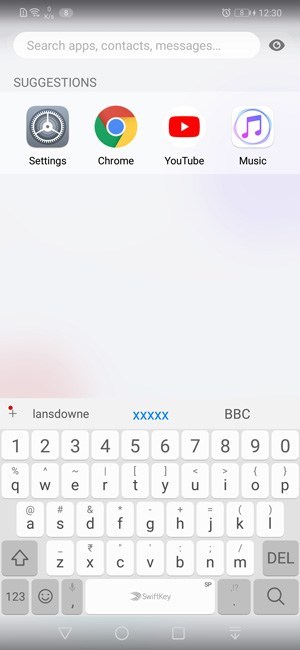 Customize Swipe Down Search from launcher settings.
3. Share or Recover WiFi Password
If you have forgotten the Wi-Fi password for an SSID that your phone is already connected to, you can recover it with ease on Honor phones.
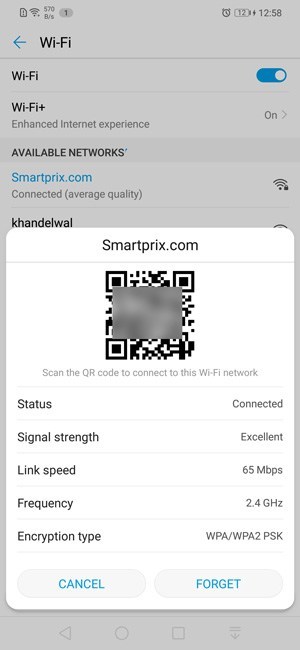
To do so, open WiFi Settings, and tap on the WiFi network whose password you wish to recover.Now Scan the QR code using any app (using any other Android phone) and you will get the WiFi Password.You can also use this QR code to share WiFi with friends without revealing your password.
4. Use two different accounts for Whatsapp, Facebook
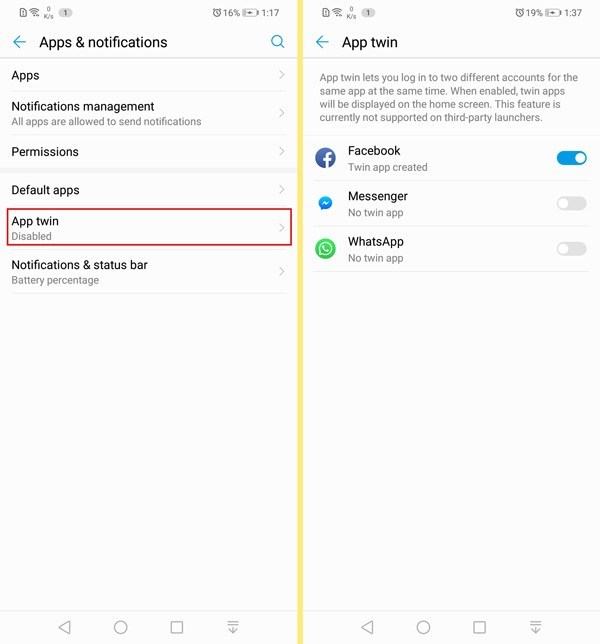
Huawei Honor phones also have support for dual apps.To use the same app with multiple accounts, go to Settings>>Apps and Notifications>>App Twin.
5. Bike Mode
Huawei also adds a very handy and elaborate Ride mode.Unlike other Bike modes, the phone on Honor phones allows you to play pre-recorded messages to callers when you are riding.There is also an option to play auto recording mesaages in your choice of language.
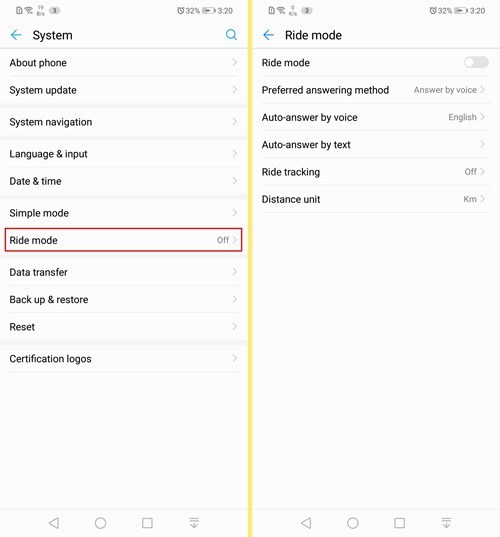 You can also use the ride mode to track and map your bike travels.
Source: https://www.smartprix.com/bytes/15-honor-play-hidden-features-tips-and-tricks-to-know/
Thank you all......


- Posts
- Following
- Followers
- Energy
-

JackGrim
-
+ Follow

-
- 84 Posts
- 6 Following
- 209 Followers
- 9988 Energy







- Posts
- photo
- video

1.Call Recording and Call Forwarding on Honor Phones
To enable call recording ,Auto call recording or call forwarding ,just open the dial app.Now press on the triple dot menu icon to access settings.From the next menu, you can customize all call-related settings.Here you'll notice options for call recording, Call forwarding, to set Speed dial,for setting individual ringtones for both SIM cards and more.
2. Launcher settings - Add/remove App drawer,customise search
A launcher is the UI element that you'd interact with the most.In case you don't wish to third party launchers on EMUI 8.2, you can also ways customize the default one.
If you wish to add or remove app drawer, head to Settings>>Display>>Home screen style.
To access other launcher settings, just long press anywhere on the home screen and select settings.
Now, you can turn off Google feed on the left pane, and customize 'Search Results'.This search refers to the option that appears with 'swipe down gesture' on the home screen.From search result settings, you can decide data ( Settings, contact, apps etc.) that you wish your phone to search through when you enter a keyword.
3. Share or Recover WiFi Password
If you have forgotten the Wi-Fi password for an SSID that your phone is already connected to, you can recover it with ease on Honor phones.
To do so, open WiFi Settings, and tap on the WiFi network whose password you wish to recover.Now Scan the QR code using any app (using any other Android phone) and you will get the WiFi Password.You can also use this QR code to share WiFi with friends without revealing your password.
4. Use two different accounts for Whatsapp, Facebook
Huawei Honor phones also have support for dual apps.To use the same app with multiple accounts, go to Settings>>Apps and Notifications>>App Twin.
5. Bike Mode
Huawei also adds a very handy and elaborate Ride mode.Unlike other Bike modes, the phone on Honor phones allows you to play pre-recorded messages to callers when you are riding.There is also an option to play auto recording mesaages in your choice of language.
Source: https://www.smartprix.com/bytes/15-honor-play-hidden-features-tips-and-tricks-to-know/
Thank you all......