



 More Products
 Compare














我的荣耀 开启荣耀之旅



 Disagree Terms
 Log out




Tips and Tricks How to customize HONOR smartwatch faces


 Last reply :
Customizing watch faces is considered the most desired feature for the smartwatch or bracelet by all users. With this opportunity, I would like to share with you something about Honor sports wearable products (Honor smartwatch and bracelet), specifically for customizing and changing watch face or bracelet face.
Currently, there are only several products equipped with that feature, like Honor Watch Magic, Honor Band 5, and Honor Band 4. These products above mentioned, we can change their watch face or bracelet face by Huawei Health App, but we cannot update our favorite pictures as a watch face. I know all users expect this feature, isn’t it? So in this embarrassing case, Honor Magic Watch 2 is suggested to buy if you want to customize your watch face. So next, I will share the methods of customizing the watch face for Honor Magic Watch 2 and changing the watch face for other products.
Methods of Changing and Customizing the Watch Face
Because this smartwatch is the only one that supports the customizing watch face, I will choose this device as a sample introducing these methods. There are 2 products that do not support changing and customizing the watch face, and they are Honor Band 3 and Honor Band 3 Pro. As for others, the methods of changing watch faces are the same as Magic Watch 2, even though there is no need to put images here one by one, but I would like to add a link to the video at the end of this article for products.
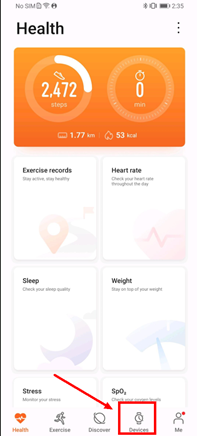
1. Open Health App ⟶ 2. Click Device
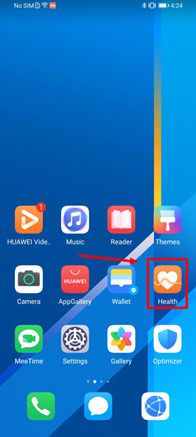 ⟶
⟶ 
If the Huawei Health App is not installed on your smartphone yet, you can click the link below to download this app or download it via AppGallery for Petal Search.
https://www.huaweicentral.com/download-the-latest-huawei-health-apk-august-11-2020/
3. Select Device ⟶ 4. Click Watch faces
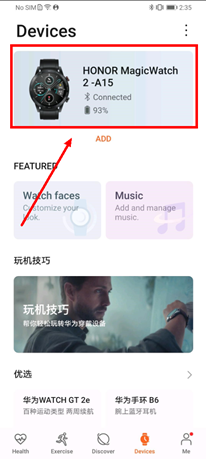 ⟶
⟶ 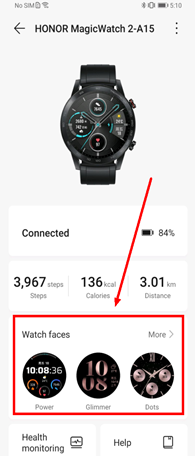
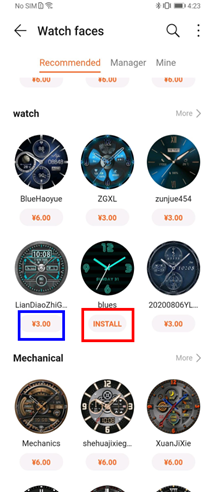
You will find some recommended watch faces once you clicked watch face at last method, you need to make payment installing some of those watch faces, and some of them you get them for free.
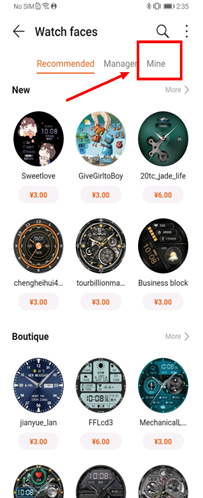
5. Install your favorite watch face ⟶ 6. Click “Mine”
 ⟶
⟶ 
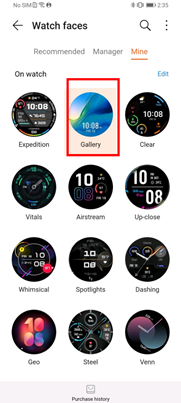
7. Select your favorite watch face and confirm

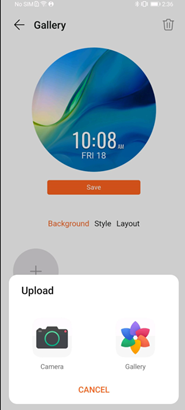
That is all methods of changing watch face, but if your device is Honor Magic Watch 2, you can update your favorite picture as a watch face, by clicking“Gallery” like what in the next method.
8. Click Gallery ⟶ 9. Update a picture via Gallery or Camera
 ⟶
⟶ 
Click Here to learn more about Honor Magic Watch 2’s Watch face setting guidelines
Video of Changing Watch Faces for Other Wearable Products
1. Honor Magic Watch 2
Click here if you are unable to watch this video
2. Honor Watch magic
Click here if you are unable to watch this video
3. Honor Band 5
Click here if you are unable to watch this video
4. Honor Band 4
Click here if you are unable to watch this video






- Posts
- photo
- video

Customizing watch faces is considered the most desired feature for the smartwatch or bracelet by all users. With this opportunity, I would like to share with you something about Honor sports wearable products (Honor smartwatch and bracelet), specifically for customizing and changing watch face or bracelet face.
Currently, there are only several products equipped with that feature, like Honor Watch Magic, Honor Band 5, and Honor Band 4. These products above mentioned, we can change their watch face or bracelet face by Huawei Health App, but we cannot update our favorite pictures as a watch face. I know all users expect this feature, isn’t it? So in this embarrassing case, Honor Magic Watch 2 is suggested to buy if you want to customize your watch face. So next, I will share the methods of customizing the watch face for Honor Magic Watch 2 and changing the watch face for other products.
Methods of Changing and Customizing the Watch Face
Because this smartwatch is the only one that supports the customizing watch face, I will choose this device as a sample introducing these methods. There are 2 products that do not support changing and customizing the watch face, and they are Honor Band 3 and Honor Band 3 Pro. As for others, the methods of changing watch faces are the same as Magic Watch 2, even though there is no need to put images here one by one, but I would like to add a link to the video at the end of this article for products.
1. Open Health App ⟶ 2. Click Device
If the Huawei Health App is not installed on your smartphone yet, you can click the link below to download this app or download it via AppGallery for Petal Search.
https://www.huaweicentral.com/download-the-latest-huawei-health-apk-august-11-2020/
3. Select Device ⟶ 4. Click Watch faces
You will find some recommended watch faces once you clicked watch face at last method, you need to make payment installing some of those watch faces, and some of them you get them for free.
5. Install your favorite watch face ⟶ 6. Click “Mine”
7. Select your favorite watch face and confirm
That is all methods of changing watch face, but if your device is Honor Magic Watch 2, you can update your favorite picture as a watch face, by clicking“Gallery” like what in the next method.
8. Click Gallery ⟶ 9. Update a picture via Gallery or Camera
Click Here to learn more about Honor Magic Watch 2’s Watch face setting guidelines
Video of Changing Watch Faces for Other Wearable Products
1. Honor Magic Watch 2
Click here if you are unable to watch this video
2. Honor Watch magic
Click here if you are unable to watch this video
3. Honor Band 5
Click here if you are unable to watch this video
4. Honor Band 4
Click here if you are unable to watch this video